Čo máme v aplikáciiWhat we have in the application PojmyTerms Ako to funguje: kto koho voláHow it works: who calls whom Fyzická podoba: priečinky, súbory, ComposerPhysical form: folders, files, Composer Úlohy na cvičenieLab tasks Obhajoba a live codingDefence and live coding
Dnes sa HTML stránok presunie zo súborov views/*.php do súborov views/*.twig – volajú sa template – a HTML z nich vyrobí knižnica Twig. Je to prvý cudzí kód v aplikácii; stiahne ho Composer do priečinka vendor/. Stránky budú v prehliadači vyzerať rovnako. Pribudne nová funkcia: pridanie záznamu hlavnej entity cez formulár – prvá požiadavka HTTP metódou POST a prvý zápis do databázy. Vzorová aplikácia beží na https://sigma.tuke.sk/beata.stehlikova/it/ukazky/cv05/. Pojmy sú v tabuľke pojmov.
Celá stránka sleduje jedného študenta, Jána Nováka: jeho číselník categories so štyrmi záznamami (id 1 polievka, 2 hlavné jedlo, 3 dezert, 4 raňajky) a jeho hlavnú entitu recipes so stĺpcami id, title, servings, prep_time, instructions, created_at, difficulty_id; difficulty_id je cudzí kľúč na číselník difficulties (1 ľahký, 2 stredný, 3 náročný). V projekte má CategoryController s index(), RecipeController s index() a show(), RecipeModel so search() a views z minulého cvičenia.
Pojmy sú na tejto stránke v angličtine tak, ako ich používa Twig a jeho dokumentácia: template, layout, extends, block, filter, autoescape, autoloader, redirect. Všetko v src/ je náš kód. Všetko vo vendor/twig/ je kód Twigu: dá sa otvoriť a čítať; pri ďalšom composer install sa prepíše, preto sa doň nepíše.
Today the HTML of the pages moves from the files views/*.php into the files views/*.twig – they are called templates – and the Twig library builds the HTML from them. It is the first foreign code in the application; Composer downloads it into the folder vendor/. The pages will look the same in the browser. A new feature arrives: adding a record of the main entity through a form – the first request with the HTTP method POST and the first write into the database. The sample application runs at https://sigma.tuke.sk/beata.stehlikova/it/ukazky/cv05/. The terms are in the table of terms.
The whole page follows one student, Ján Novák: his lookup table categories with four records (id 1 polievka, 2 hlavné jedlo, 3 dezert, 4 raňajky) and his main entity recipes with the columns id, title, servings, prep_time, instructions, created_at, difficulty_id; difficulty_id is a foreign key to the lookup table difficulties (1 ľahký, 2 stredný, 3 náročný). In his project he has CategoryController with index(), RecipeController with index() and show(), RecipeModel with search() and the views from the last lab.
The terms on this page are in English as Twig and its documentation use them: template, layout, extends, block, filter, autoescape, autoloader, redirect. Everything in src/ is our code. Everything in vendor/twig/ is Twig’s code: it can be opened and read; the next composer install overwrites it, so nothing is written into it.
Čo máme v aplikáciiWhat we have in the application
Keď Ján Novák otvorí https://sigma.tuke.sk/student/jan.novak/it/cv04/recipes?q=tofu, stane sa toto:
- Apache na sigma.tuke.sk podľa
.htaccesszistí, že súborrecipesneexistuje, a spustíindex.php. Pred tým naplní pole$_SERVER(REQUEST_METHOD,REQUEST_URI,SCRIPT_NAME) a$_GET(['q' => 'tofu']). index.phpnačítaconfig.phpavendor/autoload.php, zavoláRequest::fromGlobals(), definujeBASE_URL, zaregistruje route ($router->get('/recipes', [RecipeController::class, 'index']), …) a zavolá$router->dispatch($request).Routernájde route preGETa/recipes, vytvorínew RecipeController()a zavolá jeho metóduindex($request).RecipeController::index()zavolá$request->query('q')(vráti'tofu'), zavoláRecipeModel::search('tofu')a vráti$this->render('list', [...]).RecipeModel::search()cez PDO vykonáSELECT … WHERE r.title LIKE ?a vráti pole záznamov.BaseController::render()zavoláview('list', $data)zsrc/helpers.php:view()cezob_start()spustíviews/list.php(PHP súbor s HTML a<?= e($row['title']) ?>), výsledok vloží doviews/layout.phpa vráti HTML celej stránky.render()ho dá ako parameter donew Response($html).Response::send()vindex.phpnastaví stavový kód a hlavičky a vypíše HTML. Apache ho odošle prehliadaču.
Súbory: index.php, .htaccess, config.php, composer.json, src/Router.php, src/Http/Request.php, src/Http/Response.php, src/Controller/*, src/Model/*, src/Database.php, src/helpers.php (e(), url(), view()), views/*.php, vendor/ (len autoloader z Composeru, žiadna cudzia knižnica).
Čo sa dnes zmení: krok 6 – namiesto súborov views/*.php bude HTML v súboroch views/*.twig a vyrobí ho Twig. Kroky 1–5 a 7 ostávajú, používame ich ďalej bez zmeny. A pribudne nová cesta: požiadavka metódou POST z formulára, ktorá záznam do databázy zapíše a prehliadač presmeruje na jeho detail.
When Ján Novák opens https://sigma.tuke.sk/student/jan.novak/it/cv04/recipes?q=tofu, this happens:
- Apache on sigma.tuke.sk finds out from
.htaccessthat the filerecipesdoes not exist and runsindex.php. Before that it fills the array$_SERVER(REQUEST_METHOD,REQUEST_URI,SCRIPT_NAME) and$_GET(['q' => 'tofu']). index.phploadsconfig.phpandvendor/autoload.php, callsRequest::fromGlobals(), definesBASE_URL, registers the routes ($router->get('/recipes', [RecipeController::class, 'index']), …) and calls$router->dispatch($request).Routerfinds the route forGETand/recipes, createsnew RecipeController()and calls its methodindex($request).RecipeController::index()calls$request->query('q')(returns'tofu'), callsRecipeModel::search('tofu')and returns$this->render('list', [...]).RecipeModel::search()runsSELECT … WHERE r.title LIKE ?through PDO and returns an array of records.BaseController::render()callsview('list', $data)fromsrc/helpers.php:view()runsviews/list.php(a PHP file with HTML and<?= e($row['title']) ?>) throughob_start(), puts the result intoviews/layout.phpand returns the HTML of the whole page.render()passes it as a parameter tonew Response($html).Response::send()inindex.phpsets the status code and the headers and prints the HTML. Apache sends it to the browser.
Files: index.php, .htaccess, config.php, composer.json, src/Router.php, src/Http/Request.php, src/Http/Response.php, src/Controller/*, src/Model/*, src/Database.php, src/helpers.php (e(), url(), view()), views/*.php, vendor/ (only the autoloader from Composer, no foreign library).
What changes today: step 6 – instead of the files views/*.php the HTML will be in the files views/*.twig and Twig will build it. Steps 1–5 and 7 stay; we keep using them unchanged. And a new path arrives: a request with the method POST from a form, which writes the record into the database and redirects the browser to its detail.
PojmyTerms
Twig – čo to je
Twig je knižnica tried PHP na templates. Autor Fabien Potencier (autor Symfony), od roku 2009; používame verziu 3. Je to cudzí kód: Composer ho stiahne do vendor/twig/twig/ (asi 250 súborov) a náš kód ho použije cez triedu Twig\Environment vo funkcii view().
Template je súbor .twig vo views/ s HTML jednej stránky. Twig ho číta zhora nadol: obyčajné HTML opíše do výsledku tak, ako je; {% … %} je príkaz (niečo urob); {{ … }} je výpis (sem daj hodnotu); {# … #} je komentár (do výsledku nejde). Nič iné v template nie je – žiadne <?php, žiadne e(). Hodnoty, ktoré template vypisuje, sú kľúče poľa, ktoré controller dal ako parameter do render().
Ako sa Twig zapisuje: zoznam kategórií
Čo Ján Novák chce: klikne v menu na Kategórie a chce vidieť tabuľku číselníka kategórií. CategoryController::index() zavolá $this->render('list', ['title' => 'Kategórie', 'rows' => $rows]); $rows sú štyri záznamy (id = 1, name = polievka; 2 hlavné jedlo; 3 dezert; 4 raňajky). View z nich vyrobí HTML tabuľku.
Doteraz to robil views/list.php – PHP pomiešané s HTML (tu časť, ktorá sa pre kategórie vykoná):
<p>Počet záznamov: <?= count($rows) ?></p>      <?php /* <?= … ?> vypíše hodnotu; count() z PHP spočíta záznamy → 4 */ ?>
<table>
    <tr>
        <?php foreach (array_keys($rows[0]) as $col): ?>   <?php /* array_keys() vezme z 1. záznamu názvy stĺpcov: id, name;
                                                                    foreach: riadok nižšie urob pre každý názov */ ?>
            <th><?= e($col) ?></th>                         <?php /* e() ošetrí text pre HTML → <th>id</th>, <th>name</th> */ ?>
        <?php endforeach; ?>                                <?php /* koniec foreach */ ?>
    </tr>
    <?php foreach ($rows as $row): ?>                       <?php /* pre každý zo 4 záznamov jeden riadok tabuľky */ ?>
        <tr>
            <?php foreach ($row as $v): ?>                  <?php /* pre každý stĺpec záznamu jedna bunka: 1, polievka */ ?>
                <td><?= e((string) $v) ?></td>              <?php /* → <td>1</td>, <td>polievka</td> */ ?>
            <?php endforeach; ?>
        </tr>
    <?php endforeach; ?>
</table>
To isté v Twigu:
{% extends "layout.twig" %} {# tento súbor je len obsah; hlavička, menu a nadpis sú v layout.twig a Twig doň obsah vloží #}
{% block content %} {# odtiaľto po {% endblock %} je ten obsah #}
<p>Počet záznamov: {{ rows|length }}</p> {# {{ }} vypíše hodnotu; |length = filter: úprava hodnoty za zvislou čiarou,
length spočíta prvky → 4 → <p>Počet záznamov: 4</p> #}
<table>
<tr>
{% for col in rows[0]|keys %} {# for = opakuj riadky po {% endfor %} pre každý prvok; rows[0] = 1. záznam,
filter keys z neho vezme názvy stĺpcov: id, name → col = id, potom name #}
<th>{{ col }}</th> {# → <th>id</th>, <th>name</th> #}
{% endfor %} {# koniec opakovania; každý príkaz, ktorý niečo začína (block, for, if), má svoj koniec #}
</tr>
{% for row in rows %} {# pre každý zo 4 záznamov jeden riadok tabuľky #}
<tr>
{% for v in row %} {# pre každý stĺpec záznamu jedna bunka: v = 1, potom polievka #}
<td>{{ v }}</td> {# → <td>1</td>, <td>polievka</td>; Twig pri každom {{ }} sám nahradí < > & "
ich HTML zápisom (< → <) – to, čo v list.php robila funkcia e() #}
{% endfor %}
</tr>
{% endfor %}
</table>
{% endblock %}
Výsledok z PHP aj z Twigu je rovnaký:
<p>Počet záznamov: 4</p>
<table>
    <tr><th>id</th><th>name</th></tr>
    <tr><td>1</td><td>polievka</td></tr>
    <tr><td>2</td><td>hlavné jedlo</td></tr>
    <tr><td>3</td><td>dezert</td></tr>
    <tr><td>4</td><td>raňajky</td></tr>
</table>
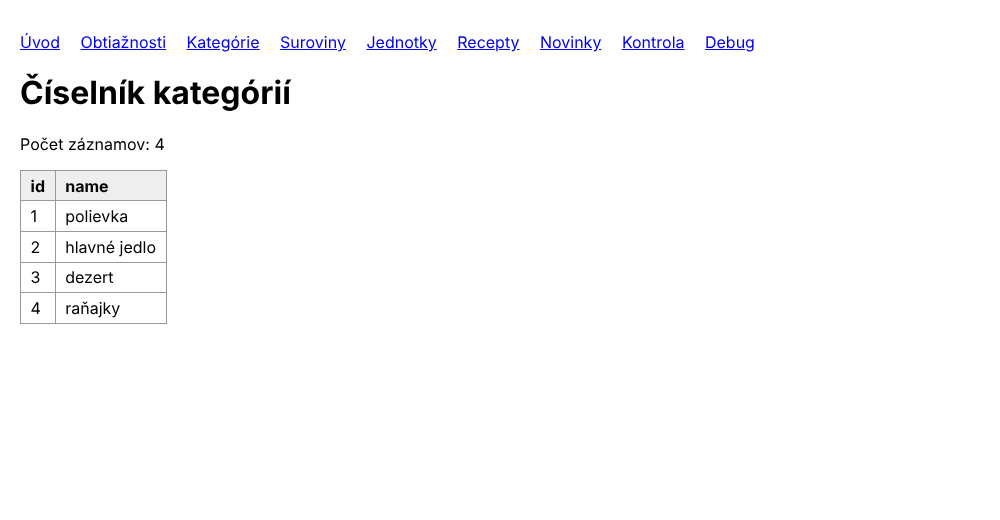
Rozdiel je v zápise: v Twigu je každý príkaz {% %} a každý výpis {{ }}, bez <?php, bez e(), bez (string). Skutočný list.twig v twig.zip má navyše tri {% if %} (formulár na hľadanie, odkaz „Pridať záznam“, odkaz na detail v stĺpci id); celý je v časti „Ako to funguje“ pri receptoch, kde sa prvýkrát použijú.
layout.twig: rám každej stránky
Čo Ján Novák chce: aby každá stránka mala hore to isté menu a nadpis, a aby ho písal raz, nie v každom súbore. V cv04 to riešil views/layout.php a funkcia view() ho spojila s obsahom dvoma require. V Twigu je rám súbor views/layout.twig a spojenie urobí Twig podľa dvoch príkazov: {% extends "layout.twig" %} v obsahu („môj rám je layout.twig“) a {% block content %}{% endblock %} v ráme („sem obsah“).
<!doctype html>
<html lang="sk">
<head>
    <meta charset="utf-8">
    <title>{{ title }}</title>   {# title = hodnota pod kľúčom 'title' z poľa, ktoré CategoryController::index() dal ako
                                    parameter do render(); render() ho dalo ako parameter do view(); view() do
                                    $twig->render('list.twig', $data). → <title>Kategórie</title> #}
    <style> … </style>           {# CSS stránky, rovnaké ako doteraz v layout.php #}
</head>
<body>
<nav>
    <a href="{{ url('/') }}">Úvod</a>        {# Twig vidí v {{ }} meno url s hodnotou '/'. Vo view() v src/helpers.php je riadok
                                               addFunction(new TwigFunction('url', 'url')): meno url v template = PHP funkcia url().
                                               Twig teda spustí url('/') zo src/helpers.php; tá vráti BASE_URL . '/' =
                                               '/student/jan.novak/it/cv05/' a Twig ten text dá namiesto {{ }}
                                               → <a href="/student/jan.novak/it/cv05/">Úvod</a> #}
    <a href="{{ url('/categories') }}">Kategórie</a>   {# url('/categories') vráti '/student/jan.novak/it/cv05/categories'
                                                          → <a href="/student/jan.novak/it/cv05/categories">Kategórie</a> #}
    <a href="{{ url('/kontrola') }}">Kontrola</a>      {# → href="/student/jan.novak/it/cv05/kontrola" #}
    <a href="{{ url('/debug') }}">Debug</a>            {# → href="/student/jan.novak/it/cv05/debug" #}
</nav>
<h1>{{ title }}</h1>                        {# → <h1>Kategórie</h1> #}

{% block content %}{% endblock %}           {# sem Twig vloží to, čo je v list.twig medzi {% block content %} a {% endblock %}:
                                               <p>Počet záznamov: 4</p><table>…</table>. Tu je block prázdny, naplní ho stránka. #}

</body>
</html>
Výsledok pre kategórie – jedna celá stránka:
<!doctype html>
<html lang="sk">
<head>
    <meta charset="utf-8">
    <title>Kategórie</title>
    <style> … </style>
</head>
<body>
<nav>
    <a href="/student/jan.novak/it/cv05/">Úvod</a>
    <a href="/student/jan.novak/it/cv05/categories">Kategórie</a>
    <a href="/student/jan.novak/it/cv05/kontrola">Kontrola</a>
    <a href="/student/jan.novak/it/cv05/debug">Debug</a>
</nav>
<h1>Kategórie</h1>

<p>Počet záznamov: 4</p>
<table> … </table>

</body>
</html>
Keď Ján Novák dopíše do layout.twig riadok <a href="{{ url('/recipes') }}">Recepty</a>, odkaz je od tej chvíle na každej stránke, lebo každý súbor vo views/ začína riadkom {% extends "layout.twig" %}.
Čo robí Twig lepšie: tri ukážky
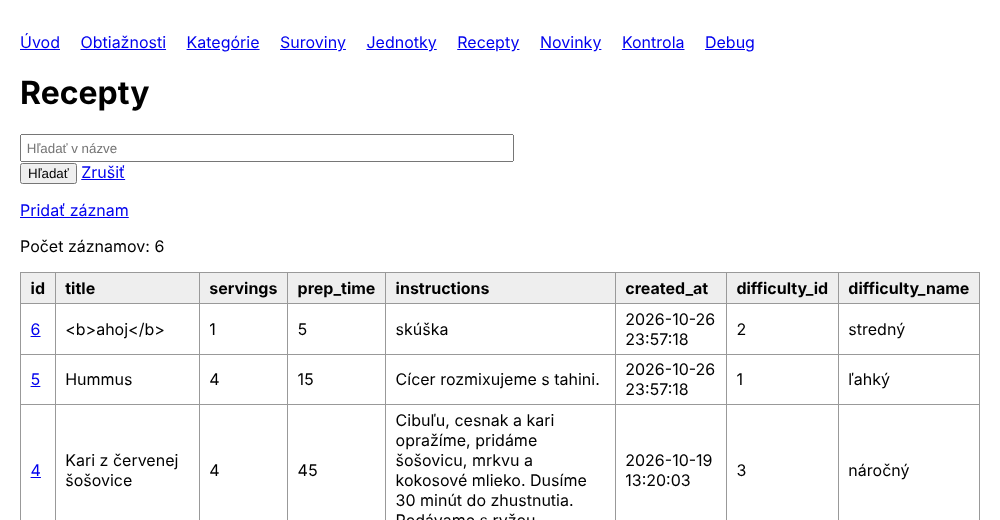
1. Text od používateľa sa nespustí ako HTML. Ján Novák napíše do formulára ako názov receptu <b>ahoj</b>. Záznam sa uloží do databázy aj so značkami. V list.php by výpis bez e() vyzeral takto:
<td><?= $v ?></td> <?php /* bez e(): do HTML ide <td><b>ahoj</b></td> → prehliadač ukáže tučné ahoj;
namiesto <b> môže byť <script> a spustí sa cudzí kód (chyba zvaná XSS) */ ?>
<td><?= e((string) $v) ?></td> <?php /* s e(): <td><b>ahoj</b></td> → prehliadač ukáže text <b>ahoj</b>;
e() musel Ján Novák napísať ku každému výpisu sám */ ?>
V list.twig je len {{ v }} a Twig urobí to isté, čo e(), pri každom {{ }} sám (volá sa to autoescape):
<td>{{ v }}</td> {# → <td><b>ahoj</b></td> #}
2. Chyba v template má zrozumiteľnú hlášku. Ján Novák omylom zmaže v list.twig riadok {% endfor %} vonkajšieho opakovania. Twig pri najbližšej požiadavke vypíše:
Twig\Error\SyntaxError: Unexpected "endif" tag (expecting closing tag for the "for" tag defined near line 28)
in "list.twig" at line 41.
Hláška hovorí, čo chýba (koniec pre for), kde for začína (riadok 28) a kde Twig narazil na problém (riadok 41). To isté v list.php – zmazaný <?php endforeach; ?>:
PHP Parse error: syntax error, unexpected end of file in views/list.php on line 15
Riadok 15 je koniec súboru; kde foreach začína, PHP nepovie. Preklep v názve premennej ({{ rovs|length }}) Twig hlási tiež, kvôli nastaveniu strict_variables vo view():
Twig\Error\RuntimeError: Variable "rovs" does not exist in "list.twig" at line 20.
3. Nová stránka je pár riadkov. Ján Novák chce stránku O aplikácii. Má HomeController::about(), ktoré volá $this->render('about', ['title' => 'O aplikácii']). Celý views/about.twig:
{% extends "layout.twig" %}       {# rám s menu a nadpisom je hotový v layout.twig #}
{% block content %}
<p>Semestrálny projekt Jána Nováka: recepty. Predmet Informačné technológie, FBERG TUKE.</p>
{% endblock %}
Výsledok: celá stránka s menu, nadpisom O aplikácii a týmto odsekom. V about.php by bol ten istý odsek, ale rám by skladala funkcia view() dvoma require.
Čo z toho máš ďalej: e() v template nepíšeš; chybu v template nájdeš podľa čísla riadku; každá nová stránka je {% extends %}, {% block %} a jej obsah. A to isté stretneš v práci: Symfony, Drupal, Craft CMS používajú Twig, Laravel má to isté pod menom Blade.
view(): kde Twig začína
Čo Ján Novák chce: aby render() v controlleri fungovalo ako doteraz – dá mu názov template a pole hodnôt, dostane text HTML. render() v BaseController sa nemení; mení sa funkcia view() v src/helpers.php, ktorú render() volá. Celý súbor, z twig.zip:
<?php
declare(strict_types=1);
// Tri funkcie: e(), url(), view(). Súbor načíta vendor/autoload.php pri každej požiadavke (composer.json → "files"),
// preto tieto funkcie existujú pre index.php, pre controllery aj pre Twig.
use Twig\Environment; // trieda Twigu zo súboru vendor/twig/twig/src/Environment.php
use Twig\Loader\FilesystemLoader; // trieda Twigu, ktorá číta súbory .twig z priečinka
use Twig\TwigFunction; // trieda Twigu, ktorou sa k menu v template priradí PHP funkcia
/** Ošetrí text pre HTML: < > & " nahradí ich HTML zápisom. e('<b>ahoj</b>') vráti '<b>ahoj</b>'.
* V template ju nepíšeš – Twig to robí pri každom {{ }} sám; ostáva pre výpis mimo template. */
function e(?string $text): string
{
return htmlspecialchars((string) $text, ENT_QUOTES, 'UTF-8');
}
/** Z relatívnej adresy vyrobí plnú cestu pre href. url('/recipes/3') vráti '/student/jan.novak/it/cv05/recipes/3'. */
function url(string $path): string
{
return BASE_URL . '/' . ltrim($path, '/'); // BASE_URL = prefix, define() v index.php; ltrim() zmaže lomku na začiatku
}
/** Vyrobí HTML stránky z template views/<name>.twig a vráti ho ako text. Volá ju BaseController::render(),
* ktoré jej odovzdá názov template ('list') a pole hodnôt (['title' => 'Kategórie', 'rows' => [...]]). */
function view(string $name, array $data = []): string
{
$loader = new FilesystemLoader(__DIR__ . '/../views'); // objekt, ktorý bude čítať súbory z priečinka views/
$twig = new Environment($loader, [ // objekt Twigu; dostane loader a dve nastavenia:
'cache' => false, // preložené template neukladá na disk → zmena v .twig platí hneď po uložení
'strict_variables' => true, // premenná, ktorá v poli nie je ({{ titel }}), je chyba s hláškou, nie prázdne miesto
]);
$twig->addFunction(new TwigFunction('url', 'url')); // meno url v template = PHP funkcia url() z tohto súboru
return $twig->render($name . '.twig', $data); // $twig->render('list.twig', ['title' => 'Kategórie', 'rows' => [...]]):
// Twig prečíta views/list.twig (a kvôli extends aj layout.twig),
// každý kľúč poľa je v template premenná, vráti text HTML
}
Výsledok view('list', ['title' => 'Kategórie', 'rows' => $rows]) je text '<!doctype html>…<h1>Kategórie</h1>…<table>…</table>…</html>' – ten istý, ako je pri layout.twig vyššie. render() ho dá ako parameter do new Response($html).
Čo $twig->render() urobí vnútri, v štyroch krokoch, všetko na sigma.tuke.sk pri tejto požiadavke: (1) loader otvorí views/list.twig a prečíta ho ako text; (2) Twig text preloží na triedu PHP v pamäti – z {{ title }} vznikne echo htmlspecialchars($context['title']), z {% for row in rows %} vznikne foreach ($context['rows'] as $row); preto je Twig rovnako rýchly ako ručne písané PHP; (3) kvôli {% extends %} načíta a preloží aj layout.twig a obsah bloku content vloží na jeho miesto; (4) preloženú triedu spustí s hodnotami z $data a výstup pozbiera do textu, ktorý vráti.
Composer a composer require
Čo Ján Novák chce: mať Twig v aplikácii. Twig je asi 250 súborov .php, ktoré napísal niekto iný; musia byť v priečinku aplikácie, aby ich PHP na sigma.tuke.sk mohlo spustiť. Stiahne ich Composer – program, ktorým doteraz vyrábal vendor/autoload.php (composer install). Knižnice sú na packagist.org, verejnom registri balíkov PHP; Twig je tam pod menom twig/twig (vlastník/balík). Ján Novák v termináli v Kubeflow, v priečinku projektu, raz spustí:
composer require twig/twig
Čo po tom pribudne v projekte (celý návod s výpisom terminálu je v časti „Fyzická podoba“):
{
    "name": "tuke/it-projekt",
    "require": {
        "php": ">=8.1",
        "twig/twig": "^3.30"          ← Composer dopísal: aplikácia potrebuje Twig verzie 3.30 alebo novšej 3.x, nikdy 4.0
    },
    "autoload": {
        "psr-4": { "App\\": "src/" },
        "files": [ "src/helpers.php" ]
    },
    "config": {
        "platform": { "php": "8.1.2" }   ← PHP na sigma.tuke.sk; Composer vyberie verzie, ktoré na ňom bežia
    }
}
composer.lock          ← nový súbor: presné verzie všetkého, čo Composer stiahol (twig/twig v3.30.0, symfony/… v1.43.0, …);
                          ide na GitHub; kto spustí composer install, dostane presne tie isté verzie
vendor/
├── autoload.php       ← prepísaný: v mape sú odteraz aj triedy Twig\…
├── composer/          ← mapy tried; v autoload_psr4.php pribudol riadok 'Twig\\' => array($vendorDir . '/twig/twig/src')
├── twig/twig/src/     ← Twig: Environment.php, Loader/FilesystemLoader.php, TwigFunction.php, … (asi 250 súborov)
└── symfony/           ← tri malé knižnice, ktoré Twig potrebuje (polyfill-ctype, polyfill-mbstring, deprecation-contracts)
Na sigma.tuke.sk Composer nebeží: tam ide hotový vendor/ cez Upload Folder. vendor/ nejde na GitHub (je v .gitignore); composer.json a composer.lock idú.
HTTP metóda POST
Čo Ján Novák chce: uložiť nový recept. Vyplní formulár a klikne na Uložiť. Prehliadač pošle na sigma.tuke.sk požiadavku, ale inú než doteraz: doteraz bola vždy GET („daj mi stránku“; všetko, čo nesie, je v adrese, napr. ?q=tofu). Teraz je POST („posielam ti dáta“): dáta sú v tele požiadavky, za prázdnym riadkom, nie v adrese. Prehliadač pošle POST vtedy, keď formulár má method="post".
POST /student/jan.novak/it/cv05/recipes HTTP/1.1          ← HTTP metóda POST; cesta je z atribútu action formulára
Host: sigma.tuke.sk
Content-Type: application/x-www-form-urlencoded           ← tvar dát v tele: name=hodnota, oddelené &
Content-Length: 89                                        ← dĺžka tela v bajtoch
                                                          ← prázdny riadok: koniec hlavičiek, začiatok tela
title=Hummus&servings=4&prep_time=15&instructions=C%C3%ADcer+rozmixujeme.&difficulty_id=1
                                                          ← telo: polia formulára; kľúče sú atribúty name z HTML,
                                                             medzera je +, slovenské znaky sú zakódované
Z tela Apache a PHP vyrobia pole $_POST (pojem nižšie), rovnako ako z ?q=tofu vyrábajú $_GET:
$_POST = ['title' => 'Hummus', 'servings' => '4', 'prep_time' => '15', 'instructions' => 'Cícer rozmixujeme.', 'difficulty_id' => '1'];
// všetko sú texty, aj čísla
Kde to Ján Novák vidí: F12 → karta Network → odoslať formulár → klik na riadok recipes → karta Payload (Chrome) alebo Request (Firefox): polia s hodnotami; v karte Headers je Request Method: POST a stavový kód odpovede 302.
$_POST a Request::post()
Čo Ján Novák chce: v controlleri prečítať, čo používateľ napísal do formulára. Hodnoty sú v poli $_POST z PHP. V aplikácii ho číta jediné miesto – Request::fromGlobals() – a controller si hodnoty pýta cez $request->post('title'), rovnako ako hodnoty z adresy cez $request->query('q'). Celý súbor, z twig.zip; nové sú vlastnosť $post, piaty parameter konštruktora, $_POST vo fromGlobals() a metóda post():
<?php
declare(strict_types=1);

namespace App\Http;

/**
 * Request: požiadavka z prehliadača ako objekt. Hodnoty, ktoré Apache dal do $_SERVER, $_GET a $_POST,
 * sú tu ako vlastnosti s metódami na čítanie. Vzniká raz za požiadavku, v index.php, cez fromGlobals().
 */
final class Request
{
    // Vlastnosti sú private: zapíšu sa raz v konštruktore, potom sa len čítajú metódami.
    private string $method;   // 'GET' alebo 'POST'
    private string $prefix;   // '/student/jan.novak/it/cv05'
    private string $path;     // '/recipes'
    private array  $query;    // z adresy za '?':        ['q' => 'tofu']
    private array  $post;     // z tela požiadavky POST: ['title' => 'Hummus', 'servings' => '4', ...]; pri GET []

    public function __construct(string $method, string $prefix, string $path, array $query, array $post)
    {
        $this->method = $method;
        $this->prefix = $prefix;
        $this->path   = $path;
        $this->query  = $query;
        $this->post   = $post;
    }

    /**
     * Zostaví Request z polí $_SERVER, $_GET a $_POST, ktoré naplnil Apache.
     * static: metóda patrí triede, volá sa bez objektu zápisom Request::fromGlobals().
     * "::" znamená „z triedy vezmi“; pri objekte sa píše "->". Rovnako Database::getInstance().
     */
    public static function fromGlobals(): self
    {
        $prefix = rtrim(dirname($_SERVER['SCRIPT_NAME']), '/');       // '/student/jan.novak/it/cv05'
        $path   = parse_url($_SERVER['REQUEST_URI'], PHP_URL_PATH);   // '/student/jan.novak/it/cv05/recipes'
        $path   = substr($path, strlen($prefix));                     // '/recipes'
        $path   = '/' . trim($path, '/');                             // '/recipes'  (pre '.../cv05/' vyjde '/')

        return new self($_SERVER['REQUEST_METHOD'], $prefix, $path, $_GET, $_POST);   // objekt Request
    }

    public function method(): string
    {
        return $this->method;
    }

    public function prefix(): string
    {
        return $this->prefix;
    }

    public function path(): string
    {
        return $this->path;
    }

    /**
     * Parameter z adresy za '?'. Pre ?q=tofu je $this->query = ['q' => 'tofu'] a query('q') vráti 'tofu'.
     * Pre adresu bez '?' je $this->query = [] a query('q') vráti $default, teda ''.
     * "??" znamená: ak ľavá strana neexistuje, použi pravú.
     */
    public function query(string $key, string $default = ''): string
    {
        return (string) ($this->query[$key] ?? $default);
    }

    /**
     * Hodnota poľa formulára z tela požiadavky POST. Kľúč je atribút name v HTML:
     * <input name="title"> → post('title') vráti to, čo používateľ napísal, napríklad 'Hummus'.
     * Všetko z formulára prichádza ako text, aj čísla ('4'); na číslo ho prevedie controller: (int) '4' → 4.
     * Pole, ktoré vo formulári nebolo (alebo pri GET), vráti $default, teda ''.
     */
    public function post(string $key, string $default = ''): string
    {
        return (string) ($this->post[$key] ?? $default);
    }
}
Výsledok pre požiadavku POST /recipes s telom z pojmu vyššie:
$request->method();          // 'POST'
$request->path();            // '/recipes'
$request->post('title');     // 'Hummus'
$request->post('servings');  // '4'      text; (int) $request->post('servings') → 4
$request->post('nic');       // ''       pole, ktoré vo formulári nebolo
Router::post()
Čo Ján Novák chce: aby na POST /recipes bežala iná metóda controllera než na GET /recipes: GET zobrazí zoznam, POST uloží záznam. Router doteraz mal len get(); v src/Router.php z twig.zip pribudla metóda post(). add() a dispatch() sú rovnaké ako doteraz:
    /** Pridá route pre HTTP metódu GET. $handler je dvojica [názov triedy, názov metódy]. */
    public function get(string $path, array $handler): void
    {
        $this->add('GET', $path, $handler);
    }

    /**
     * Pridá route pre HTTP metódu POST – požiadavku, ktorú pošle formulár s method="post".
     * Tá istá adresa môže mať GET aj POST route: GET /recipes zobrazí zoznam, POST /recipes uloží nový záznam.
     * dispatch() ich rozlíši podľa $request->method().
     */
    public function post(string $path, array $handler): void
    {
        $this->add('POST', $path, $handler);
    }
V dispatch() je od minula tento riadok; teraz má prvýkrát čo robiť:
        foreach ($this->routes as $route) {
            if ($route['method'] !== $request->method()) {
                continue;                                     // iná HTTP metóda → ďalšia route (GET /recipes nesedí na POST)
            }
Do index.php Ján Novák dopíše dve route:
// Hlavná entita: zoznam (aj s ?q= vyhľadávaním), detail, formulár na nový záznam a jeho uloženie.
$router->get('/recipes',      [RecipeController::class, 'index']);
$router->get('/recipes/{id}', [RecipeController::class, 'show']);     // {id} sedí len na číslice, 'new' naň nesedí
$router->get('/recipes/new',  [RecipeController::class, 'create']);   // GET: zobraz prázdny formulár
$router->post('/recipes',     [RecipeController::class, 'store']);    // POST: tá istá adresa ako zoznam, iná HTTP metóda
Výsledok dispatch() pre štyri požiadavky:
GET  /recipes       → route get('/recipes')       → RecipeController::index()
GET  /recipes/new   → route get('/recipes/new')   → RecipeController::create()   (route /recipes/{id} nesedí: 'new' nie sú číslice)
GET  /recipes/5     → route get('/recipes/{id}')  → RecipeController::show($request, 5)
POST /recipes       → route post('/recipes')      → RecipeController::store()    (všetky GET route preskočí)
Názvy create (zobraz formulár) a store (ulož) sú dohoda, rovnako ako index a show.
Formulár
Čo Ján Novák chce: stránku, kde vyplní nový recept a klikne na Uložiť. Formulár je HTML prvok <form> s poľami a tlačidlom; po kliknutí prehliadač zoberie hodnoty všetkých polí, ktoré majú atribút name, a pošle ich na adresu z action HTTP metódou z method. Celý views/form.twig; Ján Novák ho píše sám pre svoju entitu, podľa tohto vzoru:
{# Formulár na nový recept. Premenné z poľa od RecipeController::create() alebo store():
   title, difficulties (záznamy číselníka), old (hodnoty polí: pri prvom zobrazení []), error (text hlášky alebo ''). #}
{% extends "layout.twig" %}
{% block content %}
{% if error %}                                      {# error = '' → nepravda → preskočiť; po neúspešnom store() je tam text #}
    <p class="error">{{ error }}</p>                {# → <p class="error">Názov je povinný.</p> #}
{% endif %}
<form method="post" action="{{ url('/recipes') }}">     {# method="post": hodnoty polí pôjdu v tele požiadavky;
                                                           action: url('/recipes') → /student/jan.novak/it/cv05/recipes,
                                                           Router nájde route post('/recipes', …) → store() #}
    <label>Názov
        <input type="text" name="title" value="{{ old.title|default('') }}" required>
        {# name="title": pod týmto kľúčom bude hodnota v $_POST a store() ju prečíta cez post('title').
           old.title = hodnota z poľa old pod kľúčom title; filter default('') dá '', keď kľúč nie je (prvé zobrazenie).
           required: prehliadač nedovolí odoslať prázdne pole. → <input type="text" name="title" value="" required> #}
    </label>
    <label>Porcie
        <input type="number" name="servings" value="{{ old.servings|default(4) }}" min="1">   {# → value="4" #}
    </label>
    <label>Čas prípravy (minúty)
        <input type="number" name="prep_time" value="{{ old.prep_time|default(30) }}" min="0">   {# → value="30" #}
    </label>
    <label>Obtiažnosť
        <select name="difficulty_id">               {# odošle sa value vybranej option, teda id záznamu číselníka #}
        {% for d in difficulties %}                 {# d = záznam číselníka: d.id = 1, d.name = 'ľahký'; potom 2 stredný; 3 náročný #}
            <option value="{{ d.id }}" {% if d.id == old.difficulty_id|default(0) %}selected{% endif %}>{{ d.name }}</option>
            {# → <option value="1" >ľahký</option>; selected dostane tá option, ktorej id je v old.difficulty_id #}
        {% endfor %}
        </select>
    </label>
    <label>Postup
        <textarea name="instructions" rows="6">{{ old.instructions|default('') }}</textarea>   {# hodnota textarea je medzi značkami #}
    </label>
    <button type="submit">Uložiť</button>           {# klik: prehliadač zoberie všetky polia s name a odošle POST na action #}
    <a href="{{ url('/recipes') }}">Zrušiť</a>      {# obyčajný odkaz, nič neodosiela #}
</form>
{% endblock %}
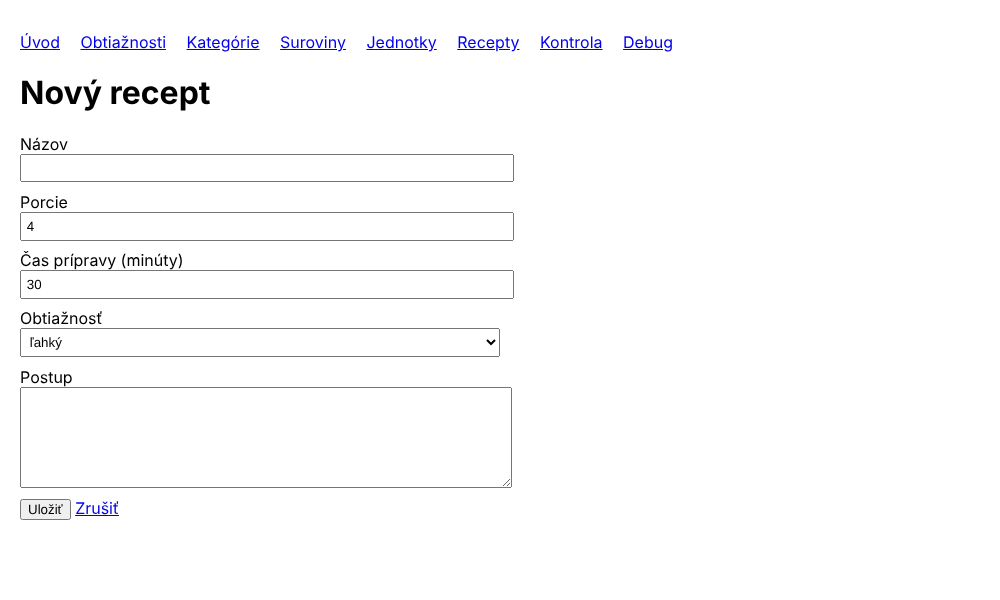
Výsledok pre GET /recipes/new (old = [], error = ''):
<form method="post" action="/student/jan.novak/it/cv05/recipes">
    <label>Názov <input type="text" name="title" value="" required></label>
    <label>Porcie <input type="number" name="servings" value="4" min="1"></label>
    <label>Čas prípravy (minúty) <input type="number" name="prep_time" value="30" min="0"></label>
    <label>Obtiažnosť
        <select name="difficulty_id">
            <option value="1" >ľahký</option>
            <option value="2" >stredný</option>
            <option value="3" >náročný</option>
        </select>
    </label>
    <label>Postup <textarea name="instructions" rows="6"></textarea></label>
    <button type="submit">Uložiť</button>
    <a href="/student/jan.novak/it/cv05/recipes">Zrušiť</a>
</form>
insert() a lastInsertId()
Čo Ján Novák chce: zapísať nový recept do tabuľky recipes. Doteraz boli všetky dotazy SELECT; toto je prvý zápis. Metódu insert() píše do src/Model/RecipeModel.php sám:
    /**
     * Vloží nový recept a vráti jeho id. $data má kľúče rovnaké ako stĺpce tabuľky:
     * ['title' => 'Hummus', 'servings' => 4, 'prep_time' => 15, 'instructions' => '...', 'difficulty_id' => 1]
     * id a created_at dopĺňa databáza sama (AUTO_INCREMENT, DEFAULT CURRENT_TIMESTAMP v schema.sql).
     */
    public function insert(array $data): int
    {
        $sql = "INSERT INTO recipes (title, servings, prep_time, instructions, difficulty_id)
                VALUES (:title, :servings, :prep_time, :instructions, :difficulty_id)";   // :title atď. sú parametre;
                                                                                             // hodnoty sa doplnia v execute(),
                                                                                             // nikdy sa nelepia do textu SQL
        $stmt = $this->pdo->prepare($sql);                       // PDO pripraví dotaz (prepared statement) ako v search()
        $stmt->execute([                                         // PDO doplní hodnoty a dotaz vykoná
            ':title'         => $data['title'],
            ':servings'      => $data['servings'],
            ':prep_time'     => $data['prep_time'],
            ':instructions'  => $data['instructions'],
            ':difficulty_id' => $data['difficulty_id'],
        ]);
        return (int) $this->pdo->lastInsertId();                 // lastInsertId() z PDO: id, ktoré databáza pridelila
                                                                 // novému riadku → 5; controller ho potrebuje na presmerovanie
    }
Výsledok: v tabuľke recipes je nový riadok a insert() vráti jeho id:
id | title  | servings | prep_time | instructions       | created_at          | difficulty_id
5  | Hummus | 4        | 15        | Cícer rozmixujeme. | 2026-10-26 23:57:18 | 1
Ak difficulty_id ukazuje na neexistujúci záznam číselníka, databáza INSERT odmietne (cudzí kľúč) a PDO vyhodí výnimku; pri debug => true v config.php ju Ján Novák vidí v prehliadači.
Response::redirect() a stavový kód 302
Čo Ján Novák chce: po uložení receptu vidieť jeho detail, a aby F5 na detaile neuložilo recept druhýkrát. Preto store() po insert() nevráti stránku, ale odpoveď „choď na inú adresu“: stavový kód 302, hlavička Location s adresou, prázdne telo. Prehliadač po nej sám pošle GET na adresu z Location. V src/Http/Response.php z twig.zip pribudla statická metóda redirect(); všetko ostatné v súbore je ako doteraz:
    /**
     * Odpoveď „choď na inú adresu“: stavový kód 302 a hlavička Location, telo prázdne.
     * Prehliadač po nej sám pošle novú požiadavku GET na adresu z Location.
     * Response::redirect('/recipes/5') → prehliadač otvorí /student/jan.novak/it/cv05/recipes/5.
     * static: volá sa bez objektu, vráti nový objekt Response. Používa sa po uložení dát z formulára.
     */
    public static function redirect(string $path): self
    {
        return new self('', 302, ['Location' => url($path)]);   // url('/recipes/5') → '/student/jan.novak/it/cv05/recipes/5'
    }
send() v index.php potom urobí to, čo vždy: http_response_code(302), header('Location: …'), header('Content-Type: …'), echo ''. Výsledok, ktorý Apache pošle prehliadaču:
HTTP/1.1 302 Found
Location: /student/jan.novak/it/cv05/recipes/5
Content-Type: text/html; charset=UTF-8
Prečo nie rovno detail: keby store() vrátila stránku detailu, prehliadač by si pamätal, že ju dostal na POST /recipes; F5 by poslal ten istý POST znova a recept by bol v tabuľke dvakrát. Po presmerovaní je poslednou požiadavkou GET /recipes/5; F5 zopakuje len ju. Postup sa volá POST → redirect → GET a používa ho každá webová aplikácia.
Twig – what it is
Twig is a library of PHP classes for templates. Author Fabien Potencier (the author of Symfony), since 2009; we use version 3. It is foreign code: Composer downloads it into vendor/twig/twig/ (about 250 files) and our code uses it through the class Twig\Environment in the function view().
A template is a .twig file in views/ with the HTML of one page. Twig reads it from top to bottom: ordinary HTML is copied into the result as it is; {% … %} is a command (do something); {{ … }} is an output (put a value here); {# … #} is a comment (it does not go into the result). There is nothing else in a template – no <?php, no e(). The values a template prints are the keys of the array the controller passed as a parameter to render().
How Twig is written: the list of categories
What Ján Novák wants: he clicks Kategórie in the menu and wants to see the table of the lookup table of categories. CategoryController::index() calls $this->render('list', ['title' => 'Kategórie', 'rows' => $rows]); $rows are four records (id = 1, name = polievka; 2 hlavné jedlo; 3 dezert; 4 raňajky). The view builds an HTML table from them.
Until now views/list.php did that – PHP mixed with HTML (here the part that runs for the categories):
<p>Počet záznamov: <?= count($rows) ?></p>      <?php /* <?= … ?> prints a value; count() from PHP counts the records → 4 */ ?>
<table>
    <tr>
        <?php foreach (array_keys($rows[0]) as $col): ?>   <?php /* array_keys() takes the column names from the 1st record: id, name;
                                                                    foreach: do the line below for every name */ ?>
            <th><?= e($col) ?></th>                         <?php /* e() escapes the text for HTML → <th>id</th>, <th>name</th> */ ?>
        <?php endforeach; ?>                                <?php /* end of foreach */ ?>
    </tr>
    <?php foreach ($rows as $row): ?>                       <?php /* one table row for each of the 4 records */ ?>
        <tr>
            <?php foreach ($row as $v): ?>                  <?php /* one cell for each column of the record: 1, polievka */ ?>
                <td><?= e((string) $v) ?></td>              <?php /* → <td>1</td>, <td>polievka</td> */ ?>
            <?php endforeach; ?>
        </tr>
    <?php endforeach; ?>
</table>
The same in Twig:
{% extends "layout.twig" %} {# this file is only the content; the header, menu and heading are in layout.twig and Twig puts the content into it #}
{% block content %} {# from here to {% endblock %} is that content #}
<p>Počet záznamov: {{ rows|length }}</p> {# {{ }} prints a value; |length = a filter: an adjustment of the value after a vertical bar,
length counts the elements → 4 → <p>Počet záznamov: 4</p> #}
<table>
<tr>
{% for col in rows[0]|keys %} {# for = repeat the lines up to {% endfor %} for every element; rows[0] = the 1st record,
the filter keys takes the column names from it: id, name → col = id, then name #}
<th>{{ col }}</th> {# → <th>id</th>, <th>name</th> #}
{% endfor %} {# end of the repetition; every command that starts something (block, for, if) has its end #}
</tr>
{% for row in rows %} {# one table row for each of the 4 records #}
<tr>
{% for v in row %} {# one cell for each column of the record: v = 1, then polievka #}
<td>{{ v }}</td> {# → <td>1</td>, <td>polievka</td>; at every {{ }} Twig itself replaces < > & "
with their HTML form (< → <) – what the function e() did in list.php #}
{% endfor %}
</tr>
{% endfor %}
</table>
{% endblock %}
The result from PHP and from Twig is the same:
<p>Počet záznamov: 4</p>
<table>
    <tr><th>id</th><th>name</th></tr>
    <tr><td>1</td><td>polievka</td></tr>
    <tr><td>2</td><td>hlavné jedlo</td></tr>
    <tr><td>3</td><td>dezert</td></tr>
    <tr><td>4</td><td>raňajky</td></tr>
</table>
The difference is in the notation: in Twig every command is {% %} and every output is {{ }}, without <?php, without e(), without (string). The real list.twig in twig.zip has three more {% if %} (the search form, the link “Pridať záznam”, the link to the detail in the id column); the whole file is in the part “How it works” at the recipes, where they are used for the first time.
layout.twig: the frame of every page
What Ján Novák wants: every page to have the same menu and heading at the top, written once, not in every file. In cv04 views/layout.php did that and the function view() joined it with the content by two requires. In Twig the frame is the file views/layout.twig and Twig does the joining according to two commands: {% extends "layout.twig" %} in the content (“my frame is layout.twig”) and {% block content %}{% endblock %} in the frame (“the content goes here”).
<!doctype html>
<html lang="sk">
<head>
    <meta charset="utf-8">
    <title>{{ title }}</title>   {# title = the value under the key 'title' from the array that CategoryController::index() passed as
                                    a parameter to render(); render() passed it as a parameter to view(); view() to
                                    $twig->render('list.twig', $data). → <title>Kategórie</title> #}
    <style> … </style>           {# the CSS of the page, the same as in layout.php so far #}
</head>
<body>
<nav>
    <a href="{{ url('/') }}">Úvod</a>        {# Twig sees in {{ }} the name url with the value '/'. In view() in src/helpers.php there is the line
                                               addFunction(new TwigFunction('url', 'url')): the name url in a template = the PHP function url().
                                               So Twig runs url('/') from src/helpers.php; it returns BASE_URL . '/' =
                                               '/student/jan.novak/it/cv05/' and Twig puts that text in place of {{ }}
                                               → <a href="/student/jan.novak/it/cv05/">Úvod</a> #}
    <a href="{{ url('/categories') }}">Kategórie</a>   {# url('/categories') returns '/student/jan.novak/it/cv05/categories'
                                                          → <a href="/student/jan.novak/it/cv05/categories">Kategórie</a> #}
    <a href="{{ url('/kontrola') }}">Kontrola</a>      {# → href="/student/jan.novak/it/cv05/kontrola" #}
    <a href="{{ url('/debug') }}">Debug</a>            {# → href="/student/jan.novak/it/cv05/debug" #}
</nav>
<h1>{{ title }}</h1>                        {# → <h1>Kategórie</h1> #}

{% block content %}{% endblock %}           {# here Twig puts what is in list.twig between {% block content %} and {% endblock %}:
                                               <p>Počet záznamov: 4</p><table>…</table>. Here the block is empty, the page fills it. #}

</body>
</html>
The result for the categories – one whole page:
<!doctype html>
<html lang="sk">
<head>
    <meta charset="utf-8">
    <title>Kategórie</title>
    <style> … </style>
</head>
<body>
<nav>
    <a href="/student/jan.novak/it/cv05/">Úvod</a>
    <a href="/student/jan.novak/it/cv05/categories">Kategórie</a>
    <a href="/student/jan.novak/it/cv05/kontrola">Kontrola</a>
    <a href="/student/jan.novak/it/cv05/debug">Debug</a>
</nav>
<h1>Kategórie</h1>

<p>Počet záznamov: 4</p>
<table> … </table>

</body>
</html>
When Ján Novák adds the line <a href="{{ url('/recipes') }}">Recepty</a> to layout.twig, the link is on every page from that moment, because every file in views/ starts with the line {% extends "layout.twig" %}.
What Twig does better: three examples
1. Text from the user does not run as HTML. Ján Novák types <b>ahoj</b> into the form as the recipe title. The record is saved into the database with the tags. In list.php an output without e() would look like this:
<td><?= $v ?></td> <?php /* without e(): <td><b>ahoj</b></td> goes into the HTML → the browser shows a bold ahoj;
instead of <b> there can be <script> and foreign code runs (the bug called XSS) */ ?>
<td><?= e((string) $v) ?></td> <?php /* with e(): <td><b>ahoj</b></td> → the browser shows the text <b>ahoj</b>;
Ján Novák had to write e() at every output himself */ ?>
In list.twig there is only {{ v }} and Twig does the same as e() at every {{ }} by itself (this is called autoescape):
<td>{{ v }}</td> {# → <td><b>ahoj</b></td> #}
2. An error in a template has a readable message. Ján Novák deletes by mistake the line {% endfor %} of the outer repetition in list.twig. At the next request Twig prints:
Twig\Error\SyntaxError: Unexpected "endif" tag (expecting closing tag for the "for" tag defined near line 28)
in "list.twig" at line 41.
The message says what is missing (the end for for), where for starts (line 28) and where Twig hit the problem (line 41). The same in list.php – a deleted <?php endforeach; ?>:
PHP Parse error: syntax error, unexpected end of file in views/list.php on line 15
Line 15 is the end of the file; PHP does not say where foreach starts. A typo in a variable name ({{ rovs|length }}) Twig reports too, thanks to the setting strict_variables in view():
Twig\Error\RuntimeError: Variable "rovs" does not exist in "list.twig" at line 20.
3. A new page is a few lines. Ján Novák wants the page O aplikácii. He has HomeController::about(), which calls $this->render('about', ['title' => 'O aplikácii']). The whole views/about.twig:
{% extends "layout.twig" %}       {# the frame with the menu and heading is ready in layout.twig #}
{% block content %}
<p>Semestrálny projekt Jána Nováka: recepty. Predmet Informačné technológie, FBERG TUKE.</p>
{% endblock %}
The result: a whole page with the menu, the heading O aplikácii and this paragraph. In about.php there would be the same paragraph, but the function view() would assemble the frame with two requires.
What you have from this from now on: you do not write e() in a template; you find an error in a template by the line number; every new page is {% extends %}, {% block %} and its content. And you will meet the same thing at work: Symfony, Drupal, Craft CMS use Twig, Laravel has the same thing under the name Blade.
view(): where Twig starts
What Ján Novák wants: render() in the controller to work as before – he gives it the template name and the array of values, he gets the HTML text. render() in BaseController does not change; what changes is the function view() in src/helpers.php, which render() calls. The whole file, from twig.zip:
<?php
declare(strict_types=1);
// Three functions: e(), url(), view(). vendor/autoload.php loads this file at every request (composer.json → "files"),
// so these functions exist for index.php, for the controllers and for Twig.
use Twig\Environment; // Twig class from the file vendor/twig/twig/src/Environment.php
use Twig\Loader\FilesystemLoader; // Twig class that reads .twig files from a folder
use Twig\TwigFunction; // Twig class through which a PHP function is assigned to a name in a template
/** Escapes text for HTML: replaces < > & " with their HTML form. e('<b>ahoj</b>') returns '<b>ahoj</b>'.
* You do not write it in a template – Twig does it at every {{ }} itself; it stays for output outside templates. */
function e(?string $text): string
{
return htmlspecialchars((string) $text, ENT_QUOTES, 'UTF-8');
}
/** Makes the full path for href from a relative address. url('/recipes/3') returns '/student/jan.novak/it/cv05/recipes/3'. */
function url(string $path): string
{
return BASE_URL . '/' . ltrim($path, '/'); // BASE_URL = the prefix, define() in index.php; ltrim() removes the slash at the start
}
/** Builds the page HTML from the template views/<name>.twig and returns it as text. BaseController::render() calls it
* and passes it the template name ('list') and the array of values (['title' => 'Kategórie', 'rows' => [...]]). */
function view(string $name, array $data = []): string
{
$loader = new FilesystemLoader(__DIR__ . '/../views'); // an object that will read files from the folder views/
$twig = new Environment($loader, [ // the Twig object; it gets the loader and two settings:
'cache' => false, // compiled templates are not stored on disk → a change in .twig applies right after saving
'strict_variables' => true, // a variable that is not in the array ({{ titel }}) is an error with a message, not an empty spot
]);
$twig->addFunction(new TwigFunction('url', 'url')); // the name url in a template = the PHP function url() from this file
return $twig->render($name . '.twig', $data); // $twig->render('list.twig', ['title' => 'Kategórie', 'rows' => [...]]):
// Twig reads views/list.twig (and because of extends also layout.twig),
// every key of the array is a variable in the template, returns the HTML text
}
The result of view('list', ['title' => 'Kategórie', 'rows' => $rows]) is the text '<!doctype html>…<h1>Kategórie</h1>…<table>…</table>…</html>' – the same as at layout.twig above. render() passes it as a parameter to new Response($html).
What $twig->render() does inside, in four steps, all on sigma.tuke.sk at this request: (1) the loader opens views/list.twig and reads it as text; (2) Twig compiles the text into a PHP class in memory – from {{ title }} comes echo htmlspecialchars($context['title']), from {% for row in rows %} comes foreach ($context['rows'] as $row); that is why Twig is as fast as hand-written PHP; (3) because of {% extends %} it loads and compiles layout.twig too and puts the content of the block content in its place; (4) it runs the compiled class with the values from $data and collects the output into text, which it returns.
Composer and composer require
What Ján Novák wants: to have Twig in the application. Twig is about 250 .php files written by somebody else; they must be in the application folder so that PHP on sigma.tuke.sk can run them. Composer downloads them – the program with which he has made vendor/autoload.php until now (composer install). The libraries are on packagist.org, the public registry of PHP packages; Twig is there under the name twig/twig (owner/package). Ján Novák runs once, in the terminal in Kubeflow, in the project folder:
composer require twig/twig
What appears in the project after that (the whole guide with the terminal output is in the part “Physical form”):
{
    "name": "tuke/it-projekt",
    "require": {
        "php": ">=8.1",
        "twig/twig": "^3.30"          ← Composer added this: the application needs Twig version 3.30 or a newer 3.x, never 4.0
    },
    "autoload": {
        "psr-4": { "App\\": "src/" },
        "files": [ "src/helpers.php" ]
    },
    "config": {
        "platform": { "php": "8.1.2" }   ← the PHP on sigma.tuke.sk; Composer picks versions that run on it
    }
}
composer.lock          ← a new file: the exact versions of everything Composer downloaded (twig/twig v3.30.0, symfony/… v1.43.0, …);
                          goes to GitHub; whoever runs composer install gets exactly the same versions
vendor/
├── autoload.php       ← rewritten: from now on the map has the classes Twig\… too
├── composer/          ← class maps; in autoload_psr4.php the line 'Twig\\' => array($vendorDir . '/twig/twig/src') was added
├── twig/twig/src/     ← Twig: Environment.php, Loader/FilesystemLoader.php, TwigFunction.php, … (about 250 files)
└── symfony/           ← three small libraries Twig needs (polyfill-ctype, polyfill-mbstring, deprecation-contracts)
On sigma.tuke.sk Composer does not run: the finished vendor/ goes there through Upload Folder. vendor/ does not go to GitHub (it is in .gitignore); composer.json and composer.lock do.
HTTP method POST
What Ján Novák wants: to save a new recipe. He fills in the form and clicks Uložiť. The browser sends a request to sigma.tuke.sk, but a different one than so far: until now it was always GET (“give me the page”; everything it carries is in the address, e.g. ?q=tofu). Now it is POST (“I am sending you data”): the data is in the body of the request, after the empty line, not in the address. The browser sends POST when the form has method="post".
POST /student/jan.novak/it/cv05/recipes HTTP/1.1          ← HTTP method POST; the path is from the form's action attribute
Host: sigma.tuke.sk
Content-Type: application/x-www-form-urlencoded           ← the shape of the data in the body: name=value, separated by &
Content-Length: 89                                        ← the length of the body in bytes
                                                          ← empty line: end of the headers, start of the body
title=Hummus&servings=4&prep_time=15&instructions=C%C3%ADcer+rozmixujeme.&difficulty_id=1
                                                          ← the body: the form fields; the keys are the name attributes from the HTML,
                                                             a space is +, Slovak characters are encoded
From the body Apache and PHP make the array $_POST (term below), just as they make $_GET from ?q=tofu:
$_POST = ['title' => 'Hummus', 'servings' => '4', 'prep_time' => '15', 'instructions' => 'Cícer rozmixujeme.', 'difficulty_id' => '1'];
// all are texts, the numbers too
Where Ján Novák sees it: F12 → tab Network → submit the form → click the row recipes → tab Payload (Chrome) or Request (Firefox): the fields with values; in the Headers tab there is Request Method: POST and the response status code 302.
$_POST and Request::post()
What Ján Novák wants: to read in the controller what the user typed into the form. The values are in the array $_POST from PHP. In the application a single place reads it – Request::fromGlobals() – and the controller asks for the values through $request->post('title'), just like for the values from the address through $request->query('q'). The whole file, from twig.zip; new are the property $post, the fifth constructor parameter, $_POST in fromGlobals() and the method post():
<?php
declare(strict_types=1);

namespace App\Http;

/**
 * Request: the request from the browser as an object. The values Apache put into $_SERVER, $_GET and $_POST
 * are here as properties with methods for reading. It is created once per request, in index.php, through fromGlobals().
 */
final class Request
{
    // The properties are private: written once in the constructor, then only read through methods.
    private string $method;   // 'GET' or 'POST'
    private string $prefix;   // '/student/jan.novak/it/cv05'
    private string $path;     // '/recipes'
    private array  $query;    // from the address after '?':   ['q' => 'tofu']
    private array  $post;     // from the body of a POST request: ['title' => 'Hummus', 'servings' => '4', ...]; at GET []

    public function __construct(string $method, string $prefix, string $path, array $query, array $post)
    {
        $this->method = $method;
        $this->prefix = $prefix;
        $this->path   = $path;
        $this->query  = $query;
        $this->post   = $post;
    }

    /**
     * Builds the Request from the arrays $_SERVER, $_GET and $_POST that Apache filled.
     * static: the method belongs to the class, it is called without an object as Request::fromGlobals().
     * "::" means "take from the class"; with an object "->" is written. The same as Database::getInstance().
     */
    public static function fromGlobals(): self
    {
        $prefix = rtrim(dirname($_SERVER['SCRIPT_NAME']), '/');       // '/student/jan.novak/it/cv05'
        $path   = parse_url($_SERVER['REQUEST_URI'], PHP_URL_PATH);   // '/student/jan.novak/it/cv05/recipes'
        $path   = substr($path, strlen($prefix));                     // '/recipes'
        $path   = '/' . trim($path, '/');                             // '/recipes'  (for '.../cv05/' it is '/')

        return new self($_SERVER['REQUEST_METHOD'], $prefix, $path, $_GET, $_POST);   // the Request object
    }

    public function method(): string
    {
        return $this->method;
    }

    public function prefix(): string
    {
        return $this->prefix;
    }

    public function path(): string
    {
        return $this->path;
    }

    /**
     * A parameter from the address after '?'. For ?q=tofu $this->query is ['q' => 'tofu'] and query('q') returns 'tofu'.
     * For an address without '?' $this->query is [] and query('q') returns $default, i.e. ''.
     * "??" means: if the left side does not exist, use the right one.
     */
    public function query(string $key, string $default = ''): string
    {
        return (string) ($this->query[$key] ?? $default);
    }

    /**
     * The value of a form field from the body of a POST request. The key is the name attribute in HTML:
     * <input name="title"> → post('title') returns what the user typed, for example 'Hummus'.
     * Everything from a form arrives as text, numbers too ('4'); the controller converts it to a number: (int) '4' → 4.
     * A field that was not in the form (or at GET) returns $default, i.e. ''.
     */
    public function post(string $key, string $default = ''): string
    {
        return (string) ($this->post[$key] ?? $default);
    }
}
The result for the request POST /recipes with the body from the term above:
$request->method();          // 'POST'
$request->path();            // '/recipes'
$request->post('title');     // 'Hummus'
$request->post('servings');  // '4'      text; (int) $request->post('servings') → 4
$request->post('nic');       // ''       a field that was not in the form
Router::post()
What Ján Novák wants: a different controller method to run for POST /recipes than for GET /recipes: GET shows the list, POST saves the record. The Router only had get() until now; in src/Router.php from twig.zip the method post() was added. add() and dispatch() are the same as before:
    /** Adds a route for the HTTP method GET. $handler is the pair [class name, method name]. */
    public function get(string $path, array $handler): void
    {
        $this->add('GET', $path, $handler);
    }

    /**
     * Adds a route for the HTTP method POST – the request sent by a form with method="post".
     * The same address can have a GET and a POST route: GET /recipes shows the list, POST /recipes saves a new record.
     * dispatch() tells them apart by $request->method().
     */
    public function post(string $path, array $handler): void
    {
        $this->add('POST', $path, $handler);
    }
In dispatch() this line has been there since last time; now it has something to do for the first time:
        foreach ($this->routes as $route) {
            if ($route['method'] !== $request->method()) {
                continue;                                     // other HTTP method → next route (GET /recipes does not match POST)
            }
Ján Novák adds two routes to index.php:
// Main entity: list (also with ?q= search), detail, form for a new record and saving it.
$router->get('/recipes',      [RecipeController::class, 'index']);
$router->get('/recipes/{id}', [RecipeController::class, 'show']);     // {id} matches digits only, 'new' does not match it
$router->get('/recipes/new',  [RecipeController::class, 'create']);   // GET: show the empty form
$router->post('/recipes',     [RecipeController::class, 'store']);    // POST: the same address as the list, another HTTP method
The result of dispatch() for four requests:
GET  /recipes       → route get('/recipes')       → RecipeController::index()
GET  /recipes/new   → route get('/recipes/new')   → RecipeController::create()   (route /recipes/{id} does not match: 'new' is not digits)
GET  /recipes/5     → route get('/recipes/{id}')  → RecipeController::show($request, 5)
POST /recipes       → route post('/recipes')      → RecipeController::store()    (all GET routes are skipped)
The names create (show the form) and store (save) are a convention, just like index and show.
Form
What Ján Novák wants: a page where he fills in a new recipe and clicks Uložiť. A form is the HTML element <form> with fields and a button; after the click the browser takes the values of all fields that have the attribute name and sends them to the address from action with the HTTP method from method. The whole views/form.twig; Ján Novák writes it himself for his entity, following this model:
{# Form for a new recipe. Variables from the array from RecipeController::create() or store():
   title, difficulties (lookup table records), old (field values: at the first display []), error (message text or ''). #}
{% extends "layout.twig" %}
{% block content %}
{% if error %}                                      {# error = '' → false → skip; after an unsuccessful store() there is text #}
    <p class="error">{{ error }}</p>                {# → <p class="error">Názov je povinný.</p> #}
{% endif %}
<form method="post" action="{{ url('/recipes') }}">     {# method="post": the field values go in the request body;
                                                           action: url('/recipes') → /student/jan.novak/it/cv05/recipes,
                                                           the Router finds the route post('/recipes', …) → store() #}
    <label>Názov
        <input type="text" name="title" value="{{ old.title|default('') }}" required>
        {# name="title": under this key the value will be in $_POST and store() reads it through post('title').
           old.title = the value from the array old under the key title; the filter default('') gives '' when the key is missing (first display).
           required: the browser does not allow submitting an empty field. → <input type="text" name="title" value="" required> #}
    </label>
    <label>Porcie
        <input type="number" name="servings" value="{{ old.servings|default(4) }}" min="1">   {# → value="4" #}
    </label>
    <label>Čas prípravy (minúty)
        <input type="number" name="prep_time" value="{{ old.prep_time|default(30) }}" min="0">   {# → value="30" #}
    </label>
    <label>Obtiažnosť
        <select name="difficulty_id">               {# the value of the chosen option is sent, i.e. the id of the lookup table record #}
        {% for d in difficulties %}                 {# d = a lookup table record: d.id = 1, d.name = 'ľahký'; then 2 stredný; 3 náročný #}
            <option value="{{ d.id }}" {% if d.id == old.difficulty_id|default(0) %}selected{% endif %}>{{ d.name }}</option>
            {# → <option value="1" >ľahký</option>; selected goes to the option whose id is in old.difficulty_id #}
        {% endfor %}
        </select>
    </label>
    <label>Postup
        <textarea name="instructions" rows="6">{{ old.instructions|default('') }}</textarea>   {# the value of a textarea is between the tags #}
    </label>
    <button type="submit">Uložiť</button>           {# click: the browser takes all fields with name and sends POST to action #}
    <a href="{{ url('/recipes') }}">Zrušiť</a>      {# an ordinary link, it sends nothing #}
</form>
{% endblock %}
The result for GET /recipes/new (old = [], error = ''):
<form method="post" action="/student/jan.novak/it/cv05/recipes">
    <label>Názov <input type="text" name="title" value="" required></label>
    <label>Porcie <input type="number" name="servings" value="4" min="1"></label>
    <label>Čas prípravy (minúty) <input type="number" name="prep_time" value="30" min="0"></label>
    <label>Obtiažnosť
        <select name="difficulty_id">
            <option value="1" >ľahký</option>
            <option value="2" >stredný</option>
            <option value="3" >náročný</option>
        </select>
    </label>
    <label>Postup <textarea name="instructions" rows="6"></textarea></label>
    <button type="submit">Uložiť</button>
    <a href="/student/jan.novak/it/cv05/recipes">Zrušiť</a>
</form>
insert() and lastInsertId()
What Ján Novák wants: to write the new recipe into the table recipes. Until now all queries were SELECT; this is the first write. He writes the method insert() into src/Model/RecipeModel.php himself:
    /**
     * Inserts a new recipe and returns its id. $data has the same keys as the table columns:
     * ['title' => 'Hummus', 'servings' => 4, 'prep_time' => 15, 'instructions' => '...', 'difficulty_id' => 1]
     * id and created_at are filled by the database itself (AUTO_INCREMENT, DEFAULT CURRENT_TIMESTAMP in schema.sql).
     */
    public function insert(array $data): int
    {
        $sql = "INSERT INTO recipes (title, servings, prep_time, instructions, difficulty_id)
                VALUES (:title, :servings, :prep_time, :instructions, :difficulty_id)";   // :title etc. are parameters;
                                                                                             // the values are filled in execute(),
                                                                                             // never glued into the SQL text
        $stmt = $this->pdo->prepare($sql);                       // PDO prepares the query (prepared statement) as in search()
        $stmt->execute([                                         // PDO fills in the values and runs the query
            ':title'         => $data['title'],
            ':servings'      => $data['servings'],
            ':prep_time'     => $data['prep_time'],
            ':instructions'  => $data['instructions'],
            ':difficulty_id' => $data['difficulty_id'],
        ]);
        return (int) $this->pdo->lastInsertId();                 // lastInsertId() from PDO: the id the database assigned
                                                                 // to the new row → 5; the controller needs it for the redirect
    }
The result: there is a new row in the table recipes and insert() returns its id:
id | title  | servings | prep_time | instructions       | created_at          | difficulty_id
5  | Hummus | 4        | 15        | Cícer rozmixujeme. | 2026-10-26 23:57:18 | 1
If difficulty_id points to a non-existent lookup table record, the database rejects the INSERT (foreign key) and PDO throws an exception; with debug => true in config.php Ján Novák sees it in the browser.
Response::redirect() and status code 302
What Ján Novák wants: to see the detail of the recipe after saving it, and F5 on the detail not to save the recipe a second time. So after insert() store() does not return a page but the response “go to another address”: status code 302, the header Location with the address, an empty body. After it the browser itself sends GET to the address from Location. In src/Http/Response.php from twig.zip the static method redirect() was added; everything else in the file is as before:
    /**
     * The response "go to another address": status code 302 and the Location header, empty body.
     * After it the browser itself sends a new GET request to the address from Location.
     * Response::redirect('/recipes/5') → the browser opens /student/jan.novak/it/cv05/recipes/5.
     * static: called without an object, returns a new Response object. Used after saving form data.
     */
    public static function redirect(string $path): self
    {
        return new self('', 302, ['Location' => url($path)]);   // url('/recipes/5') → '/student/jan.novak/it/cv05/recipes/5'
    }
send() in index.php then does what it always does: http_response_code(302), header('Location: …'), header('Content-Type: …'), echo ''. The result Apache sends to the browser:
HTTP/1.1 302 Found
Location: /student/jan.novak/it/cv05/recipes/5
Content-Type: text/html; charset=UTF-8
Why not the detail directly: if store() returned the detail page, the browser would remember that it got it for POST /recipes; F5 would send the same POST again and the recipe would be in the table twice. After the redirect the last request is GET /recipes/5; F5 repeats only that one. The procedure is called POST → redirect → GET and every web application uses it.
Ako to funguje: kto koho voláHow it works: who calls whom
Kategórie: od kliknutia po tabuľku
Čo Ján Novák chce: vidieť kategórie. Klikne v menu na Kategórie; prehliadač pošle GET /student/jan.novak/it/cv05/categories. Apache podľa .htaccess spustí index.php, Request::fromGlobals() vráti objekt s path() = '/categories', Router::dispatch($request) nájde route GET /categories, vytvorí new CategoryController() a zavolá index($request) – všetko ako v cv04. Celý controller, bez zmeny:
<?php
declare(strict_types=1);

namespace App\Controller;

use App\Http\Request;
use App\Http\Response;
use App\Model\CategoryModel;

/** Číselník kategórií: zoznam. */
final class CategoryController extends BaseController
{
    public function index(Request $request): Response
    {
        $model = new CategoryModel();                       // objekt modelu; jeho getAll() vykoná SELECT * FROM categories

        return $this->render('list', [                      // zavolá render() z BaseController a odovzdá mu dva parametre:
            'title' => $model->describe(),                  //   'list' = názov template (views/list.twig)
            'rows'  => $model->getAll(),                    //   pole: 'title' => 'Kategórie', 'rows' => 4 záznamy
        ]);
    }
}
Čo sa stane s tým poľom – tri volania, zakaždým odovzdané ako parameter:
// 1. src/Controller/BaseController.php – render() dostane pole ako $data a zavolá view(), do zátvorky dá $data:
protected function render(string $view, array $data = [], int $status = 200): Response
{
    return new Response(view($view, $data), $status);       // view('list', ['title' => 'Kategórie', 'rows' => [...]])
}

// 2. src/helpers.php – view() dostane pole ako $data a zavolá $twig->render(), do zátvorky dá $data:
    return $twig->render($name . '.twig', $data);           // $twig->render('list.twig', ['title' => 'Kategórie', 'rows' => [...]])

// 3. Twig: každý kľúč poľa je v list.twig a layout.twig premenná s tým istým menom:
//    {{ title }} = 'Kategórie', rows = 4 záznamy. Twig vráti text HTML; view() ho vráti do render(); render() ho dá
//    ako parameter do new Response($html, 200); index.php zavolá $response->send().
Výsledok v prehliadači:
Zoznam receptov: ten istý list.twig s tromi if
Čo Ján Novák chce: zoznam receptov s poľom na hľadanie, s odkazom Pridať záznam a s odkazmi na detail v stĺpci id. Ten istý views/list.twig ako pri kategóriách to urobí, lebo RecipeController::index() dá do poľa pre render() tri kľúče navyše: show = '/recipes', q = hľadaný text, create = '/recipes/new'. Celý súbor z twig.zip:
{# Tabuľka záznamov. Premenné sú kľúče poľa, ktoré controller odovzdal ako parameter do render():
title, rows vždy; show (adresa detailu), q (hľadaný text), create (adresa formulára) len od controllera hlavnej entity. #}
{% extends "layout.twig" %} {# tento súbor je len obsah; hlavička, menu a nadpis sú v layout.twig a Twig doň obsah vloží #}
{% block content %} {# odtiaľto po {% endblock %} je ten obsah #}
{% if q is defined %} {# if = ak; "q is defined" = ak v poli od controllera je kľúč q.
Kategórie: nie je (q dáva len RecipeController) → riadky po {% endif %} sa preskočia #}
<form method="get" action="{{ url(show) }}"> {# url('/recipes') → /student/jan.novak/it/cv05/recipes #}
<input type="text" name="q" value="{{ q }}" placeholder="Hľadať v názve">
<button type="submit">Hľadať</button>
<a href="{{ url(show) }}">Zrušiť</a>
</form>
{% endif %} {# koniec if; každý príkaz, ktorý niečo začína (block, if, for), má svoj koniec #}
{% if create is defined %} {# create = adresa formulára na nový záznam; kategórie: nie je → preskočiť #}
<p><a href="{{ url(create) }}">Pridať záznam</a></p> {# recepty: url('/recipes/new') → …/cv05/recipes/new #}
{% endif %}
{% if rows is empty %} {# rows = pole záznamov; "is empty" = je prázdne; kategórie: 4 záznamy → nie je #}
<p>Žiadne záznamy.</p>
{% else %} {# else = inak; Twig pokračuje tu #}
<p>Počet záznamov: {{ rows|length }}</p> {# {{ }} vypíše hodnotu; |length = filter: úprava hodnoty za zvislou čiarou,
length spočíta prvky → 4 → <p>Počet záznamov: 4</p> #}
<table>
<tr>
{% for col in rows[0]|keys %} {# for = opakuj riadky po {% endfor %} pre každý prvok; rows[0] = 1. záznam,
filter keys z neho vezme názvy stĺpcov: id, name → col = id, potom name #}
<th>{{ col }}</th> {# → <th>id</th>, <th>name</th> #}
{% endfor %} {# koniec opakovania: Twig sa vráti hore po ďalší prvok; keď nie je, ide ďalej #}
</tr>
{% for row in rows %} {# pre každý zo 4 záznamov jeden riadok tabuľky #}
<tr>
{% for col, v in row %} {# pre každý stĺpec záznamu jedna bunka; col = názov, v = hodnota: col = id, v = 1 #}
<td>
{% if col == 'id' and show is defined %} {# stĺpec id A ZÁROVEŇ v poli je show → z čísla urob odkaz;
kategórie: show nie je → else #}
<a href="{{ url(show ~ '/' ~ v) }}">{{ v }}</a> {# ~ spája texty: '/recipes' ~ '/' ~ 3 = '/recipes/3' #}
{% else %}
{{ v }} {# → 1, potom polievka; Twig pri každom {{ }} sám nahradí < > & " ich HTML zápisom
(< → <) – to, čo v list.php robila funkcia e() #}
{% endif %}
</td>
{% endfor %}
</tr>
{% endfor %}
</table>
{% endif %}
{% endblock %}
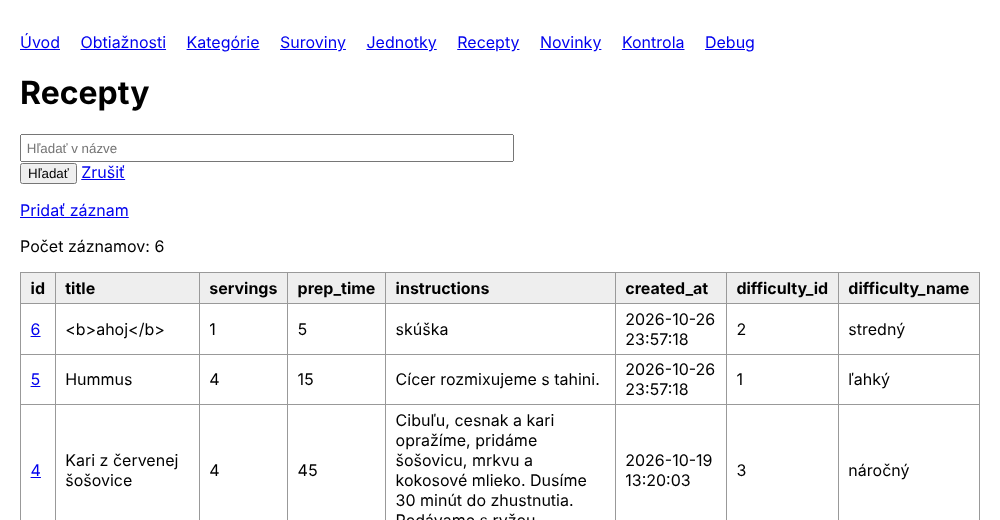
Výsledok pre recepty (skrátené):
<form method="get" action="/student/jan.novak/it/cv05/recipes">
    <input type="text" name="q" value="" placeholder="Hľadať v názve">
    <button type="submit">Hľadať</button>
    <a href="/student/jan.novak/it/cv05/recipes">Zrušiť</a>
</form>
<p><a href="/student/jan.novak/it/cv05/recipes/new">Pridať záznam</a></p>
<p>Počet záznamov: 4</p>
<table>
    <tr><th>id</th><th>title</th><th>servings</th> … </tr>
    <tr><td><a href="/student/jan.novak/it/cv05/recipes/4">4</a></td><td>Kari z červenej šošovice</td><td>4</td> … </tr>
    …
</table>
Ján Novák pridá recept
Čo Ján Novák chce: pridať recept Hummus. Klikne na Pridať záznam, vyplní formulár, klikne na Uložiť a chce vidieť uložený recept. Z tohto jedného želania vzniknú tri požiadavky: GET /recipes/new (formulár), POST /recipes (uloženie), GET /recipes/5 (detail). Celý RecipeController, ktorý ich obslúži; index() a show() sú z cv04, v index() pribudol kľúč 'create':
<?php
declare(strict_types=1);

namespace App\Controller;

use App\Http\Request;
use App\Http\Response;
use App\Model\DifficultyModel;
use App\Model\RecipeModel;

final class RecipeController extends BaseController
{
    // GET /recipes a /recipes?q=tofu
    public function index(Request $request): Response
    {
        $model = new RecipeModel();
        $q     = $request->query('q');          // pre /recipes → '';  pre /recipes?q=tofu → 'tofu'
        $rows  = $q === ''                      // nič sa nehľadá?
            ? $model->getAll()                  // → všetky recepty
            : $model->search($q);               // → len recepty s 'tofu' v názve

        return $this->render('list', [
            'title'  => $model->describe(),     // 'Recepty'
            'rows'   => $rows,
            'show'   => '/recipes',             // list.twig z toho urobí odkaz v stĺpci id: /recipes/3
            'q'      => $q,                     // list.twig vráti hľadaný text do poľa formulára
            'create' => '/recipes/new',         // list.twig z toho urobí odkaz „Pridať záznam“
        ]);
    }

    // GET /recipes/3: Router dá do $id číslo z adresy
    public function show(Request $request, int $id): Response
    {
        $model = new RecipeModel();
        $row   = $model->getById($id);          // pre 3 → pole so záznamom; pre 999 → null
        if ($row === null) {
            return $this->notFound();           // stránka „Nenájdené“, stavový kód 404
        }

        return $this->render('show', [
            'title' => $row['title'],           // 'Tofu na sójovej omáčke s ryžou'
            'row'   => $row,
            'back'  => '/recipes',              // show.twig z toho urobí odkaz „Späť na zoznam“
        ]);
    }

    // GET /novinky: tri najnovšie recepty
    public function novinky(Request $request): Response
    {
        $rows = (new RecipeModel())->getAll();             // getAll() vracia najnovšie prvé (ORDER BY id DESC)
        return $this->render('novinky', [
            'title' => 'Novinky',
            'rows'  => array_slice($rows, 0, 3),            // prvé tri
        ]);
    }

    // GET /recipes/new: prázdny formulár
    public function create(Request $request): Response
    {
        return $this->render('form', [
            'title'        => 'Nový recept',
            'difficulties' => (new DifficultyModel())->getAll(),   // záznamy číselníka pre <select>
            'old'          => [],                                   // hodnoty polí: pri prvom zobrazení žiadne
            'error'        => '',
        ]);
    }

    // POST /recipes: údaje z formulára. Uloží záznam a presmeruje na jeho detail.
    public function store(Request $request): Response
    {
        $data = [                                                   // kľúče = atribúty name vo form.twig = stĺpce tabuľky
            'title'         => trim($request->post('title')),       // 'Hummus'
            'servings'      => (int) $request->post('servings'),    // '4' → 4
            'prep_time'     => (int) $request->post('prep_time'),   // '15' → 15
            'instructions'  => trim($request->post('instructions')),
            'difficulty_id' => (int) $request->post('difficulty_id'),   // id z <option value>: '1' → 1
        ];

        if ($data['title'] === '') {                                // jediná kontrola: názov nie je prázdny
            return $this->render('form', [                          // formulár znova, s hláškou a s tým, čo používateľ napísal
                'title'        => 'Nový recept',
                'difficulties' => (new DifficultyModel())->getAll(),
                'old'          => $data,
                'error'        => 'Názov je povinný.',
            ]);
        }

        $id = (new RecipeModel())->insert($data);                   // INSERT; vráti id nového záznamu, napríklad 5
        return Response::redirect('/recipes/' . $id);               // 302 + Location → prehliadač otvorí GET /recipes/5
    }
}
(new DifficultyModel())->getAll() vytvorí objekt modelu a hneď zavolá jeho metódu; zátvorky okolo new sú potrebné. trim() (z PHP) zmaže medzery na začiatku a konci textu. (int) prevedie text na číslo: '4' → 4, 'abc' → 0.
Požiadavka 1: GET /recipes/new. Ján Novák klikol na Pridať záznam (odkaz z list.twig: url(create) → /student/jan.novak/it/cv05/recipes/new).
- Apache spustí
index.php;$_SERVER['REQUEST_METHOD']='GET',$_POST=[]. Request::fromGlobals()vráti objekt:method()='GET',path()='/recipes/new'.dispatch(): routeGET /recipes/{id}nesedí (newnie sú číslice), routeGET /recipes/newsedí →new RecipeController()→create($request).create():DifficultyModel::getAll()vráti[['id' => 1, 'name' => 'ľahký'], ['id' => 2, 'name' => 'stredný'], ['id' => 3, 'name' => 'náročný']];render('form', [...])→view('form', [...])→ Twig zform.twigalayout.twigvyrobí stránku s formulárom: tri<option>, polia prázdne (oldje[], filterdefaultdá'',4,30), bez hlášky (errorje'').send():200, HTML. Prehliadač ukáže formulár.
Požiadavka 2: POST /recipes. Ján Novák napísal Hummus, 4, 15, vybral ľahký, napísal postup a klikol na Uložiť.
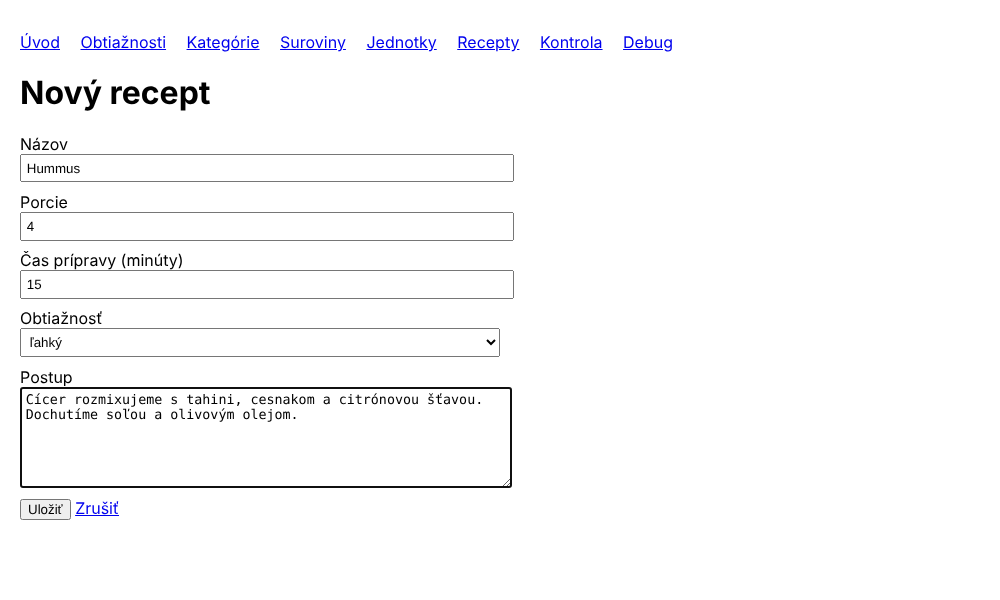
- Prehliadač zoberie polia s
namea pošlePOST /student/jan.novak/it/cv05/recipess telomtitle=Hummus&servings=4&prep_time=15&difficulty_id=1&instructions=…. - Apache spustí
index.php;$_SERVER['REQUEST_METHOD']='POST',$_POST=['title' => 'Hummus', 'servings' => '4', 'prep_time' => '15', 'difficulty_id' => '1', 'instructions' => '…']. Request::fromGlobals()vráti objekt:method()='POST',path()='/recipes',post('title')='Hummus'.dispatch(): všetkyGETroute preskočí ($route['method'] !== 'POST'); routePOST /recipessedí →new RecipeController()→store($request).store(): zostaví$data(servingsje už číslo4);titlenie je prázdny;RecipeModel::insert($data)vykonáINSERT INTO recipes …, databáza pridelíid=5,lastInsertId()vráti5;Response::redirect('/recipes/5')vráti objekt Response so stavovým kódom 302.send():http_response_code(302),header('Location: /student/jan.novak/it/cv05/recipes/5'), prázdne telo. Prehliadač nič nezobrazí; prečítaLocation.
Požiadavka 3: GET /recipes/5. Pošle ju prehliadač sám, bez kliknutia.
- Apache spustí
index.phpznova od začiatku;$_POSTje prázdne, aplikácia si z požiadavky 2 nič nepamätá. dispatch(): routeGET /recipes/{id}sedí,$id=5→show($request, 5).getById(5)vráti nový záznam aj sdifficulty_name='ľahký'acreated_atod databázy;render('show', [...])→show.twig.send():200, detail. V riadku prehliadača je…/cv05/recipes/5;F5zopakuje len túto požiadavku.
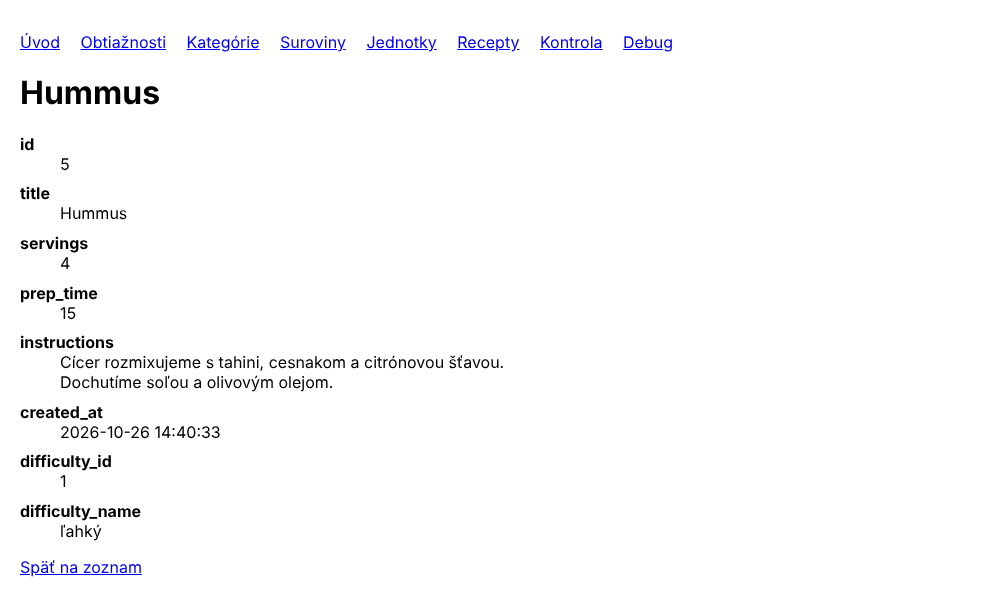
V karte Network (F12 → Network) sú požiadavky 2 a 3 pod sebou: recipes so stavom 302 a 5 so stavom 200.
Keď názov chýba
Keby Ján Novák odoslal formulár s prázdnym názvom (prehliadač to pre required nedovolí, ale iný program môže poslať POST aj bez prehliadača), store() v kroku 5 požiadavky 2 zistí $data['title'] === '' a namiesto insert() zavolá render('form', [... 'old' => $data, 'error' => 'Názov je povinný.']): odpoveď 200 so stránkou formulára, v ktorej je hláška a polia majú hodnoty z old (filter default sa nepoužije, lebo kľúče existujú; selected dostane <option> s id rovným old.difficulty_id). Nič sa neuložilo, adresa v prehliadači je …/cv05/recipes (adresa z action).
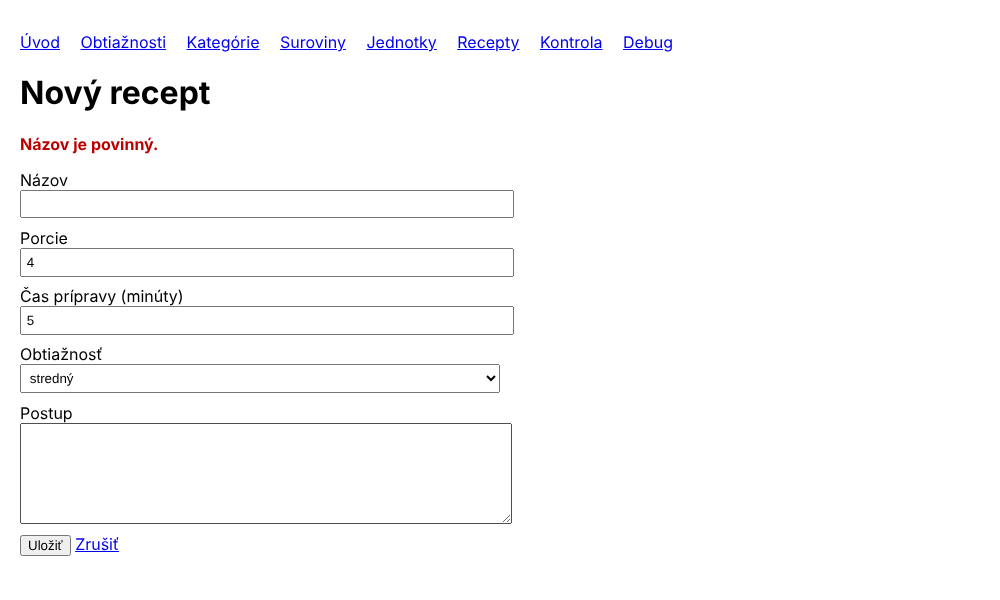
Kontrola a debug: dáta pripraví controller
Čo Ján Novák chce: stránky Kontrola a Debug ako doteraz. Template ale nemá prístup k databáze ani k $_SERVER – má len kľúče poľa z render(). Dve stránky, ktoré to doteraz robili vo view (kontrola.php robilo dotazy, debug.php čítalo $_SERVER), to teraz robia v controlleri a do poľa pre render() dajú hotové hodnoty. Celý HomeController vzoru; Ján Novák si podľa neho prepíše svoj (zoznam modelov je jeho, about() z minula ostáva):
<?php
declare(strict_types=1);

namespace App\Controller;

use App\Database;
use App\Http\Request;
use App\Http\Response;
use App\Model\CategoryModel;
use App\Model\DifficultyModel;
use App\Model\IngredientModel;
use App\Model\RecipeModel;
use App\Model\UnitModel;
use PDO;

/** Stránky bez tabuľky: úvod, kontrola, debug. Templates nerobia nič s databázou – všetky dáta pripraví controller. */
final class HomeController extends BaseController
{
    public function index(Request $request): Response
    {
        return $this->render('home', ['title' => 'Úvod']);                   // views/home.twig
    }

    // Kontrolná stránka: controller urobí dotazy a hotové polia dá ako parameter do render(); template ich len vypíše.
    public function kontrola(Request $request): Response
    {
        $pdo    = Database::getInstance();
        $tables = $pdo->query('SHOW TABLES')->fetchAll(PDO::FETCH_COLUMN);   // ['categories', 'difficulties', ...]

        $models = [];
        foreach ([new DifficultyModel(), new CategoryModel(), new IngredientModel(), new UnitModel(), new RecipeModel()] as $model) {
            $models[] = [
                'name'  => $model->describe(),                                // 'Recepty'
                'count' => $model->getCount(),                                // 4
                'rows'  => array_slice($model->getAll(), 0, 5),               // prvých päť záznamov
            ];
        }

        return $this->render('kontrola', [                                   // views/kontrola.twig
            'title'  => 'Kontrola projektu',
            'tables' => $tables,
            'models' => $models,
        ]);
    }

    // Debug: template nemá prístup k $_SERVER, preto controller dá potrebné hodnoty do poľa pre render().
    public function debug(Request $request): Response
    {
        return $this->render('debug', [                                      // views/debug.twig
            'title'   => 'Debug',
            'server'  => [
                'REQUEST_METHOD' => $_SERVER['REQUEST_METHOD'],
                'SCRIPT_NAME'    => $_SERVER['SCRIPT_NAME'],
                'REQUEST_URI'    => $_SERVER['REQUEST_URI'],
            ],
            'request' => $request,                                           // objekt; template volá jeho metódy (request.method)
        ]);
    }
}
Templates k nim, obe z twig.zip:
{# Kontrolná stránka. Dotazy robí HomeController::kontrola(); tu sa len vypisuje.
   Premenné z jeho poľa: title, tables (pole názvov tabuliek), models (pole polí: name, count, rows). #}
{% extends "layout.twig" %}
{% block content %}
<h2>Tabuľky v databáze ({{ tables|length }})</h2>   {# → Tabuľky v databáze (7) #}
<ul>
{% for t in tables %}
    <li>{{ t }}</li>                                 {# → <li>categories</li>, <li>difficulties</li>, … #}
{% endfor %}
</ul>
<h2>Modely ({{ models|length }})</h2>
{% for m in models %}                                {# m = jedno pole: m.name = 'Recepty', m.count = 4, m.rows = záznamy #}
    <h3>{{ m.name }} – {{ m.count }} záznamov</h3>   {# → <h3>Recepty – 4 záznamov</h3> #}
    {% if m.rows is empty %}
        <p>Tabuľka je prázdna – spusti seed.sql.</p>
    {% else %}
        <table>
            <tr>{% for col in m.rows[0]|keys %}<th>{{ col }}</th>{% endfor %}</tr>
            {% for row in m.rows %}
                <tr>{% for v in row %}<td>{{ v }}</td>{% endfor %}</tr>
            {% endfor %}
        </table>
    {% endif %}
{% endfor %}
{% endblock %}
{# Čo dal Apache do $_SERVER a čo z toho vypočítal Request. Premenné z poľa od HomeController::debug():
   title, server (pole s tromi hodnotami z $_SERVER), request (objekt App\Http\Request). #}
{% extends "layout.twig" %}
{% block content %}
<table>
    <tr><th>$_SERVER['REQUEST_METHOD']</th><td>{{ server.REQUEST_METHOD }}</td></tr>   {# server je pole: server.REQUEST_METHOD
                                                                                          = $server['REQUEST_METHOD'] v PHP → GET #}
    <tr><th>$_SERVER['SCRIPT_NAME']</th>   <td>{{ server.SCRIPT_NAME }}</td></tr>      {# → /student/jan.novak/it/cv05/index.php #}
    <tr><th>$_SERVER['REQUEST_URI']</th>   <td>{{ server.REQUEST_URI }}</td></tr>      {# → /student/jan.novak/it/cv05/debug?q=tofu #}
    <tr><th>$request->method()</th>  <td>{{ request.method }}</td></tr>    {# request je objekt: request.method zavolá
                                                                              metódu $request->method() → GET #}
    <tr><th>$request->prefix()</th>  <td>{{ request.prefix }}</td></tr>    {# → /student/jan.novak/it/cv05 #}
    <tr><th>$request->path()</th>    <td>{{ request.path }}</td></tr>      {# → /debug #}
    <tr><th>$request->query('q')</th><td>{{ request.query('q') }}</td></tr>   {# metóda s parametrom → tofu #}
</table>
<p>Zmeň koniec adresy, napríklad na <code>/debug?q=tofu</code>, a sleduj, čo sa v tabuľke zmení.</p>
{% endblock %}
Výsledok …/cv05/debug?q=tofu:
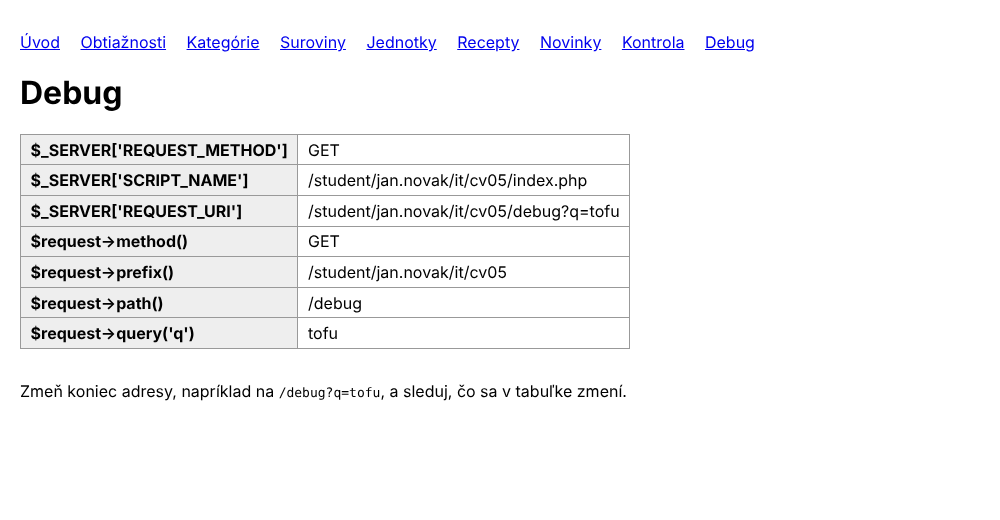
Nová stránka v aplikácii: postup
Čo Ján Novák chce: novú stránku /novinky s troma najnovšími receptami. Každá nová stránka v aplikácii vzniká rovnakými štyrmi krokmi, v tomto poradí:
1. Metóda controllera – pripraví dáta. Do ktorého controllera patrí? Stránka je o receptoch, teda do RecipeController:
    // GET /novinky: tri najnovšie recepty
    public function novinky(Request $request): Response
    {
        $rows = (new RecipeModel())->getAll();             // getAll() vracia najnovšie prvé (ORDER BY id DESC)
        return $this->render('novinky', [                   // template views/novinky.twig
            'title' => 'Novinky',
            'rows'  => array_slice($rows, 0, 3),            // array_slice() z PHP: tri prvky od začiatku poľa
        ]);
    }
2. Route – adresa pre metódu. V index.php medzi ostatné route:
$router->get('/novinky', [RecipeController::class, 'novinky']); // tri najnovšie recepty
3. Template – HTML stránky. Nový súbor views/novinky.twig; názov je ten z render():
{# Tri najnovšie recepty. Premenné z poľa od RecipeController::novinky(): title, rows (tri záznamy). #}
{% extends "layout.twig" %}
{% block content %}
{% if rows is empty %}
    <p>Zatiaľ žiadne recepty.</p>
{% else %}
    <ul>
    {% for row in rows %}          {# row = najnovší záznam, potom druhý a tretí #}
        <li><a href="{{ url('/recipes/' ~ row.id) }}">{{ row.title }}</a> – pridané {{ row.created_at|date('d. m. Y') }}</li>
        {# '/recipes/' ~ row.id = '/recipes/6'; filter date: '2026-10-26 23:57:18' → 26. 10. 2026
           → <li><a href="/student/jan.novak/it/cv05/recipes/6">Hummus</a> – pridané 26. 10. 2026</li> #}
    {% endfor %}
    </ul>
{% endif %}
{% endblock %}
4. Odkaz v menu. Do layout.twig medzi ostatné odkazy:
<a href="{{ url('/novinky') }}">Novinky</a> {# → <a href="/student/jan.novak/it/cv05/novinky">Novinky</a> #}
Výsledok …/cv05/novinky:
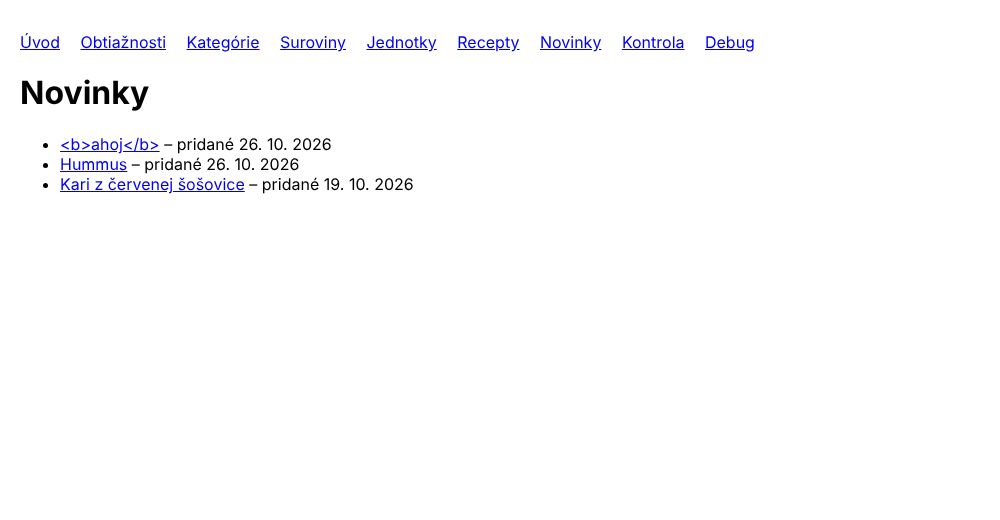
Router, Request, Response, view() a model sa používajú tak, ako sú – stránka potrebovala len to, čo je o nej: dáta (krok 1), adresu (krok 2), vzhľad (krok 3), cestu k nej (krok 4). Keď stránka potrebuje dáta, ktoré model nevie dať, pribudne pred krok 1 ešte jeden: nová metóda modelu s vlastným SELECT.
Categories: from the click to the table
What Ján Novák wants: to see the categories. He clicks Kategórie in the menu; the browser sends GET /student/jan.novak/it/cv05/categories. Apache runs index.php according to .htaccess, Request::fromGlobals() returns an object with path() = '/categories', Router::dispatch($request) finds the route GET /categories, creates new CategoryController() and calls index($request) – everything as in cv04. The whole controller, unchanged:
<?php
declare(strict_types=1);

namespace App\Controller;

use App\Http\Request;
use App\Http\Response;
use App\Model\CategoryModel;

/** Lookup table of categories: list. */
final class CategoryController extends BaseController
{
    public function index(Request $request): Response
    {
        $model = new CategoryModel();                       // model object; its getAll() runs SELECT * FROM categories

        return $this->render('list', [                      // calls render() from BaseController and passes it two parameters:
            'title' => $model->describe(),                  //   'list' = the template name (views/list.twig)
            'rows'  => $model->getAll(),                    //   the array: 'title' => 'Kategórie', 'rows' => 4 records
        ]);
    }
}
What happens with that array – three calls, each time passed as a parameter:
// 1. src/Controller/BaseController.php – render() gets the array as $data and calls view(), putting $data in the parentheses:
protected function render(string $view, array $data = [], int $status = 200): Response
{
    return new Response(view($view, $data), $status);       // view('list', ['title' => 'Kategórie', 'rows' => [...]])
}

// 2. src/helpers.php – view() gets the array as $data and calls $twig->render(), putting $data in the parentheses:
    return $twig->render($name . '.twig', $data);           // $twig->render('list.twig', ['title' => 'Kategórie', 'rows' => [...]])

// 3. Twig: every key of the array is a variable with the same name in list.twig and layout.twig:
//    {{ title }} = 'Kategórie', rows = 4 records. Twig returns the HTML text; view() returns it to render(); render() passes it
//    as a parameter to new Response($html, 200); index.php calls $response->send().
The result in the browser:
Recipe list: the same list.twig with three ifs
What Ján Novák wants: the recipe list with a search field, with the link Pridať záznam and with links to the detail in the id column. The same views/list.twig as for the categories does that, because RecipeController::index() puts three more keys into the array for render(): show = '/recipes', q = the searched text, create = '/recipes/new'. The whole file from twig.zip:
{# Table of records. The variables are the keys of the array the controller passed as a parameter to render():
title, rows always; show (detail address), q (searched text), create (form address) only from the main entity controller. #}
{% extends "layout.twig" %} {# this file is only the content; the header, menu and heading are in layout.twig and Twig puts the content into it #}
{% block content %} {# from here to {% endblock %} is that content #}
{% if q is defined %} {# if; "q is defined" = if the array from the controller has the key q.
Categories: it does not (only RecipeController gives q) → the lines up to {% endif %} are skipped #}
<form method="get" action="{{ url(show) }}"> {# url('/recipes') → /student/jan.novak/it/cv05/recipes #}
<input type="text" name="q" value="{{ q }}" placeholder="Hľadať v názve">
<button type="submit">Hľadať</button>
<a href="{{ url(show) }}">Zrušiť</a>
</form>
{% endif %} {# end of if; every command that starts something (block, if, for) has its end #}
{% if create is defined %} {# create = the address of the new record form; categories: missing → skip #}
<p><a href="{{ url(create) }}">Pridať záznam</a></p> {# recipes: url('/recipes/new') → …/cv05/recipes/new #}
{% endif %}
{% if rows is empty %} {# rows = the array of records; "is empty" = is empty; categories: 4 records → it is not #}
<p>Žiadne záznamy.</p>
{% else %} {# else = otherwise; Twig continues here #}
<p>Počet záznamov: {{ rows|length }}</p> {# {{ }} prints a value; |length = a filter: an adjustment of the value after a vertical bar,
length counts the elements → 4 → <p>Počet záznamov: 4</p> #}
<table>
<tr>
{% for col in rows[0]|keys %} {# for = repeat the lines up to {% endfor %} for every element; rows[0] = the 1st record,
the filter keys takes the column names from it: id, name → col = id, then name #}
<th>{{ col }}</th> {# → <th>id</th>, <th>name</th> #}
{% endfor %} {# end of the repetition: Twig goes back up for the next element; when there is none, it goes on #}
</tr>
{% for row in rows %} {# one table row for each of the 4 records #}
<tr>
{% for col, v in row %} {# one cell for each column of the record; col = name, v = value: col = id, v = 1 #}
<td>
{% if col == 'id' and show is defined %} {# the column id AND the array has show → make a link from the number;
categories: show is missing → else #}
<a href="{{ url(show ~ '/' ~ v) }}">{{ v }}</a> {# ~ joins texts: '/recipes' ~ '/' ~ 3 = '/recipes/3' #}
{% else %}
{{ v }} {# → 1, then polievka; at every {{ }} Twig itself replaces < > & " with their HTML form
(< → <) – what the function e() did in list.php #}
{% endif %}
</td>
{% endfor %}
</tr>
{% endfor %}
</table>
{% endif %}
{% endblock %}
The result for the recipes (shortened):
<form method="get" action="/student/jan.novak/it/cv05/recipes">
    <input type="text" name="q" value="" placeholder="Hľadať v názve">
    <button type="submit">Hľadať</button>
    <a href="/student/jan.novak/it/cv05/recipes">Zrušiť</a>
</form>
<p><a href="/student/jan.novak/it/cv05/recipes/new">Pridať záznam</a></p>
<p>Počet záznamov: 4</p>
<table>
    <tr><th>id</th><th>title</th><th>servings</th> … </tr>
    <tr><td><a href="/student/jan.novak/it/cv05/recipes/4">4</a></td><td>Kari z červenej šošovice</td><td>4</td> … </tr>
    …
</table>
Ján Novák adds a recipe
What Ján Novák wants: to add the recipe Hummus. He clicks Pridať záznam, fills in the form, clicks Uložiť and wants to see the saved recipe. From this one wish three requests arise: GET /recipes/new (the form), POST /recipes (saving), GET /recipes/5 (the detail). The whole RecipeController that serves them; index() and show() are from cv04, in index() the key 'create' was added:
<?php
declare(strict_types=1);

namespace App\Controller;

use App\Http\Request;
use App\Http\Response;
use App\Model\DifficultyModel;
use App\Model\RecipeModel;

final class RecipeController extends BaseController
{
    // GET /recipes and /recipes?q=tofu
    public function index(Request $request): Response
    {
        $model = new RecipeModel();
        $q     = $request->query('q');          // for /recipes → '';  for /recipes?q=tofu → 'tofu'
        $rows  = $q === ''                      // nothing searched?
            ? $model->getAll()                  // → all recipes
            : $model->search($q);               // → only recipes with 'tofu' in the title

        return $this->render('list', [
            'title'  => $model->describe(),     // 'Recepty'
            'rows'   => $rows,
            'show'   => '/recipes',             // list.twig makes the link in the id column from it: /recipes/3
            'q'      => $q,                     // list.twig puts the searched text back into the form field
            'create' => '/recipes/new',         // list.twig makes the link "Pridať záznam" from it
        ]);
    }

    // GET /recipes/3: the Router puts the number from the address into $id
    public function show(Request $request, int $id): Response
    {
        $model = new RecipeModel();
        $row   = $model->getById($id);          // for 3 → array with the record; for 999 → null
        if ($row === null) {
            return $this->notFound();           // the "Not found" page, status code 404
        }

        return $this->render('show', [
            'title' => $row['title'],           // 'Tofu na sójovej omáčke s ryžou'
            'row'   => $row,
            'back'  => '/recipes',              // show.twig makes the link "Späť na zoznam" from it
        ]);
    }

    // GET /novinky: the three newest recipes
    public function novinky(Request $request): Response
    {
        $rows = (new RecipeModel())->getAll();             // getAll() returns the newest first (ORDER BY id DESC)
        return $this->render('novinky', [
            'title' => 'Novinky',
            'rows'  => array_slice($rows, 0, 3),            // the first three
        ]);
    }

    // GET /recipes/new: the empty form
    public function create(Request $request): Response
    {
        return $this->render('form', [
            'title'        => 'Nový recept',
            'difficulties' => (new DifficultyModel())->getAll(),   // lookup table records for <select>
            'old'          => [],                                   // field values: none at the first display
            'error'        => '',
        ]);
    }

    // POST /recipes: the data from the form. Saves the record and redirects to its detail.
    public function store(Request $request): Response
    {
        $data = [                                                   // keys = name attributes in form.twig = table columns
            'title'         => trim($request->post('title')),       // 'Hummus'
            'servings'      => (int) $request->post('servings'),    // '4' → 4
            'prep_time'     => (int) $request->post('prep_time'),   // '15' → 15
            'instructions'  => trim($request->post('instructions')),
            'difficulty_id' => (int) $request->post('difficulty_id'),   // id from <option value>: '1' → 1
        ];

        if ($data['title'] === '') {                                // the only check: the title is not empty
            return $this->render('form', [                          // the form again, with a message and with what the user typed
                'title'        => 'Nový recept',
                'difficulties' => (new DifficultyModel())->getAll(),
                'old'          => $data,
                'error'        => 'Názov je povinný.',
            ]);
        }

        $id = (new RecipeModel())->insert($data);                   // INSERT; returns the id of the new record, for example 5
        return Response::redirect('/recipes/' . $id);               // 302 + Location → the browser opens GET /recipes/5
    }
}
(new DifficultyModel())->getAll() creates a model object and calls its method at once; the parentheses around new are needed. trim() (from PHP) removes spaces at the start and end of the text. (int) converts text to a number: '4' → 4, 'abc' → 0.
Request 1: GET /recipes/new. Ján Novák clicked Pridať záznam (the link from list.twig: url(create) → /student/jan.novak/it/cv05/recipes/new).
- Apache runs
index.php;$_SERVER['REQUEST_METHOD']='GET',$_POST=[]. Request::fromGlobals()returns an object:method()='GET',path()='/recipes/new'.dispatch(): the routeGET /recipes/{id}does not match (newis not digits), the routeGET /recipes/newmatches →new RecipeController()→create($request).create():DifficultyModel::getAll()returns[['id' => 1, 'name' => 'ľahký'], ['id' => 2, 'name' => 'stredný'], ['id' => 3, 'name' => 'náročný']];render('form', [...])→view('form', [...])→ Twig builds the page with the form fromform.twigandlayout.twig: three<option>s, empty fields (oldis[], the filterdefaultgives'',4,30), no message (erroris'').send():200, HTML. The browser shows the form.
Request 2: POST /recipes. Ján Novák typed Hummus, 4, 15, chose ľahký, typed the instructions and clicked Uložiť.
- The browser takes the fields with
nameand sendsPOST /student/jan.novak/it/cv05/recipeswith the bodytitle=Hummus&servings=4&prep_time=15&difficulty_id=1&instructions=…. - Apache runs
index.php;$_SERVER['REQUEST_METHOD']='POST',$_POST=['title' => 'Hummus', 'servings' => '4', 'prep_time' => '15', 'difficulty_id' => '1', 'instructions' => '…']. Request::fromGlobals()returns an object:method()='POST',path()='/recipes',post('title')='Hummus'.dispatch(): skips allGETroutes ($route['method'] !== 'POST'); the routePOST /recipesmatches →new RecipeController()→store($request).store(): builds$data(servingsis already the number4);titleis not empty;RecipeModel::insert($data)runsINSERT INTO recipes …, the database assignsid=5,lastInsertId()returns5;Response::redirect('/recipes/5')returns a Response object with the status code 302.send():http_response_code(302),header('Location: /student/jan.novak/it/cv05/recipes/5'), empty body. The browser shows nothing; it readsLocation.
Request 3: GET /recipes/5. The browser sends it by itself, without a click.
- Apache runs
index.phpagain from the beginning;$_POSTis empty, the application remembers nothing from request 2. dispatch(): the routeGET /recipes/{id}matches,$id=5→show($request, 5).getById(5)returns the new record withdifficulty_name='ľahký'andcreated_atfrom the database;render('show', [...])→show.twig.send():200, the detail. In the browser bar there is…/cv05/recipes/5;F5repeats only this request.
In the Network tab (F12 → Network) requests 2 and 3 are one under the other: recipes with the status 302 and 5 with the status 200.
When the title is missing
If Ján Novák submitted the form with an empty title (the browser does not allow it because of required, but another program can send POST without a browser), store() in step 5 of request 2 finds $data['title'] === '' and instead of insert() calls render('form', [... 'old' => $data, 'error' => 'Názov je povinný.']): a 200 response with the form page, in which there is the message and the fields have the values from old (the filter default is not used, because the keys exist; selected goes to the <option> whose id equals old.difficulty_id). Nothing was saved, the address in the browser is …/cv05/recipes (the address from action).
Check and debug: the controller prepares the data
What Ján Novák wants: the pages Kontrola and Debug as before. But a template has no access to the database or to $_SERVER – it has only the keys of the array from render(). The two pages that did that in the view until now (kontrola.php ran queries, debug.php read $_SERVER) now do it in the controller and put the finished values into the array for render(). The whole HomeController of the sample; Ján Novák rewrites his own according to it (the list of models is his, about() from last time stays):
<?php
declare(strict_types=1);

namespace App\Controller;

use App\Database;
use App\Http\Request;
use App\Http\Response;
use App\Model\CategoryModel;
use App\Model\DifficultyModel;
use App\Model\IngredientModel;
use App\Model\RecipeModel;
use App\Model\UnitModel;
use PDO;

/** Pages without a table: home, check, debug. The templates do nothing with the database – the controller prepares all data. */
final class HomeController extends BaseController
{
    public function index(Request $request): Response
    {
        return $this->render('home', ['title' => 'Úvod']);                   // views/home.twig
    }

    // Check page: the controller runs the queries and passes finished arrays as a parameter to render(); the template only prints them.
    public function kontrola(Request $request): Response
    {
        $pdo    = Database::getInstance();
        $tables = $pdo->query('SHOW TABLES')->fetchAll(PDO::FETCH_COLUMN);   // ['categories', 'difficulties', ...]

        $models = [];
        foreach ([new DifficultyModel(), new CategoryModel(), new IngredientModel(), new UnitModel(), new RecipeModel()] as $model) {
            $models[] = [
                'name'  => $model->describe(),                                // 'Recepty'
                'count' => $model->getCount(),                                // 4
                'rows'  => array_slice($model->getAll(), 0, 5),               // the first five records
            ];
        }

        return $this->render('kontrola', [                                   // views/kontrola.twig
            'title'  => 'Kontrola projektu',
            'tables' => $tables,
            'models' => $models,
        ]);
    }

    // Debug: a template has no access to $_SERVER, so the controller puts the needed values into the array for render().
    public function debug(Request $request): Response
    {
        return $this->render('debug', [                                      // views/debug.twig
            'title'   => 'Debug',
            'server'  => [
                'REQUEST_METHOD' => $_SERVER['REQUEST_METHOD'],
                'SCRIPT_NAME'    => $_SERVER['SCRIPT_NAME'],
                'REQUEST_URI'    => $_SERVER['REQUEST_URI'],
            ],
            'request' => $request,                                           // object; the template calls its methods (request.method)
        ]);
    }
}
The templates for them, both from twig.zip:
{# Check page. HomeController::kontrola() runs the queries; here only printing.
   Variables from its array: title, tables (array of table names), models (array of arrays: name, count, rows). #}
{% extends "layout.twig" %}
{% block content %}
<h2>Tabuľky v databáze ({{ tables|length }})</h2>   {# → Tabuľky v databáze (7) #}
<ul>
{% for t in tables %}
    <li>{{ t }}</li>                                 {# → <li>categories</li>, <li>difficulties</li>, … #}
{% endfor %}
</ul>
<h2>Modely ({{ models|length }})</h2>
{% for m in models %}                                {# m = one array: m.name = 'Recepty', m.count = 4, m.rows = records #}
    <h3>{{ m.name }} – {{ m.count }} záznamov</h3>   {# → <h3>Recepty – 4 záznamov</h3> #}
    {% if m.rows is empty %}
        <p>Tabuľka je prázdna – spusti seed.sql.</p>
    {% else %}
        <table>
            <tr>{% for col in m.rows[0]|keys %}<th>{{ col }}</th>{% endfor %}</tr>
            {% for row in m.rows %}
                <tr>{% for v in row %}<td>{{ v }}</td>{% endfor %}</tr>
            {% endfor %}
        </table>
    {% endif %}
{% endfor %}
{% endblock %}
{# What Apache put into $_SERVER and what Request computed from it. Variables from the array from HomeController::debug():
   title, server (array with three values from $_SERVER), request (object App\Http\Request). #}
{% extends "layout.twig" %}
{% block content %}
<table>
    <tr><th>$_SERVER['REQUEST_METHOD']</th><td>{{ server.REQUEST_METHOD }}</td></tr>   {# server is an array: server.REQUEST_METHOD
                                                                                          = $server['REQUEST_METHOD'] in PHP → GET #}
    <tr><th>$_SERVER['SCRIPT_NAME']</th>   <td>{{ server.SCRIPT_NAME }}</td></tr>      {# → /student/jan.novak/it/cv05/index.php #}
    <tr><th>$_SERVER['REQUEST_URI']</th>   <td>{{ server.REQUEST_URI }}</td></tr>      {# → /student/jan.novak/it/cv05/debug?q=tofu #}
    <tr><th>$request->method()</th>  <td>{{ request.method }}</td></tr>    {# request is an object: request.method calls
                                                                              the method $request->method() → GET #}
    <tr><th>$request->prefix()</th>  <td>{{ request.prefix }}</td></tr>    {# → /student/jan.novak/it/cv05 #}
    <tr><th>$request->path()</th>    <td>{{ request.path }}</td></tr>      {# → /debug #}
    <tr><th>$request->query('q')</th><td>{{ request.query('q') }}</td></tr>   {# a method with a parameter → tofu #}
</table>
<p>Zmeň koniec adresy, napríklad na <code>/debug?q=tofu</code>, a sleduj, čo sa v tabuľke zmení.</p>
{% endblock %}
The result of …/cv05/debug?q=tofu:
A new page in the application: the procedure
What Ján Novák wants: a new page /novinky with the three newest recipes. Every new page in the application arises by the same four steps, in this order:
1. A controller method – prepares the data. Which controller does it belong to? The page is about recipes, so RecipeController:
    // GET /novinky: the three newest recipes
    public function novinky(Request $request): Response
    {
        $rows = (new RecipeModel())->getAll();             // getAll() returns the newest first (ORDER BY id DESC)
        return $this->render('novinky', [                   // template views/novinky.twig
            'title' => 'Novinky',
            'rows'  => array_slice($rows, 0, 3),            // array_slice() from PHP: three elements from the start of the array
        ]);
    }
2. A route – the address for the method. In index.php among the other routes:
$router->get('/novinky', [RecipeController::class, 'novinky']); // the three newest recipes
3. A template – the HTML of the page. A new file views/novinky.twig; the name is the one from render():
{# The three newest recipes. Variables from the array from RecipeController::novinky(): title, rows (three records). #}
{% extends "layout.twig" %}
{% block content %}
{% if rows is empty %}
    <p>Zatiaľ žiadne recepty.</p>
{% else %}
    <ul>
    {% for row in rows %}          {# row = the newest record, then the second and the third #}
        <li><a href="{{ url('/recipes/' ~ row.id) }}">{{ row.title }}</a> – pridané {{ row.created_at|date('d. m. Y') }}</li>
        {# '/recipes/' ~ row.id = '/recipes/6'; the filter date: '2026-10-26 23:57:18' → 26. 10. 2026
           → <li><a href="/student/jan.novak/it/cv05/recipes/6">Hummus</a> – pridané 26. 10. 2026</li> #}
    {% endfor %}
    </ul>
{% endif %}
{% endblock %}
4. A link in the menu. Into layout.twig among the other links:
<a href="{{ url('/novinky') }}">Novinky</a> {# → <a href="/student/jan.novak/it/cv05/novinky">Novinky</a> #}
The result of …/cv05/novinky:
Router, Request, Response, view() and the model are used as they are – the page needed only what is about itself: data (step 1), an address (step 2), a look (step 3), a way to it (step 4). When a page needs data the model cannot give, one more step comes before step 1: a new model method with its own SELECT.
Fyzická podoba: priečinky, súbory, ComposerPhysical form: folders, files, Composer
Čo Ján Novák chce: vedieť, kde ktorý súbor leží, ktoré súbory sú v twig.zip, ktoré píše sám, ktoré vyrobí Composer, a ako Twig nainštaluje.
Priečinky a súbory
Projekt cv05 Jána Nováka po dokončení cvičenia. Pri každom súbore je, odkiaľ je:
cv05/
├── .htaccess                         z cv04 bez zmeny
├── .gitignore                        z cv04 bez zmeny (config.php, vendor/)
├── composer.json                     z cv04; composer require doň dopíše "twig/twig"
├── composer.lock                     nový, vyrobí Composer: presné verzie knižníc; ide na GitHub
├── config.php, config.example.php    z cv04 bez zmeny
├── index.php                         z cv04; Ján Novák dopíše route GET /recipes/new a POST /recipes
├── sql/                              z cv02 bez zmeny
├── src/
│   ├── Database.php                  z cv02 bez zmeny
│   ├── helpers.php                   twig.zip: view() cez Twig; e() a url() ostávajú
│   ├── Router.php                    twig.zip: pribudla metóda post()
│   ├── Http/
│   │   ├── Request.php               twig.zip: pribudlo $post a metóda post()
│   │   └── Response.php              twig.zip: pribudla statická metóda redirect()
│   ├── Controller/
│   │   ├── BaseController.php        z cv04 bez zmeny
│   │   ├── HomeController.php        z cv04; Ján Novák prepíše kontrola() a debug() podľa vzoru vyššie
│   │   ├── CategoryController.php …  z cv04 bez zmeny – controllery číselníkov sa nemenia
│   │   └── RecipeController.php      z cv04; Ján Novák dopíše create() a store()
│   └── Model/
│       ├── CategoryModel.php …       z cv04 bez zmeny
│       └── RecipeModel.php           z cv04; Ján Novák dopíše insert()
├── views/                            .php súbory po prerobení zmaže; ostanú len .twig
│   ├── layout.twig                   twig.zip; Ján Novák doplní menu
│   ├── list.twig, show.twig, 404.twig, debug.twig, kontrola.twig   twig.zip
│   ├── home.twig                     twig.zip; Ján Novák doň prepíše obsah svojho home.php
│   ├── about.twig                    píše Ján Novák z about.php
│   ├── novinky.twig                  píše Ján Novák – vlastná stránka (vzor v časti „Nová stránka v aplikácii“)
│   └── form.twig                     píše Ján Novák podľa vzoru pri pojme Formulár
└── vendor/                           vyrobí composer require v Kubeflow; nie je na GitHub, na sigma ide
    ├── autoload.php                  autoloader: require tohto súboru v index.php; potom PHP nájde App\… aj Twig\…
    ├── composer/                     mapy tried pre autoloader (ClassLoader.php, autoload_psr4.php, …)
    ├── twig/twig/src/                Twig: Environment.php, Loader/FilesystemLoader.php, … (asi 250 súborov)
    └── symfony/                      tri malé knižnice, ktoré Twig potrebuje (polyfill-ctype, polyfill-mbstring, deprecation-contracts)
twig.zip má jedenásť súborov: src/helpers.php, src/Router.php, src/Http/Request.php, src/Http/Response.php a views/layout.twig, home.twig, list.twig, show.twig, 404.twig, debug.twig, kontrola.twig. Študent píše form.twig, about.twig, create() a store(), insert(), dve route, menu v layout.twig, nové kontrola() a debug() v HomeController a jednu vlastnú stránku (metóda, route, template, odkaz). Vzorová aplikácia aj s vendor/ je vo vzor-cv05.zip.
Knižnica v aplikácii: vendor/ a autoloader
Čo Ján Novák chce: klikne na Kategórie a stránku mu vyrobí Twig – kód, ktorý nenapísal. Ako sa cudzí kód dostal do aplikácie a ako ho PHP nájde?
Raz, v Kubeflow: stiahne knižnicu. Twig je asi 250 súborov .php. Musia byť v priečinku aplikácie, aby ich PHP na sigma.tuke.sk mohlo spustiť. Stiahne ich Composer: Ján Novák mu povie meno knižnice (composer require twig/twig), Composer ju stiahne z packagist.org a uloží do priečinka vendor/ v aplikácii. Všetko cudzie je v vendor/, náš kód v src/. Composer zapíše meno a verziu knižnice do composer.json a composer.lock vedľa index.php, aby ju vedel stiahnuť znova – o rok, alebo spolužiakovi po git clone.
A vyrobí autoloader. V vendor/ je teraz niekoľko sto súborov, o ktorých PHP nevie. Keď náš kód napíše new Twig\Environment(...), PHP triedu Twig\Environment nemá a potrebuje súbor, v ktorom je. Na to Composer vyrobil súbor vendor/autoload.php – autoloader. index.php ho načíta ako prvú vec riadkom require __DIR__ . '/vendor/autoload.php'; (je tam od cv02). Čo ten riadok urobí:
// Tento súbor napísal Composer. Načíta vendor/composer/ClassLoader.php (trieda, ktorá hľadá súbory tried)
// a mapy z vendor/composer/: v autoload_psr4.php je, ktorá predpona názvu triedy je v ktorom priečinku:
//     'Twig\\' => array($vendorDir . '/twig/twig/src'),     // Twig\Environment → vendor/twig/twig/src/Environment.php
//     'App\\'  => array($baseDir . '/src'),                 // App\Model\CategoryModel → src/Model/CategoryModel.php
// v autoload_files.php je, ktoré súbory načítať hneď: src/helpers.php (z composer.json "files").
// Potom zavolá spl_autoload_register(...) z PHP: od tejto chvíle PHP pri triede, ktorú ešte nemá, nehlási chybu,
// ale zavolá ClassLoader; ten z názvu triedy podľa mapy zloží cestu k súboru, urobí require a PHP pokračuje.
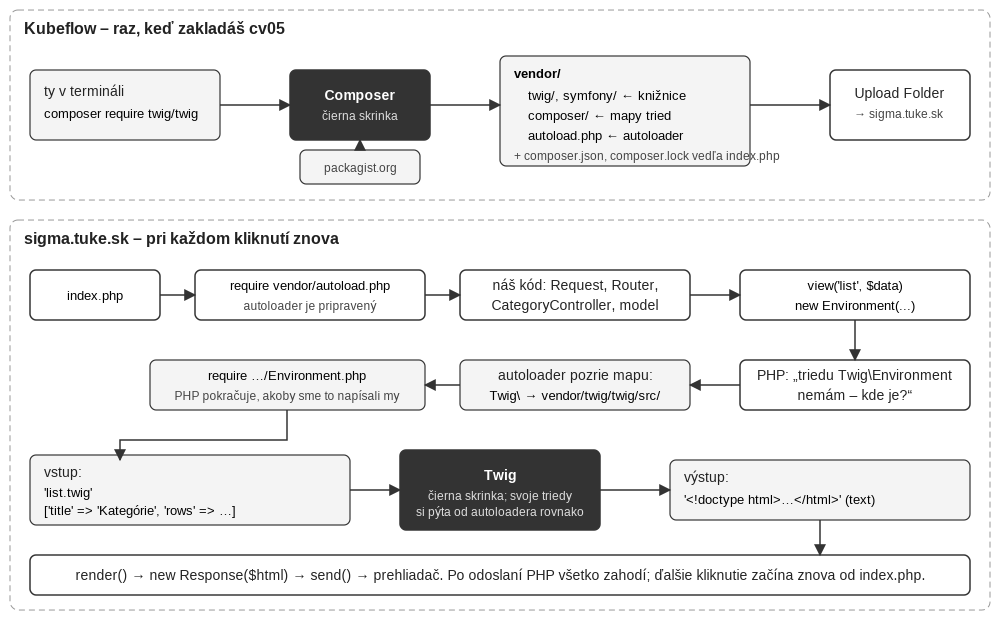
Každé kliknutie, na sigma.tuke.sk:
- Apache spustí
index.php. index.phpvykonárequire vendor/autoload.php. Od tejto chvíle až do odoslania odpovede PHP pri neznámej triede volá ClassLoader.- Náš kód beží ako doteraz:
Request::fromGlobals(),new Router(),new CategoryController(),new CategoryModel(). Pri každom z nich PHP triedu ešte nemá, ClassLoader podľa mapyApp\→src/urobírequiresúboru a PHP pokračuje. Súbory, ktoré toto kliknutie nepotrebuje (RecipeModel.php), sa nenačítajú vôbec. - Controller zavolá
render('list', ...), to zavoláview('list', ...). Voview()jenew Environment(...)– prvá cudzia trieda. ClassLoader podľa mapyTwig\→vendor/twig/twig/src/urobírequire vendor/twig/twig/src/Environment.php. Teraz prvýkrát beží kód, ktorý sme nepísali. view()zavolá$twig->render('list.twig', $data). Vnútri Twig použije desiatky svojich tried a ClassLoader ich načíta rovnako ako v kroku 4. Čo tie triedy robia, na používanie Twigu vedieť netreba, tak ako netreba čítať kód PDO: vstup je názov template a pole hodnôt, výstup je text HTML. Takto sa pracuje s každou knižnicou.- Ďalej ako doteraz:
view()vráti text,render()ho dá doResponse,send()ho vypíše. Po odoslaní odpovede PHP všetko zahodí – načítané triedy, Twig aj autoloader. Ďalšie kliknutie začína znova krokom 1.
vendor/ musí byť na sigma.tuke.sk, lebo tam PHP súbory číta – preto Upload Folder. Na GitHub nejde, lebo ho každý vyrobí Composerom za pár sekúnd z composer.json a composer.lock. Keď pribudne ďalšia knižnica, Composer stiahne aj ju a autoloader prepíše, aby mapa poznala aj jej triedy. Náš kód sa vendor/ dotýka jediným riadkom – tým require v index.php.
Over si to v termináli v Kubeflow, v priečinku projektu:
php -r 'require "vendor/autoload.php"; echo (new ReflectionClass("Twig\\Environment"))->getFileName(), PHP_EOL;'
Príkaz načíta autoloader a opýta sa PHP (ReflectionClass, z PHP), z ktorého súboru má triedu Twig\Environment. Výsledok:
/home/jan.novak/web/it/cv05/vendor/twig/twig/src/Environment.php
To isté s "App\\Model\\CategoryModel" vypíše …/cv05/src/Model/CategoryModel.php.
Composer v Kubeflow krok za krokom
Ján Novák má cv05 skopírované z cv04 a rozbalený twig.zip (úloha 6.1). Potom:
- Otvor terminál: v hornom menu Terminal → New Terminal (alebo klávesy
Ctrl+`). Dole sa otvorí panel s riadkom končiacim$. - Napíš a potvrď Enterom:
cd ~/web/it/cv05
composer require twig/twig
- Čakaj 10–30 sekúnd. Správny výpis končí takto (čísla verzií môžu byť vyššie):
./composer.json has been updated
Running composer update twig/twig
Loading composer repositories with package information
Updating dependencies
Lock file operations: 4 installs, 0 updates, 0 removals
  - Locking symfony/deprecation-contracts (v3.7.1)
  - Locking symfony/polyfill-ctype (v1.37.0)
  - Locking symfony/polyfill-mbstring (v1.43.0)
  - Locking twig/twig (v3.30.0)
Writing lock file
Installing dependencies from lock file (including require-dev)
Package operations: 4 installs, 0 updates, 0 removals
  - Downloading symfony/polyfill-mbstring (v1.43.0)
  - Downloading twig/twig (v3.30.0)
  - Installing symfony/polyfill-mbstring (v1.43.0): Extracting archive
  - Installing symfony/polyfill-ctype (v1.37.0): Extracting archive
  - Installing symfony/deprecation-contracts (v3.7.1): Extracting archive
  - Installing twig/twig (v3.30.0): Extracting archive
Generating autoload files
4 packages you are using are looking for funding.
Use the `composer fund` command to find out more!
No security vulnerability advisories found.
Using version ^3.30 for twig/twig
- Kontrola v termináli:
ls vendor                      # autoload.php  composer  symfony  twig
du -sh vendor                  # asi 11M – kvóta na sigma.tuke.sk je 50 MB
php -r 'require "vendor/autoload.php"; echo Twig\Environment::VERSION, PHP_EOL;'   # vypíše 3.30.0
Tretí príkaz je najdôležitejší: spustí kúsok PHP priamo v termináli, načíta autoloader a vypíše konštantu z triedy Twigu. Ak vypíše verziu, autoloader Twig nachádza a aplikácia pôjde.
- V Explorer vľavo pravý klik na priečinok
cv05→ Upload Folder. Čakaj, kým dole vpravo zmizne hlásenie o nahrávaní (vendor/má niekoľko sto súborov, trvá to asi minútu). - Kontrola v prehliadači:
https://sigma.tuke.sk/student/jan.novak/it/cv05/ukáže úvodnú stránku; vyrobil ju už Twig zhome.twig. Ak sa namiesto nej ukáže chyba, pozri „Najčastejšie chyby“ nižšie.
Do GitHubu idú composer.json a composer.lock; vendor/ tam nejde (je v .gitignore). Kto si repository naklonuje, spustí composer install a dostane podľa composer.lock ten istý vendor/.
Kde čo beží a kedy
- Kubeflow, raz:
composer require twig/twigstiahne Twig dovendor/; Upload Folder ho prenesie na sigma.tuke.sk. Potom sa už Composer nespúšťa; zmeny v.twiga.phpsúboroch idú na sigma.tuke.sk uložením v editore. - sigma.tuke.sk, pri každej požiadavke: Apache spustí
index.php, autoloader sprístupníApp\…ajTwig\…, vznikneRequest, Router nájde route, controller zavolá model,view()vytvoríTwig\Environment, Twig načíta template zviews/, preloží ju na PHP v pamäti, spustí,send()pošle HTML. PriPOSTz formulára to isté, len controller zapíše do databázy asend()pošle302; prehliadač hneď pošle ďalšiu požiadavkuGETa všetko beží znova odindex.php. Po každej odpovedi PHP všetko zahodí, aj preložené template (cachejefalse).
Najčastejšie chyby a čo znamenajú
| Čo vidíš | Príčina | Riešenie |
|---|---|---|
Class "Twig\Environment" not found |
vendor/ na sigma.tuke.sk nemá Twig: composer require nebežalo, alebo Upload Folder nedobehol |
v Kubeflow ls vendor musí ukázať twig; pravý klik na vendor → Upload Folder |
Unable to find template "about.twig" |
controller volá render('about', …), ale views/about.twig neexistuje (ešte je about.php) |
vytvor about.twig |
Variable "tables" does not exist in "kontrola.twig" |
HomeController::kontrola() je ešte z cv04 a v poli pre render() nemá tables a models |
prepíš kontrola() podľa vzoru |
Variable "titel" does not exist |
preklep v názve premennej v template (strict_variables) |
oprav názov; porovnaj s kľúčmi v poli pre render() |
Unexpected "endfor" / Unexpected end of template |
chýba alebo prebýva {% endif %}, {% endfor %}, {% endblock %} |
ku každému if/for/block jeden end… |
Unknown "url" function |
view() je ešte zo starého helpers.php bez addFunction |
src/helpers.php z twig.zip |
| stránka 404 po kliknutí na Uložiť | v index.php chýba $router->post('/…', …), alebo action formulára ukazuje inam |
route post(); action="{{ url('/tvoja-entita') }}" |
Call to undefined method App\Router::post() |
src/Router.php je ešte z cv04 |
Router.php z twig.zip |
Call to undefined method App\Http\Request::post() |
src/Http/Request.php je ešte z cv04 |
Request.php z twig.zip |
Too few arguments to function Request::__construct(), 4 passed |
nový Request.php, ale niekde v kóde je new Request(...) so štyrmi parametrami |
používa sa len Request::fromGlobals() |
| po Uložiť sa zobrazí formulár s hláškou, hoci názov je vyplnený | name poľa nie je title (alebo iný kľúč, ktorý store() číta) |
name v HTML = kľúč v post() |
SQLSTATE[23000]: … a foreign key constraint fails |
difficulty_id z formulára neukazuje na záznam číselníka (<option value> nie je id) |
value="{{ d.id }}" |
SQLSTATE[42S22]: Column not found |
názov stĺpca v INSERT nie je v tvojej tabuľke |
stĺpce podľa svojej schema.sql |
po F5 na detaile pribudol záznam druhýkrát |
store() vracia render('show', …) namiesto redirect() |
return Response::redirect('/tvoja-entita/' . $id) |
Warning: Cannot modify header information - headers already sent |
text vypísaný pred send(): echo v controlleri alebo medzera pred <?php |
controller vracia Response; odstráň znaky pred <?php |
v tabuľke je <b> namiesto tučného textu |
Twig ošetril {{ v }}; to je správne – HTML od používateľa sa nemá spúšťať |
nič; takto to má byť |
What Ján Novák wants: to know where each file lies, which files are in twig.zip, which he writes himself, which Composer creates, and how to install Twig.
Folders and files
Ján Novák’s project cv05 after finishing the lab. At every file is where it comes from:
cv05/
├── .htaccess                         from cv04 unchanged
├── .gitignore                        from cv04 unchanged (config.php, vendor/)
├── composer.json                     from cv04; composer require adds "twig/twig" to it
├── composer.lock                     new, made by Composer: exact library versions; goes to GitHub
├── config.php, config.example.php    from cv04 unchanged
├── index.php                         from cv04; Ján Novák adds the routes GET /recipes/new and POST /recipes
├── sql/                              from cv02 unchanged
├── src/
│   ├── Database.php                  from cv02 unchanged
│   ├── helpers.php                   twig.zip: view() through Twig; e() and url() stay
│   ├── Router.php                    twig.zip: the method post() was added
│   ├── Http/
│   │   ├── Request.php               twig.zip: $post and the method post() were added
│   │   └── Response.php              twig.zip: the static method redirect() was added
│   ├── Controller/
│   │   ├── BaseController.php        from cv04 unchanged
│   │   ├── HomeController.php        from cv04; Ján Novák rewrites kontrola() and debug() following the model above
│   │   ├── CategoryController.php …  from cv04 unchanged – the lookup table controllers do not change
│   │   └── RecipeController.php      from cv04; Ján Novák adds create() and store()
│   └── Model/
│       ├── CategoryModel.php …       from cv04 unchanged
│       └── RecipeModel.php           from cv04; Ján Novák adds insert()
├── views/                            the .php files are deleted after the rewrite; only .twig stay
│   ├── layout.twig                   twig.zip; Ján Novák completes the menu
│   ├── list.twig, show.twig, 404.twig, debug.twig, kontrola.twig   twig.zip
│   ├── home.twig                     twig.zip; Ján Novák rewrites the content of his home.php into it
│   ├── about.twig                    written by Ján Novák from about.php
│   ├── novinky.twig                  written by Ján Novák – his own page (model in the part “A new page in the application”)
│   └── form.twig                     written by Ján Novák following the model at the term Form
└── vendor/                           made by composer require in Kubeflow; not on GitHub, goes to sigma
    ├── autoload.php                  autoloader: require of this file in index.php; then PHP finds App\… and Twig\…
    ├── composer/                     class maps for the autoloader (ClassLoader.php, autoload_psr4.php, …)
    ├── twig/twig/src/                Twig: Environment.php, Loader/FilesystemLoader.php, … (about 250 files)
    └── symfony/                      three small libraries Twig needs (polyfill-ctype, polyfill-mbstring, deprecation-contracts)
twig.zip has eleven files: src/helpers.php, src/Router.php, src/Http/Request.php, src/Http/Response.php and views/layout.twig, home.twig, list.twig, show.twig, 404.twig, debug.twig, kontrola.twig. The student writes form.twig, about.twig, create() and store(), insert(), two routes, the menu in layout.twig, the new kontrola() and debug() in HomeController and one page of their own (method, route, template, link). The sample application, including vendor/, is in vzor-cv05.zip.
A library in the application: vendor/ and the autoloader
What Ján Novák wants: he clicks Kategórie and Twig builds the page for him – code he did not write. How did foreign code get into the application and how does PHP find it?
Once, in Kubeflow: he downloads the library. Twig is about 250 .php files. They must be in the application folder so that PHP on sigma.tuke.sk can run them. Composer downloads them: Ján Novák tells it the library name (composer require twig/twig), Composer downloads it from packagist.org and stores it in the folder vendor/ in the application. Everything foreign is in vendor/, our code in src/. Composer writes the name and version of the library into composer.json and composer.lock next to index.php, so that it can download it again – in a year, or for a classmate after git clone.
And it makes the autoloader. In vendor/ there are now several hundred files PHP knows nothing about. When our code writes new Twig\Environment(...), PHP does not have the class Twig\Environment and needs the file it is in. For that Composer made the file vendor/autoload.php – the autoloader. index.php loads it as the first thing with the line require __DIR__ . '/vendor/autoload.php'; (it has been there since cv02). What that line does:
// Composer wrote this file. It loads vendor/composer/ClassLoader.php (the class that looks for class files)
// and the maps from vendor/composer/: autoload_psr4.php says which class-name prefix is in which folder:
//     'Twig\\' => array($vendorDir . '/twig/twig/src'),     // Twig\Environment → vendor/twig/twig/src/Environment.php
//     'App\\'  => array($baseDir . '/src'),                 // App\Model\CategoryModel → src/Model/CategoryModel.php
// autoload_files.php says which files to load at once: src/helpers.php (from composer.json "files").
// Then it calls spl_autoload_register(...) from PHP: from this moment, at a class it does not have yet, PHP does not report an error
// but calls ClassLoader; it builds the file path from the class name according to the map, does require, and PHP goes on.
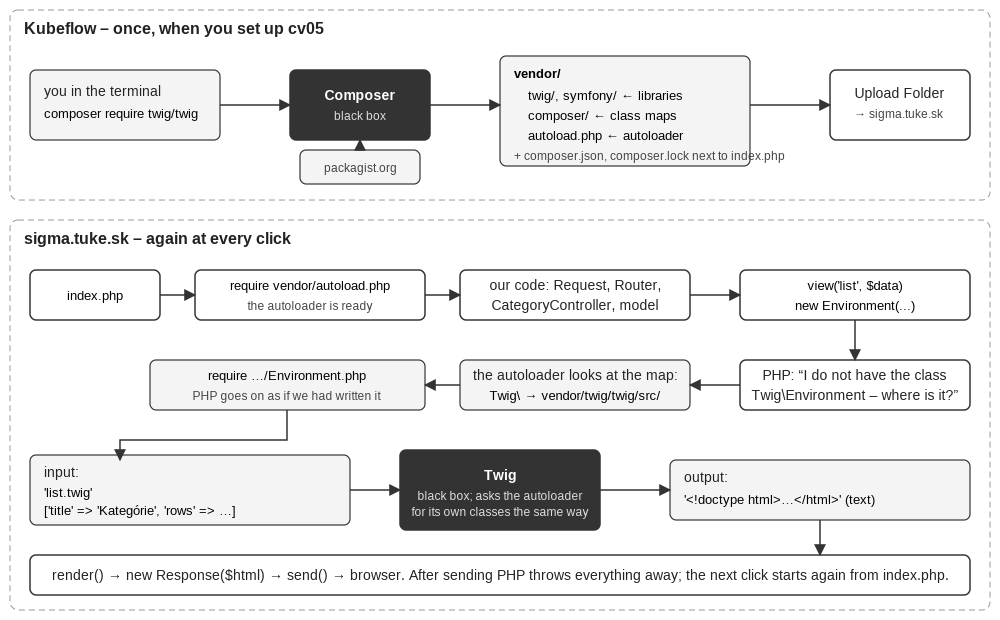
Every click, on sigma.tuke.sk:
- Apache runs
index.php. index.phprunsrequire vendor/autoload.php. From this moment until the response is sent PHP calls ClassLoader at an unknown class.- Our code runs as before:
Request::fromGlobals(),new Router(),new CategoryController(),new CategoryModel(). At each of them PHP does not have the class yet, ClassLoader does arequireof the file according to the mapApp\→src/and PHP goes on. Files this click does not need (RecipeModel.php) are not loaded at all. - The controller calls
render('list', ...), which callsview('list', ...). Inview()there isnew Environment(...)– the first foreign class. ClassLoader doesrequire vendor/twig/twig/src/Environment.phpaccording to the mapTwig\→vendor/twig/twig/src/. Now, for the first time, code we did not write runs. view()calls$twig->render('list.twig', $data). Inside, Twig uses dozens of its own classes and ClassLoader loads them just as in step 4. What those classes do you do not need to know in order to use Twig, just as you do not need to read the code of PDO: the input is the template name and the array of values, the output is the HTML text. This is how one works with every library.- Then as before:
view()returns the text,render()puts it into aResponse,send()prints it. After the response is sent PHP throws everything away – the loaded classes, Twig and the autoloader. The next click starts again with step 1.
vendor/ must be on sigma.tuke.sk, because PHP reads the files there – hence Upload Folder. It does not go to GitHub, because anyone makes it with Composer in a few seconds from composer.json and composer.lock. When another library is added, Composer downloads it too and rewrites the autoloader so that the map knows its classes as well. Our code touches vendor/ with a single line – that require in index.php.
Verify it in the terminal in Kubeflow, in the project folder:
php -r 'require "vendor/autoload.php"; echo (new ReflectionClass("Twig\\Environment"))->getFileName(), PHP_EOL;'
The command loads the autoloader and asks PHP (ReflectionClass, from PHP) from which file it has the class Twig\Environment. The result:
/home/jan.novak/web/it/cv05/vendor/twig/twig/src/Environment.php
The same with "App\\Model\\CategoryModel" prints …/cv05/src/Model/CategoryModel.php.
Composer in Kubeflow step by step
Ján Novák has cv05 copied from cv04 and twig.zip unpacked (task 6.1). Then:
- Open the terminal: in the top menu Terminal → New Terminal (or the keys
Ctrl+`). A panel opens at the bottom with a line ending in$. - Type and confirm with Enter:
cd ~/web/it/cv05
composer require twig/twig
- Wait 10–30 seconds. The correct output ends like this (the version numbers may be higher):
./composer.json has been updated
Running composer update twig/twig
Loading composer repositories with package information
Updating dependencies
Lock file operations: 4 installs, 0 updates, 0 removals
  - Locking symfony/deprecation-contracts (v3.7.1)
  - Locking symfony/polyfill-ctype (v1.37.0)
  - Locking symfony/polyfill-mbstring (v1.43.0)
  - Locking twig/twig (v3.30.0)
Writing lock file
Installing dependencies from lock file (including require-dev)
Package operations: 4 installs, 0 updates, 0 removals
  - Downloading symfony/polyfill-mbstring (v1.43.0)
  - Downloading twig/twig (v3.30.0)
  - Installing symfony/polyfill-mbstring (v1.43.0): Extracting archive
  - Installing symfony/polyfill-ctype (v1.37.0): Extracting archive
  - Installing symfony/deprecation-contracts (v3.7.1): Extracting archive
  - Installing twig/twig (v3.30.0): Extracting archive
Generating autoload files
4 packages you are using are looking for funding.
Use the `composer fund` command to find out more!
No security vulnerability advisories found.
Using version ^3.30 for twig/twig
- Check in the terminal:
ls vendor                      # autoload.php  composer  symfony  twig
du -sh vendor                  # about 11M – the quota on sigma.tuke.sk is 50 MB
php -r 'require "vendor/autoload.php"; echo Twig\Environment::VERSION, PHP_EOL;'   # prints 3.30.0
The third command is the most important one: it runs a piece of PHP straight in the terminal, loads the autoloader and prints a constant from a Twig class. If it prints the version, the autoloader finds Twig and the application will work.
- In the Explorer on the left right-click the folder
cv05→ Upload Folder. Wait until the upload message at the bottom right disappears (vendor/has several hundred files, it takes about a minute). - Check in the browser:
https://sigma.tuke.sk/student/jan.novak/it/cv05/shows the home page; Twig already built it fromhome.twig. If an error shows instead, see “Most common errors” below.
composer.json and composer.lock go to GitHub; vendor/ does not (it is in .gitignore). Whoever clones the repository runs composer install and gets the same vendor/ according to composer.lock.
Where what runs and when
- Kubeflow, once:
composer require twig/twigdownloads Twig intovendor/; Upload Folder transfers it to sigma.tuke.sk. After that Composer is not run again; changes in.twigand.phpfiles go to sigma.tuke.sk by saving in the editor. - sigma.tuke.sk, at every request: Apache runs
index.php, the autoloader makesApp\…andTwig\…available, aRequestis created, the Router finds the route, the controller calls the model,view()creates aTwig\Environment, Twig loads the template fromviews/, compiles it to PHP in memory, runs it,send()sends the HTML. At aPOSTfrom a form the same, only the controller writes into the database andsend()sends302; the browser at once sends anotherGETrequest and everything runs again fromindex.php. After every response PHP throws everything away, the compiled templates too (cacheisfalse).
Most common errors and what they mean
| What you see | Cause | Fix |
|---|---|---|
Class "Twig\Environment" not found |
vendor/ on sigma.tuke.sk has no Twig: composer require did not run, or Upload Folder did not finish |
in Kubeflow ls vendor must show twig; right-click vendor → Upload Folder |
Unable to find template "about.twig" |
the controller calls render('about', …), but views/about.twig does not exist (it is still about.php) |
create about.twig |
Variable "tables" does not exist in "kontrola.twig" |
HomeController::kontrola() is still from cv04 and the array for render() has no tables and models |
rewrite kontrola() following the model |
Variable "titel" does not exist |
a typo in a variable name in the template (strict_variables) |
fix the name; compare with the keys in the array for render() |
Unexpected "endfor" / Unexpected end of template |
an {% endif %}, {% endfor %}, {% endblock %} is missing or extra |
one end… for every if/for/block |
Unknown "url" function |
view() is still from the old helpers.php without addFunction |
src/helpers.php from twig.zip |
| 404 page after clicking Uložiť | $router->post('/…', …) is missing in index.php, or the form’s action points elsewhere |
the post() route; action="{{ url('/your-entity') }}" |
Call to undefined method App\Router::post() |
src/Router.php is still from cv04 |
Router.php from twig.zip |
Call to undefined method App\Http\Request::post() |
src/Http/Request.php is still from cv04 |
Request.php from twig.zip |
Too few arguments to function Request::__construct(), 4 passed |
new Request.php, but somewhere in the code there is new Request(...) with four parameters |
only Request::fromGlobals() is used |
| after Uložiť the form shows with the message although the title is filled in | the field’s name is not title (or another key that store() reads) |
name in HTML = key in post() |
SQLSTATE[23000]: … a foreign key constraint fails |
difficulty_id from the form does not point to a lookup table record (<option value> is not the id) |
value="{{ d.id }}" |
SQLSTATE[42S22]: Column not found |
a column name in INSERT is not in your table |
columns according to your schema.sql |
after F5 on the detail the record was added a second time |
store() returns render('show', …) instead of redirect() |
return Response::redirect('/your-entity/' . $id) |
Warning: Cannot modify header information - headers already sent |
text printed before send(): echo in a controller or a space before <?php |
the controller returns a Response; remove characters before <?php |
<b> in the table instead of bold text |
Twig escaped {{ v }}; that is correct – HTML from the user must not run |
nothing; this is how it should be |
Úlohy na cvičenieLab tasks
Úlohy dostaneš aj ako zadanie cv05 v Classroom 50, sú v súbore README.md v tvojom repository. Repository má na začiatku len README.md.
Link na zadanie cv05: prijať zadanie (platí pre skupiny B. Stehlíkovej; ostatné skupiny dostanú link od svojho cvičiaceho)
Úloha 6.1: Repository cv05 z cv04, twig.zip a Composer. Prijmi zadanie cv05 (link je vyššie) a repository naklonuj do ~/web/it/cv05 podľa návodu 04 Odovzdávanie, časti 2 a 3 (posledné slovo príkazu je cv05). Potom v termináli v Kubeflow:
cd ~/web/it
cp cv04/config.php cv04/config.example.php cv04/.gitignore cv04/.htaccess cv04/composer.json cv04/index.php cv05/
cp -r cv04/sql cv04/src cv04/views cv05/
cd cv05
curl -O https://beata.stehlikova.website.tuke.sk/it/twig.zip
unzip -o twig.zip && rm twig.zip
composer require twig/twig
Čo sa stalo: z cv04 sú v cv05 všetky súbory okrem .git/, vendor/ a README.md. unzip -o prepísal src/helpers.php, src/Router.php, src/Http/Request.php, src/Http/Response.php a pridal do views/ sedem súborov .twig (staré .php tam zatiaľ ostali). composer require stiahol Twig a vyrobil vendor/ a composer.lock; výpis a kontrola sú v časti „Composer v Kubeflow krok za krokom“, kroky 3 a 4.
Pravý klik na priečinok cv05 → Upload Folder. Kontrola v prehliadači: https://sigma.tuke.sk/student/meno.priezvisko/it/cv05/ ukáže úvodnú stránku (zatiaľ len jednu vetu; menu má Úvod, Kontrola, Debug, O aplikácii), …/cv05/nic ukáže stránku „Nenájdené“. Kontrola a Debug zatiaľ hlásia chybu – opravíš to v úlohe 6.2. Commit a push: cv05: Twig.
Úloha 6.2: Všetky stránky cez template.
- Vo
views/layout.twigpridaj do menu odkaz na každý svoj číselník a na hlavnú entitu:<a href="{{ url('/categories') }}">Kategórie</a>. Kontrola: každý číselník sa zobrazí ako tabuľka; jeho controller si nemenil. - V
src/Controller/HomeController.phpprepíškontrola()adebug()podľaHomeControllerv časti „Kontrola a debug“; vkontrola()daj do poľa svoje modely a pridaj k riadkomusesvoje modely,App\DatabaseaPDO. Kontrola:…/cv05/kontrolaukáže tabuľky a modely,…/cv05/debug?q=abcukáže sedem riadkov. - Obsah svojho
views/home.phpprepíš doviews/home.twigaviews/about.phpdo novéhoviews/about.twig: PHP značky preč,<?= url('/x') ?>→{{ url('/x') }},<?= e($x) ?>→{{ x }}; na začiatok{% extends "layout.twig" %}a obsah do{% block content %} … {% endblock %}. Kontrola: úvod aj/o-aplikaciifungujú. - Zmaž všetky
.phpsúbory voviews/(v Explorer pravý klik → Delete). Kontrola: preklikaj celé menu; nič sa nezmenilo.
Úloha 6.3: insert() v modeli hlavnej entity. Do svojho modelu hlavnej entity pridaj metódu insert(array $data): int podľa pojmu „insert() a lastInsertId()“: v INSERT sú stĺpce tvojej tabuľky, ktoré vypĺňa človek (bez id a bez stĺpcov s DEFAULT), každý ako parameter :nazov. Kontrola zatiaľ nie je možná – metódu zavolá controller v úlohe 6.4.
Úloha 6.4: create() a store() v controlleri hlavnej entity. Do controllera hlavnej entity pridaj metódy create() a store() podľa RecipeController v časti „Ako to funguje“: v store() čítaj cez post() polia svojej tabuľky, čísla preveď (int), kontroluj prázdny názov; pre <select> použi model svojho číselníka pripojeného cez 1:N. Do index() pridaj kľúč 'create' => '/tvoja-entita/new'. V index.php pridaj dve route: $router->get('/tvoja-entita/new', [TvojController::class, 'create']); a $router->post('/tvoja-entita', [TvojController::class, 'store']);. Kontrola: nad zoznamom hlavnej entity je odkaz Pridať záznam; …/cv05/tvoja-entita/new zatiaľ hlási Unable to find template "form.twig" – to je správne, formulár je úloha 6.5.
Úloha 6.5: form.twig. Vytvor views/form.twig podľa pojmu „Formulár“: action na adresu svojej POST route, jedno pole pre každý stĺpec z insert() s name rovnakým ako stĺpec, <select> pre cudzí kľúč so záznamami číselníka, required pri názve. Kontrola: klik na Pridať záznam ukáže formulár; po vyplnení a kliknutí na Uložiť sa zobrazí detail nového záznamu a v adrese je jeho id; v karte Network (F12 → Network) sú pod sebou požiadavka s metódou POST a stavom 302 a požiadavka GET so stavom 200; F5 na detaile nepridá ďalší záznam; nový záznam je v zozname a v Adminer v tabuľke. Potom v Chrome pravý klik na pole názvu → Inspect, v značke <input> dvojklik na required a zmaž ho, odošli prázdny formulár: zobrazí sa formulár s hláškou a ostatné polia majú tvoje hodnoty.
Úloha 6.6: Vlastná stránka. Vymysli jednu stránku, ktorú tvoja aplikácia zatiaľ nemá, a urob ju štyrmi krokmi z časti „Nová stránka v aplikácii: postup“. Námety: tri najnovšie záznamy; záznamy hlavnej entity s jednou hodnotou číselníka (napríklad len ľahké recepty – nová metóda modelu s WHERE); náhodný záznam; prehľad, koľko záznamov má každá hodnota číselníka. Podmienky: nová metóda controllera, nová route, nová template s {% for %}, {% if %} a aspoň jedným filtrom, odkaz v menu. Názov stránky a čo ukazuje napíš do README.md. Kontrola: stránka funguje z menu aj z adresy; pri obhajobe ju vysvetlíš.
Úloha 6.7: Odovzdanie. Commit a push podľa návodu 04 Odovzdávanie, časť 5. Na GitHub skontroluj, že je tam composer.json s twig/twig, composer.lock, views/ len so súbormi .twig (aj form.twig), tvoj controller hlavnej entity s create() a store(), tvoj model s insert(), tvoja vlastná stránka. config.php a vendor/ tam nie sú.
Úloha 6.8: Kontrola na sigma.tuke.sk. Pravý klik na cv05 → Upload Folder. Preklikaj menu: úvod, každý číselník, hlavná entita, detail, vyhľadávanie, pridanie záznamu, vlastná stránka, kontrola, debug, o aplikácii. Over, že …/cv05/nic ukáže stránku „Nenájdené“, …/cv05/vendor/autoload.php vráti 404 a …/cv05/config.php vráti 403. Do README.md doplň tabuľku všetkých route: HTTP metóda a relatívna adresa, controller a metóda, čo zobrazí alebo urobí; pri vlastnej stránke napíš, čo ukazuje.
Hodnotenie: 1 bod. Aplikácia vo webovom priestore na sigma.tuke.sk má všetky stránky z Twig templates, zoznam hlavnej entity má odkaz na formulár, formulár uloží nový záznam a presmeruje na jeho detail, aplikácia má jednu vlastnú stránku navyše. Commit a push najneskôr do nasledujúceho cvičenia.
You also get the tasks as the assignment cv05 in Classroom 50, in the file README.md in your repository. The repository has only README.md at the start.
Link to the assignment cv05: accept the assignment (valid for B. Stehlíková’s groups; other groups get the link from their lab teacher)
Task 6.1: Repository cv05 from cv04, twig.zip and Composer. Accept the assignment cv05 (the link is above) and clone the repository into ~/web/it/cv05 following the guide 04 Submitting, parts 2 and 3 (the last word of the command is cv05). Then in the terminal in Kubeflow:
cd ~/web/it
cp cv04/config.php cv04/config.example.php cv04/.gitignore cv04/.htaccess cv04/composer.json cv04/index.php cv05/
cp -r cv04/sql cv04/src cv04/views cv05/
cd cv05
curl -O https://beata.stehlikova.website.tuke.sk/it/twig.zip
unzip -o twig.zip && rm twig.zip
composer require twig/twig
What happened: all files from cv04 are in cv05 except .git/, vendor/ and README.md. unzip -o replaced src/helpers.php, src/Router.php, src/Http/Request.php, src/Http/Response.php and added seven .twig files to views/ (the old .php files stayed there for now). composer require downloaded Twig and made vendor/ and composer.lock; the output and the check are in the part “Composer in Kubeflow step by step”, steps 3 and 4.
Right-click the folder cv05 → Upload Folder. Check in the browser: https://sigma.tuke.sk/student/meno.priezvisko/it/cv05/ shows the home page (only one sentence for now; the menu has Úvod, Kontrola, Debug, O aplikácii), …/cv05/nic shows the “Not found” page. Kontrola and Debug report an error for now – you fix that in task 6.2. Commit and push: cv05: Twig.
Task 6.2: All pages through templates.
- In
views/layout.twigadd a menu link to each of your lookup tables and to the main entity:<a href="{{ url('/categories') }}">Kategórie</a>. Check: every lookup table shows as a table; you did not change its controller. - In
src/Controller/HomeController.phprewritekontrola()anddebug()followingHomeControllerin the part “Check and debug”; inkontrola()put your models into the array and add your models,App\DatabaseandPDOto theuselines. Check:…/cv05/kontrolashows the tables and models,…/cv05/debug?q=abcshows seven rows. - Rewrite the content of your
views/home.phpintoviews/home.twigandviews/about.phpinto a newviews/about.twig: PHP tags out,<?= url('/x') ?>→{{ url('/x') }},<?= e($x) ?>→{{ x }};{% extends "layout.twig" %}at the beginning and the content into{% block content %} … {% endblock %}. Check: the home page and/o-aplikaciiwork. - Delete all
.phpfiles inviews/(in the Explorer right-click → Delete). Check: click through the whole menu; nothing changed.
Task 6.3: insert() in the main entity model. Add the method insert(array $data): int to your main entity model following the term “insert() and lastInsertId()”: in the INSERT are the columns of your table that a person fills in (without id and without columns with DEFAULT), each as a parameter :name. A check is not possible yet – the controller calls the method in task 6.4.
Task 6.4: create() and store() in the main entity controller. Add the methods create() and store() to the main entity controller following RecipeController in the part “How it works”: in store() read the fields of your table through post(), convert numbers with (int), check the empty title; for the <select> use the model of your lookup table connected through 1:N. Add the key 'create' => '/your-entity/new' to index(). In index.php add two routes: $router->get('/your-entity/new', [YourController::class, 'create']); and $router->post('/your-entity', [YourController::class, 'store']);. Check: above the main entity list there is the link Pridať záznam; …/cv05/your-entity/new reports Unable to find template "form.twig" for now – that is correct, the form is task 6.5.
Task 6.5: form.twig. Create views/form.twig following the term “Form”: action to the address of your POST route, one field for every column from insert() with name the same as the column, a <select> for the foreign key with the lookup table records, required on the title. Check: a click on Pridať záznam shows the form; after filling it in and clicking Uložiť the detail of the new record shows and its id is in the address; in the Network tab (F12 → Network) there are, one under the other, a request with the method POST and the status 302 and a GET request with the status 200; F5 on the detail does not add another record; the new record is in the list and in Adminer in the table. Then in Chrome right-click the title field → Inspect, double-click required in the <input> tag and delete it, submit the empty form: the form shows with the message and the other fields have your values.
Task 6.6: Your own page. Think up one page your application does not have yet and make it with the four steps from the part “A new page in the application: the procedure”. Ideas: the three newest records; records of the main entity with one lookup table value (for example only easy recipes – a new model method with WHERE); a random record; an overview of how many records each lookup table value has. Conditions: a new controller method, a new route, a new template with {% for %}, {% if %} and at least one filter, a link in the menu. Write the name of the page and what it shows into README.md. Check: the page works from the menu and from the address; you will explain it at the defence.
Task 6.7: Submission. Commit and push following the guide 04 Submitting, part 5. On GitHub check that there is composer.json with twig/twig, composer.lock, views/ with .twig files only (form.twig too), your main entity controller with create() and store(), your model with insert(), your own page. config.php and vendor/ are not there.
Task 6.8: Check on sigma.tuke.sk. Right-click cv05 → Upload Folder. Click through the menu: home, every lookup table, main entity, detail, search, adding a record, your own page, check, debug, about. Verify that …/cv05/nic shows the “Not found” page, …/cv05/vendor/autoload.php returns 404 and …/cv05/config.php returns 403. Add a table of all routes to README.md: HTTP method and relative address, controller and method, what it shows or does; for your own page write what it shows.
Grading: 1 point. The application in your web space on sigma.tuke.sk has all pages from Twig templates, the main entity list has a link to the form, the form saves a new record and redirects to its detail, the application has one page of its own in addition. Commit and push by the next lab at the latest.
Obhajoba a live codingDefence and live coding
Pri obhajobe budú použité iba zverejnené otázky a úlohy. Druhý míľnik (7. týždeň) pokrýva týždne 5–7: dostaneš jednu položku z „Vysvetli“, jednu z „Uprav“ a jednu zo „Zdôvodni“ z tohto týždňa alebo zo susedných dvoch, spolu cca 5 minút. Postup s priečinkom obhajoba2 je na stránke 5. týždňa.
Vysvetli (code walkthrough)
Nad svojím projektom vieš povedať:
- Čo je Twig, kde v projekte leží jeho kód a ako sa tam dostal.
- Čo urobil
composer require twig/twig; ukáž, čo pribudlo vcomposer.json, čo jecomposer.locka prečo ide na GitHub, keďvendor/nejde. - Ako autoloader nájde
Twig\Environment; ukáž riadok vovendor/composer/autoload_psr4.php. - Čo je template a čo z projektu vidí a čo nevidí; prečo
kontrola.twignerobí dotaz do databázy. - Štyri druhy značiek Twigu; ukáž každý vo svojej
list.twig. - Čo robí
{% extends %}a{% block %}; ukáž, kde vlayout.twigsa objaví obsah tvojej stránky. - Čo robí
view()riadok po riadku: loader,Environment,addFunction,render. - Čo znamená
cache => falseastrict_variables => true; čo by sa stalo bez každého z nich. - Prečo v template nie je
e()a čo sa stane, keď používateľ napíše do názvu<b>. - Čo je filter; čo robia
length,keys,nl2br,defaultv tvojich template. - Čo robí bodka v
m.name,request.methodarequest.query('q'). - Čím sa líši požiadavka
POSTodGET; kde sú dáta; ukáž obe v karte Network. - Čo je
$_POST, kto ho naplní, kde ho aplikácia číta a prečo len tam. - Čo robí
Request::post(); prečo vráti text aj pre číslo a kto ho prevedie na číslo. - Čo robí
Router::post(); prečo môžu maťGET /tvoja-entitaaPOST /tvoja-entitarôzne metódy controllera. - Prečo route
/tvoja-entita/{id}nesedí na/tvoja-entita/new. - Čo urobí prehliadač po kliknutí na Uložiť: ktoré polia pošle, kam, akou metódou.
- Čo robí
store()krok za krokom; čo sa stane pri prázdnom názve. - Čo robí
insert(); prečo sú hodnoty vexecute()a nie v SQL; čo vrátilastInsertId(). - Čo je odpoveď
302, čo s ňou urobí prehliadač, a prečostore()nevracia rovno stránku detailu. - Čo je vo
vendor/, kto ho vyrobil, čo urobí riadokrequire vendor/autoload.phpa čo sa stane, keď kód napíšenew Twig\Environment; ukáž mapu vautoload_psr4.php. - Ukáž štyri kroky svojej vlastnej stránky: metódu, route, template, odkaz; povedz, čo stránka ukazuje a odkiaľ má dáta.
Uprav (live coding)
Zmeny v kóde vidno v prehliadači po uložení. Záznamy, ktoré pri tom pridáš, môžeš potom zmazať v Adminer.
- Pridaj naživo novú stránku
/pocets počtom záznamov hlavnej entity (getCount()): metóda, route, template, odkaz v menu. - Pridaj do
list.twignad tabuľku výpisZobrazené: {{ rows|length }} z {{ total }}atotalpošli z controllera (getCount()). - Zmeň
show.twigtak, aby stĺpeccreated_atvypísal cez filterdate('d.m.Y'). - Pridaj do
store()druhú kontrolu: počet porcií (alebo iné číslo tvojej entity) musí byť aspoň 1; hláška doerror. - Pridaj do formulára pole, ktoré v tabuľke nie je, a ukáž na stránke
/debug(alebo cezvar_dumpvstore()), že$_POSTho má ainsert()ho ignoruje; potom pole zmaž. - Zmeň
redirect()vstore()tak, aby po uložení išiel na zoznam namiesto detailu; ukáž v karte Network hlavičkuLocation. - Pridaj metódu
Response::redirect()s druhým parametromint $status = 302a použi303; ukáž rozdiel v karte Network. - Pridaj do
create()aform.twigzaškrtávacie políčka pre kategórie (<input type="checkbox" name="categories[]" value="{{ c.id }}">) a vstore()vypíš cezvar_dump($_POST['categories']), čo prišlo; zápis do prepojky nie je potrebný. - Vysvetli bez spúšťania, čo vráti
dispatch()preGET /tvoja-entita/new,POST /tvoja-entita/new,POST /tvoja-entita/5,GET /tvoja-entita?title=x; potom over v prehliadači alebo cez formulár. - Zapni
cachevoview()na priečinokcache/('cache' => __DIR__ . '/../cache'), načítaj stránku a ukáž, čo v priečinku pribudlo; otvor jeden súbor a nájdi v ňom svoje HTML; potom cache vypni.
Zdôvodni (design decisions)
- Prečo HTML stránok píšeme v template Twig a nie v PHP súboroch, keď výsledok je rovnaký.
- Prečo template nemá prístup k databáze ani k
$_SERVERa dáta jej pripravuje controller. - Prečo Twig ošetruje každý výpis sám a nenecháva to na programátora.
- Prečo ide nový záznam v tele požiadavky
POSTa nie v adrese ako priGET. - Prečo po uložení nasleduje presmerovanie a nie rovno stránka detailu.
- Prečo
composer.lockide na GitHub avendor/nie.
Definition of Done
Týždeň je hotový, keď:
- vo
views/sú len súbory.twig, každý s{% extends "layout.twig" %}, a všetky stránky z menu fungujú, composer.jsonmátwig/twig,composer.lockexistuje,…/cv05/vendor/autoload.phpvráti 404,…/cv05/kontrolaa…/cv05/debugfungujú a ich template nerobia nič s databázou ani s$_SERVER,- zoznam hlavnej entity má odkaz Pridať záznam; formulár má
<select>z číselníka, - po Uložiť je v karte Network
POSTso stavom302aGETso stavom200, v adrese jeidnového záznamu,F5nepridá ďalší, - prázdny názov vráti formulár s hláškou a s vyplnenými ostatnými poľami,
- aplikácia má jednu vlastnú stránku navyše (metóda, route, template, odkaz v menu), popísanú v
README.md, README.mdmá tabuľku route s HTTP metódou, controllerom a metódou,- commit a push sú na GitHub,
vendor/aniconfig.phpv repository nie sú.
Only the published questions and tasks are used in the defence. The second milestone (week 7) covers weeks 5–7: you get one item from “Explain”, one from “Change” and one from “Justify” from this week or from the two neighbouring ones, about 5 minutes in all. The procedure with the folder obhajoba2 is on the week 5 page.
Explain (code walkthrough)
Over your own project you can say:
- What Twig is, where in the project its code lies and how it got there.
- What
composer require twig/twigdid; show what was added tocomposer.json, whatcomposer.lockis and why it goes to GitHub whenvendor/does not. - How the autoloader finds
Twig\Environment; show the line invendor/composer/autoload_psr4.php. - What a template is and what of the project it sees and does not see; why
kontrola.twigdoes not run a database query. - The four kinds of Twig tags; show each in your
list.twig. - What
{% extends %}and{% block %}do; show where inlayout.twigthe content of your page appears. - What
view()does line by line: loader,Environment,addFunction,render. - What
cache => falseandstrict_variables => truemean; what would happen without each of them. - Why there is no
e()in a template and what happens when the user types<b>into the title. - What a filter is; what
length,keys,nl2br,defaultdo in your templates. - What the dot does in
m.name,request.methodandrequest.query('q'). - How a
POSTrequest differs fromGET; where the data is; show both in the Network tab. - What
$_POSTis, who fills it, where the application reads it and why only there. - What
Request::post()does; why it returns text even for a number and who converts it to a number. - What
Router::post()does; whyGET /your-entityandPOST /your-entitycan have different controller methods. - Why the route
/your-entity/{id}does not match/your-entity/new. - What the browser does after a click on Uložiť: which fields it sends, where, with which method.
- What
store()does step by step; what happens with an empty title. - What
insert()does; why the values are inexecute()and not in the SQL; whatlastInsertId()returns. - What a
302response is, what the browser does with it, and whystore()does not return the detail page directly. - What is in
vendor/, who made it, what the linerequire vendor/autoload.phpdoes and what happens when the code writesnew Twig\Environment; show the map inautoload_psr4.php. - Show the four steps of your own page: the method, the route, the template, the link; say what the page shows and where it gets the data.
Change (live coding)
Changes in the code show in the browser after saving. You can delete the records you add in Adminer afterwards.
- Add live a new page
/pocetwith the number of records of the main entity (getCount()): method, route, template, link in the menu. - Add the line
Zobrazené: {{ rows|length }} z {{ total }}above the table inlist.twigand passtotalfrom the controller (getCount()). - Change
show.twigso that the columncreated_atis printed through the filterdate('d.m.Y'). - Add a second check to
store(): the number of servings (or another number of your entity) must be at least 1; the message goes intoerror. - Add a field to the form that is not in the table and show on the page
/debug(or throughvar_dumpinstore()) that$_POSThas it andinsert()ignores it; then delete the field. - Change
redirect()instore()so that after saving it goes to the list instead of the detail; show theLocationheader in the Network tab. - Add a second parameter
int $status = 302toResponse::redirect()and use303; show the difference in the Network tab. - Add checkboxes for categories to
create()andform.twig(<input type="checkbox" name="categories[]" value="{{ c.id }}">) and instore()print throughvar_dump($_POST['categories'])what arrived; writing into the junction table is not needed. - Explain without running what
dispatch()returns forGET /your-entity/new,POST /your-entity/new,POST /your-entity/5,GET /your-entity?title=x; then verify in the browser or through the form. - Turn
cacheon inview()to the foldercache/('cache' => __DIR__ . '/../cache'), load a page and show what appeared in the folder; open one file and find your HTML in it; then turn the cache off.
Justify (design decisions)
- Why we write the HTML of the pages in Twig templates and not in PHP files, when the result is the same.
- Why a template has no access to the database or to
$_SERVERand the controller prepares the data for it. - Why Twig escapes every output itself and does not leave it to the programmer.
- Why a new record goes in the body of a
POSTrequest and not in the address as withGET. - Why a redirect follows the saving and not the detail page directly.
- Why
composer.lockgoes to GitHub andvendor/does not.
Definition of Done
The week is done when:
- in
views/there are only.twigfiles, each with{% extends "layout.twig" %}, and all pages from the menu work, composer.jsonhastwig/twig,composer.lockexists,…/cv05/vendor/autoload.phpreturns 404,…/cv05/kontrolaand…/cv05/debugwork and their templates do nothing with the database or$_SERVER,- the main entity list has the link Pridať záznam; the form has a
<select>from a lookup table, - after Uložiť the Network tab shows
POSTwith the status302andGETwith the status200, theidof the new record is in the address,F5does not add another one, - an empty title returns the form with the message and with the other fields filled in,
- the application has one page of its own in addition (method, route, template, menu link), described in
README.md, README.mdhas a table of routes with the HTTP method, controller and method,- the commit and push are on GitHub, neither
vendor/norconfig.phpis in the repository.