Slovník pojmov pre túto stránkuGlossary for this page Čo máme v aplikáciiWhat we have in the application PojmyTerms Ako to fungujeHow it works Útoky v praxiAttacks in practice Fyzická podobaPhysical form Úlohy na cvičenieLab tasks Obhajoba a live codingDefence and live coding
Minulý týždeň aplikácia zistila, kto je prihlásený (autentifikácia): v session je id, ktoré má prihlásený user. Tento týždeň pribudne na čo má oprávnenie (autorizácia): kód v controlleri porovná, či je prihlásený user autor record, a podľa toho úpravu alebo zmazanie povolí, alebo vráti stránku 403. A pribudnú bezpečnostné opatrenia proti útokom, ktoré sú možné odvtedy, čo aplikácia rozlišuje, ktorý user je prihlásený: útočník sa pokúsi upraviť alebo zmazať cudzí record, alebo odošle request tak, aby ho server vyhodnotil ako request, ktorý poslal prihlásený user. Vzorová aplikácia beží na https://sigma.tuke.sk/beata.stehlikova/it/ukazky/cv07/. Pojmy sú v tabuľke pojmov.
Last week the application found out who is logged in (authentication): the session holds the id of the logged-in user. This week what they may do arrives (authorization): code in the controller compares the logged-in user with the author of a record and, based on that, allows the change or returns a 403 page. And security measures arrive against attacks that are possible from the moment the application distinguishes users: an attacker tries to edit or delete someone else’s record, or sends a request so that the server treats it as a request from the logged-in user. The sample application runs at https://sigma.tuke.sk/beata.stehlikova/it/ukazky/cv07/. The terms are in the table of terms.
Slovník pojmov pre túto stránkuGlossary for this page
Doteraz sme písali „záznam“, „používateľ“, „požiadavka“. Od tohto týždňa používame anglické termíny tak, ako ich používa dokumentácia; staršie stránky zjednotíme neskôr. V zátvorke je príklad zo vzorovej aplikácie.
- main entity – hlavná tabuľka aplikácie (
recipes). lookup table – číselník (difficulties). pivot table – tabuľka väzby M:N (recipe_categories). - record – jeden riadok tabuľky (jeden recept). user – účet v tabuľke
users. admin – user s hodnotourole = 'admin'. - request, response – HTTP požiadavka a odpoveď. redirect – odpoveď 302 s hlavičkou
Location. route – adresa priradená metóde controllera. - foreign key (FK) – stĺpec, ktorý ukazuje na
idv inej tabuľke. token – náhodný text na overenie. origin – schéma + server + port webu.
Metódy controllera pre main entity:
| Metóda | HTTP a route | Akcia |
|---|---|---|
create() |
GET /recipes/new |
prázdny formulár |
store() |
POST /recipes |
uloží nový record |
edit() |
GET /recipes/{id}/edit |
formulár s hodnotami z databázy |
update() |
POST /recipes/{id} |
uloží zmeny |
delete() |
POST /recipes/{id}/delete |
zmaže record |
V príkladoch vystupujú: Ján (admin, autor receptu č. 5) a Peter (user).
Until now we wrote “record”, “user”, “request” in Slovak. From this week we use the English terms as the documentation uses them; older pages will be unified later. In brackets is an example from the sample application.
- main entity – the application’s main table (
recipes). lookup table – a code list (difficulties). pivot table – an M:N link table (recipe_categories). - record – one table row (one recipe). user – an account in the
userstable. admin – a user withrole = 'admin'. - request, response – the HTTP request and response. redirect – a 302 response with a
Locationheader. route – an address assigned to a controller method. - foreign key (FK) – a column pointing to
idin another table. token – a random text for verification. origin – scheme + server + port of a web site.
Controller methods for the main entity:
| Method | HTTP and route | Action |
|---|---|---|
create() |
GET /recipes/new |
empty form |
store() |
POST /recipes |
saves a new record |
edit() |
GET /recipes/{id}/edit |
form with values from the database |
update() |
POST /recipes/{id} |
saves the changes |
delete() |
POST /recipes/{id}/delete |
deletes the record |
In the examples: Ján (admin, author of recipe no. 5) and Peter (user).
Čo máme v aplikáciiWhat we have in the application
Z minulého týždňa: aplikácia má tabuľku users, registráciu, prihlásenie a odhlásenie. Po prihlásení je v session user_id a v menu meno, ktoré má prihlásený user. Formulár na nový recept (create(), store()) je len pre prihláseného: na jeho začiatku je kontrola Auth::check(), inak redirect na /login.
Čo chýba a dnes pribudne:
- Autor record. Recept zatiaľ nevie, kto ho vytvoril. Pribudne stĺpec
recipes.user_id. - Oprávnenie. Oprávnenie upraviť alebo zmazať recept má teraz ktokoľvek prihlásený, aj cudzí. Pribudne kontrola „autor alebo admin“.
- Úprava a mazanie. Aplikácia zatiaľ recept len pridáva a zobrazuje. Pribudnú
edit(),update(),delete(). - Obrana proti útokom. Pribudnú CSRF token, nové id session pri prihlásení, validácia, pravidlo pre heslo a vlastnosti cookie session.
From last week: the application has a users table, registration, login and logout. After login the session holds user_id and the menu shows the logged-in user’s name. The form for a new recipe (create(), store()) is for logged-in users only: it begins with an Auth::check() check, otherwise a redirect to /login.
What is missing and arrives today:
- Author of the record. A recipe does not know who created it yet. The column
recipes.user_idarrives. - Permission. Anyone logged in may edit or delete a recipe, even someone else’s. An “author or admin” check arrives.
- Editing and deleting. The application only adds and shows a recipe so far.
edit(),update(),delete()arrive. - Defence against attacks. A CSRF token, a new session id at login, validation, a password rule and session cookie properties arrive.
PojmyTerms
Autor record a rola user
Čo Ján Novák chce: aby recept vedel, kto ho vytvoril, a aby existoval admin, ktorý má oprávnenie upraviť čokoľvek. Pribudnú dva stĺpce. Štruktúra tabuliek (len stĺpce tohto týždňa):
users                                       recipes (main entity)
--------------------------------            --------------------------------
id             INT UNSIGNED  PK  ◄───────┐  id         INT UNSIGNED  PK
username       VARCHAR(50)   UNIQUE       └─ user_id    INT UNSIGNED  FK → users.id   (nový)
password_hash  VARCHAR(255)                 difficulty_id INT UNSIGNED FK
role           VARCHAR(10)   'user'|'admin' (nový)       …ostatné stĺpce bez zmeny
Príkazy v Adminer (SQL command, po jednom):
-- 1. rola user: nový user má automaticky 'user'
ALTER TABLE users ADD role VARCHAR(10) NOT NULL DEFAULT 'user';

-- 2. autor receptu; zatiaľ NULL, lebo doteraz uložené recepty autora nemajú
ALTER TABLE recipes ADD user_id INT UNSIGNED NULL;

-- 3. doteraz uloženým receptom nastav autora na id admina (admin má id 1)
UPDATE recipes SET user_id = 1;

-- 4. každý recept má teraz autora → NOT NULL a foreign key na users
ALTER TABLE recipes
    MODIFY user_id INT UNSIGNED NOT NULL,
    ADD FOREIGN KEY (user_id) REFERENCES users(id) ON DELETE RESTRICT;   -- RESTRICT: user, ktorý má recepty, sa nedá zmazať
Výsledok v Adminer po týchto príkazoch (tabuľka users so stĺpcom role, recept so stĺpcom user_id):
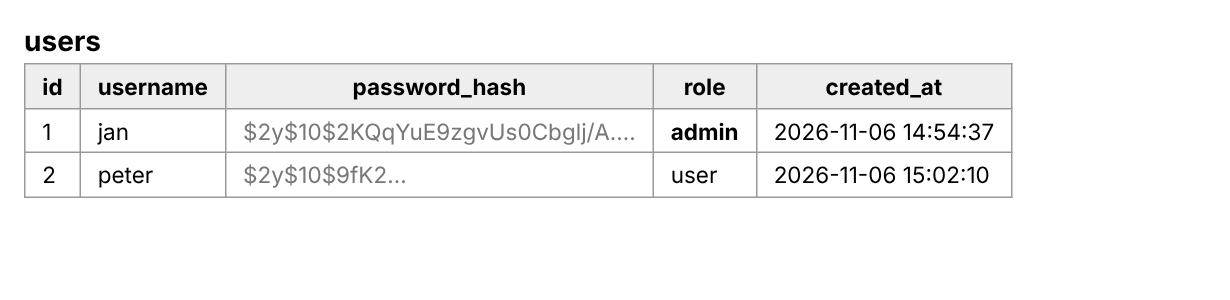
Admina si Ján Novák spraví zo svojho účtu v Adminer: v tabuľke users klik na edit pri svojom riadku, pole role prepíše na admin, Save.
store() zapíše autora
Čo Ján Novák chce: aby autorom nového receptu bol prihlásený user. V store() pribudne jeden riadok a v RecipeModel::insert() sa raz upraví príkaz INSERT:
        $data['user_id'] = Auth::id();                             // autor = prihlásený user (napríklad 1)
        $id = (new RecipeModel())->insert($data);                  // INSERT; vráti id nového record
        $sql = "INSERT INTO recipes (title, servings, prep_time, instructions, difficulty_id, user_id)
                VALUES (:title, :servings, :prep_time, :instructions, :difficulty_id, :user_id)";   // pribudol stĺpec user_id
Auth::user() vracia riadok z tabuľky users (SELECT *) bez password_hash (ten metóda z poľa odstráni). Po pridaní stĺpca obsahuje aj role: Auth::user() → ['id' => 1, 'username' => 'jan', 'role' => 'admin', 'created_at' => '…'].
requireLogin(): kontrola prihlásenia na jednom mieste
Čo Ján Novák chce: nemať kontrolu prihlásenia skopírovanú v každej metóde. Minulý týždeň bola na začiatku create() a store() táto trojica riadkov:
if (!Auth::check()) {                                  // v session nie je user_id → nikto nie je prihlásený
    flash('Na pridanie receptu sa najprv prihlás.');
    return Response::redirect('/login');               // redirect na prihlásenie
}
Rovnaký kód by teraz musel byť aj v edit(), update() a delete(). Preto je v BaseController (spoločný predok všetkých controllerov) metóda requireLogin():
    /**
     * Kontrola prihlásenia. Vráti null, keď je niekto prihlásený (nič nebráni pokračovať),
     * inak redirect na /login s flash správou.
     */
    protected function requireLogin(): ?Response
    {
        if (Auth::check()) {
            return null;                                           // niekto je prihlásený
        }
        flash('Na túto akciu sa najprv prihlás.');
        return Response::redirect('/login');
    }
Návratový typ ?Response znamená „objekt Response alebo null“ (otáznik pred typom). Metóda controllera ju volá na začiatku:
    $deny = $this->requireLogin();     // null = prihlásený; inak Response s redirect na /login
    if ($deny !== null) {              // nikto nie je prihlásený
        return $deny;                  // metóda vráti redirect a ďalej nepokračuje
    }
    // sem sa dostane len prihlásený user
O tom, čo sa stane, rozhoduje if, nie samotná návratová hodnota: keď je $deny objekt Response, metóda ho vráti; keď je null, pokračuje ďalším riadkom.
authorize(): kontrola oprávnenia na record
Čo Ján Novák chce: aby recept upravil alebo zmazal len jeho autor alebo admin. RecipeController v metódach edit(), update() a delete() postupuje takto: requireLogin(), potom načíta recept (ak neexistuje, 404), potom authorize(). Porovnanie je v BaseController:
    /**
     * Kontrola oprávnenia na record. Vráti null, keď prihlásený user je autor ALEBO má rolu admin; inak stránku 403.
     * $record musí mať kľúč 'user_id' (autor record). Predpokladá, že requireLogin() už prebehol.
     */
    protected function authorize(array $record): ?Response
    {
        $user = Auth::user();                                   // ['id' => 2, 'username' => 'peter', 'role' => 'user', …]
        if ((int) $record['user_id'] === Auth::id() || $user['role'] === 'admin') {   // === porovnáva aj typ; (int) zaručí číslo s číslom
            return null;                                        // autor alebo admin: má oprávnenie
        }
        return $this->render('403', ['title' => 'Prístup zamietnutý'], 403);
    }
|| znamená „alebo“: stačí, aby platila jedna podmienka. === porovnáva hodnotu aj typ. V našej aplikácii vracia PDO čísla z databázy ako PHP int (Database.php má ATTR_EMULATE_PREPARES => false), takže user_id je číslo a === by fungovalo aj bez (int). Cast (int) je poistka: v inom nastavení (emulované prepared statements, iný ovládač) môže číslo prísť ako text '1' a potom je '1' === 1 nepravda. S (int) je výsledok správny vždy. Výsledok pre recept Jána (user_id = 1): pre Jána (Auth::id() = 1) a pre admina → null; pre Petra (id 2, rola user) → stránka 403.
403 Forbidden: prístup zamietnutý
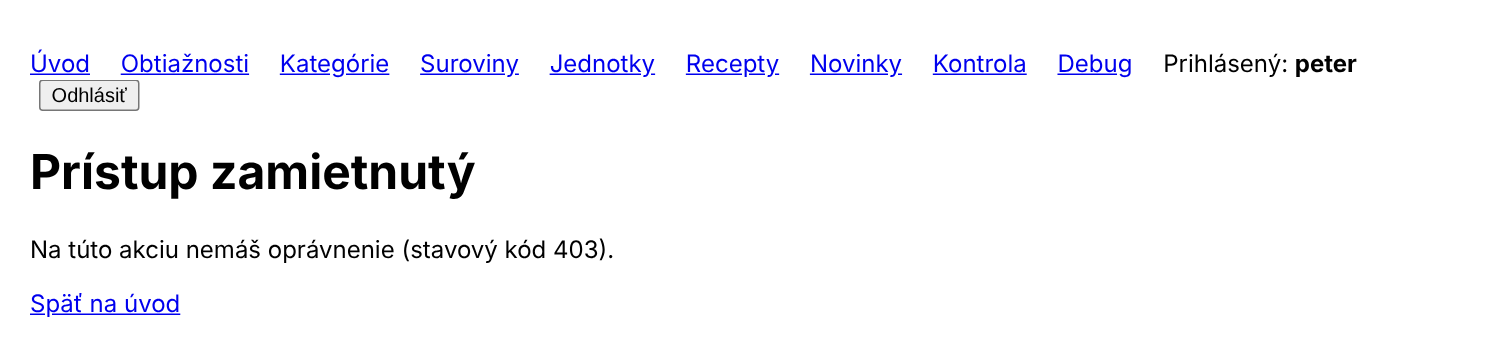
Čo Ján Novák chce: keď Peter skúsi upraviť cudzí recept, aby dostal jasnú stránku, nie chybu. 403 je stavový kód HTTP (poznáme už 200, 302, 404). Rozdiel oproti presmerovaniu: neprihlásený návštevník dostane redirect na /login (nevie, kto je), prihlásený bez oprávnenia dostane 403 (vieme, kto je, ale nemá oprávnenie). Template views/403.twig zo súboru bezpecnost.zip:
{% extends "layout.twig" %}
{% block content %}
<p>Na túto akciu nemáš oprávnenie (stavový kód 403).</p>
<p><a href="{{ url('/') }}">Späť na úvod</a></p>
{% endblock %}
Výsledok, keď Peter otvorí …/cv07/recipes/1/edit (recept Jána):
CSRF token: request naozaj z našej stránky
Čo Ján Novák chce: aby cudzia stránka nemohla v jeho mene zmazať recept. Útok sa volá CSRF (Cross-Site Request Forgery). Ide o to, že keď je Ján prihlásený vo svojej aplikácii, prehliadač pribalí jeho cookie session ku každému request na jej adresu – aj k request, ktorý odoslala úplne iná stránka. Útočník si pripraví stránku so skrytým formulárom:
<!-- stránka útočníka na inom webe -->
<form id="utok" method="post" action="https://sigma.tuke.sk/student/jan.novak/it/cv07/recipes/5/delete">
</form>
<script>document.getElementById('utok').submit();</script>   <!-- formulár sa odošle hneď po načítaní stránky -->
Keď Ján (prihlásený) túto stránku otvorí, prehliadač odošle POST …/recipes/5/delete aj s Jánovou cookie a recept sa zmaže, hoci Ján na nič neklikol.
Obrana – CSRF token: náhodný text, ktorý vznikne pri prvom zobrazení formulára, uloží sa do session a do skrytého input každého formulára aplikácie. Router pri každom POST request porovná token z formulára s tokenom v session. Stránka útočníka token nepozná, lebo prehliadač jej nedovolí prečítať obsah Jánovej stránky (same-origin policy). Trieda Csrf zo súboru bezpecnost.zip:
final class Csrf
{
    /** Token pre túto session. Pri prvom volaní ho vytvorí (náhodných 32 bajtov ako 64 znakov) a uloží; potom vracia ten istý. */
    public static function token(): string
    {
        if (!isset($_SESSION['csrf'])) {
            $_SESSION['csrf'] = bin2hex(random_bytes(32));   // random_bytes: kryptograficky náhodné; bin2hex: na čitateľný text
        }
        return $_SESSION['csrf'];
    }

    /** Porovná token z formulára s tokenom v session. hash_equals porovná texty bezpečne. */
    public static function check(string $token): bool
    {
        return isset($_SESSION['csrf']) && hash_equals($_SESSION['csrf'], $token);
    }
}
Router zo súboru bezpecnost.zip má na začiatku dispatch() novú kontrolu:
        // CSRF: každý POST request musí niesť platný token z formulára. Útok z cudzej stránky token nemá → 403.
        if ($request->method() === 'POST' && !Csrf::check($request->post('csrf'))) {
            return new Response(view('403', ['title' => 'Prístup zamietnutý']), 403);
        }
Token do formulára vloží Twig funkcia csrf_field() (v src/helpers.php zo bezpecnost.zip); v template stačí {{ csrf_field() }}:
    $twig->addFunction(new TwigFunction('csrf_field', function (): string {
        return '<input type="hidden" name="csrf" value="' . e(Csrf::token()) . '">';   // → <input type="hidden" name="csrf" value="f3a9…">
    }, ['is_safe' => ['html']]));   // is_safe: Twig výstup nenahrádza (je to hotové HTML)
<form method="post" action="{{ url(action) }}">
    {{ csrf_field() }}                               {# skrytý input s CSRF tokenom; Router ho skontroluje pri POST #}
    …
Výsledok v HTML formulára:
<form method="post" action="/student/jan.novak/it/cv07/recipes">
    <input type="hidden" name="csrf" value="f3a9c1b7…64 znakov…">
    …
{{ csrf_field() }} patrí do každého formulára aplikácie – aj do prihlásenia, registrácie a do tlačidla Odhlásiť v layout.twig. Formulár bez tokenu dostane od Routera 403.
Session fixation: nové id session pri prihlásení
Čo Ján Novák chce: aby prihlásenie dostalo nové id session. Útok session fixation: útočník zistí id session obete ešte pred jej prihlásením (napríklad si ho opíše na spoločnom počítači v učebni). Ak sa id pri prihlásení nemení, po prihlásení obete je útočníkovo id platné ako prihlásené. Obrana je jeden riadok vo Auth::login():
    public static function login(array $user): void
    {
        session_regenerate_id(true);                        // nové id session; true zmaže starý súbor (ochrana proti session fixation)
        $_SESSION['user_id'] = (int) $user['id'];
    }
session_regenerate_id(true) vyrobí nové id session; obsah session (aj CSRF token) sa prenesie do nového. Parameter true zmaže starý súbor session, takže staré id prestane platiť. To isté je v Auth::logout(): id z času prihlásenia po odhlásení prestane platiť. Na stránke Debug vidno, že id pred prihlásením a po ňom je iné.
Validácia: hláška pri každom poli
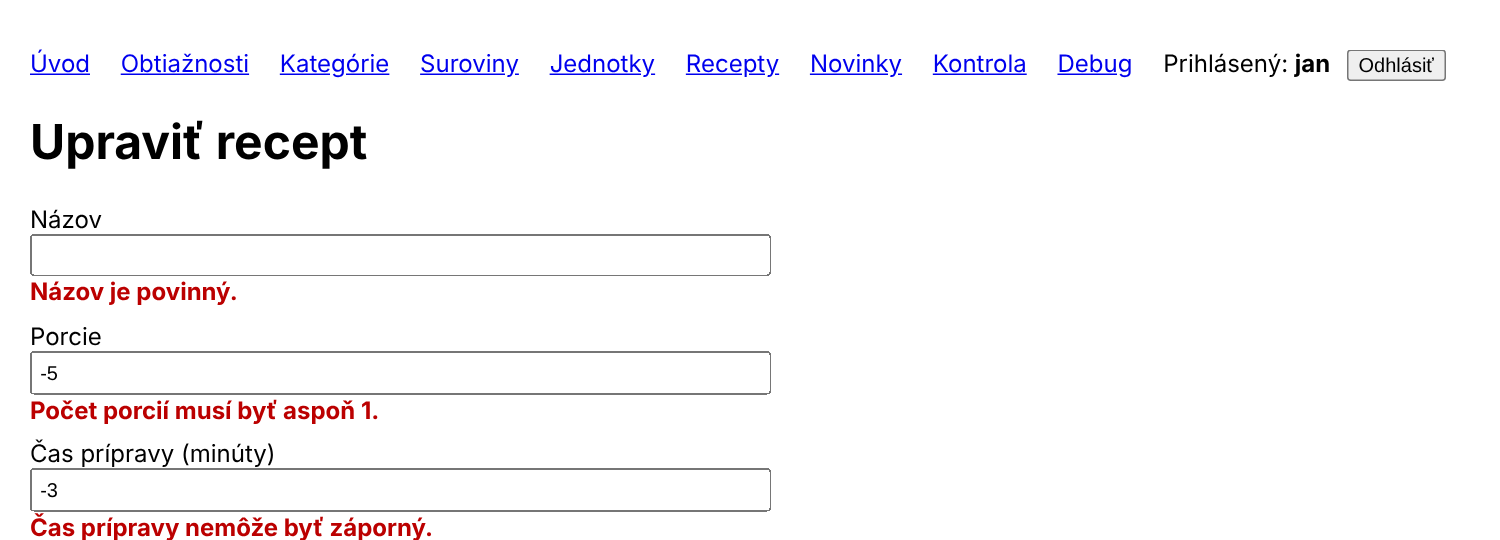
Čo Ján Novák chce: keď niekto odošle počet porcií -5 alebo prázdny názov, aby dostal hlášku pri tom poli, nie pokazený record. Validácia je v RecipeController; chyby sa zbierajú do poľa $errors, kľúč je názov políčka:
    private function validate(array $data): array
    {
        $errors = [];
        if ($data['title'] === '') {
            $errors['title'] = 'Názov je povinný.';
        } elseif (mb_strlen($data['title']) > 120) {           // mb_strlen: počíta znaky aj s diakritikou
            $errors['title'] = 'Názov má najviac 120 znakov.';
        }
        if ($data['servings'] < 1) {
            $errors['servings'] = 'Počet porcií musí byť aspoň 1.';
        }
        if ($data['prep_time'] < 0) {
            $errors['prep_time'] = 'Čas prípravy nemôže byť záporný.';
        }
        return $errors;
    }
store() (aj update()) zavolá validate(); keď pole $errors nie je prázdne, vráti formulár znova s hláškami a s tým, čo user napísal:
        $data   = $this->readForm($request);
        $errors = $this->validate($data);
        if ($errors !== []) {
            return $this->render('form', [
                'title'        => 'Nový recept',
                'action'       => '/recipes',
                'difficulties' => (new DifficultyModel())->getAll(),
                'old'          => $data,
                'errors'       => $errors,
            ]);
        }
Template pod každým políčkom vypíše jeho hlášku:
    <label>Porcie
        <input type="number" name="servings" value="{{ old.servings|default(4) }}" min="1">
        {% if errors.servings is defined %}<span class="error">{{ errors.servings }}</span>{% endif %}
    </label>
Výsledok po odoslaní prázdneho názvu, porcií -5 a času -3:
Pravidlo pre heslo
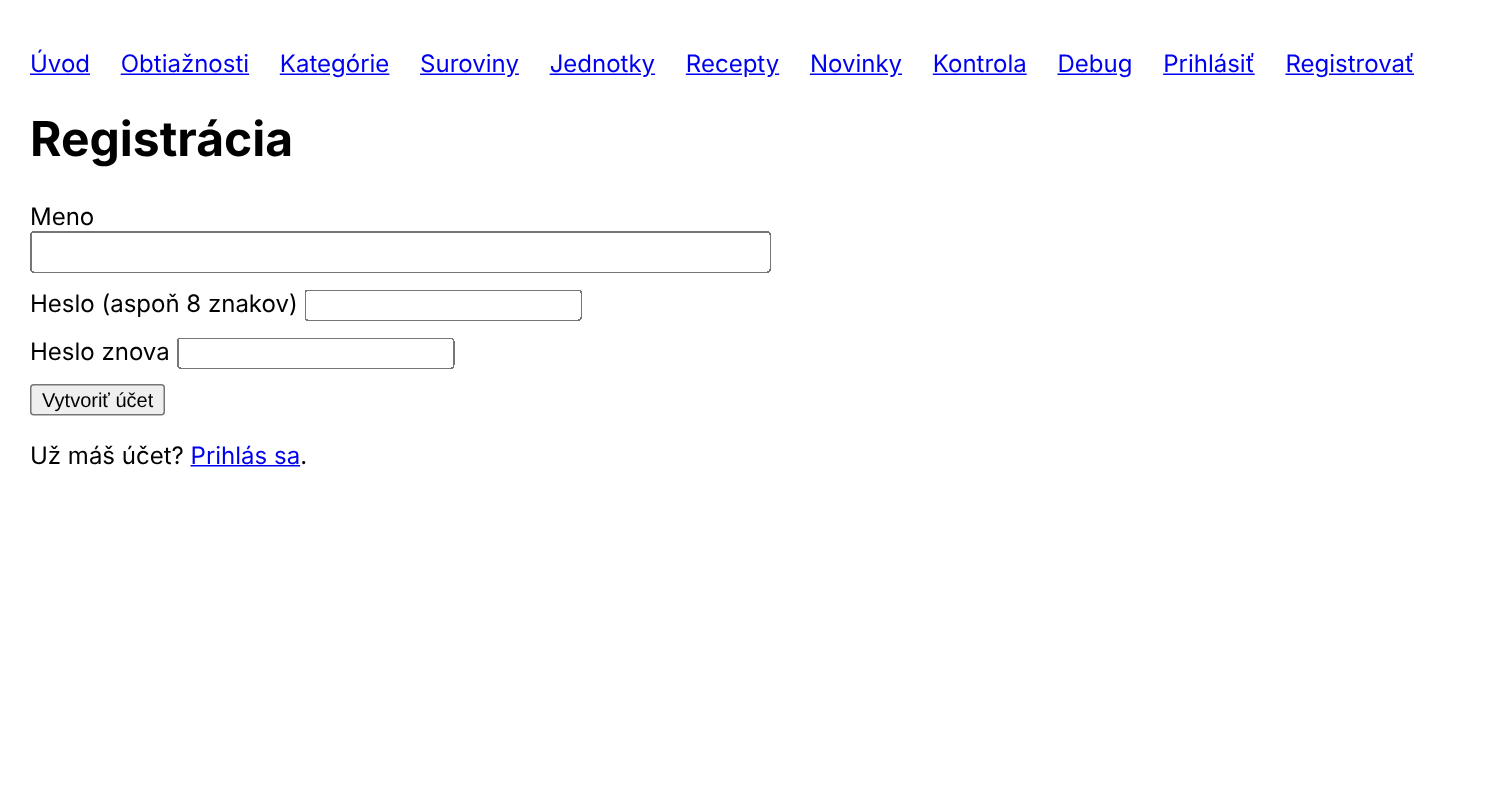
Čo Ján Novák chce: aby registrácia neprijala heslo x. V register() pribudne kontrola dĺžky a druhé pole Heslo znova:
        $password2 = $request->post('password2');                   // druhé pole: heslo znova
        …
        } elseif (mb_strlen($password) < 8) {                       // mb_strlen: počíta znaky aj s diakritikou
            $error = 'Heslo musí mať aspoň 8 znakov.';
        } elseif ($password !== $password2) {
            $error = 'Heslá sa nezhodujú.';
Vlastnosti cookie session
Čo Ján Novák chce: aby prihlásenie v jeho cv07 neplatilo aj v jeho projekte a v cudzích aplikáciách. Cookie PHPSESSID (id session, ktoré prehliadač nosí v každom request) má okrem mena a hodnoty aj vlastnosti; určí ich server v hlavičke Set-Cookie.
Prečo je to potrebné – skutočný test na sigma.tuke.sk. Súbor test-a/zapis.php zapíše do session text, súbor test-b/citaj.php v inom priečinku ho prečíta. Výsledok v tom istom okne prehliadača:
test-a/zapis.php                                   test-b/citaj.php
session_id: vhsh9sf1tlharpl2c0led5ue23             session_id: vhsh9sf1tlharpl2c0led5ue23
priečinok sessions: /var/lib/php/sessions          priečinok sessions: /var/lib/php/sessions
zapísané: zapísané v test-a o 13:41:22             prečítané: zapísané v test-a o 13:41:22
Rovnaké session_id aj rovnaký obsah: dve rôzne aplikácie čítajú tú istú session. Priečinok /var/lib/php/sessions je spoločný pre celý server a cookie má path=/. Prihlásenie v cv07 ako user s id 1 preto platí aj v projekte, kde id 1 môže mať iný user. Nastavenie path to oddelí.
Hlavička dnes a po zmene:
Set-Cookie: PHPSESSID=vhsh9sf1tlharpl2c0led5ue23; path=/
Set-Cookie: PHPSESSID=…; path=/student/jan.novak/it/cv07; secure; HttpOnly; SameSite=Lax
- path určuje, pre ktoré adresy prehliadač cookie posiela. Nastavíme ho na prefix aplikácie: prehliadač cookie pošle len adresám, ktoré týmto prefixom začínajú. Je to oddelenie aplikácií, nie ochrana pred útočníkom na tom istom serveri.
- secure: cookie ide len cez https (sigma.tuke.sk beží na https).
- httponly: JavaScript na stránke cookie neprečíta (
document.cookieju nezobrazí). - samesite=Lax: prehliadač cookie nepošle s POST request z iného site (iná registrovaná doména ako
tuke.sk). Pri obyčajnom kliknutí na link (GET) cookie pošle, preto mazanie a zmeny idú len cez POST. Chrome to robí aj bez nastavenia; v ostatných prehliadačoch to zaručené nie je, pretoSameSite=Laxnastavíme výslovne.
Vlastnosti sa nastavujú pred session_start():
$request = Request::fromGlobals();                    // prefix odvodí z $_SERVER['SCRIPT_NAME']: '/student/jan.novak/it/cv07'
session_set_cookie_params([
    'path'     => $request->prefix(),                 // cookie len pre túto aplikáciu
    'secure'   => isset($_SERVER['HTTPS']),           // na https true (sigma), cez http false
    'httponly' => true,                               // JavaScript ju neprečíta
    'samesite' => 'Lax',                              // nepošle sa s POST z iného site
]);
session_start();                                      // podľa cookie PHPSESSID načíta súbor session; musí byť pred prvým výstupom
Na nastavenie path treba vedieť prefix aplikácie, ktorý určí Request::fromGlobals(). Preto session_start() presunieme za Request::fromGlobals() – minulý týždeň bolo pravidlo „pred“, odteraz „za“. Request::fromGlobals() číta iba $_SERVER, $_GET a $_POST, session nepoužíva a nič nevypisuje. Po zmene treba v prehliadači zmazať starú cookie s path=/ (F12 → Application → Cookies), inak prehliadač posiela obe.
Hranica opatrení na spoločnom serveri
Aplikácie všetkých študentov bežia na sigma.tuke.sk. Pre prehliadač je to jeden web s rovnakým origin. Študent, ktorý na sigma.tuke.sk napíše vlastnú stránku s JavaScriptom, môže načítať Jánov formulár aj s tokenom a poslať platný request. Proti nemu CSRF token ani vlastnosti cookie nepomôžu. Skutočné riešenie je samostatná doména pre každú aplikáciu, ako to býva v praxi. Preto ukážku CSRF útoku robíme zo stránky na inom serveri (beata.stehlikova.website.tuke.sk), kde token chráni.
Author of the record and the user’s role
What Ján Novák wants: a recipe should know who created it, and there should be an admin who may edit anything. Two columns arrive. Table structure (only this week’s columns):
users                                       recipes (main entity)
--------------------------------            --------------------------------
id             INT UNSIGNED  PK  ◄───────┐  id         INT UNSIGNED  PK
username       VARCHAR(50)   UNIQUE       └─ user_id    INT UNSIGNED  FK → users.id   (new)
password_hash  VARCHAR(255)                 difficulty_id INT UNSIGNED FK
role           VARCHAR(10)   'user'|'admin' (new)        …other columns unchanged
Commands in Adminer (SQL command, one by one):
-- 1. the user's role: a new user automatically gets 'user'
ALTER TABLE users ADD role VARCHAR(10) NOT NULL DEFAULT 'user';

-- 2. the recipe's author; NULL for now, the existing recipes have no author
ALTER TABLE recipes ADD user_id INT UNSIGNED NULL;

-- 3. set the author of the existing recipes to the admin's id (the admin has id 1)
UPDATE recipes SET user_id = 1;

-- 4. every recipe now has an author → NOT NULL and a foreign key to users
ALTER TABLE recipes
    MODIFY user_id INT UNSIGNED NOT NULL,
    ADD FOREIGN KEY (user_id) REFERENCES users(id) ON DELETE RESTRICT;   -- RESTRICT: a user who has recipes cannot be deleted
The result in Adminer after these commands (the users table with the role column, a recipe with the user_id column):
Ján Novák makes an admin out of his own account in Adminer: in the users table click edit on his row, change the role field to admin, Save.
store() writes the author
What Ján Novák wants: a new recipe should get the logged-in user as its author. One line arrives in store() and the INSERT command in RecipeModel::insert() is changed once:
        $data['user_id'] = Auth::id();                             // author = logged-in user (for example 1)
        $id = (new RecipeModel())->insert($data);                  // INSERT; returns the id of the new record
        $sql = "INSERT INTO recipes (title, servings, prep_time, instructions, difficulty_id, user_id)
                VALUES (:title, :servings, :prep_time, :instructions, :difficulty_id, :user_id)";   // the column user_id was added
Auth::user() returns a row from the users table (SELECT *) without password_hash (the method removes it from the array). After the column is added it also holds role: Auth::user() → ['id' => 1, 'username' => 'jan', 'role' => 'admin', 'created_at' => '…'].
requireLogin(): the login check in one place
What Ján Novák wants: not to have the login check copied into every method. Last week these three lines were at the start of create() and store():
if (!Auth::check()) {                                  // no user_id in the session → nobody is logged in
    flash('Na pridanie receptu sa najprv prihlás.');
    return Response::redirect('/login');               // redirect to login
}
The same code would now have to be in edit(), update() and delete() too. That is why BaseController (the common parent of all controllers) has the method requireLogin():
    /**
     * Login check. Returns null when somebody is logged in (nothing stops you continuing),
     * otherwise a redirect to /login with a flash message.
     */
    protected function requireLogin(): ?Response
    {
        if (Auth::check()) {
            return null;                                           // somebody is logged in
        }
        flash('Na túto akciu sa najprv prihlás.');
        return Response::redirect('/login');
    }
The return type ?Response means “a Response object or null” (a question mark before the type). The controller method calls it at the start:
    $deny = $this->requireLogin();     // null = logged in; otherwise a Response with a redirect to /login
    if ($deny !== null) {              // nobody is logged in
        return $deny;                  // the method returns the redirect and does not continue
    }
    // only a logged-in user gets here
The if decides what happens, not the return value itself: when $deny is a Response object, the method returns it; when it is null, it continues with the next line.
authorize(): the permission check on a record
What Ján Novák wants: only the author or an admin should edit or delete a recipe. RecipeController in edit(), update() and delete() proceeds like this: requireLogin(), then loads the recipe (404 if it does not exist), then authorize(). The comparison is in BaseController:
    /**
     * Permission check on a record. Returns null when the logged-in user is the author OR has the admin role; otherwise a 403 page.
     * $record must have the key 'user_id' (the record's author). Assumes requireLogin() already ran.
     */
    protected function authorize(array $record): ?Response
    {
        $user = Auth::user();                                   // ['id' => 2, 'username' => 'peter', 'role' => 'user', …]
        if ((int) $record['user_id'] === Auth::id() || $user['role'] === 'admin') {   // === compares the type too; (int) ensures number with number
            return null;                                        // author or admin: has permission
        }
        return $this->render('403', ['title' => 'Prístup zamietnutý'], 403);
    }
|| means “or”: one condition is enough. === compares the value and the type. In our application PDO returns database numbers as PHP int (Database.php has ATTR_EMULATE_PREPARES => false), so user_id is a number and === would work even without (int). The (int) cast is a safeguard: with a different setup (emulated prepared statements, another driver) a number can arrive as the text '1', and then '1' === 1 is false. With (int) the result is always correct. The result for Ján’s recipe (user_id = 1): for Ján (Auth::id() = 1) and for an admin → null; for Peter (id 2, role user) → the 403 page.
403 Forbidden: access denied
What Ján Novák wants: when Peter tries to edit someone else’s recipe, he should get a clear page, not an error. 403 is an HTTP status code (we already know 200, 302, 404). The difference from a redirect: an unauthenticated visitor gets a redirect to /login (we do not know who they are), a logged-in user without permission gets 403 (we know who they are, but they must not). The template views/403.twig from the file bezpecnost.zip:
{% extends "layout.twig" %}
{% block content %}
<p>Na túto akciu nemáš oprávnenie (stavový kód 403).</p>
<p><a href="{{ url('/') }}">Späť na úvod</a></p>
{% endblock %}
The result when Peter opens …/cv07/recipes/1/edit (Ján’s recipe):
CSRF token: the request really comes from our page
What Ján Novák wants: a foreign page must not delete a recipe in his name. The attack is called CSRF (Cross-Site Request Forgery). The point is that when Ján is logged in in his application, the browser attaches his session cookie to every request to its address – even to a request sent by a completely different page. The attacker prepares a page with a hidden form:
<!-- the attacker's page on another site -->
<form id="utok" method="post" action="https://sigma.tuke.sk/student/jan.novak/it/cv07/recipes/5/delete">
</form>
<script>document.getElementById('utok').submit();</script>   <!-- the form submits right after the page loads -->
When Ján (logged in) opens this page, the browser sends POST …/recipes/5/delete with Ján’s cookie and the recipe is deleted, although Ján clicked nothing.
Defence – the CSRF token: a random text that arises when a form is first shown, is stored in the session and in a hidden input of every form of the application. The Router compares the token from the form with the token in the session at every POST request. The attacker’s page does not know the token, because the browser does not let it read the content of Ján’s page (same-origin policy). The class Csrf from bezpecnost.zip:
final class Csrf
{
    /** The token for this session. On the first call it creates it (32 random bytes as 64 characters) and stores it; then returns the same one. */
    public static function token(): string
    {
        if (!isset($_SESSION['csrf'])) {
            $_SESSION['csrf'] = bin2hex(random_bytes(32));   // random_bytes: cryptographically random; bin2hex: to readable text
        }
        return $_SESSION['csrf'];
    }

    /** Compares the token from the form with the token in the session. hash_equals compares texts safely. */
    public static function check(string $token): bool
    {
        return isset($_SESSION['csrf']) && hash_equals($_SESSION['csrf'], $token);
    }
}
The Router from bezpecnost.zip has a new check at the start of dispatch():
        // CSRF: every POST request must carry a valid token from the form. An attack from a foreign page has no token → 403.
        if ($request->method() === 'POST' && !Csrf::check($request->post('csrf'))) {
            return new Response(view('403', ['title' => 'Prístup zamietnutý']), 403);
        }
The token is put into the form by the Twig function csrf_field() (in src/helpers.php from bezpecnost.zip); in a template {{ csrf_field() }} is enough:
    $twig->addFunction(new TwigFunction('csrf_field', function (): string {
        return '<input type="hidden" name="csrf" value="' . e(Csrf::token()) . '">';   // → <input type="hidden" name="csrf" value="f3a9…">
    }, ['is_safe' => ['html']]));   // is_safe: Twig does not escape the output (it is ready HTML)
<form method="post" action="{{ url(action) }}">
    {{ csrf_field() }}                               {# hidden input with the CSRF token; the Router checks it at POST #}
    …
The result in the form HTML:
<form method="post" action="/student/jan.novak/it/cv07/recipes">
    <input type="hidden" name="csrf" value="f3a9c1b7…64 characters…">
    …
{{ csrf_field() }} belongs in every form of the application – in login, registration and in the Odhlásiť button in layout.twig too. A form without the token gets 403 from the Router.
Session fixation: a new session id at login
What Ján Novák wants: login should get a new session id. The session fixation attack: the attacker finds out the victim’s session id before they log in (for example copies it on a shared computer in a lab). If the id does not change at login, after the victim logs in the attacker has a valid id of the logged-in user. The defence is one line in Auth::login():
    public static function login(array $user): void
    {
        session_regenerate_id(true);                        // new session id; true deletes the old file (protection against session fixation)
        $_SESSION['user_id'] = (int) $user['id'];
    }
session_regenerate_id(true) makes a new session id; the session content (the CSRF token too) is carried over to the new one. The parameter true deletes the old session file, so the old id stops working. The same is in Auth::logout(): the id from the login time stops working after logout. On the Debug page you can see the id before and after login is different.
Validation: a message at each field
What Ján Novák wants: when somebody submits servings -5 or an empty title, they should get a message at that field, not a broken record. The validation is in RecipeController; errors are collected into the array $errors, the key is the field name:
    private function validate(array $data): array
    {
        $errors = [];
        if ($data['title'] === '') {
            $errors['title'] = 'Názov je povinný.';
        } elseif (mb_strlen($data['title']) > 120) {           // mb_strlen: counts characters including diacritics
            $errors['title'] = 'Názov má najviac 120 znakov.';
        }
        if ($data['servings'] < 1) {
            $errors['servings'] = 'Počet porcií musí byť aspoň 1.';
        }
        if ($data['prep_time'] < 0) {
            $errors['prep_time'] = 'Čas prípravy nemôže byť záporný.';
        }
        return $errors;
    }
store() (and update()) calls validate(); when the array $errors is not empty, it returns the form again with the messages and with what the user typed:
        $data   = $this->readForm($request);
        $errors = $this->validate($data);
        if ($errors !== []) {
            return $this->render('form', [
                'title'        => 'Nový recept',
                'action'       => '/recipes',
                'difficulties' => (new DifficultyModel())->getAll(),
                'old'          => $data,
                'errors'       => $errors,
            ]);
        }
The template prints each field’s message under it:
    <label>Porcie
        <input type="number" name="servings" value="{{ old.servings|default(4) }}" min="1">
        {% if errors.servings is defined %}<span class="error">{{ errors.servings }}</span>{% endif %}
    </label>
The result after submitting an empty title, servings -5 and time -3:
The password rule
What Ján Novák wants: registration must not accept the password x. A length check and a second field Heslo znova arrive in register():
        $password2 = $request->post('password2');                   // the second field: password again
        …
        } elseif (mb_strlen($password) < 8) {                       // mb_strlen: counts characters including diacritics
            $error = 'Heslo musí mať aspoň 8 znakov.';
        } elseif ($password !== $password2) {
            $error = 'Heslá sa nezhodujú.';
Session cookie properties
What Ján Novák wants: login in his cv07 must not also apply in his project and in other applications. The cookie PHPSESSID (the session id the browser carries in every request) has, besides the name and value, also properties; the server sets them in the Set-Cookie header.
Why it is needed – a real test on sigma.tuke.sk. The file test-a/zapis.php writes a text into the session, the file test-b/citaj.php in another folder reads it. The result in the same browser window:
test-a/zapis.php                                   test-b/citaj.php
session_id: vhsh9sf1tlharpl2c0led5ue23             session_id: vhsh9sf1tlharpl2c0led5ue23
priečinok sessions: /var/lib/php/sessions          priečinok sessions: /var/lib/php/sessions
zapísané: zapísané v test-a o 13:41:22             prečítané: zapísané v test-a o 13:41:22
The same session_id and the same content: two different applications read the same session. The folder /var/lib/php/sessions is shared for the whole server and the cookie has path=/. Login in cv07 as a user with id 1 therefore applies in the project too, where id 1 may belong to a different user. Setting path separates them.
The header today and after the change:
Set-Cookie: PHPSESSID=vhsh9sf1tlharpl2c0led5ue23; path=/
Set-Cookie: PHPSESSID=…; path=/student/jan.novak/it/cv07; secure; HttpOnly; SameSite=Lax
- path determines which addresses the browser sends the cookie to. We set it to the application’s prefix: the browser sends it only to addresses that start with this prefix. It separates applications, it is not protection against an attacker on the same server.
- secure: the cookie goes only over encrypted https (sigma.tuke.sk runs on https).
- httponly: JavaScript on the page cannot read the cookie (
document.cookiedoes not show it). - samesite=Lax: the browser does not send the cookie with a POST request sent by a page from another site (a different registered domain than
tuke.sk). On an ordinary click on a link (GET) it sends it, so deleting and changes go only through POST. Chrome does this even without the setting; in other browsers it is not guaranteed, so we setSameSite=Laxexplicitly.
The properties are set before session_start():
$request = Request::fromGlobals();                    // the prefix is derived from $_SERVER['SCRIPT_NAME']: '/student/jan.novak/it/cv07'
session_set_cookie_params([
    'path'     => $request->prefix(),                 // cookie only for this application
    'secure'   => isset($_SERVER['HTTPS']),           // true on https (sigma), false over http
    'httponly' => true,                               // JavaScript cannot read it
    'samesite' => 'Lax',                              // not sent with a POST from another site
]);
session_start();                                      // loads the session file by the cookie PHPSESSID; must be before the first output
Setting path needs the application’s prefix, which Request::fromGlobals() determines. That is why session_start() is moved after Request::fromGlobals() – last week the rule was “before”, from now “after”. Request::fromGlobals() reads only $_SERVER, $_GET and $_POST, it does not use the session and does not output anything. After the change delete the old cookie with path=/ in the browser (F12 → Application → Cookies), otherwise the browser sends both.
The limit of the measures on a shared server
All students’ applications run on sigma.tuke.sk. For the browser it is one web with the same origin. A student who writes their own page with JavaScript on sigma.tuke.sk can load Ján’s form including the token and send a valid request. Neither the CSRF token nor the cookie properties help against them. The real solution is a separate domain for each application, as it is in practice. That is why we show the CSRF attack from a page on another server (beata.stehlikova.website.tuke.sk), where the token protects.
Ako to fungujeHow it works
Ján upraví svoj recept
Čo Ján Novák chce: opraviť čas prípravy v recepte č. 1. Klikne v detaile na Upraviť. Pošle dva request: GET /recipes/1/edit a POST /recipes/1.
Request 1: GET /recipes/1/edit. Router nájde route GET /recipes/{id}/edit → RecipeController::edit($request, 1):
    public function edit(Request $request, int $id): Response
    {
        $deny = $this->requireLogin();                     // Ján je prihlásený → null
        if ($deny !== null) {
            return $deny;
        }
        $row = (new RecipeModel())->getById($id);          // recept č. 1
        if ($row === null) {
            return $this->notFound();                      // neexistuje → 404
        }
        $deny = $this->authorize($row);                    // Ján je autor (user_id 1 === Auth::id() 1) → null
        if ($deny !== null) {
            return $deny;
        }
        return $this->render('form', [
            'title'  => 'Upraviť recept',
            'action' => '/recipes/' . $id,                 // formulár sa odošle na POST /recipes/1 → update()
            'difficulties' => (new DifficultyModel())->getAll(),
            'old'    => $row,                              // formulár vyplní hodnotami z databázy
            'errors' => [],
        ]);
    }
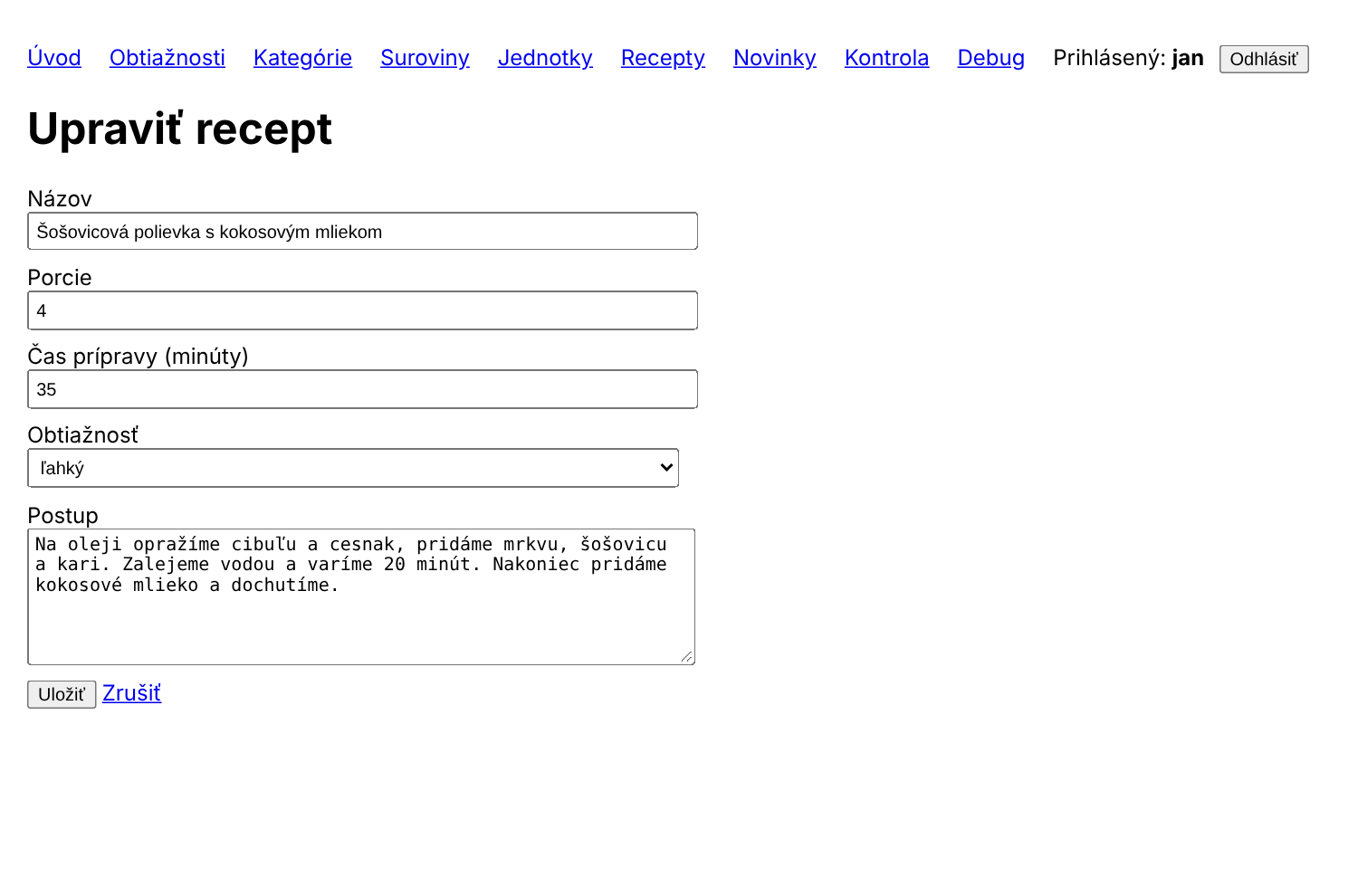
Formulár je ten istý form.twig ako pri novom recepte, len action je /recipes/1 a polia sú vyplnené:
Request 2: POST /recipes/1. Ján zmení čas a klikne na Uložiť. Router najprv skontroluje CSRF token (formulár ho má z csrf_field()), potom nájde route POST /recipes/{id} → update($request, 1). Začiatok je ako v edit() (prihlásenie, načítanie, oprávnenie), potom validácia a uloženie:
    public function update(Request $request, int $id): Response
    {
        $deny = $this->requireLogin();                     // prihlásený? inak redirect na /login
        if ($deny !== null) {
            return $deny;
        }
        $model = new RecipeModel();
        $row   = $model->getById($id);
        if ($row === null) {
            return $this->notFound();                      // neexistuje → 404
        }
        $deny = $this->authorize($row);                    // autor alebo admin? inak 403
        if ($deny !== null) {
            return $deny;
        }

        $data   = $this->readForm($request);
        $errors = $this->validate($data);
        if ($errors !== []) {                              // chybné hodnoty → formulár s hláškami
            $data['id'] = $id;                             // aby action formulára ukázal späť na /recipes/1
            return $this->render('form', [
                'title'        => 'Upraviť recept',
                'action'       => '/recipes/' . $id,
                'difficulties' => (new DifficultyModel())->getAll(),
                'old'          => $data,
                'errors'       => $errors,
            ]);
        }
        $model->update($id, $data);                        // UPDATE v databáze
        flash('Zmeny boli uložené.');
        return Response::redirect('/recipes/' . $id);
    }
RecipeModel::update() je nová metóda modelu; UPDATE so SET a WHERE id (parametre cez :name ako pri insert()):
    public function update(int $id, array $data): bool
    {
        $sql = "UPDATE recipes
                SET title = :title, servings = :servings, prep_time = :prep_time,
                    instructions = :instructions, difficulty_id = :difficulty_id
                WHERE id = :id";                            // WHERE id: zmení len tento jeden recept
        $stmt = $this->pdo->prepare($sql);
        $stmt->execute([
            ':title'         => $data['title'],
            ':servings'      => $data['servings'],
            ':prep_time'     => $data['prep_time'],
            ':instructions'  => $data['instructions'],
            ':difficulty_id' => $data['difficulty_id'],
            ':id'            => $id,
        ]);
        return $stmt->rowCount() >= 0;
    }
Peter chce upraviť Jánov recept
Čo Peter chce: zmeniť Jánov recept č. 1. V detaile Petra tlačidlo Upraviť nevidí (zobrazuje sa len autorovi a adminovi), tak napíše adresu …/cv07/recipes/1/edit priamo do prehliadača. edit($request, 1): requireLogin() → Peter je prihlásený → null; recept existuje; authorize($row) → Peter nie je autor (user_id 1 ≠ Auth::id() 2) ani admin → stránka 403. Recept sa nezmení. To isté platí, keby Peter poslal POST /recipes/1 bez formulára: update() robí tú istú kontrolu, preto authorize() je v edit(), update() aj delete().
Ján zmaže recept
Čo Ján chce: zmazať recept. V detaile klikne na Zmazať (tlačidlo vo formulári s metódou POST, nie odkaz – odkaz posiela GET a GET nemá meniť dáta).
Tlačidlá Upraviť a Zmazať sa majú zobraziť len autorovi alebo adminovi. authorize() vracia Response (hodí sa na kontrolu v metódach), ale template potrebuje true/false. Preto show() spočíta tie isté dve podmienky do premennej canEdit a pošle ju do template:
        return $this->render('show', [
            'title'   => $row['title'],
            'row'     => $row,
            // tlačidlá len pre autora alebo admina: tie isté dve podmienky ako v authorize()
            'canEdit' => Auth::check()
                && ((int) $row['user_id'] === Auth::id() || (Auth::user()['role'] ?? '') === 'admin'),
        ]);
Auth::check() && je na začiatku preto, že show() vidí aj neprihlásený návštevník: keď nikto nie je prihlásený, podmienka sa vďaka && ďalej nevyhodnocuje a Auth::user() sa nezavolá. ?? '' dá prázdny text, keby role chýbala. Template podľa canEdit tlačidlá zobrazí alebo nie:
{% if canEdit|default(false) %}                       {# canEdit = true len pre autora alebo admina (z controllera) #}
    <p>
        <a href="{{ url('/recipes/' ~ row.id ~ '/edit') }}">Upraviť</a>
        <form method="post" action="{{ url('/recipes/' ~ row.id ~ '/delete') }}" style="display:inline"
              onsubmit="return confirm('Naozaj zmazať?')">   {# confirm() sa spýta pred odoslaním #}
            {{ csrf_field() }}
            <button type="submit">Zmazať</button>
        </form>
    </p>
{% endif %}
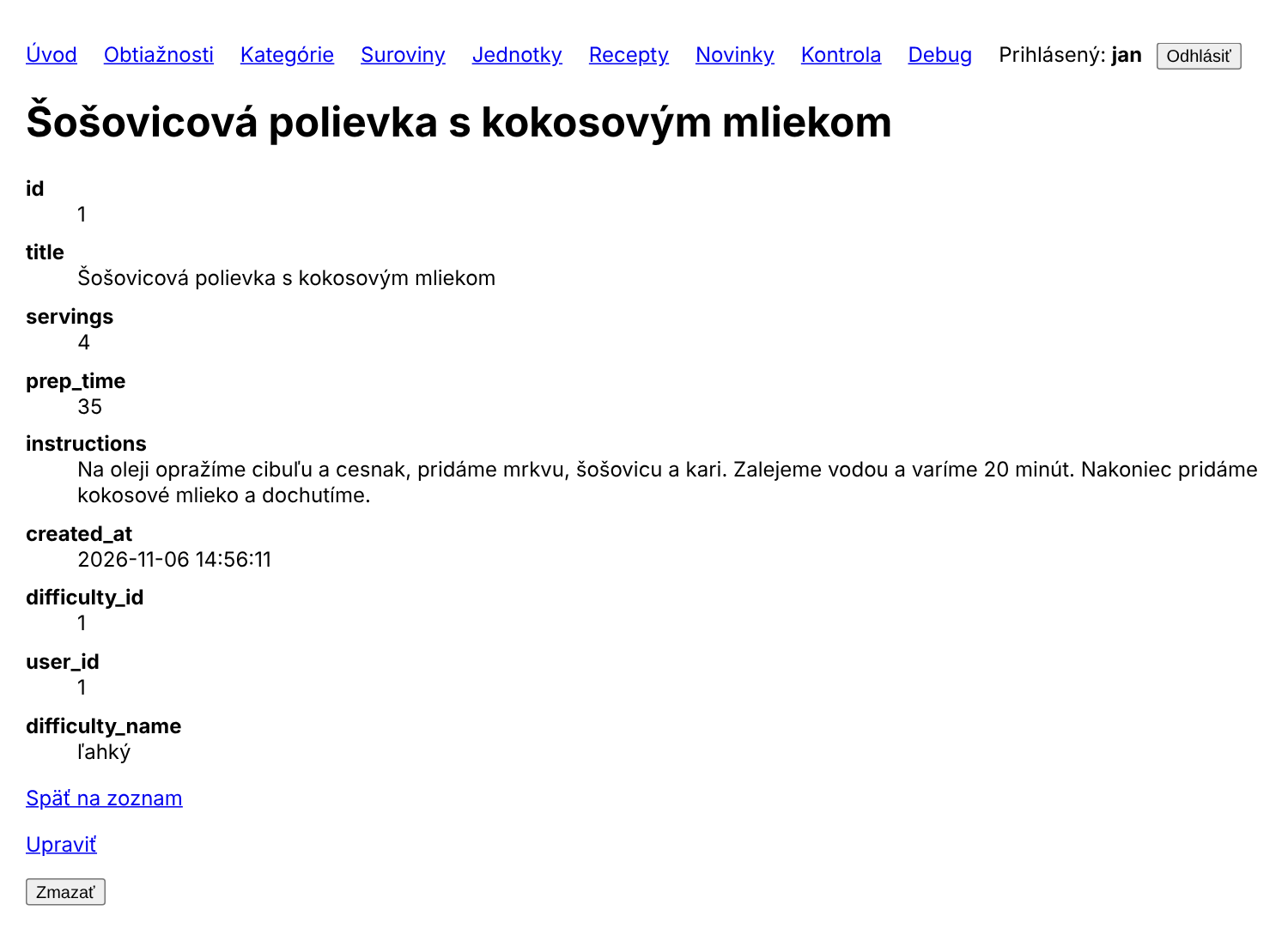
Detail receptu pre prihláseného autora (dole Upraviť a Zmazať):
Router pri POST znova skontroluje CSRF token a nájde route POST /recipes/{id}/delete → delete($request, 1). Má rovnaký začiatok ako update(), len namiesto validácie a uloženia zmaže:
    public function delete(Request $request, int $id): Response
    {
        $deny = $this->requireLogin();                     // prihlásený? inak redirect na /login
        if ($deny !== null) {
            return $deny;
        }
        $model = new RecipeModel();
        $row   = $model->getById($id);
        if ($row === null) {
            return $this->notFound();                      // neexistuje → 404
        }
        $deny = $this->authorize($row);                    // autor alebo admin? inak 403
        if ($deny !== null) {
            return $deny;
        }
        $model->delete($id);                               // DELETE v databáze (metóda z cv05)
        flash('Recept bol zmazaný.');
        return Response::redirect('/recipes');
    }
Postup: chránená akcia štyrmi krokmi
Čo Ján Novák chce: vedieť, ako spraviť ďalšiu akciu len pre autora alebo admina. Vždy rovnako:
- requireLogin() na začiatku metódy (je niekto prihlásený?).
- Načítanie record z databázy; ak neexistuje,
notFound()(404). - authorize($record) (je prihlásený user autor alebo admin?).
- Formulár má
{{ csrf_field() }}; akcia ide cez POST.
Ján edits his recipe
What Ján Novák wants: to fix the prep time in recipe no. 1. He clicks Upraviť in the detail. Two requests: GET /recipes/1/edit and POST /recipes/1.
Request 1: GET /recipes/1/edit. The Router finds the route GET /recipes/{id}/edit → RecipeController::edit($request, 1):
    public function edit(Request $request, int $id): Response
    {
        $deny = $this->requireLogin();                     // Ján is logged in → null
        if ($deny !== null) {
            return $deny;
        }
        $row = (new RecipeModel())->getById($id);          // recipe no. 1
        if ($row === null) {
            return $this->notFound();                      // does not exist → 404
        }
        $deny = $this->authorize($row);                    // Ján is the author (user_id 1 === Auth::id() 1) → null
        if ($deny !== null) {
            return $deny;
        }
        return $this->render('form', [
            'title'  => 'Upraviť recept',
            'action' => '/recipes/' . $id,                 // the form submits to POST /recipes/1 → update()
            'difficulties' => (new DifficultyModel())->getAll(),
            'old'    => $row,                              // the form is filled with values from the database
            'errors' => [],
        ]);
    }
The form is the same form.twig as for a new recipe, only action is /recipes/1 and the fields are filled:
Request 2: POST /recipes/1. Ján changes the time and clicks Uložiť. The Router first checks the CSRF token (the form has it from csrf_field()), then finds the route POST /recipes/{id} → update($request, 1). The beginning is like in edit() (login, loading, authorization), then validation and saving:
    public function update(Request $request, int $id): Response
    {
        $deny = $this->requireLogin();                     // logged in? otherwise redirect to /login
        if ($deny !== null) {
            return $deny;
        }
        $model = new RecipeModel();
        $row   = $model->getById($id);
        if ($row === null) {
            return $this->notFound();                      // does not exist → 404
        }
        $deny = $this->authorize($row);                    // author or admin? otherwise 403
        if ($deny !== null) {
            return $deny;
        }

        $data   = $this->readForm($request);
        $errors = $this->validate($data);
        if ($errors !== []) {                              // bad values → form with messages
            $data['id'] = $id;                             // so the form action points back to /recipes/1
            return $this->render('form', [
                'title'        => 'Upraviť recept',
                'action'       => '/recipes/' . $id,
                'difficulties' => (new DifficultyModel())->getAll(),
                'old'          => $data,
                'errors'       => $errors,
            ]);
        }
        $model->update($id, $data);                        // UPDATE in the database
        flash('Zmeny boli uložené.');
        return Response::redirect('/recipes/' . $id);
    }
RecipeModel::update() is a new model method; UPDATE with SET and WHERE id (parameters via :name as in insert()):
    public function update(int $id, array $data): bool
    {
        $sql = "UPDATE recipes
                SET title = :title, servings = :servings, prep_time = :prep_time,
                    instructions = :instructions, difficulty_id = :difficulty_id
                WHERE id = :id";                            // WHERE id: changes only this one recipe
        $stmt = $this->pdo->prepare($sql);
        $stmt->execute([
            ':title'         => $data['title'],
            ':servings'      => $data['servings'],
            ':prep_time'     => $data['prep_time'],
            ':instructions'  => $data['instructions'],
            ':difficulty_id' => $data['difficulty_id'],
            ':id'            => $id,
        ]);
        return $stmt->rowCount() >= 0;
    }
Peter wants to edit Ján’s recipe
What Peter wants: to change Ján’s recipe no. 1. In the detail Peter does not see the Upraviť button (it is shown only to the author and admin), so he types the address …/cv07/recipes/1/edit straight into the browser. edit($request, 1): requireLogin() → Peter is logged in → null; the recipe exists; authorize($row) → Peter is not the author (user_id 1 ≠ Auth::id() 2) nor an admin → the 403 page. The recipe does not change. The same holds if Peter sent POST /recipes/1 without the form: update() does the same check, which is why authorize() is in edit(), update() and delete().
Ján deletes a recipe
What Ján wants: to delete a recipe. In the detail he clicks Zmazať (a button in a form with the POST method, not a link – a link sends GET and GET must not change data).
The Upraviť and Zmazať buttons should show only to the author or admin. authorize() returns a Response (useful for the check inside methods), but the template needs true/false. So show() computes the same two conditions into a canEdit variable and passes it to the template:
        return $this->render('show', [
            'title'   => $row['title'],
            'row'     => $row,
            // buttons only for the author or admin: the same two conditions as in authorize()
            'canEdit' => Auth::check()
                && ((int) $row['user_id'] === Auth::id() || (Auth::user()['role'] ?? '') === 'admin'),
        ]);
Auth::check() && comes first because show() is also seen by a logged-out visitor: when nobody is logged in, thanks to && the rest is not evaluated and Auth::user() is not called. ?? '' yields an empty string in case role is missing. The template shows the buttons based on canEdit:
{% if canEdit|default(false) %}                       {# canEdit = true only for the author or admin (from the controller) #}
    <p>
        <a href="{{ url('/recipes/' ~ row.id ~ '/edit') }}">Upraviť</a>
        <form method="post" action="{{ url('/recipes/' ~ row.id ~ '/delete') }}" style="display:inline"
              onsubmit="return confirm('Naozaj zmazať?')">   {# confirm() asks before submitting #}
            {{ csrf_field() }}
            <button type="submit">Zmazať</button>
        </form>
    </p>
{% endif %}
The recipe detail for the logged-in author (Upraviť and Zmazať at the bottom):
On POST the Router again checks the CSRF token and finds the route POST /recipes/{id}/delete → delete($request, 1). It has the same beginning as update(), only instead of validation and saving it deletes:
    public function delete(Request $request, int $id): Response
    {
        $deny = $this->requireLogin();                     // logged in? otherwise redirect to /login
        if ($deny !== null) {
            return $deny;
        }
        $model = new RecipeModel();
        $row   = $model->getById($id);
        if ($row === null) {
            return $this->notFound();                      // does not exist → 404
        }
        $deny = $this->authorize($row);                    // author or admin? otherwise 403
        if ($deny !== null) {
            return $deny;
        }
        $model->delete($id);                               // DELETE in the database (method from cv05)
        flash('Recept bol zmazaný.');
        return Response::redirect('/recipes');
    }
Procedure: a protected action in four steps
What Ján Novák wants: to know how to make another action only for the author or admin. Always the same:
- requireLogin() at the start of the method (is anybody logged in?).
- Load the record from the database; if it does not exist,
notFound()(404). - authorize($record) (is the logged-in user the author or an admin?).
- The form has
{{ csrf_field() }}; the action goes through POST.
Útoky v praxiAttacks in practice
Opatrenia zhora vyskúšaj na vlastnej aplikácii – uvidíš, čo útok naozaj urobí a čo ho zastaví. Nič cudzie nepotrebuješ, stačí prehliadač a F12.
Útok 1: cudzí formulár bez tokenu (CSRF)
Útočník nemá tvoju stránku, ale vie, na akú adresu posielaš formulár. Spraví vlastnú stránku (utok.html na svojom webe) so skrytým formulárom na tvoju adresu a pošle ju hneď pri načítaní. Takto vyzerá:
<form action="https://sigma.tuke.sk/.../cv07/recipes" method="post">
    <input type="hidden" name="title" value="HACKED">
    <input type="hidden" name="servings" value="1">
    <input type="hidden" name="prep_time" value="0">
    <input type="hidden" name="instructions" value="toto pridal cudzí formulár">
    <input type="hidden" name="difficulty_id" value="1">
    <!-- žiadny <input name="csrf"> – útočník token nepozná -->
</form>
<script>document.forms[0].submit();</script>   <!-- odošle sa sám -->
Skús to isté bez hostovania stránky: v aplikácii otvor Nový recept. F12 → záložka Elements → nájdi riadok <input type="hidden" name="csrf" …> → pravý klik → Delete element. Vyplň formulár a Odošli.
Uvidíš: stránku 403 Prístup zamietnutý. Odoslal si presne to, čo útočníkov formulár – POST bez tokenu.
Prečo: Router pri každom POST overí token (Csrf::check()). Útočník token nevie, lebo je náhodný a je uložený v tvojej session. Bez tokenu → 403.
Pozor na „same origin” na sigme. Všetci na
sigma.tuke.sksme ten istý server (origin). Útočníkova stránka na sigme teda tvoju cookie session pošle (nezastaví juSameSiteanipath). Jediné, čo ju zastaví, je CSRF token. Keby útočníkova stránka bola na inom serveri, cookie by sa vďakaSameSite=Laxneposlala vôbec.
Útok 2: cudzí record (autorizácia)
Skús: zaregistruj si druhý účet a prihlás sa naň. Do adresy napíš .../cv07/recipes/1/edit (to je cudzí recept, patrí účtu jan) a daj Enter.
Uvidíš: 403 Prístup zamietnutý. A na detaile cudzieho receptu nie sú ani tlačidlá Upraviť / Zmazať (canEdit je false).
Prečo: edit() zavolá authorize($record) a prihlásený user nie je ani autor, ani admin. Bez authorize() (ako v cv06) by cudzí účet upravil čokoľvek.
Útok 3: session (fixation a zdieľanie)
Skús: ešte neprihlásená otvor .../cv07/debug a opíš si session_id(). Prihlás sa a otvor /debug znova.
Uvidíš: session_id() je iné ako predtým.
Prečo: pri prihlásení beží session_regenerate_id(true). Útočník, ktorý ti podstrčil svoje id pred prihlásením, ťa po prihlásení už „nevidí”.
A ešte: F12 → Application → Cookies → klikni PHPSESSID → stĺpec Path. V cv07 je to tvoj prefix (/…/cv07), nie /. Na spoločnej sigme sú session súbory všetkých v jednom priečinku (/debug ukazuje session_save_path()); path zariadi, že cudzia aplikácia na serveri ti cookie neprepíše.
Try the measures above on your own application – you will see what an attack actually does and what stops it. You need nothing external, just a browser and F12.
Attack 1: a foreign form without the token (CSRF)
The attacker does not have your page, but knows the address your form posts to. They make their own page (utok.html on their own site) with a hidden form pointing at your address and submit it on load. It looks like this:
<form action="https://sigma.tuke.sk/.../cv07/recipes" method="post">
    <input type="hidden" name="title" value="HACKED">
    <input type="hidden" name="servings" value="1">
    <input type="hidden" name="prep_time" value="0">
    <input type="hidden" name="instructions" value="this was added by a foreign form">
    <input type="hidden" name="difficulty_id" value="1">
    <!-- no <input name="csrf"> – the attacker does not know the token -->
</form>
<script>document.forms[0].submit();</script>   <!-- submits itself -->
Try the same without hosting a page: in the application open Nový recept. F12 → the Elements tab → find the line <input type="hidden" name="csrf" …> → right-click → Delete element. Fill the form and submit.
You will see: the 403 Prístup zamietnutý page. You sent exactly what the attacker’s form sends – a POST without the token.
Why: the Router checks the token on every POST (Csrf::check()). The attacker does not know it, because it is random and stored in your session. No token → 403.
Beware of “same origin” on sigma. Everyone on
sigma.tuke.skis the same server (origin). An attacker’s page on sigma therefore does send your session cookie (neitherSameSitenorpathstops it). The only thing that stops it is the CSRF token. If the attacker’s page were on a different server, the cookie would not be sent at all thanks toSameSite=Lax.
Attack 2: a foreign record (authorization)
Try: register a second account and log in as it. Type .../cv07/recipes/1/edit into the address bar (that is a foreign recipe, it belongs to the jan account) and press Enter.
You will see: 403 Prístup zamietnutý. And the detail of a foreign recipe does not even show the Upraviť / Zmazať buttons (canEdit is false).
Why: edit() calls authorize($record) and the logged-in user is neither the author nor an admin. Without authorize() (as in cv06) a foreign account could edit anything.
Attack 3: the session (fixation and sharing)
Try: while still logged out, open .../cv07/debug and write down session_id(). Log in and open /debug again.
You will see: session_id() is different from before.
Why: at login session_regenerate_id(true) runs. An attacker who slipped you their id before login no longer “sees” you after login.
And also: F12 → Application → Cookies → click PHPSESSID → the Path column. In cv07 it is your prefix (/…/cv07), not /. On the shared sigma the session files of everyone are in one folder (/debug shows session_save_path()); path makes sure a foreign application on the server cannot overwrite your cookie.
Fyzická podobaPhysical form
Priečinky a súbory
Nové a zmenené súbory oproti cv06:
cv07/
├── index.php                         zmena: session_set_cookie_params + session_start za Request; route edit/update/delete
├── sql/
│   └── schema.sql                    zmena: users.role, recipes.user_id + FK (v Kubeflow cez ALTER TABLE v Adminer)
├── src/
│   ├── Csrf.php                      bezpecnost.zip: token(), check()
│   ├── Router.php                    bezpecnost.zip: kontrola CSRF tokenu pri POST
│   ├── helpers.php                   bezpecnost.zip: Twig funkcia csrf_field()
│   ├── Auth.php                      zmena: session_regenerate_id() v login() a logout()
│   ├── Controller/
│   │   ├── BaseController.php        zmena: requireLogin(), authorize()
│   │   ├── RecipeController.php      zmena: edit(), update(), delete(), validate(), user_id v store()
│   │   └── AuthController.php        zmena: pravidlo pre heslo, pole password2
│   └── Model/
│       └── RecipeModel.php           zmena: user_id v insert(), nová metóda update()
└── views/
    ├── 403.twig                      bezpecnost.zip
    ├── form.twig                     zmena: csrf_field(), hlášky pri poliach, action pre úpravu
    ├── show.twig                     zmena: tlačidlá Upraviť/Zmazať pre autora a admina
    ├── layout.twig, login.twig, register.twig   zmena: {{ csrf_field() }} do formulárov; register aj password2
Zo súboru bezpecnost.zip sú src/Csrf.php, src/Router.php, src/helpers.php, views/403.twig. Študent píše: ALTER TABLE a UPDATE v Adminer, requireLogin() a authorize() v BaseController, edit()/update()/delete() a route, validáciu, pravidlo pre heslo a {{ csrf_field() }} do každého formulára. Celý vzor aj s vendor/ je vo vzor-cv07.zip.
Najčastejšie chyby a čo znamenajú
| Čo vidíš | Príčina | Riešenie |
|---|---|---|
| každý formulár po odoslaní stránku 403 | formulár nemá {{ csrf_field() }}, Router token nenašiel |
{{ csrf_field() }} do každého <form method="post">, aj do prihlásenia, registrácie a odhlásenia |
| 403 aj pri prihlásení hneď po registrácii | login.twig alebo register.twig nemá {{ csrf_field() }} |
doplň token do oboch formulárov |
Class "App\Csrf" not found |
src/Csrf.php zo bezpecnost.zip chýba, alebo Upload Folder nedobehol |
unzip -o bezpecnost.zip; Upload Folder |
Call to undefined function csrf_field() |
src/helpers.php je ešte z cv06 |
helpers.php zo bezpecnost.zip |
Undefined array key "user_id" v authorize() |
authorize($row) dostal recept bez stĺpca user_id |
spusti ALTER TABLE recipes ADD user_id … v Adminer |
| admin dostane 403 na cudzí recept | v authorize() je && namiesto || (podmienka žiada autora aj admina naraz) |
medzi podmienkami má byť || – stačí, aby platila jedna |
Cannot add foreign key constraint pri ALTER TABLE |
niektorý recept má user_id NULL alebo id user, ktorý neexistuje |
najprv UPDATE recipes SET user_id = 1;, potom pridaj FK |
po prihlásení stále „Prihlásiť“ v menu; /debug ukazuje stále rovnaké id |
stará cookie s path=/ zostala v prehliadači vedľa novej |
F12 → Application → Cookies → zmaž PHPSESSID; alebo iné okno |
session_set_cookie_params(): Session cannot be started after headers already sent |
medzera alebo výpis pred <?php, alebo pred session_start() |
<?php je prvý znak; session_set_cookie_params() a session_start() pred prvým výstupom |
| Peter upraví Jánov recept | authorize() chýba v update() alebo delete() (je len v edit()) |
kontrola musí byť vo všetkých troch metódach |
Folders and files
New and changed files compared to cv06:
cv07/
├── index.php                         change: session_set_cookie_params + session_start after Request; routes edit/update/delete
├── sql/
│   └── schema.sql                    change: users.role, recipes.user_id + FK (in Kubeflow via ALTER TABLE in Adminer)
├── src/
│   ├── Csrf.php                      bezpecnost.zip: token(), check()
│   ├── Router.php                    bezpecnost.zip: CSRF token check at POST
│   ├── helpers.php                   bezpecnost.zip: the Twig function csrf_field()
│   ├── Auth.php                      change: session_regenerate_id() in login() and logout()
│   ├── Controller/
│   │   ├── BaseController.php        change: requireLogin(), authorize()
│   │   ├── RecipeController.php      change: edit(), update(), delete(), validate(), user_id in store()
│   │   └── AuthController.php        change: the password rule, the password2 field
│   └── Model/
│       └── RecipeModel.php           change: user_id in insert(), new method update()
└── views/
    ├── 403.twig                      bezpecnost.zip
    ├── form.twig                     change: csrf_field(), messages at the fields, action for editing
    ├── show.twig                     change: Upraviť/Zmazať buttons for the author and admin
    ├── layout.twig, login.twig, register.twig   change: {{ csrf_field() }} into the forms; register also password2
From bezpecnost.zip come src/Csrf.php, src/Router.php, src/helpers.php, views/403.twig. The student writes: ALTER TABLE and UPDATE in Adminer, requireLogin() and authorize() in BaseController, edit()/update()/delete() and the routes, the validation, the password rule and {{ csrf_field() }} into every form. The whole sample including vendor/ is in vzor-cv07.zip.
The most common errors and what they mean
| What you see | Cause | Fix |
|---|---|---|
| every form returns the 403 page after submitting | the form has no {{ csrf_field() }}, the Router found no token |
{{ csrf_field() }} into every <form method="post">, including login, registration and logout |
| 403 even at login right after registration | login.twig or register.twig has no {{ csrf_field() }} |
add the token into both forms |
Class "App\Csrf" not found |
src/Csrf.php from bezpecnost.zip is missing, or Upload Folder did not finish |
unzip -o bezpecnost.zip; Upload Folder |
Call to undefined function csrf_field() |
src/helpers.php is still from cv06 |
helpers.php from bezpecnost.zip |
Undefined array key "user_id" in authorize() |
authorize($row) got a recipe without the user_id column |
run ALTER TABLE recipes ADD user_id … in Adminer |
| an admin gets 403 on someone else’s recipe | authorize() uses && instead of || (the condition requires author and admin at once) |
use || between the conditions – one is enough |
Cannot add foreign key constraint at ALTER TABLE |
some recipe has user_id NULL or the id of a non-existent user |
first UPDATE recipes SET user_id = 1;, then add the FK |
still “Prihlásiť” in the menu after login; /debug shows the same id |
the old cookie with path=/ stayed in the browser next to the new one |
F12 → Application → Cookies → delete PHPSESSID; or another window |
session_set_cookie_params(): Session cannot be started after headers already sent |
a space or output before <?php, or before session_start() |
<?php is the first character; session_set_cookie_params() and session_start() before the first output |
| Peter edits Ján’s recipe | authorize() is missing in update() or delete() (it is only in edit()) |
the check must be in all three methods |
Úlohy na cvičenieLab tasks
Úlohy dostaneš aj ako zadanie cv07 v Classroom 50.
Link na zadanie cv07: prijať zadanie (platí pre skupiny B. Stehlíkovej; ostatné skupiny dostanú link od svojho cvičiaceho)
Úloha 8.1: Repository cv07 z cv06, bezpecnost.zip, cookie session. Prijmi zadanie cv07 a repository naklonuj do ~/web/it/cv07 podľa návodu 04 Odovzdávanie. Potom v termináli v Kubeflow:
cd ~/web/it
cp cv06/config.php cv06/config.example.php cv06/.gitignore cv06/.htaccess cv06/composer.json cv06/composer.lock cv06/index.php cv07/
cp -r cv06/sql cv06/src cv06/views cv07/
cd cv07
curl -O https://beata.stehlikova.website.tuke.sk/it/bezpecnost.zip
unzip -o bezpecnost.zip && rm bezpecnost.zip
composer install
unzip -o prepísal src/Router.php, src/helpers.php a pridal src/Csrf.php, views/403.twig.
V index.php presuň session_start() za Request::fromGlobals() a pred neho pridaj session_set_cookie_params([...]) podľa pojmu „Vlastnosti cookie session“. Pravý klik na cv07 → Upload Folder. Kontrola: …/cv07/ funguje; v F12 → Application → Cookies má PHPSESSID path s tvojím prefixom (nie /). Zmaž starú cookie s path=/. Commit a push: cv07: bezpečnosť.
Úloha 8.2: Autor a rola. V Adminer spusti štyri príkazy z pojmu „Autor record a rola user“ (ALTER TABLE users ADD role …, ALTER TABLE <main entity> ADD user_id …, UPDATE … SET user_id = 1, ALTER TABLE … MODIFY … ADD FOREIGN KEY …). Svojmu účtu nastav v Adminer role = 'admin'. V metóde insert() modelu pre main entity pridaj do INSERT stĺpec user_id a v store() pridaj $data['user_id'] = Auth::id();. Kontrola: pridaj nový record; v Adminer má v stĺpci user_id tvoje id.
Úloha 8.3: requireLogin() a authorize(). Do BaseController pridaj metódy requireLogin() a authorize() podľa pojmov. V create() a store() nahraď kód z minulého týždňa volaním requireLogin(). Kontrola: bez prihlásenia ťa formulár na nový record presmeruje na prihlásenie.
Úloha 8.4: edit, update, delete. Do controllera pre main entity pridaj edit(), update(), delete() podľa časti „Ako to funguje“ (každá: requireLogin(), načítanie record alebo 404, authorize()). Do modelu pridaj update(int $id, array $data). V index.php pridaj route GET /<entita>/{id}/edit, POST /<entita>/{id}, POST /<entita>/{id}/delete. V form.twig zmeň action na premennú action a pridaj {{ csrf_field() }}. V show.twig pridaj tlačidlá Upraviť a Zmazať pre autora a admina (premenná canEdit z controllera). Kontrola: vlastný record upravíš aj zmažeš; cudzí (prihlás sa druhým účtom) ti vráti 403.
Úloha 8.5: CSRF token do formulárov. Pridaj {{ csrf_field() }} do každého formulára aplikácie: form.twig, login.twig, register.twig a do tlačidla Odhlásiť v layout.twig. Kontrola: prihlásenie, pridanie aj odhlásenie fungujú; keď v F12 → Elements zmažeš z formulára skrytý input s tokenom a formulár odošleš, dostaneš 403.
Úloha 8.6: Validácia a heslo. Do controllera pre main entity pridaj validate() s poľom $errors (aspoň: prázdny názov, číselný stĺpec mimo rozsahu) a v store()/update() pri chybe vráť formulár s hláškami. V form.twig vypíš hlášku pod každým poľom ({% if errors.<pole> is defined %}). V register() pridaj kontrolu dĺžky hesla (aspoň 8 znakov, mb_strlen) a pole password2 (Heslo znova) v register.twig. Kontrola: záporné číslo vráti hlášku; registrácia s krátkym heslom alebo nerovnakými heslami vráti hlášku.
Úloha 8.7: session_regenerate_id. Do Auth::login() a Auth::logout() pridaj session_regenerate_id(true). Kontrola: na /debug je session_id() pred prihlásením iné ako po prihlásení.
Úloha 8.8: Vlastné pravidlo oprávnení. Urči a naprogramuj jedno vlastné pravidlo, kto má aké oprávnenie. Príklady: oprávnenie na delete record má len admin; oprávnenie na update record má autor len do 24 hodín od vytvorenia; stránka Moje records so zoznamom record prihláseného user. Pravidlo popíš a zdôvodni v README.md.
Úloha 8.9: Odovzdanie a kontrola na sigma. Commit a push. Na GitHub skontroluj, že je tam src/Csrf.php, BaseController s requireLogin() a authorize(), controller pre main entity s edit()/update()/delete(), index.php so session_set_cookie_params. config.php a vendor/ tam nie sú. Upload Folder; v dvoch účtoch (prihlás sa druhým v anonymnom okne) over: autor upraví a zmaže svoj record, druhý user dostane na cudzí 403.
Hodnotenie: 1 bod. Aplikácia na sigma.tuke.sk má autora record (user_id) a rolu user, úpravu a mazanie record len pre autora alebo admina (inak 403), CSRF token v každom formulári, nové id session pri prihlásení, validáciu formulára s hláškami, pravidlo pre heslo a cookie session s path. Commit a push najneskôr do nasledujúceho cvičenia.
You get the tasks also as the assignment cv07 in Classroom 50.
Link to the assignment cv07: accept the assignment (valid for B. Stehlíková’s groups; other groups get the link from their lab teacher)
Task 8.1: Repository cv07 from cv06, bezpecnost.zip, session cookie. Accept the assignment cv07 and clone the repository into ~/web/it/cv07 following the guide 04 Submitting. Then in the terminal in Kubeflow:
cd ~/web/it
cp cv06/config.php cv06/config.example.php cv06/.gitignore cv06/.htaccess cv06/composer.json cv06/composer.lock cv06/index.php cv07/
cp -r cv06/sql cv06/src cv06/views cv07/
cd cv07
curl -O https://beata.stehlikova.website.tuke.sk/it/bezpecnost.zip
unzip -o bezpecnost.zip && rm bezpecnost.zip
composer install
unzip -o replaced src/Router.php, src/helpers.php and added src/Csrf.php, views/403.twig.
In index.php move session_start() after Request::fromGlobals() and add session_set_cookie_params([...]) before it following the term “Session cookie properties”. Right-click cv07 → Upload Folder. Check: …/cv07/ works; in F12 → Application → Cookies PHPSESSID has a path with your prefix (not /). Delete the old cookie with path=/. Commit and push: cv07: bezpečnosť.
Task 8.2: Author and role. In Adminer run the four commands from the term “Author of the record and the user’s role” (ALTER TABLE users ADD role …, ALTER TABLE <main entity> ADD user_id …, UPDATE … SET user_id = 1, ALTER TABLE … MODIFY … ADD FOREIGN KEY …). Set role = 'admin' for your account in Adminer. In <main entity model>::insert() add the user_id column to the INSERT, and in store() add $data['user_id'] = Auth::id();. Check: add a new record; in Adminer it has your id in the user_id column.
Task 8.3: requireLogin() and authorize(). Add the methods requireLogin() and authorize() to BaseController following the terms. In create() and store() replace last week’s code with a call to requireLogin(). Check: without login the form for a new record redirects you to login.
Task 8.4: edit, update, delete. Add edit(), update(), delete() to the main entity controller following the part “How it works” (each: requireLogin(), loading the record or 404, authorize()). Add update(int $id, array $data) to the model. In index.php add the routes GET /<entity>/{id}/edit, POST /<entity>/{id}, POST /<entity>/{id}/delete. In form.twig change action to the variable action and add {{ csrf_field() }}. In show.twig add the Upraviť and Zmazať buttons for the author and admin (the variable canEdit from the controller). Check: you edit and delete your own record; someone else’s (log in as a second account) returns 403.
Task 8.5: CSRF token into the forms. Add {{ csrf_field() }} into every form of the application: form.twig, login.twig, register.twig and into the Odhlásiť button in layout.twig. Check: login, adding and logout work; when in F12 → Elements you delete the hidden input with the token from a form and submit it, you get 403.
Task 8.6: Validation and password. Add validate() with the array $errors to the main entity controller (at least: empty title, a numeric column out of range) and in store()/update() return the form with messages on an error. In form.twig print the message under each field ({% if errors.<field> is defined %}). In register() add a password length check (at least 8 characters, mb_strlen) and the password2 field (Heslo znova) in register.twig. Check: a negative number returns a message; registration with a short password or mismatched passwords returns a message.
Task 8.7: session_regenerate_id. Add session_regenerate_id(true) to Auth::login() and Auth::logout(). Check: on /debug the session_id() before login differs from the one after login.
Task 8.8: Your own permission rule. Determine and program one permission rule of your own. Examples: only an admin has permission to delete a record; the author has permission to update a record only within 24 hours of creating it; a My records page with the list of the logged-in user’s records. Describe and justify the rule in README.md.
Task 8.9: Submission and check on sigma. Commit and push. On GitHub check that there is src/Csrf.php, BaseController with requireLogin() and authorize(), the main entity controller with edit()/update()/delete(), index.php with session_set_cookie_params. config.php and vendor/ are not there. Upload Folder; in two accounts (log in as the second in an incognito window) verify: the author edits and deletes their record, the second user gets 403 on someone else’s.
Grading: 1 point. The application on sigma.tuke.sk has the record’s author (user_id) and the user’s role, editing and deleting a record only for the author or admin (otherwise 403), a CSRF token in every form, a new session id at login, form validation with messages, a password rule and a session cookie with path. Commit and push by the next lab at the latest.
Obhajoba a live codingDefence and live coding
Tretí míľnik (týždne 8–10) sa obhajuje neskôr; zverejnené otázky a úlohy sú tieto.
Vysvetli (code walkthrough)
- Rozdiel medzi autentifikáciou a autorizáciou; kde v tvojom kóde je jedna a kde druhá.
- Čo je v stĺpci
user_idarole; ukáž ich v Adminer. - Čo robí
requireLogin(); čo znamená návratový typ?Responsea prečo vrátinull. - Čo robí
authorize(); ktoré dve podmienky overuje a prečo je tam(int). - Prečo je
authorize()vedit(),update()ajdelete(), a nielen vedit(). - Rozdiel medzi redirect na
/login(neprihlásený) a stránkou 403 (prihlásený bez oprávnenia). - Čo je CSRF útok; ukáž útočnú stránku a vysvetli, prečo prehliadač pošle cookie.
- Čo robí CSRF token; kde vzniká, kam sa ukladá, kde ho Router kontroluje.
- Čo robí
csrf_field()a kde všade musí byť{{ csrf_field() }}. - Čo je session fixation; čo robí
session_regenerate_id(true)a parametertrue. - Ako funguje validácia cez pole
$errors; prečo kľúč podľa názvu poľa. - Štyri vlastnosti cookie session; čo robí každá a prečo
pathnie je ochrana pred útočníkom na sigma. - Prečo
session_start()presunulo zaRequest::fromGlobals(). - Ukáž svoje pravidlo z 8.8: čo kontroluje a kde.
Uprav (live coding)
- Pridaj do validácie kontrolu ďalšieho poľa (napr. čas prípravy najviac 1440 minút) a ukáž hlášku.
- Zmeň pravidlo tak, aby oprávnenie na delete mal len admin (autor nie), a over to druhým účtom.
- Pridaj do
authorize()tretiu podmienku podľa svojho výberu a vysvetli ju. - Zmaž
{{ csrf_field() }}z jedného formulára a ukáž, že odoslanie vráti 403; vráť ho späť. - Zmeň flash správu po úprave a ukáž ju v prehliadači.
- Pridaj stránku Moje recepty (nová metóda modelu s
WHERE user_id = :id, route, template, odkaz v menu).
Zdôvodni (design decisions)
- Prečo sa oprávnenie kontroluje v controlleri, keď tlačidlo Upraviť je už skryté v template.
- Prečo je kontrola CSRF tokenu v Routeri (pre všetky POST naraz), a nie v každom controlleri.
- Prečo mazanie ide cez POST a nie cez odkaz.
- Prečo
authorize()porovnáva(int), keď dnes===funguje aj bez neho. - Prečo CSRF token ani
pathneochránia pred útočníkom na tom istom serveri. - Prečo sa heslo kontroluje na dĺžku v
register(), keďminlengthje už v HTML.
Definition of Done
Týždeň je hotový, keď:
- v databáze je
users.rolea stĺpecuser_idv main entity s foreign key nausers, BaseControllermárequireLogin()aauthorize(); controller pre main entity máedit(),update(),delete()a ich route,- vlastný record upravíš a zmažeš; cudzí (druhý účet) vráti 403; neprihlásený redirect na
/login, - každý formulár aplikácie má
{{ csrf_field() }}; odoslanie bez tokenu vráti 403, Auth::login()másession_regenerate_id(true);/debugukazuje iné id po prihlásení,- formulár s chybnými hodnotami vráti hlášky pri poliach; registrácia vyžaduje heslo aspoň 8 znakov a Heslo znova,
index.phpmásession_set_cookie_paramsspath,session_start()je zaRequest::fromGlobals(),- aplikácia má jedno vlastné pravidlo oprávnení, popísané v
README.md, - commit a push sú na GitHub,
vendor/aniconfig.phpv repozitári nie sú.
The third milestone (weeks 8–10) is defended later; the published questions and tasks are these.
Explain (code walkthrough)
- The difference between authentication and authorization; where each is in your code.
- What is in the
user_idandrolecolumns; show them in Adminer. - What
requireLogin()does; what the return type?Responsemeans and why it returnsnull. - What
authorize()does; which two conditions it checks and why(int)is there. - Why
authorize()is inedit(),update()anddelete(), not only inedit(). - The difference between a redirect to
/login(not logged in) and the 403 page (logged in without permission). - What a CSRF attack is; show the attacker’s page and explain why the browser sends the cookie.
- What the CSRF token does; where it arises, where it is stored, where the Router checks it.
- What
csrf_field()does and everywhere{{ csrf_field() }}must be. - What session fixation is; what
session_regenerate_id(true)and the parametertruedo. - How validation through the array
$errorsworks; why the key is the field name. - The four session cookie properties; what each does and why
pathis not protection against an attacker on sigma. - Why
session_start()was moved afterRequest::fromGlobals(). - Show your rule from 8.8: what it checks and where.
Modify (live coding)
- Add a check of another field to the validation (e.g. prep time at most 1440 minutes) and show the message.
- Change the rule so that only an admin may delete (not the author), and verify with a second account.
- Add a third condition of your choice to
authorize()and explain it. - Delete
{{ csrf_field() }}from one form and show that submitting returns 403; put it back. - Change the flash message after an edit and show it in the browser.
- Add a My recipes page (a new model method with
WHERE user_id = :id, a route, a template, a link in the menu).
Justify (design decisions)
- Why the permission is checked in the controller when the Upraviť button is already hidden in the template.
- Why the CSRF token check is in the Router (for all POSTs at once), and not in each controller.
- Why deleting goes through POST and not a link.
- Why
authorize()compares with(int)when===works even without it today. - Why neither the CSRF token nor
pathprotect against an attacker on the same server. - Why the password is checked for length in
register()whenminlengthis already in the HTML.
Definition of Done
The week is done when:
- the database has
users.roleand<main entity>.user_idwith a foreign key tousers, BaseControllerhasrequireLogin()andauthorize(); the main entity controller hasedit(),update(),delete()and their routes,- you edit and delete your own record; someone else’s (a second account) returns 403; a logged-out visitor is redirected to
/login, - every form of the application has
{{ csrf_field() }}; submitting without the token returns 403, Auth::login()hassession_regenerate_id(true);/debugshows a different id after login,- a form with wrong values returns messages at the fields; registration requires a password of at least 8 characters and Heslo znova,
index.phphassession_set_cookie_paramswithpath,session_start()is afterRequest::fromGlobals(),- the application has one permission rule of its own, described in
README.md, - commit and push are on GitHub, neither
vendor/norconfig.phpis in the repository.