Čo máme v aplikáciiWhat we have in the application PojmyTerms Ako to fungujeHow it works Fyzická podobaPhysical form Úlohy na cvičenieLab tasks Obhajoba a live codingDefence and live coding
Aplikácia zatiaľ pracuje s main entity a s lookup table cez <select>. Pivot table recipe_categories má dáta len zo seed.sql; formulár ich zatiaľ nevie zmeniť. Tento týždeň pribudne zápis do pivot table cez checkbox a transakcia, ktorá zaručí, že recept a jeho kategórie sa zapíšu spolu. Zmeny štruktúry databázy dostanú poriadok: každá zmena je migrácia, uložený SQL súbor s číslom. Pribudne index na stĺpec, podľa ktorého sa hľadá. A pribudne REST API: tie isté dáta ako na stránkach, ale ako JSON – text bez HTML, ktorý si vie prečítať program. Prvý taký program bude JavaScript na našej vlastnej stránke /recipes (cv09): pri písaní do poľa Hľadať si vypýta /api/recipes?q=tofu a zoznam prekreslí bez načítania celej stránky. Ďalšie programy, ktoré by API použili: mobilná aplikácia s receptami, iná webová aplikácia (napríklad stránka jedálne, ktorá zobrazuje naše recepty), tabuľkový procesor, ktorý si dáta stiahne. Vzorová aplikácia beží na https://sigma.tuke.sk/beata.stehlikova/it/ukazky/cv08/. Pojmy sú v tabuľke pojmov.
V príkladoch vystupuje Ján Novák (admin, autor receptov) a recept č. 2 Tofu na sójovej omáčke s ryžou, ktorý má v pivot table jednu kategóriu: hlavné jedlo.
So far the application works with the main entity and with a lookup table through <select>. The pivot table recipe_categories has data only from seed.sql; the form cannot change it yet. This week writing into the pivot table through checkboxes arrives, together with a transaction that guarantees the recipe and its categories are written together. Changes of the database structure get order: every change is a migration, a stored SQL file with a number. An index arrives on the column used for searching. And a REST API arrives: the same data as on the pages, but as JSON – text without HTML that a program can read. The first such program will be the JavaScript on our own page /recipes (cv09): while typing into the Hľadať field it asks for /api/recipes?q=tofu and redraws the list without loading the whole page. Other programs that would use the API: a mobile recipe application, another web application (for example a canteen page showing our recipes), a spreadsheet that downloads the data. The sample application runs at https://sigma.tuke.sk/beata.stehlikova/it/ukazky/cv08/. The terms are in the table of terms.
In the examples: Ján Novák (admin, author of the recipes) and recipe no. 2 Tofu na sójovej omáčke s ryžou, which has one category in the pivot table: hlavné jedlo.
Čo máme v aplikáciiWhat we have in the application
Z minulého týždňa: recept má autora (user_id), user má rolu, edit()/update()/delete() sú len pre autora alebo admina, každý formulár má CSRF token, validácia vracia hlášky. Štruktúra databázy sa minulý týždeň zmenila príkazmi ALTER TABLE a UPDATE v Adminer; tie príkazy sú zatiaľ len v histórii Adminer.
Čo dnes pribudne:
- Kategórie receptu vo formulári. Checkboxy pre pivot table
recipe_categories;RecipeModelich zapíše v transakcii spolu s receptom; detail receptu ich vypíše. - Migrácie. Priečinok
sql/migrations/so súbormi001_…sql,002_…sql: každá zmena štruktúry zapísaná v súbore. - Index na
recipes.titlea príkazEXPLAIN, ktorý ukáže, či ho databáza použila. - REST API.
Response::json(),ApiControllera route/api/recipes,/api/recipes/{id},/api/categories.
From last week: a recipe has an author (user_id), a user has a role, edit()/update()/delete() are only for the author or admin, every form has a CSRF token, validation returns messages. The database structure changed last week through ALTER TABLE and UPDATE commands in Adminer; those commands exist only in the Adminer history so far.
What arrives today:
- Recipe categories in the form. Checkboxes for the pivot table
recipe_categories;RecipeModelwrites them in a transaction together with the recipe; the recipe detail prints them. - Migrations. The folder
sql/migrations/with the files001_…sql,002_…sql: every structure change written down in a file. - An index on
recipes.titleand theEXPLAINcommand, which shows whether the database used it. - REST API.
Response::json(),ApiControllerand the routes/api/recipes,/api/recipes/{id},/api/categories.
PojmyTerms
Checkboxy pre pivot table: name="categories[]"
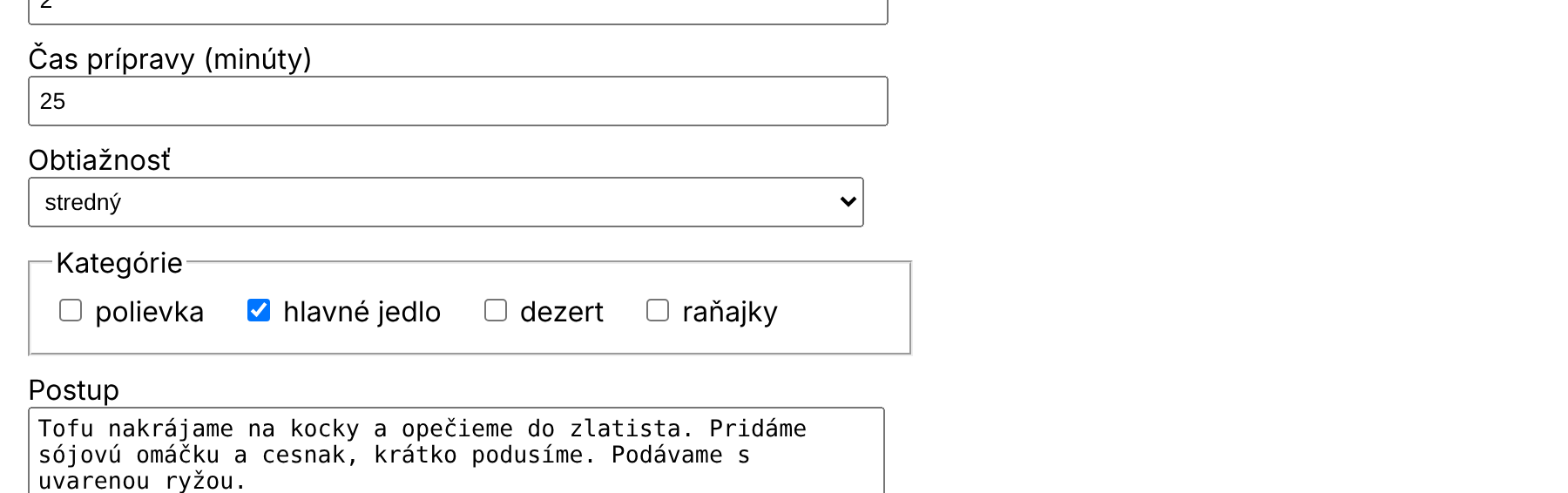
Ján Novák chce pri úprave receptu zaškrtnúť, do ktorých kategórií patrí. Kategória je lookup table a recept ich môže mať viac (M:N cez pivot table), preto nestačí <select> s jednou hodnotou: pre každý záznam lookup table je jeden checkbox. Vo form.twig:
    <fieldset>                                        {# skupina checkboxov: kategórie receptu (pivot table recipe_categories) #}
        <legend>Kategórie</legend>
        {% for c in categories %}                     {# pre každý záznam číselníka jeden checkbox #}
            <label class="check">
                <input type="checkbox" name="categories[]" value="{{ c.id }}"
                       {% if c.id in checked %}checked{% endif %}>   {# [] v mene: PHP z hodnôt urobí pole; checked: id je medzi id receptu #}
                {{ c.name }}
            </label>
        {% endfor %}
    </fieldset>
<fieldset> s <legend> je rámček so skupinou polí a jej názvom. Premenná categories je zoznam záznamov lookup table (CategoryModel::getAll()), premenná checked je pole id kategórií, ktoré recept už má, napríklad [2]. Operátor in v Twigu: c.id in checked je pravda, keď je číslo c.id v poli checked. Výsledok v HTML pre recept č. 2:
<fieldset>
    <legend>Kategórie</legend>
    <label class="check"><input type="checkbox" name="categories[]" value="1"> polievka</label>
    <label class="check"><input type="checkbox" name="categories[]" value="2" checked> hlavné jedlo</label>
    <label class="check"><input type="checkbox" name="categories[]" value="3"> dezert</label>
    <label class="check"><input type="checkbox" name="categories[]" value="4"> raňajky</label>
</fieldset>
Hranaté zátvorky v name="categories[]" sú pre PHP: keď Ján zaškrtne hlavné jedlo a dezert, prehliadač pošle v tele request categories[]=2&categories[]=3 (zátvorky zakóduje ako %5B%5D, PHP ich pri čítaní vráti) a PHP z toho urobí pole $_POST['categories'] = ['2', '3']. Bez zátvoriek by v $_POST['categories'] ostala len posledná hodnota '3'. Keď Ján nezaškrtne nič, prehliadač pole categories vôbec nepošle.
Request::postArray(): viac hodnôt z jedného poľa formulára
Ján Novák chce v controlleri dostať id zaškrtnutých kategórií ako pole. Request::post('title') vracia jeden text. Pre checkbox pribudne v Request metóda, ktorá vráti pole:
    /**
     * Viac hodnôt s rovnakým menom poľa. Checkboxy <input type="checkbox" name="categories[]" value="2"> a value="3":
     * PHP z hranatých zátvoriek v mene urobí pole, $_POST['categories'] = ['2', '3'] a postArray('categories') ho vráti.
     * Keď nie je zaškrtnutý žiadny checkbox, prehliadač pole vôbec nepošle → vráti [] (prázdne pole).
     * Hodnoty sú text ('2'); na čísla ich prevedie controller.
     */
    public function postArray(string $key): array
    {
        $value = $this->post[$key] ?? [];
        return is_array($value) ? $value : [];
    }
$this->post[$key] ?? []: keď Ján nezaškrtne nič, kľúč categories v $_POST chýba a metóda vráti []. is_array($value) overí, že hodnota je pole – z checkbox s [] v mene prichádza vždy pole. V RecipeController z textov vzniknú čísla:
    /**
     * Id zaškrtnutých kategórií z checkboxov name="categories[]". postArray() vráti texty ['2', '4'],
     * array_map s 'intval' z každého urobí číslo: [2, 4]. Bez zaškrtnutia → [].
     */
    private function readCategoryIds(Request $request): array
    {
        return array_map('intval', $request->postArray('categories'));
    }
array_map('intval', ['2', '4']) zavolá funkciu intval() (text na celé číslo) na každý prvok a vráti nové pole [2, 4].
Zápis do pivot table: DELETE a INSERT
Ján Novák chce, aby po uložení formulára mal recept tie kategórie, ktoré zaškrtol. V pivot table recipe_categories má recept č. 2 riadok (2, 2). Ján zaškrtne hlavné jedlo a dezert → majú tam byť riadky (2, 2) a (2, 3). Najjednoduchší postup: zmazať všetky riadky receptu a vložiť riadok pre každé zaškrtnuté id. Metóda v RecipeModel:
    /**
     * Zapíše kategórie receptu do pivot table: najprv zmaže všetky riadky receptu, potom vloží riadok pre každé id.
     * saveCategories(2, [2, 3]) → DELETE ... WHERE recipe_id = 2;  INSERT (2, 2);  INSERT (2, 3)
     * DELETE + INSERT je jednoduchšie než zisťovať, ktoré kategórie pribudli a ktoré ubudli.
     * private: volá sa len z insert() a update(), ktoré ju obalia transakciou – sama transakciu nezačína.
     */
    private function saveCategories(int $recipeId, array $categoryIds): void
    {
        $del = $this->pdo->prepare("DELETE FROM recipe_categories WHERE recipe_id = :id");
        $del->execute([':id' => $recipeId]);                       // po tomto riadku recept nemá žiadnu kategóriu

        $ins = $this->pdo->prepare("INSERT INTO recipe_categories (recipe_id, category_id) VALUES (:recipe_id, :category_id)");
        foreach ($categoryIds as $categoryId) {                    // pre [2, 3]: dva INSERT
            $ins->execute([':recipe_id' => $recipeId, ':category_id' => $categoryId]);
        }
    }
prepare() sa volá raz, execute() v cykle s inými hodnotami: ten istý pripravený príkaz sa spustí pre každé id. Čo sa deje v pivot table pre recept č. 2 a [2, 3]:
pred:      (2, 2)
DELETE:    (žiadny riadok pre recipe_id = 2)
INSERT:    (2, 2)
INSERT:    (2, 2) (2, 3)
Medzi DELETE a posledným INSERT je chvíľa, keď recept kategórie nemá alebo má len časť. Keby v tej chvíli nastala chyba, recept by ostal bez kategórií. To rieši transakcia.
Transakcia: buď všetko, alebo nič
Ján Novák chce, aby sa pri ukladaní receptu s kategóriami zapísalo buď všetko (recept aj všetky kategórie), alebo nič. Zápis receptu je viac príkazov SQL: UPDATE recipes, DELETE FROM recipe_categories, INSERT INTO recipe_categories pre každú kategóriu. Databáza ich vykonáva po jednom. Keď INSERT zlyhá (napríklad category_id 999, ktoré v lookup table nie je – foreign key ho odmietne), UPDATE a DELETE už prebehli: recept je zmenený a kategórie zmazané.
Skús to v Adminer → SQL command (po jednom príkaze), na recepte č. 3, ktorý má kategórie dezert a raňajky:
DELETE FROM recipe_categories WHERE recipe_id = 3;                   -- prebehne: recept 3 nemá kategórie
INSERT INTO recipe_categories (recipe_id, category_id) VALUES (3, 999);
-- chyba: Cannot add or update a child row: a foreign key constraint fails
SELECT * FROM recipe_categories WHERE recipe_id = 3;                 -- vráti 0 riadkov: kategórie sú preč, nič ich nevrátilo
Oprava: INSERT INTO recipe_categories VALUES (3, 3), (3, 4);
Transakcia je skupina príkazov SQL, ktoré databáza vykoná ako jeden celok. Príkazy PDO:
$pdo->beginTransaction()– začiatok. Od tejto chvíle databáza zmeny len pripravuje; v tabuľkách ich vidí len toto pripojenie.$pdo->commit()– koniec, všetko pripravené sa zapíše naraz.$pdo->rollBack()– koniec, všetko pripravené sa zahodí; tabuľky sú v stave spredbeginTransaction().
Transakcia v RecipeModel::update():
    /**
     * Upraví recept podľa id aj jeho kategórie. $data má tie isté kľúče ako insert() okrem user_id (autor sa nemení).
     * update(2, ['title' => 'Tofu curry', ...], [2, 3]) → UPDATE receptu 2 a jeho kategórie sú odteraz 2 a 3.
     * Transakcia ako v insert(): UPDATE recipes, DELETE a INSERT v recipe_categories sa zapíšu buď všetky, alebo žiadny.
     */
    public function update(int $id, array $data, array $categoryIds = []): bool
    {
        $this->pdo->beginTransaction();
        try {
            $sql = "UPDATE recipes
                    SET title = :title, servings = :servings, prep_time = :prep_time,
                        instructions = :instructions, difficulty_id = :difficulty_id
                    WHERE id = :id";
            $stmt = $this->pdo->prepare($sql);
            $stmt->execute([
                ':title'         => $data['title'],
                ':servings'      => $data['servings'],
                ':prep_time'     => $data['prep_time'],
                ':instructions'  => $data['instructions'],
                ':difficulty_id' => $data['difficulty_id'],
                ':id'            => $id,
            ]);

            $this->saveCategories($id, $categoryIds);               // staré riadky pivot table preč, nové dnu

            $this->pdo->commit();
            return true;
        } catch (Throwable $e) {
            $this->pdo->rollBack();                                 // recept ostane presne taký, aký bol pred úpravou
            throw $e;
        }
    }
try { … } catch (Throwable $e) { … }: PHP vykonáva príkazy v bloku try. Keď niektorý z nich skončí chybou (PDO pri chybe SQL vyhodí výnimku, lebo Database.php má ATTR_ERRMODE => ERRMODE_EXCEPTION), PHP preskočí zvyšok bloku try a vykoná blok catch; $e je objekt s popisom chyby. Throwable je spoločný typ všetkých chýb a výnimiek v PHP. throw $e chybu pošle ďalej – zobrazí ju PHP (pri debug => true) tak, ako každú inú chybu. Na začiatku súboru je k tomu riadok use Throwable;.
Čo sa stane pre recept č. 2 a [2, 999]:
beginTransaction()
UPDATE recipes SET title = 'Tofu curry' … WHERE id = 2     -- pripravené
DELETE FROM recipe_categories WHERE recipe_id = 2          -- pripravené
INSERT INTO recipe_categories VALUES (2, 2)                -- pripravené
INSERT INTO recipe_categories VALUES (2, 999)              -- chyba: foreign key → výnimka → blok catch
rollBack()                                                 -- všetko pripravené zahodené
výsledok v databáze: title = 'Tofu na sójovej omáčke s ryžou', pivot table (2, 2) – ako pred úpravou
A pre [2, 3]: všetky príkazy prebehnú, commit() ich zapíše naraz; v databáze je nový názov a riadky (2, 2), (2, 3).
insert() má rovnakú stavbu; navyše po INSERT INTO recipes zistí lastInsertId() a kategórie zapíše pre nové id:
    public function insert(array $data, array $categoryIds = []): int
    {
        $this->pdo->beginTransaction();
        try {
            $sql = "INSERT INTO recipes (title, servings, prep_time, instructions, difficulty_id, user_id)
                    VALUES (:title, :servings, :prep_time, :instructions, :difficulty_id, :user_id)";
            $stmt = $this->pdo->prepare($sql);
            $stmt->execute([
                ':title'         => $data['title'],
                ':servings'      => $data['servings'],
                ':prep_time'     => $data['prep_time'],
                ':instructions'  => $data['instructions'],
                ':difficulty_id' => $data['difficulty_id'],
                ':user_id'       => $data['user_id'],               // id prihláseného usera
            ]);
            $id = (int) $this->pdo->lastInsertId();                 // id, ktoré databáza pridelila novému riadku: 5

            $this->saveCategories($id, $categoryIds);               // riadky pivot table pre recept 5

            $this->pdo->commit();                                   // obidva INSERT sa zapíšu naraz
            return $id;
        } catch (Throwable $e) {                                    // chyba v ktoromkoľvek príkaze (zlé category_id, výpadok…)
            $this->pdo->rollBack();                                 // recept ani kategórie sa nezapíšu
            throw $e;                                               // chybu pošle ďalej – zobrazí ju PHP (debug) alebo zachytí volajúci
        }
    }
Pri zlyhaní sa nezapíše ani recept, ani kategórie – v tabuľke recipes sa neobjaví recept bez kategórií.
Čítanie kategórií receptu: getCategories() a getCategoryIds()
Ján Novák chce v detaile receptu vidieť názvy kategórií a vo formulári mať zaškrtnuté tie, ktoré recept má. Metódy getCategories() a getCategoryIds() v RecipeModel, obidve s WHERE rc.recipe_id = :id na pivot table:
    /**
     * Kategórie jedného receptu: riadky číselníka categories, ktoré sú s receptom spojené v pivot table.
     * getCategories(2) → [['id' => 2, 'name' => 'hlavné jedlo']]   (recept 2 má v recipe_categories jeden riadok)
     */
    public function getCategories(int $recipeId): array
    {
        $sql = "SELECT c.id, c.name
                FROM recipe_categories rc
                JOIN categories c ON c.id = rc.category_id       -- z id kategórie jej názov
                WHERE rc.recipe_id = :id
                ORDER BY c.name";
        $stmt = $this->pdo->prepare($sql);
        $stmt->execute([':id' => $recipeId]);
        return $stmt->fetchAll();
    }

    /**
     * Len id kategórií receptu – pre zaškrtnuté checkboxy vo formulári.
     * getCategoryIds(3) → [3, 4]   (recept 3 je dezert aj raňajky)
     */
    public function getCategoryIds(int $recipeId): array
    {
        $stmt = $this->pdo->prepare("SELECT category_id FROM recipe_categories WHERE recipe_id = :id");
        $stmt->execute([':id' => $recipeId]);
        return $stmt->fetchAll(PDO::FETCH_COLUMN);               // FETCH_COLUMN: nie riadky, len hodnoty jedného stĺpca: [3, 4]
    }
SELECT c.id, c.name FROM recipe_categories rc JOIN categories c ON c.id = rc.category_id WHERE rc.recipe_id = 3 ORDER BY c.name vráti:
id | name
---+---------
 3 | dezert
 4 | raňajky
fetchAll() z toho urobí [['id' => 3, 'name' => 'dezert'], ['id' => 4, 'name' => 'raňajky']]. fetchAll(PDO::FETCH_COLUMN) v getCategoryIds() vezme z každého riadku len prvý stĺpec: [3, 4]. V show.twig sa názvy vypíšu za ostatné stĺpce receptu:
    <dt>categories</dt>
    <dd>
    {% if categories is empty %}
        –                                                  {# recept bez kategórie #}
    {% else %}
        {% for c in categories %}{{ c.name }}{% if not loop.last %}, {% endif %}{% endfor %}   {# → hlavné jedlo, dezert #}
    {% endif %}
    </dd>
loop.last je premenná Twigu v cykle for: pravda pri poslednom prvku. Čiarka sa vypíše za každým názvom okrem posledného.
Migrácia: zmena štruktúry ako súbor s číslom
Ján Novák chce mať zapísané, ako sa štruktúra databázy menila, a vedieť tú istú zmenu urobiť znova (na inom počítači, u spolužiaka, v projekte). sql/schema.sql vytvorí tabuľky od nuly – pre databázu, ktorá už má dáta, sa nedá použiť (začína DROP TABLE). Minulý týždeň sa štruktúra zmenila príkazmi v Adminer; o mesiac už nikto presne nevie, ktoré to boli.
Migrácia je súbor SQL s jednou zmenou štruktúry pre databázu, ktorá už má dáta. Pravidlá:
- Súbor leží v
sql/migrations/a má číslo a názov:001_users_role_recipes_user_id.sql,002_index_recipes_title.sql. Číslo určuje poradie. - Spúšťa sa raz, v Adminer → SQL command, v poradí čísel. Spustený súbor sa už nemení; ďalšia zmena je ďalší súbor.
- Tá istá zmena ide aj do
sql/schema.sql, aby čistá inštalácia (schema.sql + seed.sql) dopadla rovnako ako databáza po migráciách.
Migrácia 001 sú príkazy z minulého týždňa, zapísané do súboru (v tvojej databáze už prebehli, znova sa nespúšťajú):
-- Migrácia 001 (týždeň 8): rola user a autor receptu.
-- Spustená raz v Adminer → SQL command, na databáze, ktorá už má dáta. Spustený súbor sa už nemení.
-- Rovnaký výsledok má aj čistá inštalácia zo sql/schema.sql (tam sú stĺpce priamo v CREATE TABLE).

-- 1. rola user: nový user má automaticky 'user'
ALTER TABLE users ADD role VARCHAR(10) NOT NULL DEFAULT 'user';

-- 2. autor receptu; zatiaľ NULL, lebo doteraz uložené recepty autora nemajú
ALTER TABLE recipes ADD user_id INT UNSIGNED NULL;

-- 3. doteraz uloženým receptom nastav autora na id admina (admin má id 1)
UPDATE recipes SET user_id = 1;

-- 4. každý recept má autora → NOT NULL a foreign key na users
ALTER TABLE recipes
    MODIFY user_id INT UNSIGNED NOT NULL,
    ADD FOREIGN KEY (user_id) REFERENCES users(id) ON DELETE RESTRICT;
Migrácia 002 pridáva index na stĺpec title (pojem index je vysvetlený ďalej):
-- Migrácia 002 (týždeň 9): index na stĺpec title v tabuľke recipes.
-- Spustená raz v Adminer → SQL command. Zrýchli WHERE title = '...', WHERE title LIKE 'to%' a ORDER BY title.
-- Pri LIKE '%tofu%' (hľadanie uprostred textu) index nepomôže – databáza musí prejsť všetky riadky.
CREATE INDEX idx_recipes_title ON recipes (title);
Ten istý index v sql/schema.sql, v CREATE TABLE recipes za stĺpcami:
    -- index na title (migrácia 002): zrýchli WHERE title = ..., LIKE 'to%' a ORDER BY title
    INDEX idx_recipes_title (title),
Migrácia spustená znova skončí chybou (Duplicate column name 'role', Duplicate key name 'idx_recipes_title') – chyba je znak, že zmena už prebehla.
Index: rýchle hľadanie podľa stĺpca
Ján Novák chce, aby hľadanie receptu podľa názvu bolo rýchle aj pri tisícoch receptov. Bez indexu databáza pri WHERE title = 'Hummus' prečíta každý riadok tabuľky a porovná názov. Index je pomocná štruktúra databázy: zoradený zoznam hodnôt stĺpca s odkazom na riadok, ako register na konci knihy. S indexom databáza nájde 'Hummus' priamo, bez čítania ostatných riadkov. Index vzniká príkazom:
CREATE INDEX idx_recipes_title ON recipes (title); -- idx_recipes_title: názov indexu; recipes (title): tabuľka a stĺpec
Index sa pri každom INSERT, UPDATE a DELETE prepočíta. Preto index zrýchli čítanie a mierne spomalí zápis; dáva sa na stĺpce, podľa ktorých sa hľadá alebo triedi. Index sa ruší príkazom DROP INDEX idx_recipes_title ON recipes;. Primary key a foreign key majú index automaticky – v Adminer pri tabuľke recipes klik na Indexes: PRIMARY (id), difficulty_id, user_id a po migrácii 002 aj idx_recipes_title (title). To isté vypíše SHOW INDEX FROM recipes.
EXPLAIN je príkaz, ktorý dotaz nevykoná, ale ukáže plán, ako by ho databáza vykonala. V Adminer → SQL command, pred SELECT napíš EXPLAIN. Dôležité stĺpce výsledku: type (ALL = čítanie celej tabuľky; ref, range, index = použitý index), key (ktorý index), rows (koľko riadkov databáza odhaduje prečítať). Výsledky na vzorovej databáze (4 recepty):
EXPLAIN SELECT * FROM recipes WHERE title = 'Kari z červenej šošovice';
type: ref    key: idx_recipes_title   rows: 1      -- index: databáza ide rovno na riadok

EXPLAIN SELECT * FROM recipes WHERE title LIKE 'Kari%';
type: range  key: idx_recipes_title   rows: 1      -- index: začiatok textu je známy, prejde len rozsah 'Kari…'

EXPLAIN SELECT * FROM recipes WHERE title LIKE '%kari%';
type: ALL    key: NULL                rows: 4      -- bez indexu: text uprostred, databáza číta všetky riadky

EXPLAIN SELECT id, title FROM recipes ORDER BY title;
type: index  key: idx_recipes_title   rows: 4      -- index je už zoradený podľa title, databáza ho len prečíta
Hľadanie na stránke /recipes?q=tofu používa LIKE '%tofu%' (text kdekoľvek v názve) – tam index nepomôže; v zoradenom zozname sa nedá nájsť text, ktorý môže začínať čímkoľvek. Index pomôže pri presnej hodnote, pri začiatku textu (LIKE 'Kari%') a pri ORDER BY title. Pri 4 riadkoch rozdiel neuvidíš; pri 100 000 riadkoch je to rozdiel medzi okamžitou odpoveďou a čakaním.
JSON: dáta ako text pre iný program
Ján Novák chce, aby si zoznam receptov mohol prečítať aj program – JavaScript na stránke /recipes (hľadanie bez načítania celej stránky, cv09), mobilná aplikácia, iná webová aplikácia – bez HTML okolo. HTML je pre človeka: nadpisy, tabuľky, odkazy. Program potrebuje len hodnoty a ich názvy. JSON (JavaScript Object Notation) je textový zápis dát, ktorému rozumie každý programovací jazyk: pole PHP ['id' => 2, 'title' => 'Tofu curry', 'servings' => 2] je v JSON
{
    "id": 2,
    "title": "Tofu curry",
    "servings": 2
}
{ } je objekt (dvojice "kľúč": hodnota), [ ] je zoznam, texty sú v úvodzovkách, čísla bez. Funkcia PHP json_encode($pole) vráti tento text; json_decode($text, true) ho zmení späť na pole PHP (true = ako pole, nie ako objekt). Nová static metóda v Response:
    /**
     * Odpoveď pre iný program (JavaScript v prehliadači, mobilná aplikácia, cudzí server): dáta ako JSON, nie HTML.
     * Response::json(['id' => 2, 'title' => 'Tofu na sójovej omáčke s ryžou'])
     *   → telo:      {"id": 2, "title": "Tofu na sójovej omáčke s ryžou"}
     *   → hlavička:  Content-Type: application/json; charset=UTF-8   (prehliadač aj JavaScript vedia, že je to JSON)
     * json_encode(): PHP pole prevedie na text JSON. JSON_UNESCAPED_UNICODE: 'č' ostane 'č' (bez neho by bolo \u010d).
     * JSON_PRETTY_PRINT: každá hodnota na vlastnom riadku, aby sa text dal čítať aj v prehliadači.
     * Druhý parameter je stavový kód: Response::json(['error' => 'Not found'], 404).
     */
    public static function json(array $data, int $status = 200): self
    {
        $body = json_encode($data, JSON_UNESCAPED_UNICODE | JSON_PRETTY_PRINT);
        return new self($body, $status, ['Content-Type' => 'application/json; charset=UTF-8']);
    }
Hlavička Content-Type určuje, čo je v tele odpovede: doteraz vždy text/html; charset=UTF-8 (konštruktor Response ju dopĺňa sám), teraz application/json; charset=UTF-8. Konštruktor hlavičku z parametra ponechá ($headers + [...]: pri rovnakom kľúči ostane ľavá hodnota). | medzi JSON_UNESCAPED_UNICODE a JSON_PRETTY_PRINT spája nastavenia funkcie do jedného parametra.
REST API: adresy, ktoré vracajú JSON
Ján Novák chce pevné adresy, na ktorých program dostane recepty ako JSON. API (Application Programming Interface) je rozhranie pre programy: zoznam adries a tvar dát, ktoré vracajú. REST je dohoda, ako tie adresy stavať: adresa označuje dáta, HTTP metóda operáciu s nimi. Jedna adresa API je endpoint.
| Adresa | HTTP | Čo vráti |
|---|---|---|
/api/recipes |
GET | zoznam všetkých receptov (pole objektov) |
/api/recipes/2 |
GET | jeden recept aj s kategóriami (objekt); neznáme id → {"error": "Not found"} a stavový kód 404 |
/api/categories |
GET | zoznam záznamov lookup table |
Adresy začínajú /api/, aby boli oddelené od stránok pre človeka: /recipes je HTML, /api/recipes je JSON z tých istých dát. Stavové kódy platia rovnako ako pri HTML: 200 nájdené, 404 nenájdené – z kódu je jasné, či odpoveď obsahuje dáta alebo chybu, bez čítania textu. Controller pre API nemá template; každá metóda vráti Response::json():
<?php
declare(strict_types=1);

namespace App\Controller;

use App\Http\Request;
use App\Http\Response;
use App\Model\CategoryModel;
use App\Model\RecipeModel;

/**
 * REST API: tie isté dáta ako stránky, ale ako JSON pre iný program (JavaScript, mobilná aplikácia, cudzí server).
 * Žiadny template – každá metóda vráti Response::json(). Adresy začínajú /api/.
 * Dohoda REST: /api/<entita> = zoznam, /api/<entita>/{id} = jeden record; stavový kód 200 nájdené, 404 nenájdené.
 */
final class ApiController extends BaseController
{
    // GET /api/recipes → pole receptov (to isté, čo getAll() dáva stránke /recipes)
    public function index(Request $request): Response
    {
        $rows = (new RecipeModel())->getAll();                    // [['id' => 4, 'title' => 'Kari z červenej šošovice', …], …]
        return Response::json($rows);                            // → [ {"id": 4, "title": "Kari z červenej šošovice", …}, … ]
    }

    // GET /api/recipes/2 → jeden recept aj s kategóriami; GET /api/recipes/999 → {"error": "Not found"} a stavový kód 404
    public function show(Request $request, int $id): Response
    {
        $model = new RecipeModel();
        $row   = $model->getById($id);                           // pre 2 → pole receptu; pre 999 → null
        if ($row === null) {
            return Response::json(['error' => 'Not found'], 404);   // JSON aj pri chybe: program, ktorý volá API, nečíta HTML
        }
        $row['categories'] = $model->getCategories($id);         // pridá kľúč categories: [{"id": 2, "name": "hlavné jedlo"}]
        return Response::json($row);
    }

    // GET /api/categories → pole záznamov číselníka
    public function categories(Request $request): Response
    {
        return Response::json((new CategoryModel())->getAll());  // → [ {"id": 1, "name": "polievka"}, {"id": 2, "name": "hlavné jedlo"}, … ]
    }
}
$row['categories'] = … pridá do poľa receptu nový kľúč; v JSON vznikne vnorený zoznam. Route v index.php:
// REST API: tie isté dáta ako JSON pre iný program. Len GET, preto bez CSRF tokenu (Router kontroluje token len pri POST).
$router->get('/api/recipes',      [ApiController::class, 'index']);        // zoznam receptov ako JSON
$router->get('/api/recipes/{id}', [ApiController::class, 'show']);         // jeden recept aj s kategóriami; neznáme id → 404 JSON
$router->get('/api/categories',   [ApiController::class, 'categories']);   // záznamy číselníka ako JSON
A use App\Controller\ApiController; medzi ostatné use na začiatku index.php. Router sa nemení: /api/recipes/{id} je route ako každá iná, {id} sa stane (\d+) a číslo príde do show().
Checkboxes for the pivot table: name="categories[]"
Ján Novák wants, when editing a recipe, to tick which categories it belongs to. A category is a lookup table and a recipe can have several (M:N through the pivot table), so a <select> with one value is not enough: there is one checkbox for every record of the lookup table. In form.twig:
    <fieldset>                                        {# skupina checkboxov: kategórie receptu (pivot table recipe_categories) #}
        <legend>Kategórie</legend>
        {% for c in categories %}                     {# pre každý záznam číselníka jeden checkbox #}
            <label class="check">
                <input type="checkbox" name="categories[]" value="{{ c.id }}"
                       {% if c.id in checked %}checked{% endif %}>   {# [] v mene: PHP z hodnôt urobí pole; checked: id je medzi id receptu #}
                {{ c.name }}
            </label>
        {% endfor %}
    </fieldset>
<fieldset> with <legend> is a frame around a group of fields with its name. The variable categories is the list of lookup table records (CategoryModel::getAll()), the variable checked is the array of ids of the categories the recipe already has, for example [2]. The Twig operator in: c.id in checked is true when the number c.id is in the array checked. The result in HTML for recipe no. 2:
<fieldset>
    <legend>Kategórie</legend>
    <label class="check"><input type="checkbox" name="categories[]" value="1"> polievka</label>
    <label class="check"><input type="checkbox" name="categories[]" value="2" checked> hlavné jedlo</label>
    <label class="check"><input type="checkbox" name="categories[]" value="3"> dezert</label>
    <label class="check"><input type="checkbox" name="categories[]" value="4"> raňajky</label>
</fieldset>
The square brackets in name="categories[]" are for PHP: when Ján ticks hlavné jedlo and dezert, the browser sends categories[]=2&categories[]=3 in the request body (the brackets are encoded as %5B%5D, PHP decodes them) and PHP makes the array $_POST['categories'] = ['2', '3'] from it. Without the brackets only the last value '3' would remain in $_POST['categories']. When Ján ticks nothing, the browser does not send the field categories at all.
Request::postArray(): several values from one form field
Ján Novák wants to get the ids of the ticked categories in the controller as an array. Request::post('title') returns one text. For checkboxes a method that returns an array arrives in Request:
    /**
     * Viac hodnôt s rovnakým menom poľa. Checkboxy <input type="checkbox" name="categories[]" value="2"> a value="3":
     * PHP z hranatých zátvoriek v mene urobí pole, $_POST['categories'] = ['2', '3'] a postArray('categories') ho vráti.
     * Keď nie je zaškrtnutý žiadny checkbox, prehliadač pole vôbec nepošle → vráti [] (prázdne pole).
     * Hodnoty sú text ('2'); na čísla ich prevedie controller.
     */
    public function postArray(string $key): array
    {
        $value = $this->post[$key] ?? [];
        return is_array($value) ? $value : [];
    }
$this->post[$key] ?? []: when Ján ticks nothing, the key categories is missing in $_POST and the method returns []. is_array($value) checks that the value is an array – from a checkbox with [] in its name an array always arrives. In RecipeController the texts become numbers:
    /**
     * Id zaškrtnutých kategórií z checkboxov name="categories[]". postArray() vráti texty ['2', '4'],
     * array_map s 'intval' z každého urobí číslo: [2, 4]. Bez zaškrtnutia → [].
     */
    private function readCategoryIds(Request $request): array
    {
        return array_map('intval', $request->postArray('categories'));
    }
array_map('intval', ['2', '4']) calls the function intval() (text to integer) on every element and returns a new array [2, 4].
Writing the pivot table: DELETE and INSERT
Ján Novák wants the recipe, after saving the form, to have the categories he ticked. In the pivot table recipe_categories recipe no. 2 has the row (2, 2). Ján ticks hlavné jedlo and dezert → the rows (2, 2) and (2, 3) should be there. The simplest procedure: delete all rows of the recipe and insert a row for every ticked id. The method in RecipeModel:
    /**
     * Zapíše kategórie receptu do pivot table: najprv zmaže všetky riadky receptu, potom vloží riadok pre každé id.
     * saveCategories(2, [2, 3]) → DELETE ... WHERE recipe_id = 2;  INSERT (2, 2);  INSERT (2, 3)
     * DELETE + INSERT je jednoduchšie než zisťovať, ktoré kategórie pribudli a ktoré ubudli.
     * private: volá sa len z insert() a update(), ktoré ju obalia transakciou – sama transakciu nezačína.
     */
    private function saveCategories(int $recipeId, array $categoryIds): void
    {
        $del = $this->pdo->prepare("DELETE FROM recipe_categories WHERE recipe_id = :id");
        $del->execute([':id' => $recipeId]);                       // po tomto riadku recept nemá žiadnu kategóriu

        $ins = $this->pdo->prepare("INSERT INTO recipe_categories (recipe_id, category_id) VALUES (:recipe_id, :category_id)");
        foreach ($categoryIds as $categoryId) {                    // pre [2, 3]: dva INSERT
            $ins->execute([':recipe_id' => $recipeId, ':category_id' => $categoryId]);
        }
    }
prepare() is called once, execute() in a loop with other values: the same prepared statement runs for every id. What happens in the pivot table for recipe no. 2 and [2, 3]:
before:    (2, 2)
DELETE:    (no row for recipe_id = 2)
INSERT:    (2, 2)
INSERT:    (2, 2) (2, 3)
Between DELETE and the last INSERT there is a moment when the recipe has no categories or only some of them. If an error happened at that moment, the recipe would stay without categories. The transaction solves this.
Transaction: all or nothing
Ján Novák wants, when he saves a recipe with categories, either everything to be written (the recipe and all categories) or nothing. Writing a recipe is several SQL commands: UPDATE recipes, DELETE FROM recipe_categories, INSERT INTO recipe_categories for each category. The database runs them one by one. When an INSERT fails (for example category_id 999, which is not in the lookup table – the foreign key rejects it), UPDATE and DELETE have already run: the recipe is changed and the categories deleted.
Try it in Adminer → SQL command (one command at a time), on recipe no. 3, which has the categories dezert and raňajky:
DELETE FROM recipe_categories WHERE recipe_id = 3;                   -- runs: recipe 3 has no categories
INSERT INTO recipe_categories (recipe_id, category_id) VALUES (3, 999);
-- error: Cannot add or update a child row: a foreign key constraint fails
SELECT * FROM recipe_categories WHERE recipe_id = 3;                 -- returns 0 rows: the categories are gone, nothing brought them back
Repair: INSERT INTO recipe_categories VALUES (3, 3), (3, 4);
A transaction is a group of SQL commands that the database executes as one unit. The PDO commands:
$pdo->beginTransaction()– the start. From this moment the database only prepares the changes; only this connection sees them in the tables.$pdo->commit()– the end, everything prepared is written at once.$pdo->rollBack()– the end, everything prepared is discarded; the tables are in the state from beforebeginTransaction().
The transaction in RecipeModel::update():
    /**
     * Upraví recept podľa id aj jeho kategórie. $data má tie isté kľúče ako insert() okrem user_id (autor sa nemení).
     * update(2, ['title' => 'Tofu curry', ...], [2, 3]) → UPDATE receptu 2 a jeho kategórie sú odteraz 2 a 3.
     * Transakcia ako v insert(): UPDATE recipes, DELETE a INSERT v recipe_categories sa zapíšu buď všetky, alebo žiadny.
     */
    public function update(int $id, array $data, array $categoryIds = []): bool
    {
        $this->pdo->beginTransaction();
        try {
            $sql = "UPDATE recipes
                    SET title = :title, servings = :servings, prep_time = :prep_time,
                        instructions = :instructions, difficulty_id = :difficulty_id
                    WHERE id = :id";
            $stmt = $this->pdo->prepare($sql);
            $stmt->execute([
                ':title'         => $data['title'],
                ':servings'      => $data['servings'],
                ':prep_time'     => $data['prep_time'],
                ':instructions'  => $data['instructions'],
                ':difficulty_id' => $data['difficulty_id'],
                ':id'            => $id,
            ]);

            $this->saveCategories($id, $categoryIds);               // staré riadky pivot table preč, nové dnu

            $this->pdo->commit();
            return true;
        } catch (Throwable $e) {
            $this->pdo->rollBack();                                 // recept ostane presne taký, aký bol pred úpravou
            throw $e;
        }
    }
try { … } catch (Throwable $e) { … }: PHP executes the commands in the try block. When one of them ends with an error (PDO throws an exception on an SQL error, because Database.php has ATTR_ERRMODE => ERRMODE_EXCEPTION), PHP skips the rest of the try block and executes the catch block; $e is an object describing the error. Throwable is the common type of all errors and exceptions in PHP. throw $e passes the error on – PHP shows it (with debug => true) like any other error. At the top of the file there is the line use Throwable; for it.
What happens for recipe no. 2 and [2, 999]:
beginTransaction()
UPDATE recipes SET title = 'Tofu curry' … WHERE id = 2     -- prepared
DELETE FROM recipe_categories WHERE recipe_id = 2          -- prepared
INSERT INTO recipe_categories VALUES (2, 2)                -- prepared
INSERT INTO recipe_categories VALUES (2, 999)              -- error: foreign key → exception → catch block
rollBack()                                                 -- everything prepared discarded
result in the database: title = 'Tofu na sójovej omáčke s ryžou', pivot table (2, 2) – as before the edit
And for [2, 3]: all commands run, commit() writes them at once; the database has the new title and the rows (2, 2), (2, 3).
insert() has the same structure; in addition, after INSERT INTO recipes it reads lastInsertId() and writes the categories for the new id:
    public function insert(array $data, array $categoryIds = []): int
    {
        $this->pdo->beginTransaction();
        try {
            $sql = "INSERT INTO recipes (title, servings, prep_time, instructions, difficulty_id, user_id)
                    VALUES (:title, :servings, :prep_time, :instructions, :difficulty_id, :user_id)";
            $stmt = $this->pdo->prepare($sql);
            $stmt->execute([
                ':title'         => $data['title'],
                ':servings'      => $data['servings'],
                ':prep_time'     => $data['prep_time'],
                ':instructions'  => $data['instructions'],
                ':difficulty_id' => $data['difficulty_id'],
                ':user_id'       => $data['user_id'],               // id prihláseného usera
            ]);
            $id = (int) $this->pdo->lastInsertId();                 // id, ktoré databáza pridelila novému riadku: 5

            $this->saveCategories($id, $categoryIds);               // riadky pivot table pre recept 5

            $this->pdo->commit();                                   // obidva INSERT sa zapíšu naraz
            return $id;
        } catch (Throwable $e) {                                    // chyba v ktoromkoľvek príkaze (zlé category_id, výpadok…)
            $this->pdo->rollBack();                                 // recept ani kategórie sa nezapíšu
            throw $e;                                               // chybu pošle ďalej – zobrazí ju PHP (debug) alebo zachytí volajúci
        }
    }
On failure neither the recipe nor the categories are written – no recipe without categories appears in the table recipes.
Reading the recipe’s categories: getCategories() and getCategoryIds()
Ján Novák wants to see the category names in the recipe detail and to have the recipe’s categories ticked in the form. The methods getCategories() and getCategoryIds() in RecipeModel, both with WHERE rc.recipe_id = :id on the pivot table:
    /**
     * Kategórie jedného receptu: riadky číselníka categories, ktoré sú s receptom spojené v pivot table.
     * getCategories(2) → [['id' => 2, 'name' => 'hlavné jedlo']]   (recept 2 má v recipe_categories jeden riadok)
     */
    public function getCategories(int $recipeId): array
    {
        $sql = "SELECT c.id, c.name
                FROM recipe_categories rc
                JOIN categories c ON c.id = rc.category_id       -- z id kategórie jej názov
                WHERE rc.recipe_id = :id
                ORDER BY c.name";
        $stmt = $this->pdo->prepare($sql);
        $stmt->execute([':id' => $recipeId]);
        return $stmt->fetchAll();
    }

    /**
     * Len id kategórií receptu – pre zaškrtnuté checkboxy vo formulári.
     * getCategoryIds(3) → [3, 4]   (recept 3 je dezert aj raňajky)
     */
    public function getCategoryIds(int $recipeId): array
    {
        $stmt = $this->pdo->prepare("SELECT category_id FROM recipe_categories WHERE recipe_id = :id");
        $stmt->execute([':id' => $recipeId]);
        return $stmt->fetchAll(PDO::FETCH_COLUMN);               // FETCH_COLUMN: nie riadky, len hodnoty jedného stĺpca: [3, 4]
    }
SELECT c.id, c.name FROM recipe_categories rc JOIN categories c ON c.id = rc.category_id WHERE rc.recipe_id = 3 ORDER BY c.name returns:
id | name
---+---------
 3 | dezert
 4 | raňajky
fetchAll() makes [['id' => 3, 'name' => 'dezert'], ['id' => 4, 'name' => 'raňajky']] from it. fetchAll(PDO::FETCH_COLUMN) in getCategoryIds() takes only the first column of every row: [3, 4]. In show.twig the names are printed after the other columns of the recipe:
    <dt>categories</dt>
    <dd>
    {% if categories is empty %}
        –                                                  {# recept bez kategórie #}
    {% else %}
        {% for c in categories %}{{ c.name }}{% if not loop.last %}, {% endif %}{% endfor %}   {# → hlavné jedlo, dezert #}
    {% endif %}
    </dd>
loop.last is a Twig variable inside a for loop: true at the last element. The comma is printed after every name except the last.
Migration: a structure change as a numbered file
Ján Novák wants to have written down how the database structure changed, and to be able to make the same change again (on another computer, at a classmate’s, in the project). sql/schema.sql creates the tables from scratch – it cannot be used on a database that already has data (it starts with DROP TABLE). Last week the structure changed through commands in Adminer; in a month nobody knows exactly which ones.
A migration is an SQL file with one structure change for a database that already has data. The rules:
- The file lies in
sql/migrations/and has a number and a name:001_users_role_recipes_user_id.sql,002_index_recipes_title.sql. The number determines the order. - It runs once, in Adminer → SQL command, in the order of the numbers. A file that has run is not changed any more; the next change is the next file.
- The same change goes into
sql/schema.sqltoo, so that a clean installation (schema.sql + seed.sql) ends up the same as the database after the migrations.
Migration 001 is last week’s commands, written into a file (in your database they have already run, they are not run again):
-- Migrácia 001 (týždeň 8): rola user a autor receptu.
-- Spustená raz v Adminer → SQL command, na databáze, ktorá už má dáta. Spustený súbor sa už nemení.
-- Rovnaký výsledok má aj čistá inštalácia zo sql/schema.sql (tam sú stĺpce priamo v CREATE TABLE).

-- 1. rola user: nový user má automaticky 'user'
ALTER TABLE users ADD role VARCHAR(10) NOT NULL DEFAULT 'user';

-- 2. autor receptu; zatiaľ NULL, lebo doteraz uložené recepty autora nemajú
ALTER TABLE recipes ADD user_id INT UNSIGNED NULL;

-- 3. doteraz uloženým receptom nastav autora na id admina (admin má id 1)
UPDATE recipes SET user_id = 1;

-- 4. každý recept má autora → NOT NULL a foreign key na users
ALTER TABLE recipes
    MODIFY user_id INT UNSIGNED NOT NULL,
    ADD FOREIGN KEY (user_id) REFERENCES users(id) ON DELETE RESTRICT;
Migration 002 adds an index on the column title (the term index is explained further on):
-- Migrácia 002 (týždeň 9): index na stĺpec title v tabuľke recipes.
-- Spustená raz v Adminer → SQL command. Zrýchli WHERE title = '...', WHERE title LIKE 'to%' a ORDER BY title.
-- Pri LIKE '%tofu%' (hľadanie uprostred textu) index nepomôže – databáza musí prejsť všetky riadky.
CREATE INDEX idx_recipes_title ON recipes (title);
The same index in sql/schema.sql, in CREATE TABLE recipes after the columns:
    -- index na title (migrácia 002): zrýchli WHERE title = ..., LIKE 'to%' a ORDER BY title
    INDEX idx_recipes_title (title),
A migration run again ends with an error (Duplicate column name 'role', Duplicate key name 'idx_recipes_title') – the error is the sign that the change has already happened.
Index: fast lookup by a column
Ján Novák wants searching a recipe by title to be fast even with thousands of recipes. Without an index the database, for WHERE title = 'Hummus', reads every row of the table and compares the title. An index is an auxiliary structure of the database: a sorted list of the column’s values with a pointer to the row, like the index at the back of a book. With the index the database finds 'Hummus' directly, without reading the other rows. The index is created with:
CREATE INDEX idx_recipes_title ON recipes (title); -- idx_recipes_title: the index name; recipes (title): table and column
The index is recomputed at every INSERT, UPDATE and DELETE. So an index speeds up reading and slightly slows down writing; it goes on columns used for searching or sorting. An index is removed with DROP INDEX idx_recipes_title ON recipes;. A primary key and a foreign key have an index automatically – in Adminer at the table recipes click Indexes: PRIMARY (id), difficulty_id, user_id and after migration 002 also idx_recipes_title (title). SHOW INDEX FROM recipes prints the same.
EXPLAIN is a command that does not run a query but shows the plan of how the database would run it. In Adminer → SQL command, write EXPLAIN before the SELECT. The important columns of the result: type (ALL = reading the whole table; ref, range, index = an index used), key (which index), rows (how many rows the database estimates to read). Results on the sample database (4 recipes):
EXPLAIN SELECT * FROM recipes WHERE title = 'Kari z červenej šošovice';
type: ref    key: idx_recipes_title   rows: 1      -- index: the database goes straight to the row

EXPLAIN SELECT * FROM recipes WHERE title LIKE 'Kari%';
type: range  key: idx_recipes_title   rows: 1      -- index: the start of the text is known, only the range 'Kari…' is scanned

EXPLAIN SELECT * FROM recipes WHERE title LIKE '%kari%';
type: ALL    key: NULL                rows: 4      -- no index: text in the middle, the database reads all rows

EXPLAIN SELECT id, title FROM recipes ORDER BY title;
type: index  key: idx_recipes_title   rows: 4      -- the index is already sorted by title, the database just reads it
The search on the page /recipes?q=tofu uses LIKE '%tofu%' (text anywhere in the title) – the index does not help there; in a sorted list there is no place to look for a text that can start with anything. The index helps with an exact value, with the start of a text (LIKE 'Kari%') and with ORDER BY title. With 4 rows you will see no difference; with 100 000 rows it is the difference between an instant answer and waiting.
JSON: data as text for another program
Ján Novák wants a program – the JavaScript on the page /recipes (search without loading the whole page, cv09), a mobile application, another web application – to be able to read the recipe list without HTML around it. HTML is for a human: headings, tables, links. A program needs only the values and their names. JSON (JavaScript Object Notation) is a text notation of data understood by every programming language: the PHP array ['id' => 2, 'title' => 'Tofu curry', 'servings' => 2] is in JSON
{
    "id": 2,
    "title": "Tofu curry",
    "servings": 2
}
{ } is an object (pairs "key": value), [ ] is a list, texts are in quotes, numbers without. The PHP function json_encode($array) returns this text; json_decode($text, true) turns it back into a PHP array (true = as an array, not as an object). A new static method in Response:
    /**
     * Odpoveď pre iný program (JavaScript v prehliadači, mobilná aplikácia, cudzí server): dáta ako JSON, nie HTML.
     * Response::json(['id' => 2, 'title' => 'Tofu na sójovej omáčke s ryžou'])
     *   → telo:      {"id": 2, "title": "Tofu na sójovej omáčke s ryžou"}
     *   → hlavička:  Content-Type: application/json; charset=UTF-8   (prehliadač aj JavaScript vedia, že je to JSON)
     * json_encode(): PHP pole prevedie na text JSON. JSON_UNESCAPED_UNICODE: 'č' ostane 'č' (bez neho by bolo \u010d).
     * JSON_PRETTY_PRINT: každá hodnota na vlastnom riadku, aby sa text dal čítať aj v prehliadači.
     * Druhý parameter je stavový kód: Response::json(['error' => 'Not found'], 404).
     */
    public static function json(array $data, int $status = 200): self
    {
        $body = json_encode($data, JSON_UNESCAPED_UNICODE | JSON_PRETTY_PRINT);
        return new self($body, $status, ['Content-Type' => 'application/json; charset=UTF-8']);
    }
The header Content-Type determines what is in the response body: so far always text/html; charset=UTF-8 (the Response constructor adds it itself), now application/json; charset=UTF-8. The constructor keeps the header from the parameter ($headers + [...]: on the same key the left value stays). | between JSON_UNESCAPED_UNICODE and JSON_PRETTY_PRINT joins the function’s settings into one parameter.
REST API: addresses that return JSON
Ján Novák wants fixed addresses where a program gets the recipes as JSON. An API (Application Programming Interface) is an interface for programs: a list of addresses and the shape of the data they return. REST is a convention for building those addresses: the address denotes the data, the HTTP method the operation on it. One API address is an endpoint.
| Address | HTTP | What it returns |
|---|---|---|
/api/recipes |
GET | the list of all recipes (an array of objects) |
/api/recipes/2 |
GET | one recipe with its categories (an object); unknown id → {"error": "Not found"} and status code 404 |
/api/categories |
GET | the list of lookup table records |
The addresses start with /api/ to be separate from the pages for humans: /recipes is HTML, /api/recipes is JSON from the same data. The status codes apply as with HTML: 200 found, 404 not found – the code makes clear whether the response contains data or an error, without reading the text. The API controller has no template; every method returns Response::json():
<?php
declare(strict_types=1);

namespace App\Controller;

use App\Http\Request;
use App\Http\Response;
use App\Model\CategoryModel;
use App\Model\RecipeModel;

/**
 * REST API: tie isté dáta ako stránky, ale ako JSON pre iný program (JavaScript, mobilná aplikácia, cudzí server).
 * Žiadny template – každá metóda vráti Response::json(). Adresy začínajú /api/.
 * Dohoda REST: /api/<entita> = zoznam, /api/<entita>/{id} = jeden record; stavový kód 200 nájdené, 404 nenájdené.
 */
final class ApiController extends BaseController
{
    // GET /api/recipes → pole receptov (to isté, čo getAll() dáva stránke /recipes)
    public function index(Request $request): Response
    {
        $rows = (new RecipeModel())->getAll();                    // [['id' => 4, 'title' => 'Kari z červenej šošovice', …], …]
        return Response::json($rows);                            // → [ {"id": 4, "title": "Kari z červenej šošovice", …}, … ]
    }

    // GET /api/recipes/2 → jeden recept aj s kategóriami; GET /api/recipes/999 → {"error": "Not found"} a stavový kód 404
    public function show(Request $request, int $id): Response
    {
        $model = new RecipeModel();
        $row   = $model->getById($id);                           // pre 2 → pole receptu; pre 999 → null
        if ($row === null) {
            return Response::json(['error' => 'Not found'], 404);   // JSON aj pri chybe: program, ktorý volá API, nečíta HTML
        }
        $row['categories'] = $model->getCategories($id);         // pridá kľúč categories: [{"id": 2, "name": "hlavné jedlo"}]
        return Response::json($row);
    }

    // GET /api/categories → pole záznamov číselníka
    public function categories(Request $request): Response
    {
        return Response::json((new CategoryModel())->getAll());  // → [ {"id": 1, "name": "polievka"}, {"id": 2, "name": "hlavné jedlo"}, … ]
    }
}
$row['categories'] = … adds a new key to the recipe array; in JSON a nested list appears. The routes in index.php:
// REST API: tie isté dáta ako JSON pre iný program. Len GET, preto bez CSRF tokenu (Router kontroluje token len pri POST).
$router->get('/api/recipes',      [ApiController::class, 'index']);        // zoznam receptov ako JSON
$router->get('/api/recipes/{id}', [ApiController::class, 'show']);         // jeden recept aj s kategóriami; neznáme id → 404 JSON
$router->get('/api/categories',   [ApiController::class, 'categories']);   // záznamy číselníka ako JSON
And use App\Controller\ApiController; among the other use lines at the top of index.php. The Router stays as it is: /api/recipes/{id} is a route like any other, {id} becomes (\d+) and the number arrives in show().
Ako to fungujeHow it works
Ján upraví kategórie receptu
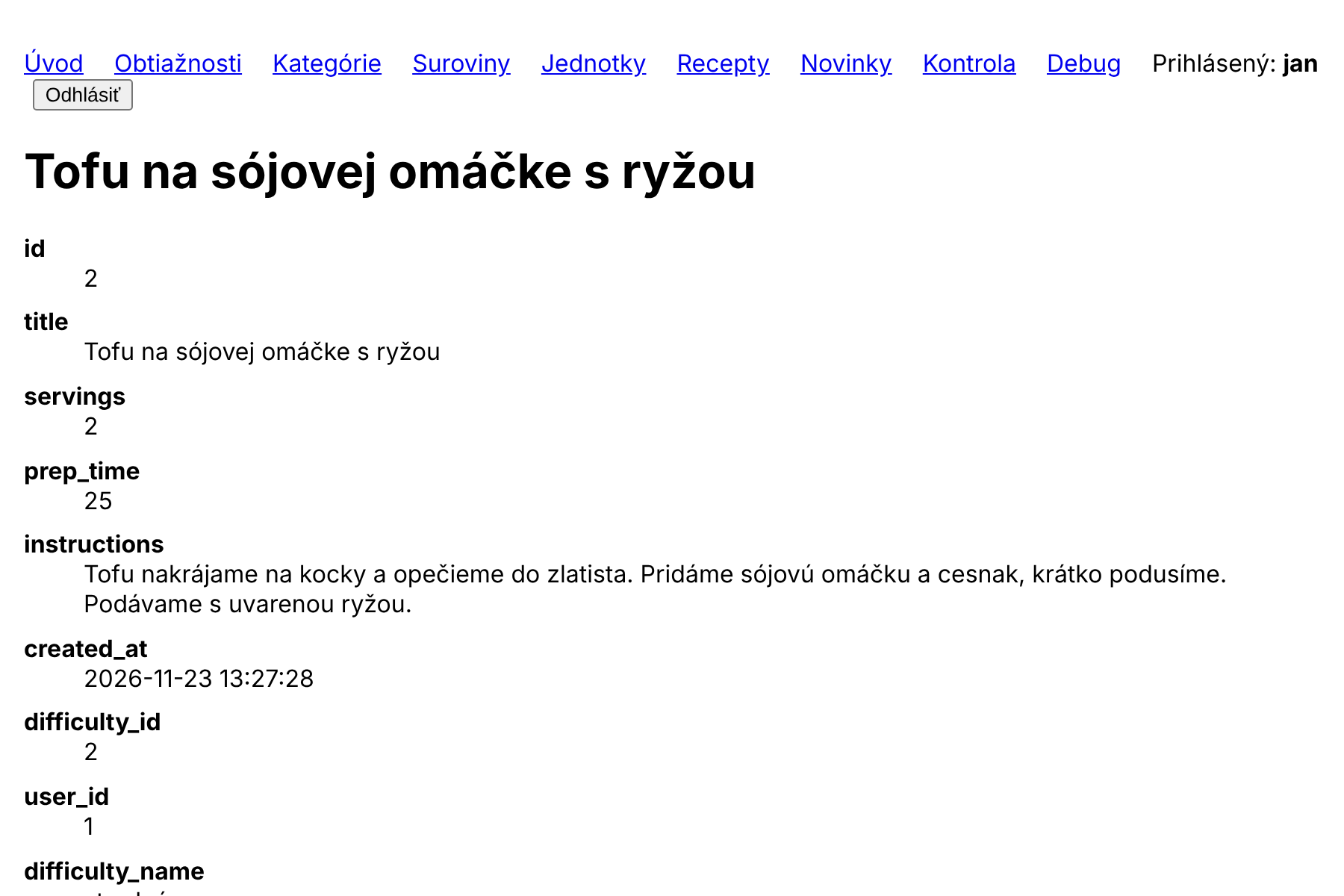
Ján Novák chce k receptu č. 2 Tofu na sójovej omáčke s ryžou (kategória hlavné jedlo) pridať kategóriu dezert a zmeniť názov na Tofu curry. V detaile klikne na Upraviť, zaškrtne dezert, prepíše názov, klikne Uložiť. Prehliadač pošle GET /recipes/2/edit a potom POST /recipes/2.
Request 1: GET /recipes/2/edit. Router → RecipeController::edit($request, 2). Kontroly sú z minulého týždňa (requireLogin(), record alebo 404, authorize()); do poľa pre template pribudli categories a checked:
        return $this->render('form', [
            'title'        => 'Upraviť recept',
            'action'       => '/recipes/' . $id,                   // kam sa formulár odošle: POST /recipes/5 → update()
            'difficulties' => (new DifficultyModel())->getAll(),
            'categories'   => (new CategoryModel())->getAll(),     // [['id' => 1, 'name' => 'polievka'], …, ['id' => 4, 'name' => 'raňajky']]
            'checked'      => $model->getCategoryIds($id),         // id kategórií receptu z pivot table: [2] → zaškrtnuté
            'old'          => $row,                                // formulár vyplní hodnotami z databázy
            'errors'       => [],
        ]);
form.twig vypíše checkbox pre každú kategóriu, pri value="2" je checked. Na začiatku súboru je use App\Model\CategoryModel;.
Request 2: POST /recipes/2. Telo request: csrf=f3a9…&title=Tofu+curry&servings=2&prep_time=25&instructions=…&difficulty_id=2&categories[]=2&categories[]=3. Router skontroluje CSRF token a zavolá update($request, 2):
        $data        = $this->readForm($request);                  // ['title' => 'Tofu curry', 'servings' => 2, …]
        $categoryIds = $this->readCategoryIds($request);           // [2, 3]
        $errors      = $this->validate($data);                     // [] – všetko v poriadku
        if ($errors !== []) {
            $data['id'] = $id;                                     // aby action vo formulári ukázal späť na /recipes/5
            return $this->render('form', [
                'title'        => 'Upraviť recept',
                'action'       => '/recipes/' . $id,
                'difficulties' => (new DifficultyModel())->getAll(),
                'categories'   => (new CategoryModel())->getAll(),
                'checked'      => $categoryIds,                    // čo user zaškrtol, ostane zaškrtnuté aj pri chybe
                'old'          => $data,
                'errors'       => $errors,
            ]);
        }

        $model->update($id, $data, $categoryIds);                  // UPDATE receptu aj kategórií v transakcii
        flash('Zmeny boli uložené.');
        return Response::redirect('/recipes/' . $id);
$model->update(2, $data, [2, 3]) na sigma.tuke.sk v databáze:
beginTransaction()UPDATE recipes SET title = 'Tofu curry', … WHERE id = 2saveCategories(2, [2, 3]):DELETE FROM recipe_categories WHERE recipe_id = 2→INSERT (2, 2)→INSERT (2, 3)commit()– všetko sa zapíše naraz
Odpoveď je redirect na /recipes/2; prehliadač pošle GET /recipes/2, show() zavolá getById(2) a getCategories(2) a show.twig vypíše categories: dezert, hlavné jedlo.
Program si vypýta recept cez API
Program chce (JavaScript na našej stránke /recipes, cv09): dáta receptu č. 2 bez HTML. Pošle GET /student/jan.novak/it/cv08/api/recipes/2. Na sigma.tuke.sk:
- Apache podľa
.htaccessspustíindex.php. Request::fromGlobals()→path()je/api/recipes/2.- Router: vzor
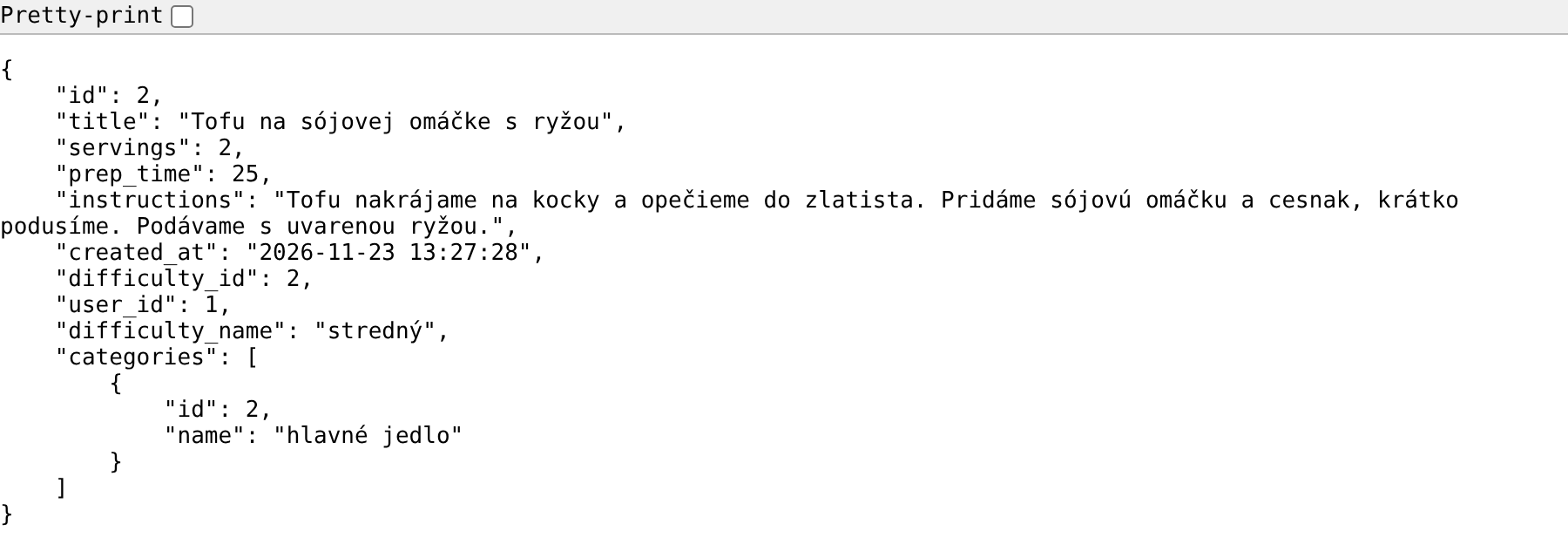
#^/api/recipes/(\d+)$#sedí →ApiController::show($request, 2). getById(2)→ pole receptu;getCategories(2)→[['id' => 2, 'name' => 'hlavné jedlo']].Response::json($row)→ objektResponseso stavovým kódom 200, hlavičkouContent-Type: application/json; charset=UTF-8a telom:
{
    "id": 2,
    "title": "Tofu na sójovej omáčke s ryžou",
    "servings": 2,
    "prep_time": 25,
    "instructions": "Tofu nakrájame na kocky a opečieme do zlatista. …",
    "created_at": "2026-11-23 13:20:19",
    "difficulty_id": 2,
    "user_id": 1,
    "difficulty_name": "stredný",
    "categories": [
        {
            "id": 2,
            "name": "hlavné jedlo"
        }
    ]
}
Pre GET /api/recipes/999: getById(999) → null → Response::json(['error' => 'Not found'], 404) → stavový kód 404 a telo {"error": "Not found"}.
To isté si vieš vypýtať sám z terminálu v Kubeflow príkazom curl (ten istý, ktorým sťahuješ ZIP súbory). -i vypíše aj stavový riadok a hlavičky:
curl -i https://sigma.tuke.sk/student/jan.novak/it/cv08/api/recipes/999
HTTP/1.1 404 Not Found
Content-Type: application/json; charset=UTF-8

{
    "error": "Not found"
}

Postup: nová migrácia v krokoch
Ján Novák chce pridať do databázy ďalšiu zmenu štruktúry tak, aby ostala zapísaná.
- V Kubeflow vytvor súbor
sql/migrations/003_nazov_zmeny.sqls príkazomALTER TABLE …aleboCREATE INDEX …a komentárom, čo a prečo. - V Adminer → SQL command obsah súboru spusti. Kontrola: Adminer ukáže zmenu (nový stĺpec, nový index).
- Tú istú zmenu zapíš do
sql/schema.sql(doCREATE TABLE), aby čistá inštalácia dopadla rovnako. - Ak zmena potrebuje kód (nový stĺpec vo formulári, v modeli), uprav kód.
- Commit a push: migrácia aj schema.sql idú do repository spolu s kódom, ktorý ich potrebuje.
Ján edits the categories of a recipe
Ján Novák wants to add the category dezert to recipe no. 2 Tofu na sójovej omáčke s ryžou (category hlavné jedlo) and change the title to Tofu curry. In the detail he clicks Upraviť, ticks dezert, rewrites the title, clicks Uložiť. The browser sends GET /recipes/2/edit and then POST /recipes/2.
Request 1: GET /recipes/2/edit. Router → RecipeController::edit($request, 2). The checks are from last week (requireLogin(), record or 404, authorize()); categories and checked arrive in the array for the template:
        return $this->render('form', [
            'title'        => 'Upraviť recept',
            'action'       => '/recipes/' . $id,                   // kam sa formulár odošle: POST /recipes/5 → update()
            'difficulties' => (new DifficultyModel())->getAll(),
            'categories'   => (new CategoryModel())->getAll(),     // [['id' => 1, 'name' => 'polievka'], …, ['id' => 4, 'name' => 'raňajky']]
            'checked'      => $model->getCategoryIds($id),         // id kategórií receptu z pivot table: [2] → zaškrtnuté
            'old'          => $row,                                // formulár vyplní hodnotami z databázy
            'errors'       => [],
        ]);
form.twig prints a checkbox for every category, at value="2" there is checked. At the top of the file there is use App\Model\CategoryModel;.
Request 2: POST /recipes/2. The request body: csrf=f3a9…&title=Tofu+curry&servings=2&prep_time=25&instructions=…&difficulty_id=2&categories[]=2&categories[]=3. The Router checks the CSRF token and calls update($request, 2):
        $data        = $this->readForm($request);                  // ['title' => 'Tofu curry', 'servings' => 2, …]
        $categoryIds = $this->readCategoryIds($request);           // [2, 3]
        $errors      = $this->validate($data);                     // [] – všetko v poriadku
        if ($errors !== []) {
            $data['id'] = $id;                                     // aby action vo formulári ukázal späť na /recipes/5
            return $this->render('form', [
                'title'        => 'Upraviť recept',
                'action'       => '/recipes/' . $id,
                'difficulties' => (new DifficultyModel())->getAll(),
                'categories'   => (new CategoryModel())->getAll(),
                'checked'      => $categoryIds,                    // čo user zaškrtol, ostane zaškrtnuté aj pri chybe
                'old'          => $data,
                'errors'       => $errors,
            ]);
        }

        $model->update($id, $data, $categoryIds);                  // UPDATE receptu aj kategórií v transakcii
        flash('Zmeny boli uložené.');
        return Response::redirect('/recipes/' . $id);
$model->update(2, $data, [2, 3]) on sigma.tuke.sk in the database:
beginTransaction()UPDATE recipes SET title = 'Tofu curry', … WHERE id = 2saveCategories(2, [2, 3]):DELETE FROM recipe_categories WHERE recipe_id = 2→INSERT (2, 2)→INSERT (2, 3)commit()– everything is written at once
The response is a redirect to /recipes/2; the browser sends GET /recipes/2, show() calls getById(2) and getCategories(2) and show.twig prints categories: dezert, hlavné jedlo.
A program asks for a recipe through the API
The program wants (the JavaScript on our page /recipes, cv09): the data of recipe no. 2 without HTML. It sends GET /student/jan.novak/it/cv08/api/recipes/2. On sigma.tuke.sk:
- Apache runs
index.phpaccording to.htaccess. Request::fromGlobals()→path()is/api/recipes/2.- Router: the pattern
#^/api/recipes/(\d+)$#matches →ApiController::show($request, 2). getById(2)→ the recipe array;getCategories(2)→[['id' => 2, 'name' => 'hlavné jedlo']].Response::json($row)→ aResponseobject with status code 200, the headerContent-Type: application/json; charset=UTF-8and the body:
{
    "id": 2,
    "title": "Tofu na sójovej omáčke s ryžou",
    "servings": 2,
    "prep_time": 25,
    "instructions": "Tofu nakrájame na kocky a opečieme do zlatista. …",
    "created_at": "2026-11-23 13:20:19",
    "difficulty_id": 2,
    "user_id": 1,
    "difficulty_name": "stredný",
    "categories": [
        {
            "id": 2,
            "name": "hlavné jedlo"
        }
    ]
}
For GET /api/recipes/999: getById(999) → null → Response::json(['error' => 'Not found'], 404) → status code 404 and the body {"error": "Not found"}.
You can ask for the same yourself from the terminal in Kubeflow with the command curl (the same one you download ZIP files with). -i prints the status line and the headers too:
curl -i https://sigma.tuke.sk/student/jan.novak/it/cv08/api/recipes/999
HTTP/1.1 404 Not Found
Content-Type: application/json; charset=UTF-8

{
    "error": "Not found"
}
Procedure: a new migration in steps
Ján Novák wants to add another structure change to the database so that it stays written down.
- In Kubeflow create the file
sql/migrations/003_change_name.sqlwith the commandALTER TABLE …orCREATE INDEX …and a comment saying what and why. - In Adminer → SQL command run the file’s content. Check: Adminer shows the change (a new column, a new index).
- Write the same change into
sql/schema.sql(intoCREATE TABLE), so that a clean installation ends up the same. - If the change needs code (a new column in the form, in the model), change the code.
- Commit and push: the migration and schema.sql go into the repository together with the code that needs them.
Fyzická podobaPhysical form
Priečinky a súbory
Nové a zmenené súbory oproti cv07:
cv08/
├── index.php                         zmena: use ApiController; 3 route /api/…
├── sql/
│   ├── schema.sql                    zmena: INDEX idx_recipes_title (title) v CREATE TABLE recipes
│   └── migrations/                   nový priečinok
│       ├── 001_users_role_recipes_user_id.sql   ALTER TABLE z týždňa 8, zapísané (už spustené)
│       └── 002_index_recipes_title.sql          CREATE INDEX (spustiť v Adminer)
├── src/
│   ├── Http/
│   │   ├── Request.php               zmena: postArray()
│   │   └── Response.php              zmena: json()
│   ├── Controller/
│   │   ├── ApiController.php         nový: index(), show(), categories()
│   │   └── RecipeController.php      zmena: categories a checked pre form, readCategoryIds(), insert/update s kategóriami, categories pre show
│   └── Model/
│       └── RecipeModel.php           zmena: getCategories(), getCategoryIds(), saveCategories(), transakcia v insert() a update()
└── views/
    ├── form.twig                     zmena: fieldset s checkbox categories[]
    ├── show.twig                     zmena: riadok categories
    └── layout.twig                   zmena: štýl pre fieldset a label.check
Tento týždeň nie je žiadny súbor na stiahnutie do projektu: všetko je krátke a píše sa podľa kódu na tejto stránke. Celý vzor aj s vendor/ je vo vzor-cv08.zip na porovnanie.
Kde čo beží a kedy
- Kubeflow (raz, pri práci na kóde): úprava
RecipeModel.php,RecipeController.php,Request.php,Response.php,ApiController.php,form.twig,show.twig,index.php; vytvorenie súborov vsql/migrations/; uloženie = SFTP na sigma.tuke.sk;git commit,git push. - Adminer (raz, pri migrácii): spustenie
002_index_recipes_title.sql;EXPLAINna vyskúšanie. - sigma.tuke.sk (pri každom request): Apache →
index.php→ Router → controller → model → MariaDB; priPOST /recipes/2beží transakcia v databáze; priGET /api/…vzniká JSON.
Najčastejšie chyby a čo znamenajú
| Čo vidíš | Príčina | Riešenie |
|---|---|---|
| po uložení má recept len jednu kategóriu, hoci si zaškrtol dve | vo form.twig je name="categories" bez [] |
name="categories[]" |
Call to undefined method App\Http\Request::postArray() |
Request.php nemá novú metódu |
doplň postArray() podľa pojmu |
There is no active transaction pri rollBack() |
rollBack() sa volá mimo try/catch alebo po commit() |
rollBack() len v bloku catch, commit() ako posledný riadok v try |
Integrity constraint violation: 1452 … foreign key constraint fails |
v categories[] prišlo id, ktoré v lookup table nie je |
value="{{ c.id }}" z lookup table; transakcia zmeny vrátila, databáza je v poriadku |
Duplicate key name 'idx_recipes_title' |
migrácia 002 spustená druhýkrát | nič – index už existuje |
Duplicate column name 'role' |
migrácia 001 spustená na databáze, kde už ALTER TABLE z týždňa 8 prebehol |
nič – 001 je len zapísaná história |
v JSON je "Ovsen\u00e1 ka\u0161a" namiesto "Ovsená kaša" |
json_encode() bez JSON_UNESCAPED_UNICODE |
doplň nastavenie v Response::json() |
/api/recipes vráti HTML stránku 404 |
route chýba v index.php alebo chýba use App\Controller\ApiController; |
doplň route aj use |
/api/recipes/2 vráti HTML s chybou PHP |
debug => true a chyba v ApiController alebo modeli |
prečítaj hlášku: názov súboru a riadok sú v nej |
Unknown column 'rc.recipe_id' |
v getCategories() iný alias alebo iný názov stĺpca pivot table |
názvy stĺpcov podľa svojej pivot table |
Folders and files
New and changed files compared to cv07:
cv08/
├── index.php                         change: use ApiController; 3 routes /api/…
├── sql/
│   ├── schema.sql                    change: INDEX idx_recipes_title (title) in CREATE TABLE recipes
│   └── migrations/                   new folder
│       ├── 001_users_role_recipes_user_id.sql   ALTER TABLE from week 8, written down (already run)
│       └── 002_index_recipes_title.sql          CREATE INDEX (run in Adminer)
├── src/
│   ├── Http/
│   │   ├── Request.php               change: postArray()
│   │   └── Response.php              change: json()
│   ├── Controller/
│   │   ├── ApiController.php         new: index(), show(), categories()
│   │   └── RecipeController.php      change: categories and checked for the form, readCategoryIds(), insert/update with categories, categories for show
│   └── Model/
│       └── RecipeModel.php           change: getCategories(), getCategoryIds(), saveCategories(), transaction in insert() and update()
└── views/
    ├── form.twig                     change: fieldset with checkboxes categories[]
    ├── show.twig                     change: the row categories
    └── layout.twig                   change: style for fieldset and label.check
There is no file to download into the project this week: everything is short and is written following the code on this page. The whole sample including vendor/ is in vzor-cv08.zip for comparison.
Where what runs and when
- Kubeflow (once, while working on the code): editing
RecipeModel.php,RecipeController.php,Request.php,Response.php,ApiController.php,form.twig,show.twig,index.php; creating the files insql/migrations/; save = SFTP to sigma.tuke.sk;git commit,git push. - Adminer (once, at the migration): running
002_index_recipes_title.sql;EXPLAINto try things out. - sigma.tuke.sk (at every request): Apache →
index.php→ Router → controller → model → MariaDB; atPOST /recipes/2the transaction runs in the database; atGET /api/…JSON is produced.
The most common errors and what they mean
| What you see | Cause | Fix |
|---|---|---|
| after saving the recipe has only one category although you ticked two | form.twig has name="categories" without [] |
name="categories[]" |
Call to undefined method App\Http\Request::postArray() |
Request.php lacks the new method |
add postArray() following the term |
There is no active transaction at rollBack() |
rollBack() is called outside try/catch or after commit() |
rollBack() only in the catch block, commit() as the last line in try |
Integrity constraint violation: 1452 … foreign key constraint fails |
an id that is not in the lookup table arrived in categories[] |
value="{{ c.id }}" from the lookup table; the transaction reverted the changes, the database is fine |
Duplicate key name 'idx_recipes_title' |
migration 002 run a second time | nothing – the index already exists |
Duplicate column name 'role' |
migration 001 run on a database where the ALTER TABLE from week 8 already ran |
nothing – 001 is only the written history |
the JSON has "Ovsen\u00e1 ka\u0161a" instead of "Ovsená kaša" |
json_encode() without JSON_UNESCAPED_UNICODE |
add the setting in Response::json() |
/api/recipes returns the HTML 404 page |
the route is missing in index.php or use App\Controller\ApiController; is missing |
add the route and the use |
/api/recipes/2 returns HTML with a PHP error |
debug => true and an error in ApiController or the model |
read the message: the file name and line are in it |
Unknown column 'rc.recipe_id' |
another alias or another column name of the pivot table in getCategories() |
column names according to your pivot table |
Úlohy na cvičenieLab tasks
Úlohy dostaneš aj ako zadanie cv08 v Classroom 50. Všade, kde je vo vzore recipes a categories, použi svoju main entity a tú svoju lookup table, ktorá je s ňou spojená cez pivot table.
Link na zadanie cv08: prijať zadanie (platí pre skupiny B. Stehlíkovej; ostatné skupiny dostanú link od svojho cvičiaceho)
Úloha 9.1: Repository cv08 z cv07. Prijmi zadanie cv08 a repository naklonuj do ~/web/it/cv08 podľa návodu 04 Odovzdávanie. Potom v termináli v Kubeflow:
cd ~/web/it
cp cv07/config.php cv07/config.example.php cv07/.gitignore cv07/.htaccess cv07/composer.json cv07/composer.lock cv07/index.php cv08/
cp -r cv07/sql cv07/src cv07/views cv08/
cd cv08
mkdir -p sql/migrations
composer install
Pravý klik na cv08 → Upload Folder. Kontrola: …/cv08/ funguje ako cv07. Commit a push: cv08: štart.
Úloha 9.2: Migrácie 001 a 002. Do sql/migrations/001_users_role_user_id.sql zapíš príkazy z minulého týždňa (ALTER TABLE users ADD role …, ALTER TABLE <main entity> ADD user_id …, UPDATE …, ALTER TABLE … MODIFY … ADD FOREIGN KEY …) s komentárom, že už prebehli. Do sql/migrations/002_index_<main entity>_<stĺpec>.sql zapíš CREATE INDEX na stĺpec main entity, podľa ktorého hľadáš (?q=) alebo triediš. Spusti 002 v Adminer → SQL command. Ten istý INDEX doplň do CREATE TABLE v sql/schema.sql. Kontrola: Adminer → tabuľka → Indexes ukazuje nový index.
Úloha 9.3: EXPLAIN. V Adminer → SQL command spusti EXPLAIN SELECT * FROM <main entity> WHERE <stĺpec> = '<existujúca hodnota>' a EXPLAIN SELECT * FROM <main entity> WHERE <stĺpec> LIKE '%<text>%'. Do README.md zapíš pre obidva dotazy hodnoty type, key, rows a jednou vetou, prečo sa líšia.
Úloha 9.4: Čítanie pivot table. Do modelu main entity pridaj get<Lookup>s(int $id) (JOIN pivot table na lookup table, vráti riadky id, name) a get<Lookup>Ids(int $id) (FETCH_COLUMN, vráti pole id) podľa pojmu „Čítanie kategórií receptu“. V show() pošli do template výsledok get<Lookup>s($id) a v show.twig ho vypíš ako riadok oddelený čiarkami (loop.last). Kontrola: detail record ukazuje názvy zo seed dát.
Úloha 9.5: Checkboxy vo formulári. Do Request.php pridaj postArray(). Do form.twig pridaj <fieldset> s checkbox name="<lookup>[]" pre každý záznam lookup table, zaškrtnuté podľa poľa checked. V create(), store(), edit() a update() pošli do template zoznam všetkých záznamov lookup table (vo vzore premenná categories) a checked (pri edit() z get<Lookup>Ids($id), pri novom [], pri chybe validácie to, čo user zaškrtol). Do controllera pridaj read<Lookup>Ids(). Kontrola: pri úprave existujúceho record sú zaškrtnuté jeho hodnoty zo seed dát.
Úloha 9.6: Zápis pivot table v transakcii. Do modelu pridaj private function save<Lookup>s(int $id, array $ids) (DELETE + INSERT v cykle). insert() a update() dostanú parameter array $ids = []; obidve obaľ beginTransaction() / try / commit() / catch (Throwable $e) / rollBack() / throw $e podľa pojmu „Transakcia“ a zavolaj v nich save<Lookup>s(). V store() a update() controllera odovzdaj pole id. Kontrola: zmeň zaškrtnutie, ulož, detail ukazuje nové hodnoty; v Adminer má pivot table presne tie riadky.
Úloha 9.7: REST API. Do Response.php pridaj json(). Vytvor src/Controller/ApiController.php s index() (zoznam main entity), show() (jeden record aj s hodnotami z pivot table, pri neznámom id ['error' => 'Not found'] a 404) a jednou metódou pre lookup table. Do index.php pridaj use a route GET /api/<main entity>, GET /api/<main entity>/{id}, GET /api/<lookup>. Kontrola: adresy v prehliadači vrátia JSON s diakritikou; neznáme id vráti 404 (stavový kód vidíš v F12 → záložka Network → riadok request → stĺpec Status).
Úloha 9.8: Vlastný endpoint. Vymysli a naprogramuj jednu ďalšiu adresu API, ktorá vracia niečo užitočné pre program: napríklad /api/<main entity>?q=text (hľadanie cez $request->query('q') a search()), /api/<lookup>/{id}/<main entity> (record jednej hodnoty lookup table) alebo /api/stats (počty záznamov v tabuľkách). Route pre vlastný endpoint zapíš v index.php až za route z úlohy 9.7. Do README.md zapíš adresu, príklad odpovede a na čo by ju program použil.
Úloha 9.9: Odovzdanie a kontrola na sigma. Commit a push. Na GitHub skontroluj sql/migrations/ so súbormi 001 a 002, src/Controller/ApiController.php, Response.php s json(), Request.php s postArray(), model s beginTransaction. config.php a vendor/ tam nie sú. Upload Folder; na sigma.tuke.sk over: úprava record s checkbox, detail s hodnotami pivot table, /api/… vracia JSON, neznáme id 404.
Hodnotenie: 1 bod. Aplikácia na sigma.tuke.sk má checkbox pre pivot table zapisované v transakcii, detail record s hodnotami pivot table, sql/migrations/ s migráciami 001 a 002 a index v schema.sql, REST API s GET /api/<main entity>, GET /api/<main entity>/{id} (404 pri neznámom id) a GET /api/<lookup>, vlastný endpoint popísaný v README.md. Commit a push najneskôr do nasledujúceho cvičenia.
You get the tasks also as the assignment cv08 in Classroom 50. Wherever the sample has recipes and categories, use your main entity and the lookup table of yours that is connected to it through a pivot table.
Link to the assignment cv08: accept the assignment (valid for B. Stehlíková’s groups; other groups get the link from their lab teacher)
Task 9.1: Repository cv08 from cv07. Accept the assignment cv08 and clone the repository into ~/web/it/cv08 following the guide 04 Submitting. Then in the terminal in Kubeflow:
cd ~/web/it
cp cv07/config.php cv07/config.example.php cv07/.gitignore cv07/.htaccess cv07/composer.json cv07/composer.lock cv07/index.php cv08/
cp -r cv07/sql cv07/src cv07/views cv08/
cd cv08
mkdir -p sql/migrations
composer install
Right-click cv08 → Upload Folder. Check: …/cv08/ works like cv07. Commit and push: cv08: štart.
Task 9.2: Migrations 001 and 002. Into sql/migrations/001_users_role_user_id.sql write last week’s commands (ALTER TABLE users ADD role …, ALTER TABLE <main entity> ADD user_id …, UPDATE …, ALTER TABLE … MODIFY … ADD FOREIGN KEY …) with a comment that they have already run. Into sql/migrations/002_index_<main entity>_<column>.sql write CREATE INDEX on the column of the main entity you search by (?q=) or sort by. Run 002 in Adminer → SQL command. Add the same INDEX into CREATE TABLE in sql/schema.sql. Check: Adminer → table → Indexes shows the new index.
Task 9.3: EXPLAIN. In Adminer → SQL command run EXPLAIN SELECT * FROM <main entity> WHERE <column> = '<existing value>' and EXPLAIN SELECT * FROM <main entity> WHERE <column> LIKE '%<text>%'. Into README.md write the values of type, key, rows for both queries and one sentence on why they differ.
Task 9.4: Reading the pivot table. Add get<Lookup>s(int $id) (JOIN of the pivot table to the lookup table, returns rows id, name) and get<Lookup>Ids(int $id) (FETCH_COLUMN, returns an array of ids) to the main entity model following the term “Reading the recipe’s categories”. In show() pass the result of get<Lookup>s($id) to the template and in show.twig print it as a comma-separated row (loop.last). Check: the record detail shows the names from the seed data.
Task 9.5: Checkboxes in the form. Add postArray() to Request.php. Add a <fieldset> with checkboxes name="<lookup>[]" for every lookup table record to form.twig, ticked according to the array checked. In create(), store(), edit() and update() pass the list of all lookup table records (in the sample the variable categories) and checked (in edit() from get<Lookup>Ids($id), for a new record [], on a validation error what the user ticked) to the template. Add read<Lookup>Ids() to the controller. Check: when editing an existing record its values from the seed data are ticked.
Task 9.6: Writing the pivot table in a transaction. Add private function save<Lookup>s(int $id, array $ids) (DELETE + INSERT in a loop) to the model. insert() and update() get the parameter array $ids = []; wrap both in beginTransaction() / try / commit() / catch (Throwable $e) / rollBack() / throw $e following the term “Transaction” and call save<Lookup>s() in them. In the controller’s store() and update() pass the array of ids. Check: change the ticks, save, the detail shows the new values; in Adminer the pivot table has exactly those rows.
Task 9.7: REST API. Add json() to Response.php. Create src/Controller/ApiController.php with index() (list of the main entity), show() (one record with the values from the pivot table, for an unknown id ['error' => 'Not found'] and 404) and one method for a lookup table. Add the use and the routes GET /api/<main entity>, GET /api/<main entity>/{id}, GET /api/<lookup> to index.php. Check: the addresses in the browser return JSON with diacritics; an unknown id returns 404 (you see the status code in F12 → the Network tab → the request row → the Status column).
Task 9.8: Your own endpoint. Invent and program one more API address that returns something useful for a program: for example /api/<main entity>?q=text (search through $request->query('q') and search()), /api/<lookup>/{id}/<main entity> (records of one lookup table value) or /api/stats (record counts in the tables). Write the route for your endpoint in index.php after the routes from task 9.7. Into README.md write the address, an example response and what a program would use it for.
Task 9.9: Submission and check on sigma. Commit and push. On GitHub check sql/migrations/ with the files 001 and 002, src/Controller/ApiController.php, Response.php with json(), Request.php with postArray(), the model with beginTransaction. config.php and vendor/ are not there. Upload Folder; on sigma.tuke.sk verify: editing a record with the checkboxes, the detail with the pivot table values, /api/… returns JSON, an unknown id 404.
Grading: 1 point. The application on sigma.tuke.sk has checkboxes for the pivot table written in a transaction, the record detail with the pivot table values, sql/migrations/ with the migrations 001 and 002 and the index in schema.sql, a REST API with GET /api/<main entity>, GET /api/<main entity>/{id} (404 for an unknown id) and GET /api/<lookup>, and your own endpoint described in README.md. Commit and push by the next lab at the latest.
Obhajoba a live codingDefence and live coding
Míľnik 3 (týždne 8–10) sa obhajuje na záverečnej obhajobe; zverejnené otázky a úlohy z tohto týždňa sú tieto.
Vysvetli (code walkthrough)
- Prečo má checkbox
name="categories[]"s hranatými zátvorkami; čo príde do$_POSTs nimi a čo bez nich. - Čo robí
Request::postArray()a čo vráti, keď nie je zaškrtnutý žiadny checkbox. - Čo robí
saveCategories()krok za krokom; ukáž riadky pivot table v Adminer pred a po uložení. - Čo je transakcia; čo robí
beginTransaction(),commit()arollBack(). - Čo sa stane v databáze, keď
INSERTdo pivot table v transakcii zlyhá; ukáž, kde v kóde jerollBack(). - Čo robí
try/catch (Throwable $e)/throw $evupdate(). - Čo je migrácia; prečo má číslo a prečo sa spustený súbor už nemení.
- Prečo je zmena z migrácie aj v
schema.sql. - Čo je index a kedy pomôže; prečo pri
LIKE '%tofu%'nepomôže. - Čo ukazuje
EXPLAIN; vysvetlitype,keyarowsna svojom výsledku z 9.3. - Čo je JSON; ukáž, ako vyzerá tvoj record ako JSON a ako to isté pole v PHP.
- Čo robí
Response::json(); prečo mení hlavičkuContent-Typea prečo je tamJSON_UNESCAPED_UNICODE. - Čo je REST API; prečo adresy začínajú
/api/a prečo neznáme id vráti 404 ako JSON. - Ukáž svoj endpoint z 9.8: adresa, kód, odpoveď.
Uprav (live coding)
- Pridaj do JSON odpovede
show()ďalší kľúč (napr. počet hodnôt z pivot table alebo názov autora) a ukáž ho v prehliadači. - Zmeň
index()vApiControllertak, aby vracal lenidatitlekaždého record (nový dotaz alebo úprava poľa v PHP). - Pridaj
/api/<lookup>/{id}s 404 pri neznámom id (route za route z úlohy 9.7). - V Adminer spusti
EXPLAINpre dotaz sORDER BY <indexovaný stĺpec>a vysvetli stĺpectype. - V Adminer vytvor index na iný stĺpec a ukáž ho v Indexes; potom ho zmaž (
DROP INDEX). - Zaškrtni vo formulári všetky hodnoty, ulož a ukáž riadky pivot table v Adminer; odškrtni všetky a ukáž, že pivot table je pre record prázdna.
Zdôvodni (design decisions)
- Prečo sa pivot table zapisuje ako DELETE + INSERT, a nie porovnaním starých a nových hodnôt.
- Prečo je transakcia v modeli (
insert(),update()), a nie v controlleri. - Prečo
saveCategories()sama transakciu nezačína. - Prečo sa migrácie nespúšťajú automaticky pri každom request, ale raz ručne.
- Prečo index nedáme na každý stĺpec.
- Prečo API vracia pri chybe JSON so stavovým kódom 404, a nie HTML stránku 404.
Definition of Done
Týždeň je hotový, keď:
- formulár main entity má checkbox pre pivot table; pri úprave sú zaškrtnuté hodnoty z databázy,
insert()aupdate()zapisujú pivot table v transakcii (beginTransaction,commit,rollBackvcatch),- detail record vypisuje hodnoty z pivot table,
sql/migrations/má001_…sql(zmeny z týždňa 8) a002_…sql(index); index je spustený v Adminer aj zapísaný vschema.sql,README.mdmá výsledokEXPLAINpre dotaz s indexom a bez neho,Response::json()existuje;GET /api/<main entity>,GET /api/<main entity>/{id}(404 JSON pri neznámom id) aGET /api/<lookup>vracajú JSON s diakritikou,- aplikácia má jeden vlastný endpoint, popísaný v
README.md, - commit a push sú na GitHub,
vendor/aniconfig.phpv repozitári nie sú.
Milestone 3 (weeks 8–10) is defended at the final defence; the published questions and tasks from this week are these.
Explain (code walkthrough)
- Why the checkbox has
name="categories[]"with square brackets; what arrives in$_POSTwith them and what without. - What
Request::postArray()does and what it returns when no checkbox is ticked. - What
saveCategories()does step by step; show the pivot table rows in Adminer before and after saving. - What a transaction is; what
beginTransaction(),commit()androllBack()do. - What happens in the database when an
INSERTinto the pivot table fails inside the transaction; show whererollBack()is in the code. - What
try/catch (Throwable $e)/throw $edo inupdate(). - What a migration is; why it has a number and why a file that has run is not changed any more.
- Why the change from a migration is also in
schema.sql. - What an index is and when it helps; why it does not help with
LIKE '%tofu%'. - What
EXPLAINshows; explaintype,keyandrowson your result from 9.3. - What JSON is; show your record as JSON and the same array in PHP.
- What
Response::json()does; why it changes theContent-Typeheader and whyJSON_UNESCAPED_UNICODEis there. - What a REST API is; why the addresses start with
/api/and why an unknown id returns 404 as JSON. - Show your endpoint from 9.8: address, code, response.
Modify (live coding)
- Add another key to the JSON response of
show()(e.g. the count of pivot table values or the author’s name) and show it in the browser. - Change
index()inApiControllerso that it returns onlyidandtitleof every record (a new query or adjusting the array in PHP). - Add
/api/<lookup>/{id}with 404 for an unknown id (the route after the routes from task 9.7). - In Adminer run
EXPLAINfor a query withORDER BY <indexed column>and explain thetypecolumn. - In Adminer create an index on another column and show it in Indexes; then drop it (
DROP INDEX). - Tick all values in the form, save and show the pivot table rows in Adminer; untick all and show that the pivot table is empty for the record.
Justify (design decisions)
- Why the pivot table is written as DELETE + INSERT and not by comparing old and new values.
- Why the transaction is in the model (
insert(),update()) and not in the controller. - Why
saveCategories()does not start a transaction itself. - Why migrations are not run automatically at every request but once by hand.
- Why we do not put an index on every column.
- Why the API returns JSON with status code 404 on an error, and not the HTML 404 page.
Definition of Done
The week is done when:
- the main entity form has checkboxes for the pivot table; when editing, the values from the database are ticked,
insert()andupdate()write the pivot table in a transaction (beginTransaction,commit,rollBackincatch),- the record detail prints the pivot table values,
sql/migrations/has001_…sql(the week-8 changes) and002_…sql(the index); the index is run in Adminer and written inschema.sql,README.mdhas theEXPLAINresult for a query with the index and without it,Response::json()exists;GET /api/<main entity>,GET /api/<main entity>/{id}(404 JSON for an unknown id) andGET /api/<lookup>return JSON with diacritics,- the application has one endpoint of its own, described in
README.md, - commit and push are on GitHub, neither
vendor/norconfig.phpis in the repository.