Doteraz tvoj web tvoril prehliadač z hotových súborov. Dnes ho začne tvoriť server: PHP vypočíta, poskladá a pošle stránku až vtedy, keď si ju niekto vyžiada. Naučíš sa výpis (echo), premenné (variables), typy (types), polia (arrays), cykly (loops) a jednu šablónu (template) pre celý web. Pokračuješ vo svojej téme z cv03. Nové pojmy sú v tabuľke (table) pojmov.
Until now the browser built your website from ready-made files. Today the server starts building it: PHP computes, assembles and sends the page only when someone requests it. You learn output (echo), variables, types, arrays, loops and one template for the whole website. You continue with your own topic from cv03. New terms are in the table of terms.
TeóriaTheory
Kolobeh od týždňa 5: request a response
Prehliadač pošle serveru požiadavku (request): „daj mi index.php“. Server pošle odpoveď (response): hotovú stránku. Pri HTML súbore server poslal súbor tak, ako bol. Pri PHP súbore server najprv spustí PHP, to vykoná príkazy a výsledok vloží na ich miesto, a až tento výsledok ide v response do prehliadača. Prehliadač PHP nikdy nevidí.
PHP teda beží len na sigma. V Kubeflow súbor napíšeš a uložíš, uloženie ho pošle na sigma, a výsledok pozeráš v prehliadači na https://sigma.tuke.sk/student/meno.priezvisko/ti/cv04/web/ a obnovuješ klávesom F5. Five Server sa na zobrazenie výstupu z PHP nedá použiť. Mimo školy potrebuješ VPN. Odovzdanie zostáva: commit a push na GitHub.
Od tohto týždňa má zadanie dva priečinky. V web/ je web: stránky, template.php, content/, css/, img/. V practice/ sú cvičné súbory z úloh (variables.php, arrays.php, loops.php), ktoré nie sú súčasťou webu a z menu sa na ne nedostaneš. Na sigma …/ti/cv04/ ukáže oba priečinky, web je na …/ti/cv04/web/, cvičný súbor na …/ti/cv04/practice/loops.php.
Kolobeh od týždňa 5.
index.php, uložíš; uloženie ide na sigma
Odovzdanie: Kubeflow → commit a push → GitHub → testy.
Súbor .php a značky (tag)
PHP kód sa píše do súboru s príponou .php medzi tag <?php a ?>. Mimo tags je obyčajné HTML. Každý príkaz končí bodkočiarkou. Ak súbor obsahuje len PHP, tag ?> na konci sa vynecháva.
<?php
echo 'Lezecká stena';
Komentár (comment) je text pre človeka, PHP ho preskočí: // jeden riadok alebo /* viac riadkov */. V HTML časti platí HTML komentár <!-- -->.
Viac: PHP: Basic syntax
Výpis
echo vypíše text do response, teda do stránky. Text je v apostrofoch. Dva echo za sebou vypíšu dva texty za sebou, bez medzery a bez nového riadka: PHP vypíše presne to, čo mu dáš, nič nepridáva.
<?php
echo 'Lezecká stena. ';
echo 'Otvorené denne.';
Takto to vyzerá v prehliadači.
echo vie zapísať aj HTML tag, prehliadač ich potom vykreslí ako HTML:
<?php
echo '<h1>Lezecká stena</h1>';
echo '<p>Otvorené denne.</p>';
Takto to vyzerá v prehliadači.
Lezecká stena
Otvorené denne.
Viac: PHP: echo
Variables a typy
Premenná (variable) je pomenované miesto na hodnotu. Začína znakom $, ďalej je písmeno alebo _, nikdy číslica. Názov píšeme po anglicky malými písmenami, bez diakritiky a bez medzier, slová spája podčiarkovník: $route_name. PHP rozlišuje veľké a malé písmená: $name a $Name sú dve rôzne variables. Niektoré názvy sú vyhradené pre PHP, napríklad $_GET, $_POST, $this; stretneš sa s nimi neskôr, vlastné variables tak nepomenúvaj.
Hodnota má vždy typ (type). PHP typ určí sám podľa toho, čo do variable dáš, preto musíš dať správnu hodnotu.
| Typ | Príklad | Kedy |
|---|---|---|
string (text) |
'Modrý previs', '0905 123 456' |
text; aj číslice, s ktorými sa nepočíta |
int (celé číslo) |
7, 2021 |
poradie, počet, rok |
float (desatinné číslo) |
6.0, 5.75 |
hodnota obťažnosti, priemer; desatinná bodka, nie čiarka |
bool (áno/nie) |
true, false |
cesta je otvorená |
array |
['žlté', 'modré'] |
viac hodnôt v jednej variable |
null (nič) |
null |
variable bez hodnoty |
Existujú ešte object a resource, tie prídu v predmete o objektovom programovaní.
bool má len dve hodnoty, true a false, a píšu sa bez apostrofov. Pri výpise sa true ukáže ako 1 a false ako prázdny text. Čísla 1 a 0 sa v podmienke (condition) správajú ako true a false, ale do variable typu bool dávaj vždy true alebo false, aby bolo jasné, čo je.
Prečo na type záleží: telefónne číslo je string, lebo začína nulou, má medzery a nepočíta sa s ním. Číslo línie je int, lebo sa podľa neho zoraďuje: ako čísla ide 2 pred 10, ako texty ide '10' pred '2', lebo '1' je v abecede pred '2'. Obťažnosť '6a' je string, jej hodnota 6.0 na počítanie je float.
<?php
$name  = 'Modrý previs';   // string
$line  = 7;                // int
$value = 6.0;              // float
$phone = '0905 123 456';   // string, aj keď sú to číslice
$open  = true;             // bool
$note  = null;             // null
var_dump($line);
var_dump($phone);
var_dump($open);
var_dump vypíše hodnotu aj s typom. Hodí sa, keď si nie si istý, čo v variable je.
Takto to vyzerá v prehliadači.
Viac: PHP: Variables, PHP: Types, PHP: var_dump
Konštanta
Konštanta (constant) je hodnota, ktorá sa počas behu nemení, napríklad názov webu. Píše sa veľkými písmenami, bez $.
<?php
const WALL_NAME = 'Lezecká stena';
echo WALL_NAME;
Viac: PHP: Constants
Operácie s textom a číslami
Spájanie textu. Text a variables sa spájajú bodkou . do jedného textu. V echo sa dá viac hodnôt oddeliť aj čiarkou: vypíšu sa za sebou. Výsledok je rovnaký, bodka sa dá použiť aj mimo echo, napríklad pri ukladaní do variable. .= pripojí text na koniec variable.
<?php
$name  = 'Modrý previs';
$name2 = 'Žltá hrana';
echo 'Cesta: ', $name;             // čiarka: dve hodnoty za sebou
echo '<br>';
echo 'Cesta: ' . $name2;           // bodka: spojené do jedného textu
echo '<br>';
$text = 'Cesty: ' . $name . ' a ' . $name2 . '.';
$text .= ' Spolu 2.';
echo $text;
Takto to vyzerá v prehliadači.
Cesta: Žltá hrana
Cesty: Modrý previs a Žltá hrana. Spolu 2.
Apostrofy a úvodzovky. Apostrofy '…' vypíšu text presne tak, ako je. Úvodzovky "…" dosadia hodnotu variable a rozumejú \n (nový riadok v zdroji). Apostrof v texte napíšeš ako \', alebo dáš celý text do úvodzoviek.
<?php
$name = 'Modrý previs';
echo "Cesta $name.";      // variable v úvodzovkách sa dosadí
echo '<br>';
echo 'Cesta $name.';      // apostrofy nedosadzujú
Takto to vyzerá v prehliadači.
Cesta $name.
Výpočty. Výsledok výpočtu sa vypíše tak, že sa bodkou pripojí k textu.
| Zápis | Čo robí | Príklad | Výsledok |
|---|---|---|---|
+ - * / |
sčítanie, odčítanie, násobenie, delenie | 7 / 2 |
3.5 |
% |
zvyšok po delení | 7 % 2 |
1 (nepárne) |
** |
mocnina | 2 ** 3 |
8 |
++, -- |
zväčši, zmenši o 1 | $i++ |
$i je o 1 väčšie |
+=, -= |
pripočítaj, odpočítaj | $sum += 5 |
to isté ako $sum = $sum + 5 |
round($x, 1) |
zaokrúhli na 1 desatinné miesto | round(5.766, 1) |
5.8 |
floor($x), ceil($x) |
zaokrúhli dole, hore | floor(5.7) |
5 |
abs($x) |
absolútna hodnota | abs(-3) |
3 |
intdiv($a, $b) |
celočíselné delenie | intdiv(7, 2) |
3 |
number_format($x, 1, ',', ' ') |
slovenský zápis čísla | number_format(1234.56, 1, ',', ' ') |
1 234,6 |
<?php
$since = 2021;
$years = date('Y') - $since;
$avg   = round((6.0 + 5.0 + 6.3) / 3, 1);
echo 'Leziem ' . $years . ' rokov.';
echo '<br>';
echo 'Priemer: ' . $avg;
echo '<br>';
echo 'Priemer po slovensky: ' . number_format($avg, 1, ',', ' ');
Takto to vyzerá v prehliadači (v roku 2026).
Priemer: 5.8
Priemer po slovensky: 5,8
Funkcie na text. Pri slovenčine používaj funkcie s mb_ (multibyte): počítajú znaky, nie bajty.
| Funkcia | Čo robí | Príklad | Výsledok |
|---|---|---|---|
strlen($s) |
dĺžka v bajtoch | strlen('Žltá') |
5 (Ž má 2 bajty) |
mb_strlen($s) |
dĺžka v znakoch | mb_strlen('Žltá') |
4 |
mb_strtoupper($s) |
veľké písmená | mb_strtoupper('žltá') |
ŽLTÁ |
mb_strtolower($s) |
malé písmená | mb_strtolower('ŽLTÁ') |
žltá |
ucfirst($s) |
prvé písmeno veľké | ucfirst('previs') |
Previs |
trim($s) |
odstráni medzery na krajoch | trim(' 7 ') |
7 |
str_replace($a, $b, $s) |
nahradí a za b |
str_replace('-', ' ', 'modry-previs') |
modry previs |
Dátum a čas. date() vráti aktuálny dátum alebo čas podľa formátu: Y rok, n mesiac, j deň, H:i hodiny a minúty.
<?php
echo date('Y');          // 2026
echo '<br>';
echo date('j. n. Y');    // 14. 10. 2026
echo '<br>';
echo date('H:i');        // 13:05
Viac: PHP: String operators, PHP: Arithmetic operators, PHP: round, PHP: number_format, PHP: Multibyte string functions, PHP: date
Dva spôsoby, ako písať HTML s PHP
Prvý spôsob: HTML je mimo tags a PHP sa vkladá dovnútra len tam, kde treba hodnotu. Skrátený zápis <?= $name ?> je to isté ako <?php echo $name; ?>. Tento spôsob používame pri stránkach: HTML je čitateľné a väčšina súboru je HTML.
<?php $name = 'Modrý previs'; ?>
<p>Cesta <strong><?= $name ?></strong> je otvorená.</p>
Druhý spôsob: celé HTML zapíše echo ako text. Používa sa, keď je HTML krátke a vzniká vnútri PHP, napríklad v loop.
<?php
$name = 'Modrý previs';
echo '<p>Cesta <strong>' . $name . '</strong> je otvorená.</p>';
Takto to vyzerá v prehliadači, v oboch prípadoch rovnako.
Cesta Modrý previs je otvorená.
Porovnanie a logika
| Zápis | Čo znamená |
|---|---|
==, != |
rovná sa, nerovná sa (hodnota) |
===, !== |
rovná sa hodnota aj typ: '7' == 7 je true, '7' === 7 je false |
<, >, <=, >= |
menší, väčší, menší alebo rovný, väčší alebo rovný |
&&, \|\|, ! |
a zároveň, alebo, nie |
Viac: PHP: Comparison operators
Condition if
if vykoná blok, keď je condition pravdivá; elseif skúsi ďalšiu; else platí, keď žiadna neplatila. V HTML časti sa používa zápis s dvojbodkou a endif, aby bolo vidno, kde blok končí.
<?php
$value = 6.0;
if ($value >= 6.0) {
    echo 'ťažká cesta';
} elseif ($value >= 5.5) {
    echo 'stredná cesta';
} else {
    echo 'ľahká cesta';
}
<?php $open = true; ?>
<?php if ($open): ?>
  <p>Stena je otvorená.</p>
<?php else: ?>
  <p>Stena je zatvorená.</p>
<?php endif; ?>
Takto to vyzerá v prehliadači.
Stena je otvorená.
Viac: PHP: if
Pole (array)
Pole (array) je viac hodnôt v jednej variable. Obyčajné array má hodnoty očíslované od 0, číslo je index. Asociatívne array (associative array) má namiesto čísel kľúče (key), ku každému kľúču patrí hodnota (value).
<?php
$holds = ['žlté', 'modré', 'červené'];        // index 0, 1, 2
echo $holds[0];                               // žlté

$route = ['name' => 'Modrý previs', 'line' => 7, 'grade' => '6a (VI+)', 'value' => 6.0];
echo $route['name'];                          // Modrý previs
| Čo chceš | Zápis | Výsledok |
|---|---|---|
| počet elements | count($holds) |
3 |
| pridať na koniec | $holds[] = 'zelené'; |
4 elements |
| pridať kľúč | $route['open'] = true; |
|
| je v array? | in_array('modré', $holds) |
true |
| spojiť do textu | implode(', ', $holds) |
žlté, modré, červené |
| zoradiť | sort($lines); |
čísla [2, 7, 10]; texty ['10', '2', '7'] |
| zoradiť opačne | rsort($lines); |
|
| prvý, posledný | $holds[0], $holds[count($holds) - 1] |
|
| vypísať celé na kontrolu | print_r($route); |
Riadok table v databáze bude o dva týždne presne takéto asociatívne array: názov stĺpca (column) je key, obsah bunky je value. A údaje z formulára (form) prídu budúci týždeň tiež ako asociatívne array.
Viac: PHP: Arrays, PHP: sort, PHP: implode
Loops
Cyklus (loop) opakuje blok kódu. Sú tri, každý na iné použitie.
foreach prejde celé array, prvok (element) po element. Neriešiš, koľko ich je.
<?php
$holds = ['žlté', 'modré', 'červené'];
$route = ['name' => 'Modrý previs', 'line' => 7];

foreach ($holds as $hold) {          // hodnota
    echo $hold, '<br>';
}
foreach ($route as $key => $value) { // key a value
    echo $key, ': ', $value, '<br>';
}
foreach ($holds as $i => $hold) {    // index a hodnota
    echo $i + 1, '. ', $hold, '<br>';
}
Takto to vyzerá v prehliadači.
modré
červené
name: Modrý previs
line: 7
1. žlté
2. modré
3. červené
for má počítadlo: začiatočnú hodnotu, condition, kým sa opakuje, a krok. Hodí sa, keď vieš počet dopredu: riadky table 1 až 10, násobilka.
<?php
for ($i = 1; $i <= 5; $i++) {
    echo 'Riadok ', $i, '<br>';
}
Takto to vyzerá v prehliadači.
Riadok 2
Riadok 3
Riadok 4
Riadok 5
while opakuje, kým platí condition. Pri databáze sa takto čítajú riadky výsledku: kým je ďalší riadok, spracuj ho.
<?php
$i = 3;
while ($i > 0) {
    echo $i, '…<br>';
    $i--;
}
echo 'Štart!';
Takto to vyzerá v prehliadači.
2…
1…
Štart!
V HTML časti sa loops píšu s dvojbodkou a endforeach, endfor, endwhile:
<ul>
<?php foreach ($holds as $hold): ?>
  <li><?= $hold ?></li>
<?php endforeach; ?>
</ul>
Takto to vyzerá v prehliadači.
- žlté
- modré
- červené
Viac: PHP: foreach, PHP: for, PHP: while
Jedna šablóna (template) pre celý web
Minulý týždeň malo menu a pätičku (footer) každá stránka vlastné. Keď si zmenil menu, musel si to urobiť dvakrát. PHP to rieši jednou šablónou (template): súbor template.php má rám stránky, <head> s CSS, menu, <main> a footer. Obsah každej stránky je v samostatnom súbore v priečinku content/. Stránka sama (index.php, routes.php, form.php) je krátka: povie názov, ktorá položka menu je aktívna a ktorý obsah sa má vložiť, a zavolá template.
Web má od tohto týždňa štyri stránky: Domov (index.php: o stene, otváracie hodiny, tlačidlo (button) na registráciu), Cesty (routes.php: karty (card) a table ciest; od týždňa 7 pôjdu z databázy), Registrácia (form.php) a Kontakt (contact.php, tú robíš ručne). V cv03 bolo všetko na index.html; teraz sa obsah rozdelí podľa sekcií (sections).
| Čo | Kde | Čo je vnútri |
|---|---|---|
| rám webu | template.php |
head, menu, <main> s include $content, footer |
| obsah stránky Domov | content/home.php |
section O stene a Otváracie hodiny, nič iné |
| obsah stránky Cesty | content/routes.php |
section s cards a table ciest, nič iné |
| obsah stránky Registrácia | content/register.php |
form, nič iné |
| stránka Domov | index.php |
5 riadkov: $title, $active, $content, include 'template.php' |
| ostatné stránky | routes.php, form.php, contact.php |
tých istých 5 riadkov s inými hodnotami |
include vloží na to miesto obsah iného súboru, ako keby tam bol napísaný. Variables zo stránky ($title, $active, $content) sú v template k dispozícii, lebo template je vložený do tej istej stránky.
Ako sa stránka poskladá pri jednom request.
index.php
title < /code>, < code>active, $content</code>; <code>include 'template.php'</code></div> <div class="sipka">→</div> <div class="krok"><span class="lbl">3. template.php</span>head s <code>$title · menu, active podľa $active · <main>: include $content → content/home.php · footer s date(‘Y’)
Nová stránka Kontakt sú tri kroky: skopíruj index.php ako contact.php a zmeň tri hodnoty, vytvor content/contact.php s obsahom, pridaj položku do menu v template.php. Zmena CSS, menu alebo footer je vždy len v template.php. Kód je v Ukážke 6.
Viac: PHP: include
Kódovanie
Diakritika na sigma funguje aj bez <meta charset="utf-8">, lebo server pošle prehliadaču kódovanie v hlavičke (header) response. <meta charset> v HTML napriek tomu nechávaš: keď si niekto stránku uloží alebo ju pošle iný server, bez neho sa diakritika pokazí.
Chyby a kde ich hľadať
PHP pri chybe vypíše hlásenie s názvom súboru a číslom riadka. Chyba je zvyčajne na tomto riadku alebo na riadku pred ním (chýbajúca bodkočiarka sa prejaví až na ďalšom riadku). Na sigma sú hlásenia vypnuté, stránka s chybou je biela. Na čas ladenia ich zapneš dvoma riadkami v súbore, ktorý ten pokazený vkladá:
<?php
ini_set('display_errors', '1');
error_reporting(E_ALL);
include 'chyba-kod.php';
<?php
$name  = 'Žltá hrana';
$grade = '5a (V)'
$line  = 3;
echo 'Cesta ' . $name . ', obťažnosť ' . $grade . ', línia ' . $line . '.';
Otvor chyba.php: hlásenie hovorí, v ktorom súbore a na ktorom riadku PHP narazilo. Riadok 4 je v poriadku, bodkočiarka chýba na riadku 3. V hotovej aplikácii sa tieto dva riadky odstránia, aby návštevník nevidel vnútro programu. Kontrolu syntaxe bez prehliadača urobí v termináli v Kubeflow php -l chyba-kod.php.

Najčastejšie chyby a čo znamenajú
| Čo vidíš | Príčina | Riešenie |
|---|---|---|
Parse error: syntax error, unexpected … |
chýba bodkočiarka, zátvorka alebo úvodzovka | pozri riadok z hlásenia a riadok pred ním |
Warning: Undefined variable $name |
variable sa použila skôr, ako dostala hodnotu, alebo je preklep v názve | porovnaj názvy, PHP rozlišuje veľké a malé písmená |
Warning: Undefined array key "name" |
v array taký key nie je | print_r($route) ukáže, aké kľúče má |
Warning: include(content/routes.php): Failed to open stream |
súbor nie je, alebo je preklep v ceste | názov a priečinok presne |
| v prehliadači vidíš PHP kód | súbor má príponu .html, alebo chýba <?php |
premenuj na .php |
| stránka je biela | chyba a vypnuté hlásenia | dva riadky ini_set a error_reporting ako v chyba.php, alebo php -l |
Žltá vypíše dĺžku 5 |
strlen počíta bajty |
mb_strlen |
'10' je pred '2' |
zoraďuješ texty, nie čísla | línia má byť int |
variable sa nevypíše, vidno $name |
text je v apostrofoch | úvodzovky alebo spájanie bodkou |
| menu je dvakrát pod sebou | obsah v content/ má vlastné menu |
v content/ je len obsah, menu má iba template |
| po uložení vidíš starú verziu | prehliadač si ju pamätá | Ctrl + F5 |
The cycle from week 5: request and response
The browser sends the server a request: “give me index.php”. The server sends a response: the finished page. For an HTML file the server sent the file as it was. For a PHP file the server first runs PHP, PHP executes the commands and puts the result in their place, and only this result goes to the browser in the response. The browser never sees PHP.
So PHP runs only on sigma. In Kubeflow you write and save the file, the save sends it to sigma, and you look at the result in the browser at https://sigma.tuke.sk/student/name.surname/ti/cv04/web/ and refresh with F5. Five Server cannot be used to show the output of PHP. Off campus you need the VPN. Submitting stays the same: commit and push to GitHub.
From this week the assignment has two folders. web/ holds the website: the pages, template.php, content/, css/, img/. practice/ holds the practice files from the tasks (variables.php, arrays.php, loops.php), which are not part of the website and cannot be reached from the menu. On sigma …/ti/cv04/ shows both folders, the website is at …/ti/cv04/web/, a practice file at …/ti/cv04/practice/loops.php.
The cycle from week 5.
index.php and save; the save goes to sigma
Submitting: Kubeflow → commit and push → GitHub → tests.
The .php file and the tags
PHP code is written in a file with the .php extension between the tags <?php and ?>. Outside the tags is ordinary HTML. Every statement ends with a semicolon. If a file contains only PHP, the closing ?> at the end is left out.
<?php
echo 'Climbing wall';
A comment is text for people; PHP skips it: // one line or /* several lines */. In the HTML part the HTML comment <!-- --> applies.
More: PHP: Basic syntax
Output
echo writes text into the response, that is into the page. The text is in single quotes. Two echos in a row write two texts in a row, with no space and no new line: PHP writes exactly what you give it and adds nothing.
<?php
echo 'Climbing wall. ';
echo 'Open daily.';
This is what it looks like in the browser.
echo can also write HTML tags; the browser then renders them as HTML:
<?php
echo '<h1>Climbing wall</h1>';
echo '<p>Open daily.</p>';
This is what it looks like in the browser.
Climbing wall
Open daily.
More: PHP: echo
Variables and types
A variable is a named place for a value. It starts with $, then a letter or _, never a digit. Names are written in English in lowercase, without accents and spaces, words joined by an underscore: $route_name. PHP is case-sensitive: $name and $Name are two different variables. Some names are reserved for PHP, for example $_GET, $_POST, $this; you will meet them later, so do not name your own variables like that.
A value always has a type. PHP decides the type itself from what you put into the variable, so you must put in the right value.
| Type | Example | When |
|---|---|---|
string (text) |
'Blue Overhang', '0905 123 456' |
text; also digits you do not calculate with |
int (whole number) |
7, 2021 |
order, count, year |
float (decimal number) |
6.0, 5.75 |
grade value, average; a decimal point, not a comma |
bool (yes/no) |
true, false |
the route is open |
array |
['yellow', 'blue'] |
several values in one variable |
null (nothing) |
null |
a variable without a value |
There are also object and resource; they come in the object-oriented programming course.
A bool has only two values, true and false, written without quotes. When printed, true shows as 1 and false as an empty text. The numbers 1 and 0 behave like true and false in a condition, but always put true or false into a bool variable, so that it is clear what it is.
Why the type matters: a phone number is a string, because it starts with a zero, has spaces and you do not calculate with it. The line number is an int, because it is used for sorting: as numbers 2 comes before 10, as texts '10' comes before '2', because '1' is before '2' in the alphabet. The grade '6a' is a string, its value 6.0 for calculations is a float.
<?php
$name  = 'Blue Overhang';  // string
$line  = 7;                // int
$value = 6.0;              // float
$phone = '0905 123 456';   // string, even though they are digits
$open  = true;             // bool
$note  = null;             // null
var_dump($line);
var_dump($phone);
var_dump($open);
var_dump prints the value together with its type. It helps when you are not sure what is in a variable.
This is what it looks like in the browser.
More: PHP: Variables, PHP: Types, PHP: var_dump
Constant
A constant is a value that does not change while the program runs, for example the name of the website. It is written in uppercase, without $.
<?php
const WALL_NAME = 'Climbing wall';
echo WALL_NAME;
More: PHP: Constants
Operations with text and numbers
Joining text. Text and variables are joined with a dot . into one text. In echo several values can also be separated by commas: they are printed one after another. The result is the same; the dot can also be used outside echo, for example when storing into a variable. .= appends text to the end of a variable.
<?php
$name  = 'Blue Overhang';
$name2 = 'Yellow Edge';
echo 'Route: ', $name;             // comma: two values in a row
echo '<br>';
echo 'Route: ' . $name2;           // dot: joined into one text
echo '<br>';
$text = 'Routes: ' . $name . ' and ' . $name2 . '.';
$text .= ' Two in total.';
echo $text;
This is what it looks like in the browser.
Route: Yellow Edge
Routes: Blue Overhang and Yellow Edge. Two in total.
Single and double quotes. Single quotes '…' print the text exactly as it is. Double quotes "…" insert the value of a variable and understand \n (a new line in the source). A single quote inside text is written as \', or you put the whole text in double quotes.
<?php
$name = 'Blue Overhang';
echo "Route $name.";      // a variable in double quotes is inserted
echo '<br>';
echo 'Route $name.';      // single quotes do not insert
This is what it looks like in the browser.
Route $name.
Calculations. The result of a calculation is printed by joining it to text with a dot.
| Notation | What it does | Example | Result |
|---|---|---|---|
+ - * / |
add, subtract, multiply, divide | 7 / 2 |
3.5 |
% |
remainder after division | 7 % 2 |
1 (odd) |
** |
power | 2 ** 3 |
8 |
++, -- |
increase, decrease by 1 | $i++ |
$i is 1 larger |
+=, -= |
add to, subtract from | $sum += 5 |
the same as $sum = $sum + 5 |
round($x, 1) |
round to 1 decimal place | round(5.766, 1) |
5.8 |
floor($x), ceil($x) |
round down, up | floor(5.7) |
5 |
abs($x) |
absolute value | abs(-3) |
3 |
intdiv($a, $b) |
integer division | intdiv(7, 2) |
3 |
number_format($x, 1, ',', ' ') |
Slovak number format | number_format(1234.56, 1, ',', ' ') |
1 234,6 |
<?php
$since = 2021;
$years = date('Y') - $since;
$avg   = round((6.0 + 5.0 + 6.3) / 3, 1);
echo 'Climbing for ' . $years . ' years.';
echo '<br>';
echo 'Average: ' . $avg;
echo '<br>';
echo 'Average in Slovak format: ' . number_format($avg, 1, ',', ' ');
This is what it looks like in the browser (in 2026).
Average: 5.8
Average in Slovak format: 5,8
Text functions. With Slovak text use the functions with mb_ (multibyte): they count characters, not bytes.
| Function | What it does | Example | Result |
|---|---|---|---|
strlen($s) |
length in bytes | strlen('Žltá') |
5 (Ž takes 2 bytes) |
mb_strlen($s) |
length in characters | mb_strlen('Žltá') |
4 |
mb_strtoupper($s) |
uppercase | mb_strtoupper('žltá') |
ŽLTÁ |
mb_strtolower($s) |
lowercase | mb_strtolower('ŽLTÁ') |
žltá |
ucfirst($s) |
first letter uppercase | ucfirst('overhang') |
Overhang |
trim($s) |
removes spaces at both ends | trim(' 7 ') |
7 |
str_replace($a, $b, $s) |
replaces a with b |
str_replace('-', ' ', 'blue-overhang') |
blue overhang |
Date and time. date() returns the current date or time in a given format: Y year, n month, j day, H:i hours and minutes.
<?php
echo date('Y');          // 2026
echo '<br>';
echo date('j. n. Y');    // 14. 10. 2026
echo '<br>';
echo date('H:i');        // 13:05
More: PHP: String operators, PHP: Arithmetic operators, PHP: round, PHP: number_format, PHP: Multibyte string functions, PHP: date
Two ways to write HTML with PHP
The first way: the HTML is outside the tags and PHP is inserted only where a value is needed. The short form <?= $name ?> is the same as <?php echo $name; ?>. We use this way for pages: the HTML stays readable and most of the file is HTML.
<?php $name = 'Blue Overhang'; ?>
<p>The route <strong><?= $name ?></strong> is open.</p>
The second way: echo writes the whole HTML as text. It is used when the HTML is short and is produced inside PHP, for example in a loop.
<?php
$name = 'Blue Overhang';
echo '<p>The route <strong>' . $name . '</strong> is open.</p>';
This is what it looks like in the browser, the same in both cases.
The route Blue Overhang is open.
Comparison and logic
| Notation | Meaning |
|---|---|
==, != |
equal, not equal (value) |
===, !== |
equal in value and type: '7' == 7 is true, '7' === 7 is false |
<, >, <=, >= |
less, greater, less or equal, greater or equal |
&&, \|\|, ! |
and, or, not |
More: PHP: Comparison operators
The if condition
if runs a block when the condition is true; elseif tries another; else applies when none applied. In the HTML part the notation with a colon and endif is used, so that you can see where the block ends.
<?php
$value = 6.0;
if ($value >= 6.0) {
    echo 'a hard route';
} elseif ($value >= 5.5) {
    echo 'a medium route';
} else {
    echo 'an easy route';
}
<?php $open = true; ?>
<?php if ($open): ?>
  <p>The wall is open.</p>
<?php else: ?>
  <p>The wall is closed.</p>
<?php endif; ?>
This is what it looks like in the browser.
The wall is open.
More: PHP: if
Array
An array is several values in one variable. A plain array has its values numbered from 0; the number is the index. An associative array has keys instead of numbers; each key has a value.
<?php
$holds = ['yellow', 'blue', 'red'];           // index 0, 1, 2
echo $holds[0];                               // yellow

$route = ['name' => 'Blue Overhang', 'line' => 7, 'grade' => '6a (VI+)', 'value' => 6.0];
echo $route['name'];                          // Blue Overhang
| What you want | Notation | Result |
|---|---|---|
| number of elements | count($holds) |
3 |
| add to the end | $holds[] = 'green'; |
4 elements |
| add a key | $route['open'] = true; |
|
| is it in the array? | in_array('blue', $holds) |
true |
| join into text | implode(', ', $holds) |
yellow, blue, red |
| sort | sort($lines); |
numbers [2, 7, 10]; texts ['10', '2', '7'] |
| sort in reverse | rsort($lines); |
|
| first, last | $holds[0], $holds[count($holds) - 1] |
|
| print the whole thing for checking | print_r($route); |
A row of a database table will be exactly such an associative array in two weeks: the column name is the key, the cell content is the value. And the data from a form will arrive next week as an associative array too.
More: PHP: Arrays, PHP: sort, PHP: implode
Loops
A loop repeats a block of code. There are three, each for a different use.
foreach goes through a whole array, element by element. You do not care how many there are.
<?php
$holds = ['yellow', 'blue', 'red'];
$route = ['name' => 'Blue Overhang', 'line' => 7];

foreach ($holds as $hold) {          // value
    echo $hold, '<br>';
}
foreach ($route as $key => $value) { // key and value
    echo $key, ': ', $value, '<br>';
}
foreach ($holds as $i => $hold) {    // index and value
    echo $i + 1, '. ', $hold, '<br>';
}
This is what it looks like in the browser.
blue
red
name: Blue Overhang
line: 7
1. yellow
2. blue
3. red
for has a counter: a start value, a condition for repeating, and a step. It suits cases where you know the count in advance: table rows 1 to 10, a multiplication table.
<?php
for ($i = 1; $i <= 5; $i++) {
    echo 'Row ', $i, '<br>';
}
This is what it looks like in the browser.
Row 2
Row 3
Row 4
Row 5
while repeats as long as the condition holds. With a database the result rows are read this way: while there is a next row, process it.
<?php
$i = 3;
while ($i > 0) {
    echo $i, '…<br>';
    $i--;
}
echo 'Go!';
This is what it looks like in the browser.
2…
1…
Go!
In the HTML part loops are written with a colon and endforeach, endfor, endwhile:
<ul>
<?php foreach ($holds as $hold): ?>
  <li><?= $hold ?></li>
<?php endforeach; ?>
</ul>
This is what it looks like in the browser.
- yellow
- blue
- red
More: PHP: foreach, PHP: for, PHP: while
One template for the whole website
Last week every page had its own menu and footer. When you changed the menu, you had to do it twice. PHP solves this with one template: the file template.php holds the frame of the page, the <head> with CSS, the menu, <main> and the footer. The content of every page is in a separate file in the content/ folder. The page itself (index.php, routes.php, form.php) is short: it states the title, which menu item is active and which content to insert, and calls the template.
From this week the site has four pages: Home (index.php: about the wall, opening hours, a button to registration), Routes (routes.php: route cards and the table; from week 7 they will come from a database), Registration (form.php) and Contact (contact.php, which you make by hand). In cv03 everything was on index.html; now the content is split by sections.
| What | Where | What is inside |
|---|---|---|
| the frame of the site | template.php |
head, menu, <main> with include $content, footer |
| content of the Home page | content/home.php |
the sections About the wall and Opening hours, nothing else |
| content of the Routes page | content/routes.php |
sections with route cards and the table, nothing else |
| content of the Registration page | content/register.php |
the form, nothing else |
| the Home page | index.php |
5 lines: $title, $active, $content, include 'template.php' |
| the other pages | routes.php, form.php, contact.php |
the same 5 lines with other values |
include inserts the content of another file at that place, as if it were written there. The variables from the page ($title, $active, $content) are available in the template, because the template is inserted into the same page.
How the page is assembled in one request.
index.php
title < /code>, < code>active, $content</code>; <code>include 'template.php'</code></div> <div class="sipka">→</div> <div class="krok"><span class="lbl">3. template.php</span>head with <code>$title · menu, active by $active · <main>: include $content → content/home.php · footer with date(‘Y’)
A new Contact page takes three steps: copy index.php as contact.php and change the three values, create content/contact.php with the content, add an item to the menu in template.php. A change of CSS, menu or footer is always only in template.php. The code is in Example 6.
More: PHP: include
Encoding
Accented characters work on sigma even without <meta charset="utf-8">, because the server tells the browser the encoding in the response header. You still keep <meta charset> in the HTML: when someone saves the page or another server sends it, the accents break without it.
Errors and where to find them
On an error PHP prints a message with the file name and the line number. The error is usually on that line or on the line before it (a missing semicolon shows up only on the next line). On sigma messages are switched off, so a page with an error is white. While debugging you switch them on with two lines in the file that includes the broken one:
<?php
ini_set('display_errors', '1');
error_reporting(E_ALL);
include 'chyba-kod.php';
<?php
$name  = 'Yellow Edge';
$grade = '5a (V)'
$line  = 3;
echo 'Route ' . $name . ', grade ' . $grade . ', line ' . $line . '.';
Open chyba.php: the message says in which file and on which line PHP stopped. Line 4 is fine, the semicolon is missing on line 3. In a finished application these two lines are removed, so that visitors do not see the inside of the program. A syntax check without the browser is done in the Kubeflow terminal with php -l chyba-kod.php.
The most common errors and what they mean
| What you see | Cause | Fix |
|---|---|---|
Parse error: syntax error, unexpected … |
a missing semicolon, bracket or quote | look at the line in the message and the line before it |
Warning: Undefined variable $name |
the variable was used before it got a value, or its name is misspelled | compare the names; PHP is case-sensitive |
Warning: Undefined array key "name" |
the array has no such key | print_r($route) shows which keys it has |
Warning: include(content/routes.php): Failed to open stream |
the file does not exist, or the path is misspelled | the name and the folder exactly |
| you see PHP code in the browser | the file has the .html extension, or <?php is missing |
rename it to .php |
| the page is white | an error and messages switched off | the two lines ini_set and error_reporting as in chyba.php, or php -l |
Žltá prints length 5 |
strlen counts bytes |
mb_strlen |
'10' comes before '2' |
you are sorting texts, not numbers | the line must be an int |
the variable is not printed, you see $name |
the text is in single quotes | double quotes or joining with a dot |
| the menu appears twice | the content in content/ has its own menu |
content/ holds only content; only the template has the menu |
| you see the old version after saving | the browser remembers it | Ctrl + F5 |
UkážkyExamples
Ukážka 1: prvá PHP stránka bez HTML
<?php
$name   = 'Modrý previs';   // string
$line   = 7;                // int
$value  = 6.0;              // float
$since  = 2021;             // int: rok, odkedy leziem
$years  = date('Y') - $since;
$avg    = round(($value + 5.0 + 6.3) / 3, 1);

echo 'Dnes je ' . date('j. n. Y') . '.';
echo 'Cesta ' . $name . ' je na línii ' . $line . '.';
echo 'Leziem ' . $years . ' rokov.';
echo 'Priemerná hodnota ciest: ' . $avg;
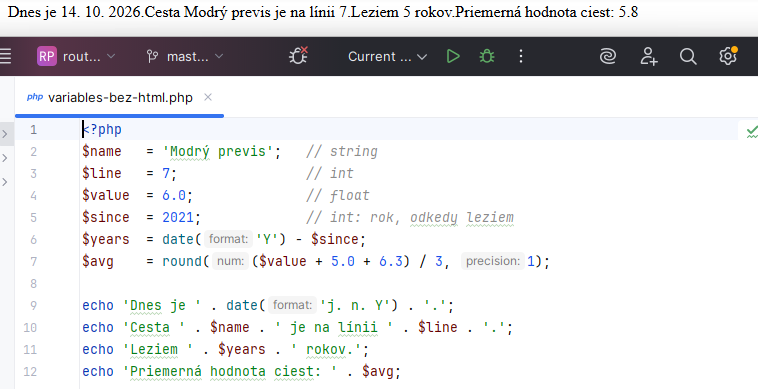
Čo robí ktorý riadok: štyri variables rôznych typov; $years je výpočet z aktuálneho roka; $avg je priemer troch hodnôt zaokrúhlený na jedno desatinné miesto; štyri echo vypíšu výsledky spojené bodkou.
Čo uvidíš v prehliadači: všetko v jednom riadku, bez medzier medzi vetami, bez odsekov (paragraphs), bez písma. Výsledok je správny, ale škaredý. Prehliadač dostal len text bez HTML, takže ho vypísal tak, ako prišiel.
Takto to vyzerá v prehliadači (v roku 2026).
Ukážka 2: tá istá stránka s HTML
<?php
$name   = 'Modrý previs';
$line   = 7;
$value  = 6.0;
$since  = 2021;
$years  = date('Y') - $since;
$avg    = round(($value + 5.0 + 6.3) / 3, 1);
?>
<!doctype html>
<html lang="sk">
<head>
  <meta charset="utf-8">
  <meta name="viewport" content="width=device-width, initial-scale=1">
  <title>Variables</title>
  <link href="https://cdn.jsdelivr.net/npm/bootstrap@5.3.3/dist/css/bootstrap.min.css" rel="stylesheet">
</head>
<body class="container">
  <h1>Variables a výpočty</h1>
  <p>Dnes je <?= date('j. n. Y') ?>.</p>
  <p>Cesta <strong><?= $name ?></strong> je na línii <?= $line ?>.<br>
     Leziem <?= $years ?> rokov.</p>
  <p>Priemerná hodnota ciest: <?= number_format($avg, 1, ',', ' ') ?></p>
</body>
</html>
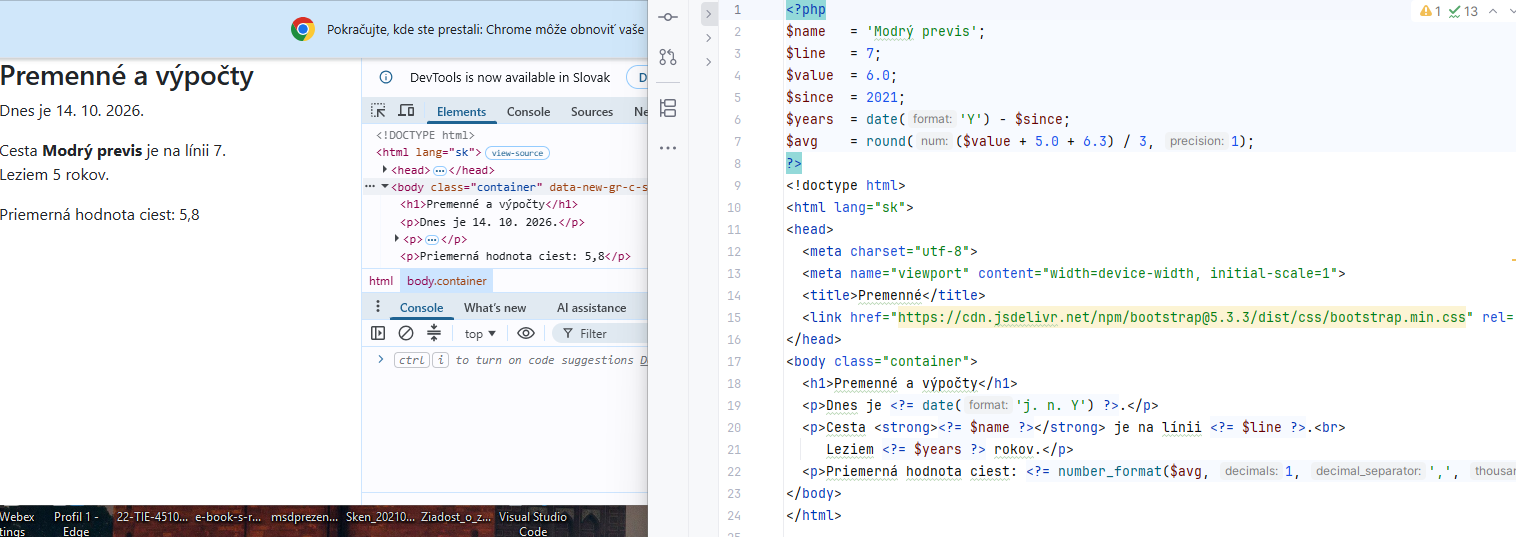
Čo robí ktorý riadok: PHP hore spočíta hodnoty, ?> ukončí PHP a ďalej je HTML; <?= ?> dosadí hodnotu na miesto v HTML; <br> zalomí riadok v paragraph; number_format vypíše desatinnú čiarku.
Takto to vyzerá v prehliadači. Stlač Ctrl + U: v zdroji sú len hotové hodnoty, žiadne <?php.
Variables a výpočty
Dnes je 14. 10. 2026.
Cesta Modrý previs je na línii 7.
Leziem 5 rokov.
Priemerná hodnota ciest: 5,8
Ukážka 3: typy a var_dump
<?php
$name  = 'Modrý previs';
$line  = 7;
$value = 6.0;
$phone = '0905 123 456';
$open  = true;
$note  = null;

var_dump($name, $line, $value, $phone, $open, $note);

echo '<br>';
var_dump('7' == 7);    // rovnaká hodnota
var_dump('7' === 7);   // iný typ
echo '<br>', strlen('Žltá'), ' ', mb_strlen('Žltá');
Takto to vyzerá v prehliadači.
bool(true) bool(false)
5 4
Všimni si: float(6), nie 6.0, lebo hodnota je celá; string(13), lebo ý má v UTF-8 dva bajty; '7' == 7 je true, ale '7' === 7 je false.
Ukážka 4: array a výpis do zoznamu
<?php
$holds = ['žlté', 'modré', 'červené'];
$holds[] = 'zelené';

$route = ['name' => 'Modrý previs', 'line' => 7, 'holds' => 'modré', 'grade' => '6a (VI+)', 'value' => 6.0];

$lines_int = [10, 2, 7];
$lines_str = ['10', '2', '7'];
sort($lines_int);
sort($lines_str);
?>
<!doctype html>
<html lang="sk">
<head>
  <meta charset="utf-8">
  <meta name="viewport" content="width=device-width, initial-scale=1">
  <title>Arrays</title>
  <link href="https://cdn.jsdelivr.net/npm/bootstrap@5.3.3/dist/css/bootstrap.min.css" rel="stylesheet">
</head>
<body class="container">
  <h1>Arrays</h1>

  <h2>Farby chytov (<?= count($holds) ?>)</h2>
  <ul>
  <?php foreach ($holds as $hold): ?>
    <li><?= $hold ?></li>
  <?php endforeach; ?>
  </ul>
  <p>Jednou vetou: <?= implode(', ', $holds) ?>.</p>

  <h2>Jedna cesta</h2>
  <ul>
  <?php foreach ($route as $key => $value): ?>
    <li><strong><?= $key ?></strong>: <?= $value ?></li>
  <?php endforeach; ?>
  </ul>

  <h2>Zoradenie</h2>
  <p>Čísla: <?= implode(', ', $lines_int) ?></p>
  <p>Texty: <?= implode(', ', $lines_str) ?></p>
</body>
</html>
Takto to vyzerá v prehliadači.
Arrays
Farby chytov (4)
- žlté
- modré
- červené
- zelené
Jednou vetou: žlté, modré, červené, zelené.
Jedna cesta
- name: Modrý previs
- line: 7
- holds: modré
- grade: 6a (VI+)
- value: 6
Zoradenie
Čísla: 2, 7, 10
Texty: 10, 2, 7
Druhý riadok zoradenia je zoradený „správne” podľa abecedy, ale nesprávne pre človeka. Preto je línia int.
Ukážka 5: loops a table s počítadlom
<?php
$routes = ['Žltá hrana', 'Modrý previs', 'Červená platňa'];
?>
<!doctype html>
<html lang="sk">
<head>
  <meta charset="utf-8">
  <meta name="viewport" content="width=device-width, initial-scale=1">
  <title>Loops</title>
  <link href="https://cdn.jsdelivr.net/npm/bootstrap@5.3.3/dist/css/bootstrap.min.css" rel="stylesheet">
</head>
<body class="container">
  <h1>Loops</h1>

  <h2>for: riadky 1 až 10</h2>
  <table class="table table-sm">
  <?php for ($i = 1; $i <= 10; $i++): ?>
    <tr class="<?= $i % 2 == 0 ? 'table-light' : '' ?>">
      <td><?= $i ?></td>
      <td><?= $i * $i ?></td>
    </tr>
  <?php endfor; ?>
  </table>

  <h2>foreach s poradím</h2>
  <ol>
  <?php foreach ($routes as $i => $route): ?>
    <li>Línia <?= $i + 1 ?>: <?= $route ?></li>
  <?php endforeach; ?>
  </ol>

  <h2>while: odpočítavanie</h2>
  <?php $n = 3; ?>
  <?php while ($n > 0): ?>
    <p><?= $n ?>…</p>
    <?php $n--; ?>
  <?php endwhile; ?>
  <p>Štart!</p>
</body>
</html>
Čo robí ktorý riadok: for má začiatok $i = 1, condition $i <= 10, krok $i++; $i % 2 == 0 ? 'table-light' : '' je skrátený if: párny riadok dostane svetlé pozadie; foreach s $i => dáva poradie od 0, preto $i + 1; while beží, kým $n > 0, a $n-- ho posúva k nule.
Takto to vyzerá v prehliadači (table skrátená na 4 riadky).
for: riadky 1 až 10
| 1 | 1 |
| 2 | 4 |
| 3 | 9 |
| 4 | 16 |
| … | |
foreach s poradím
- Línia 1: Žltá hrana
- Línia 2: Modrý previs
- Línia 3: Červená platňa
while: odpočítavanie
3…
2…
1…
Štart!
Ukážka 6: template a content
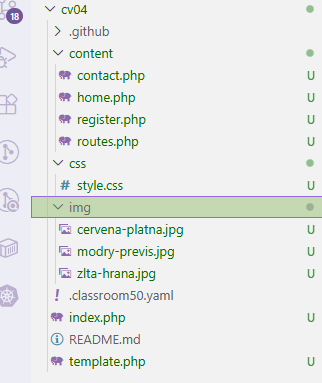
Štyri súbory, ktoré spolu tvoria stránky Domov a Cesty. Kontajnery (Containers), section, riadky a card sú z týždňa 4, len sú rozdelené do súborov.
<?php
$title   = 'Domov';                 // do <title> a do h1
$active  = 'index';                 // ktorá položka menu je active
$content = 'content/home.php';      // súbor s obsahom pre <main>
include 'template.php';
<?php
$title   = 'Cesty';
$active  = 'routes';
$content = 'content/routes.php';
include 'template.php';
<!doctype html>
<html lang="sk">
<head>
  <meta charset="utf-8">
  <meta name="viewport" content="width=device-width, initial-scale=1">
  <title><?= $title ?> | Lezecká stena</title>
  <link href="https://cdn.jsdelivr.net/npm/bootstrap@5.3.3/dist/css/bootstrap.min.css" rel="stylesheet">
  <link rel="stylesheet" href="css/style.css">
</head>
<body>
<nav class="navbar navbar-expand-md bg-dark navbar-dark fixed-top">
  <div class="container">
    <a class="navbar-brand" href="index.php">Lezecká stena</a>
    <button class="navbar-toggler" type="button" data-bs-toggle="collapse" data-bs-target="#menu">
      <span class="navbar-toggler-icon"></span>
    </button>
    <div class="collapse navbar-collapse" id="menu">
      <ul class="navbar-nav">
        <li class="nav-item"><a class="nav-link <?= $active == 'index' ? 'active' : '' ?>" href="index.php">Domov</a></li>
        <li class="nav-item"><a class="nav-link <?= $active == 'routes' ? 'active' : '' ?>" href="routes.php">Cesty</a></li>
        <li class="nav-item"><a class="nav-link <?= $active == 'form' ? 'active' : '' ?>" href="form.php">Registrácia</a></li>
      </ul>
    </div>
  </div>
</nav>

<main class="container">
  <h1><?= $title ?></h1>
  <?php include $content; ?>
</main>

<footer class="bg-light mt-5">
  <div class="container py-3">© <?= date('Y') ?> Lezecká stena</div>
</footer>
<script src="https://cdn.jsdelivr.net/npm/bootstrap@5.3.3/dist/js/bootstrap.bundle.min.js"></script>
</body>
</html>
<section id="about" class="mb-5">
  <h2>O stene</h2>
  <p>Lezecká stena s 12 líniami od 4 (IV) po 7a (VIII). Cesty prestavujeme každý mesiac.</p>
  <a href="form.php" class="btn btn-primary">Registruj sa</a>
</section>

<section id="hours" class="mb-5">
  <h2>Otváracie hodiny</h2>
  <table class="table w-auto">
    <tr><th>Po – Pia</th><td>14:00 – 22:00</td></tr>
    <tr><th>So – Ne</th><td>10:00 – 20:00</td></tr>
  </table>
</section>
<section id="routes" class="mb-5">
  <h2>Aktuálne cesty</h2>
  <div class="row g-3">
    <div class="col-md-6 col-lg-4">
      <div class="card h-100">
        <img src="img/zlta-hrana.jpg" class="card-img-top" alt="Žltá hrana">
        <div class="card-body">
          <h5 class="card-title">Žltá hrana <span class="badge text-bg-warning">5a (V)</span></h5>
          <p class="card-text">Línia 3, žlté chyty. Vhodná pre začiatočníkov.</p>
        </div>
      </div>
    </div>
    <!-- ďalšie card -->
  </div>
</section>

<section id="table" class="mb-5">
  <h2>Prehľad</h2>
  <div class="table-responsive">
    <table class="table table-striped">
      <!-- table ciest z cv03 -->
    </table>
  </div>
</section>
Čo robí ktorý riadok: index.php nastaví tri variables a vloží template; v template <?= $title ?> dosadí názov do <title> aj do <h1>; $active == 'index' ? 'active' : '' dá triedu (class) active len tej položke, ktorá sa zhoduje; include $content vloží obsah; date('Y') dá rok do footer. V content/home.php ani content/routes.php nie je <html>, <head>, menu ani footer, len to, čo patrí do <main>.
Čo uvidíš v prehliadači: to isté ako v cv03, len rozdelené na dve stránky: Domov má section O stene a Otváracie hodiny, Cesty majú card a table. routes.php a index.php sa líšia len v troch hodnotách; to je celá cena za novú stránku.
form.php vyzerá rovnako, len $title = 'Registrácia', $active = 'form', $content = 'content/register.php'.
Ukážka 7: prompt na variables a výpočty
Prompt vyrobí kostru, ty doplníš svoje údaje na miestach označených // DOPLŇ.
Vytvor PHP súbor variables.php pre web na tému [DOPLŇ tému svojho projektu].
PHP 8.1, bez databázy, bez form, bez JavaScriptu.

Hore v súbore v bloku <?php ... ?> vytvor šesť variables s názvami po anglicky:
- dve typu string, jednu typu int, jednu typu float, jednu typu bool,
  jednu s rokom (int), všetko z mojej témy; hodnoty nechaj zatiaľ ukážkové,
- jeden výpočet z roku a dnešného dátumu cez date('Y'),
- jeden výpočet z float hodnôt s round na 1 desatinné miesto.

Pod tým HTML5 stránka: meta charset utf-8, meta viewport, Bootstrap 5.3 z CDN,
body s class container, heading h1 a aspoň tri paragraphs, v ktorých sú hodnoty
variables dosadené cez <?= ?>. Jeden paragraph má zalomenie riadku <br>.
Desatinné číslo vypíš cez number_format so slovenskou desatinnou čiarkou.

Ku každej variable napíš komentár, aký má typ a prečo. Dve variables nechaj
s hodnotou a komentárom // DOPLŇ: sem dáš svoju hodnotu.
Prečo je prompt napísaný práve takto:
- šesť variables s typmi: dostaneš všetky typy, ktoré dnes preberáme,
- všetko z tvojej témy: nebude to o lezeckej stene, ale o tvojom webe,
// DOPLŇ: časť robíš sám, inak by si len kopíroval,- komentár pri type: pri obhajobe povieš, prečo je telefón string.
Ukážka 8: prompt na array a zoznam
Vytvor PHP súbor arrays.php pre web na tému [DOPLŇ tému]. PHP 8.1, HTML5
s meta charset utf-8, meta viewport, Bootstrap 5.3 z CDN, body s class container.

V bloku <?php ... ?> hore:
- obyčajné array $items s piatimi hodnotami typu string z mojej témy,
- asociatívne array $item s kľúčmi name, order (int), category (string),
  price (float) a available (bool), hodnoty z mojej témy,
- array $numbers s hodnotami [10, 2, 7, 33, 4] a jeho zoradenú kópiu cez sort.

V HTML:
- heading h2 a nečíslovaný zoznam <ul>, ktorý vypíše $items cez foreach
  v zápise s dvojbodkou (foreach: ... endforeach),
- paragraph s počtom elements cez count a vetu z elements cez implode,
- druhý zoznam, ktorý vypíše $item ako „kľúč: hodnota" cez foreach s $key => $value,
- paragraph so zoradenými $numbers cez implode.

Nechaj jeden komentár // DOPLŇ: pridaj do $items šiesty element cez $items[] = ...
a druhý // DOPLŇ: vypíš prvý a posledný element $items.
Ku každému bloku krátky slovenský komentár, čo robí.
Prečo je prompt napísaný práve takto:
- presné názvy polí (arrays) a kľúčov: obyčajné aj asociatívne array, oba druhy
foreach, - zápis s dvojbodkou: ten istý, aký budeš používať v template,
// DOPLŇ: pridanie element a prístup cez index robíš sám.
Ukážka 9: prompt na loops
Vytvor PHP súbor loops.php pre web na tému [DOPLŇ tému]. PHP 8.1, HTML5
s meta charset utf-8, meta viewport, Bootstrap 5.3 z CDN, body s class container.

- table s class table: loop for s počítadlom od 1 do 10, v každom riadku
  počítadlo a jeden výpočet z neho (napr. cena × počet); párne riadky majú
  class table-light cez $i % 2,
- číslovaný zoznam <ol> z array piatich hodnôt z mojej témy cez foreach
  s $i => $value, kde vypíšeš poradie od 1 a hodnotu,
- loop while, ktorý odpočítava od 5 do 1.

Všetky loops v zápise s dvojbodkou (endfor, endforeach, endwhile).
Nechaj komentár // DOPLŇ: prepíš loop for tak, aby išiel od 10 do 1
s krokom 1 dole, a druhý // DOPLŇ: zmeň while tak, aby odpočítaval po 2.
Prečo je prompt napísaný práve takto:
- tri loops v jednom súbore: vidíš ich vedľa seba a vieš ich porovnať,
- prepis loop robíš sám: začiatok, condition a krok sú to, čo sa pýta pri obhajobe.
Ukážka 10: prompt na template
Tento prompt dostane tvoje súbory z cv03 a rozdelí ich na template a obsah. Z index.html vzniknú dve stránky: Domov a Cesty. Nič nové nevymýšľa.
Posielam ti svoje súbory index.html a form.html z webu na tému [DOPLŇ tému].
Rozdeľ ich na PHP template a obsah. PHP 8.1. Texty, class Bootstrap, images
a form nemeň. Z index.html vzniknú dve stránky: Domov (všetko okrem
[DOPLŇ názov section s položkami, napr. ciest]) a [DOPLŇ názov stránky, napr. Cesty]
(section s cards a table).

Vytvor presne tieto súbory:
- template.php: celý rám stránky: <!doctype html>, <head> s meta charset,
  meta viewport, <title><?= $title ?> | [DOPLŇ názov webu]</title>, Bootstrap CSS
  a css/style.css; navbar z môjho index.html s položkami Domov (index.php),
  [DOPLŇ, napr. Cesty] (routes.php) a Registrácia (form.php), kde class active
  sa dáva condition <?= $active == 'index' ? 'active' : '' ?> (s hodnotami
  'index', 'routes', 'form'); <main class="container"> s <h1><?= $title ?></h1>
  a riadkom <?php include $content; ?>; footer s rokom cez date('Y');
  Bootstrap JS pred </body>.
- content/home.php: z <main> môjho index.html všetky section okrem section
  s cards a table; bez <html>, <head>, menu a footer, bez h1.
- content/routes.php: z <main> môjho index.html iba section s cards a table.
- content/register.php: iba form z môjho form.html, bez všetkého ostatného.
- index.php: päť riadkov: <?php, $title = 'Domov', $active = 'index',
  $content = 'content/home.php', include 'template.php'.
- routes.php a form.php: to isté s hodnotami pre cesty a pre registráciu.

Do template.php napíš komentár // DOPLŇ: pridaj štvrtú položku menu Kontakt
na contact.php. Ku každému súboru krátky komentár, čo v ňom je a čo v ňom nie je.

Tu sú moje súbory:
[VLOŽ index.html a form.html]
Prečo je prompt napísaný práve takto:
- presné názvy súborov a variables: testy aj obhajoba s nimi počítajú,
- „nič nemeň”: texty a vzhľad sú z cv03, mení sa len rozdelenie do súborov a stránok,
- Domov a Cesty zvlášť: Domov je statický text, Cesty budú od týždňa 7 z databázy,
activecondition: menu je raz,activesa dosadí podľa stránky,- Kontakt dopĺňaš sám: tri kroky, ktoré ukážu, že štruktúre rozumieš.
Example 1: the first PHP page without HTML
<?php
$name   = 'Blue Overhang';  // string
$line   = 7;                // int
$value  = 6.0;              // float
$since  = 2021;             // int: the year I started climbing
$years  = date('Y') - $since;
$avg    = round(($value + 5.0 + 6.3) / 3, 1);

echo 'Today is ' . date('j. n. Y') . '.';
echo 'The route ' . $name . ' is on line ' . $line . '.';
echo 'Climbing for ' . $years . ' years.';
echo 'Average route value: ' . $avg;
What each line does: four variables of different types; $years is calculated from the current year; $avg is the average of three values rounded to one decimal place; four echos print the results joined with dots.
What you see in the browser: everything on one line, no spaces between the sentences, no paragraphs, no font. The result is correct but ugly. The browser received only text without HTML, so it printed it as it came.
This is what it looks like in the browser (in 2026).
Example 2: the same page with HTML
<?php
$name   = 'Blue Overhang';
$line   = 7;
$value  = 6.0;
$since  = 2021;
$years  = date('Y') - $since;
$avg    = round(($value + 5.0 + 6.3) / 3, 1);
?>
<!doctype html>
<html lang="en">
<head>
  <meta charset="utf-8">
  <meta name="viewport" content="width=device-width, initial-scale=1">
  <title>Variables</title>
  <link href="https://cdn.jsdelivr.net/npm/bootstrap@5.3.3/dist/css/bootstrap.min.css" rel="stylesheet">
</head>
<body class="container">
  <h1>Variables and calculations</h1>
  <p>Today is <?= date('j. n. Y') ?>.</p>
  <p>The route <strong><?= $name ?></strong> is on line <?= $line ?>.<br>
     Climbing for <?= $years ?> years.</p>
  <p>Average route value: <?= number_format($avg, 1, ',', ' ') ?></p>
</body>
</html>
What each line does: the PHP at the top computes the values, ?> ends PHP and the rest is HTML; <?= ?> inserts a value into the HTML; <br> breaks the line inside a paragraph; number_format prints a decimal comma.
This is what it looks like in the browser. Press Ctrl + U: the source holds only the finished values, no <?php.
Variables and calculations
Today is 14. 10. 2026.
The route Blue Overhang is on line 7.
Climbing for 5 years.
Average route value: 5,8
Example 3: types and var_dump
<?php
$name  = 'Modrý previs';
$line  = 7;
$value = 6.0;
$phone = '0905 123 456';
$open  = true;
$note  = null;

var_dump($name, $line, $value, $phone, $open, $note);

echo '<br>';
var_dump('7' == 7);    // the same value
var_dump('7' === 7);   // a different type
echo '<br>', strlen('Žltá'), ' ', mb_strlen('Žltá');
This is what it looks like in the browser.
bool(true) bool(false)
5 4
Notice: float(6), not 6.0, because the value is whole; string(13), because ý takes two bytes in UTF-8; '7' == 7 is true, but '7' === 7 is false.
Example 4: an array printed as a list
<?php
$holds = ['yellow', 'blue', 'red'];
$holds[] = 'green';

$route = ['name' => 'Blue Overhang', 'line' => 7, 'holds' => 'blue', 'grade' => '6a (VI+)', 'value' => 6.0];

$lines_int = [10, 2, 7];
$lines_str = ['10', '2', '7'];
sort($lines_int);
sort($lines_str);
?>
<!doctype html>
<html lang="en">
<head>
  <meta charset="utf-8">
  <meta name="viewport" content="width=device-width, initial-scale=1">
  <title>Arrays</title>
  <link href="https://cdn.jsdelivr.net/npm/bootstrap@5.3.3/dist/css/bootstrap.min.css" rel="stylesheet">
</head>
<body class="container">
  <h1>Arrays</h1>

  <h2>Hold colours (<?= count($holds) ?>)</h2>
  <ul>
  <?php foreach ($holds as $hold): ?>
    <li><?= $hold ?></li>
  <?php endforeach; ?>
  </ul>
  <p>In one sentence: <?= implode(', ', $holds) ?>.</p>

  <h2>One route</h2>
  <ul>
  <?php foreach ($route as $key => $value): ?>
    <li><strong><?= $key ?></strong>: <?= $value ?></li>
  <?php endforeach; ?>
  </ul>

  <h2>Sorting</h2>
  <p>Numbers: <?= implode(', ', $lines_int) ?></p>
  <p>Texts: <?= implode(', ', $lines_str) ?></p>
</body>
</html>
This is what it looks like in the browser.
Arrays
Hold colours (4)
- yellow
- blue
- red
- green
In one sentence: yellow, blue, red, green.
One route
- name: Blue Overhang
- line: 7
- holds: blue
- grade: 6a (VI+)
- value: 6
Sorting
Numbers: 2, 7, 10
Texts: 10, 2, 7
The second sorting line is sorted “correctly” alphabetically, but wrongly for a person. That is why the line is an int.
Example 5: loops and a table with a counter
<?php
$routes = ['Yellow Edge', 'Blue Overhang', 'Red Slab'];
?>
<!doctype html>
<html lang="en">
<head>
  <meta charset="utf-8">
  <meta name="viewport" content="width=device-width, initial-scale=1">
  <title>Loops</title>
  <link href="https://cdn.jsdelivr.net/npm/bootstrap@5.3.3/dist/css/bootstrap.min.css" rel="stylesheet">
</head>
<body class="container">
  <h1>Loops</h1>

  <h2>for: rows 1 to 10</h2>
  <table class="table table-sm">
  <?php for ($i = 1; $i <= 10; $i++): ?>
    <tr class="<?= $i % 2 == 0 ? 'table-light' : '' ?>">
      <td><?= $i ?></td>
      <td><?= $i * $i ?></td>
    </tr>
  <?php endfor; ?>
  </table>

  <h2>foreach with an order</h2>
  <ol>
  <?php foreach ($routes as $i => $route): ?>
    <li>Line <?= $i + 1 ?>: <?= $route ?></li>
  <?php endforeach; ?>
  </ol>

  <h2>while: countdown</h2>
  <?php $n = 3; ?>
  <?php while ($n > 0): ?>
    <p><?= $n ?>…</p>
    <?php $n--; ?>
  <?php endwhile; ?>
  <p>Go!</p>
</body>
</html>
What each line does: for has the start $i = 1, the condition $i <= 10, the step $i++; $i % 2 == 0 ? 'table-light' : '' is a short if: an even row gets a light background; foreach with $i => gives the order from 0, hence $i + 1; while runs while $n > 0, and $n-- moves it towards zero.
This is what it looks like in the browser (the table shortened to 4 rows).
for: rows 1 to 10
| 1 | 1 |
| 2 | 4 |
| 3 | 9 |
| 4 | 16 |
| … | |
foreach with an order
- Line 1: Yellow Edge
- Line 2: Blue Overhang
- Line 3: Red Slab
while: countdown
3…
2…
1…
Go!
Example 6: template and content
Four files that together make the Home and Routes pages. The containers, sections, rows and cards are from week 4, only split into files.
<?php
$title   = 'Home';                  // into <title> and h1
$active  = 'index';                 // which menu item is active
$content = 'content/home.php';      // the file with the content for <main>
include 'template.php';
<?php
$title   = 'Routes';
$active  = 'routes';
$content = 'content/routes.php';
include 'template.php';
<!doctype html>
<html lang="en">
<head>
  <meta charset="utf-8">
  <meta name="viewport" content="width=device-width, initial-scale=1">
  <title><?= $title ?> | Climbing wall</title>
  <link href="https://cdn.jsdelivr.net/npm/bootstrap@5.3.3/dist/css/bootstrap.min.css" rel="stylesheet">
  <link rel="stylesheet" href="css/style.css">
</head>
<body>
<nav class="navbar navbar-expand-md bg-dark navbar-dark fixed-top">
  <div class="container">
    <a class="navbar-brand" href="index.php">Climbing wall</a>
    <button class="navbar-toggler" type="button" data-bs-toggle="collapse" data-bs-target="#menu">
      <span class="navbar-toggler-icon"></span>
    </button>
    <div class="collapse navbar-collapse" id="menu">
      <ul class="navbar-nav">
        <li class="nav-item"><a class="nav-link <?= $active == 'index' ? 'active' : '' ?>" href="index.php">Home</a></li>
        <li class="nav-item"><a class="nav-link <?= $active == 'routes' ? 'active' : '' ?>" href="routes.php">Routes</a></li>
        <li class="nav-item"><a class="nav-link <?= $active == 'form' ? 'active' : '' ?>" href="form.php">Registration</a></li>
      </ul>
    </div>
  </div>
</nav>

<main class="container">
  <h1><?= $title ?></h1>
  <?php include $content; ?>
</main>

<footer class="bg-light mt-5">
  <div class="container py-3">© <?= date('Y') ?> Climbing wall</div>
</footer>
<script src="https://cdn.jsdelivr.net/npm/bootstrap@5.3.3/dist/js/bootstrap.bundle.min.js"></script>
</body>
</html>
<section id="about" class="mb-5">
  <h2>About the wall</h2>
  <p>A climbing wall with 12 lines from 4 (IV) to 7a (VIII). We reset the routes every month.</p>
  <a href="form.php" class="btn btn-primary">Register</a>
</section>

<section id="hours" class="mb-5">
  <h2>Opening hours</h2>
  <table class="table w-auto">
    <tr><th>Mon – Fri</th><td>14:00 – 22:00</td></tr>
    <tr><th>Sat – Sun</th><td>10:00 – 20:00</td></tr>
  </table>
</section>
<section id="routes" class="mb-5">
  <h2>Current routes</h2>
  <div class="row g-3">
    <div class="col-md-6 col-lg-4">
      <div class="card h-100">
        <img src="img/zlta-hrana.jpg" class="card-img-top" alt="Yellow Edge">
        <div class="card-body">
          <h5 class="card-title">Yellow Edge <span class="badge text-bg-warning">5a (V)</span></h5>
          <p class="card-text">Line 3, yellow holds. Suitable for beginners.</p>
        </div>
      </div>
    </div>
    <!-- more cards -->
  </div>
</section>

<section id="table" class="mb-5">
  <h2>Overview</h2>
  <div class="table-responsive">
    <table class="table table-striped">
      <!-- the routes table from cv03 -->
    </table>
  </div>
</section>
What each line does: index.php sets three variables and includes the template; in the template <?= $title ?> inserts the title into <title> and into <h1>; $active == 'index' ? 'active' : '' gives the active class only to the item that matches; include $content inserts the content; date('Y') puts the year into the footer. Neither content/home.php nor content/routes.php has <html>, <head>, menu or footer, only what belongs in <main>.
What you see in the browser: the same as in cv03, only split into two pages: Home has the sections About the wall and Opening hours, Routes has the cards and the table. routes.php and index.php differ only in three values; that is the whole price of a new page.
form.php looks the same, only with $title = 'Registration', $active = 'form', $content = 'content/register.php'.
Example 7: a prompt for variables and calculations
The prompt builds the skeleton; you fill in your own data at the places marked // DOPLŇ (TO DO).
Create a PHP file variables.php for a website about [FILL IN your project topic].
PHP 8.1, no database, no form, no JavaScript.

At the top of the file, in a <?php ... ?> block, create six variables with
English names:
- two of type string, one int, one float, one bool, one with a year (int),
  all from my topic; leave sample values for now,
- one calculation from the year and today's date via date('Y'),
- one calculation from the float values with round to 1 decimal place.

Below it an HTML5 page: meta charset utf-8, meta viewport, Bootstrap 5.3 from
the CDN, body with the class container, an h1 heading and at least three
paragraphs in which the variable values are inserted with <?= ?>. One paragraph
has a line break <br>. Print the decimal number with number_format using a
decimal comma.

Add a comment to every variable saying its type and why. Leave two variables
with a value and the comment // DOPLŇ: put your own value here.
Why the prompt is written this way:
- six variables with types: you get all the types we cover today,
- everything from your topic: it will not be about a climbing wall but about your website,
// DOPLŇ: you do part of it yourself, otherwise you would only copy,- a comment on the type: at the defence you say why the phone is a string.
Example 8: a prompt for an array and a list
Create a PHP file arrays.php for a website about [FILL IN the topic]. PHP 8.1,
HTML5 with meta charset utf-8, meta viewport, Bootstrap 5.3 from the CDN,
body with the class container.

In a <?php ... ?> block at the top:
- a plain array $items with five string values from my topic,
- an associative array $item with the keys name, order (int), category (string),
  price (float) and available (bool), values from my topic,
- an array $numbers with the values [10, 2, 7, 33, 4] and its sorted copy via sort.

In the HTML:
- an h2 heading and an unordered list <ul> that prints $items with foreach
  in the colon notation (foreach: ... endforeach),
- a paragraph with the number of elements via count and a sentence made of
  the elements via implode,
- a second list that prints $item as "key: value" with foreach and $key => $value,
- a paragraph with the sorted $numbers via implode.

Leave one comment // DOPLŇ: add a sixth element to $items with $items[] = ...
and another // DOPLŇ: print the first and the last element of $items.
Add a short comment to every block saying what it does.
Why the prompt is written this way:
- exact names of arrays and keys: a plain and an associative array, both kinds of
foreach, - the colon notation: the same one you will use in the template,
// DOPLŇ: adding an element and accessing by index you do yourself.
Example 9: a prompt for loops
Create a PHP file loops.php for a website about [FILL IN the topic]. PHP 8.1,
HTML5 with meta charset utf-8, meta viewport, Bootstrap 5.3 from the CDN,
body with the class container.

- a table with the class table: a for loop with a counter from 1 to 10, in
  every row the counter and one calculation from it (e.g. price × quantity);
  even rows get the class table-light via $i % 2,
- an ordered list <ol> from an array of five values from my topic via foreach
  with $i => $value, printing the order from 1 and the value,
- a while loop that counts down from 5 to 1.

All loops in the colon notation (endfor, endforeach, endwhile).
Leave a comment // DOPLŇ: rewrite the for loop to go from 10 down to 1 in
steps of 1, and another // DOPLŇ: change the while loop to count down by 2.
Why the prompt is written this way:
- three loops in one file: you see them side by side and can compare them,
- you rewrite the loop yourself: the start, the condition and the step are what the defence asks about.
Example 10: a prompt for the template
This prompt gets your files from cv03 and splits them into a template and content. Your index.html becomes two pages: Home and Routes. It invents nothing new.
I am sending you my files index.html and form.html from a website about
[FILL IN the topic]. Split them into a PHP template and content. PHP 8.1.
Do not change the texts, the Bootstrap classes, the images or the form.
index.html becomes two pages: Home (everything except [FILL IN the name of
the section with the items, e.g. routes]) and [FILL IN the page name, e.g. Routes]
(the sections with the cards and the table).

Create exactly these files:
- template.php: the whole page frame: <!doctype html>, <head> with meta charset,
  meta viewport, <title><?= $title ?> | [FILL IN the site name]</title>, the
  Bootstrap CSS and css/style.css; the navbar from my index.html with the items
  Home (index.php), [FILL IN, e.g. Routes] (routes.php) and Registration (form.php),
  where the active class is given by the condition
  <?= $active == 'index' ? 'active' : '' ?> (with the values 'index', 'routes',
  'form'); <main class="container"> with <h1><?= $title ?></h1> and the line
  <?php include $content; ?>; a footer with the year via date('Y');
  the Bootstrap JS before </body>.
- content/home.php: from the <main> of my index.html all sections except the one
  with the cards and the table; without <html>, <head>, menu and footer, without h1.
- content/routes.php: from the <main> of my index.html only the sections with
  the cards and the table.
- content/register.php: only the form from my form.html, without everything else.
- index.php: five lines: <?php, $title = 'Home', $active = 'index',
  $content = 'content/home.php', include 'template.php'.
- routes.php and form.php: the same with the values for routes and for registration.

In template.php write the comment // DOPLŇ: add a fourth menu item Contact
leading to contact.php. Add a short comment to every file saying what is in it
and what is not.

Here are my files:
[PASTE index.html and form.html]
Why the prompt is written this way:
- exact file and variable names: the tests and the defence rely on them,
- “change nothing”: the texts and the look are from cv03; only the split into files and pages changes,
- Home and Routes separately: Home is static text, Routes will come from a database from week 7,
activeby a condition: the menu exists once,activeis set by the page,- you add Contact yourself: three steps that show you understand the structure.
Úlohy na cvičenieLab tasks
Úlohy dostaneš aj ako zadanie cv04 v Classroom 50, sú v súbore README.md v tvojom repository.
Link na zadanie cv04: prijať zadanie
(platí pre skupiny B. Stehlíkovej; ostatné skupiny dostanú link od svojho cvičiaceho)
Úloha 5.1: Príprava Kubeflow. Priprav si Kubeflow podľa návodu 04 Odovzdávanie, časť 1: v Explorer je hore WEB, dole na stavovej lište je Go Live. Ak tam nie je, rozšírenia vráti tento príkaz v termináli:
code-server --install-extension Natizyskunk.sftp --install-extension yandeu.five-server --install-extension bmewburn.vscode-intelephense-client --install-extension mblode.twig-language-2
Potom F1, Developer: Reload Window. Nastavenie pripojenia na sigma zostáva.
Úloha 5.2: Zadanie a kópia minulého týždňa. Prijmi zadanie cv04 v Classroom 50 (link je vyššie) a repository naklonuj do ~/web/ti/cv04 podľa návodu 04, časti 2 a 3. Potom do neho prekopíruj svoj web z minulého týždňa:
cd ~/web/ti
rsync -a --exclude .git --exclude .github --exclude README.md cv03/ cv04/
cd cv04
mkdir web practice
mv index.html form.html css img web/
ls web practice
Web z cv03 je teraz v priečinku web/, priečinok practice/ je zatiaľ prázdny. mv presunie viac súborov naraz, posledný argument je cieľový priečinok.
Úloha 5.3: Prvý PHP výpis. Vytvor practice/variables.php podľa Ukážky 1 so svojimi hodnotami: tri variables rôznych typov a jeden výpočet, výpis cez echo spojený bodkou. Ulož a otvor https://sigma.tuke.sk/student/meno.priezvisko/ti/cv04/practice/variables.php. Všetko je v jednom riadku.
Úloha 5.4: Variables s HTML. Prompt z Ukážky 7 vlož do AI, výsledok ulož ako practice/variables.php (prepíše úlohu 5.3). Doplň miesta // DOPLŇ. Ulož, F5: nadpis (heading), paragraphs, zalomenie. Ctrl + U: v zdroji nie je PHP.
Úloha 5.5: Typy. Do practice/variables.php pridaj var_dump všetkých variables a over, že každá má typ, ktorý si chcel. Jednu variable zmeň na zlý typ (číslo v apostrofoch), pozri, čo var_dump ukáže, a vráť to.
Úloha 5.6: Arrays. Prompt z Ukážky 8, výsledok ulož ako practice/arrays.php. Doplň // DOPLŇ: pridaj šiesty element, vypíš prvý a posledný. Over v prehliadači, že zoznam má šesť položiek a count sedí.
Úloha 5.7: Zoradenie. Do practice/arrays.php pridaj array troch čísel zo svojej témy ako int a to isté ako string, obe zoraď cez sort a vypíš. Do komentára napíš jednou vetou, prečo sú výsledky rôzne.
Úloha 5.8: Loops. Prompt z Ukážky 9, výsledok ulož ako practice/loops.php. Doplň // DOPLŇ: prepíš for od 10 do 1, while po 2.
Úloha 5.9: Template. Prompt z Ukážky 10 so svojimi index.html a form.html. Ak tvoj index.html má len section s cestami, dopíš do content/home.php sám krátku section O stene s jedným paragraph. Výsledné súbory ulož presne pod tými názvami (všetko do web/; priečinok web/content/ vytvor: pravý klik na web, New Folder…). Staré index.html a form.html zmaž (pravý klik na súbor, Delete). Otvor index.php, routes.php aj form.php na sigma: texty sú z cv03 a active je pri správnej položke.
Úloha 5.10: Stránka Kontakt. Ručne, bez AI: skopíruj index.php ako contact.php a zmeň tri hodnoty; vytvor content/contact.php s heading h2, paragraph a kontaktom (nie skutočným telefónom); doplň položku Kontakt do menu v template.php aj s condition pre active.
Úloha 5.11: Chyba naschvál. Vytvor practice/chyba.php a practice/chyba-kod.php z teórie, otvor chyba.php na sigma, prečítaj hlásenie a nájdi riadok. Doplň bodkočiarku, F5. Potom v echo prepíš $grade na $grad, pozri hlásenie (Warning: Undefined variable), oprav.
Úloha 5.12: Commit a push. Podľa návodu 04 Odovzdávanie, časť 5; commit po každej hotovej úlohe. Výsledok testov podľa časti 6.
Úloha 5.13: Upload Folder a kontrola na sigma. Podľa návodu 04, časť 7: pravý klik na cv04, v menu úplne dole Upload Folder. Otvor …/ti/cv04/: vidíš priečinky web a practice. Over web/index.php, web/routes.php, web/form.php, web/contact.php a practice/variables.php, practice/arrays.php, practice/loops.php.
Hodnotenie: 1 bod. V repository cv04 na GitHub aj na sigma je v web/ web prerobený na template so štyrmi stránkami a v practice/ tri cvičné súbory variables.php, arrays.php, loops.php. Commit a push najneskôr do nasledujúceho cvičenia.
You also get the tasks as the assignment cv04 in Classroom 50, in the README.md file in your repository.
Link to the assignment cv04: accept the assignment
(valid for B. Stehlíková’s groups; other groups get the link from their own teacher)
Task 5.1: Getting Kubeflow ready. Get Kubeflow ready following guide 04 Submitting, part 1: Explorer shows WEB at the top, the status bar at the bottom shows Go Live. If it does not, this terminal command brings the extensions back:
code-server --install-extension Natizyskunk.sftp --install-extension yandeu.five-server --install-extension bmewburn.vscode-intelephense-client --install-extension mblode.twig-language-2
Then F1, Developer: Reload Window. The sigma connection settings stay.
Task 5.2: The assignment and a copy of last week. Accept the assignment cv04 in Classroom 50 (the link is above) and clone the repository into ~/web/ti/cv04 following guide 04, parts 2 and 3. Then copy your website from last week into it:
cd ~/web/ti
rsync -a --exclude .git --exclude .github --exclude README.md cv03/ cv04/
cd cv04
mkdir web practice
mv index.html form.html css img web/
ls web practice
The website from cv03 is now in the web/ folder, the practice/ folder is empty for now. mv moves several files at once, the last argument is the target folder.
Task 5.3: The first PHP output. Create practice/variables.php following Example 1 with your own values: three variables of different types and one calculation, printed with echo joined with dots. Save and open https://sigma.tuke.sk/student/name.surname/ti/cv04/practice/variables.php. Everything is on one line.
Task 5.4: Variables with HTML. Paste the prompt from Example 7 into an AI and save the result as practice/variables.php (it replaces task 5.3). Fill in the // DOPLŇ places. Save, F5: a heading, paragraphs, a line break. Ctrl + U: no PHP in the source.
Task 5.5: Types. Add a var_dump of all variables to practice/variables.php and check that each has the type you wanted. Change one variable to a wrong type (a number in quotes), see what var_dump shows, and change it back.
Task 5.6: Arrays. The prompt from Example 8; save the result as practice/arrays.php. Fill in // DOPLŇ: add a sixth element, print the first and the last. Check in the browser that the list has six items and count matches.
Task 5.7: Sorting. Add to practice/arrays.php an array of three numbers from your topic as int and the same as string, sort both with sort and print them. Write in a comment, in one sentence, why the results differ.
Task 5.8: Loops. The prompt from Example 9; save the result as practice/loops.php. Fill in // DOPLŇ: rewrite for from 10 down to 1, while by 2.
Task 5.9: Template. The prompt from Example 10 with your own index.html and form.html. If your index.html has only the section with the routes, write a short About section with one paragraph into content/home.php yourself. Save the resulting files exactly under those names (everything into web/; create the web/content/ folder: right-click web, New Folder…). Delete the old index.html and form.html (right-click the file, Delete). Open index.php, routes.php and form.php on sigma: the texts are from cv03 and active is on the right item.
Task 5.10: The Contact page. By hand, without AI: copy index.php as contact.php and change the three values; create content/contact.php with an h2 heading, a paragraph and a contact (not a real phone number); add the Contact item to the menu in template.php including the condition for active.
Task 5.11: An error on purpose. Create practice/chyba.php and practice/chyba-kod.php from the theory, open chyba.php on sigma, read the message and find the line. Add the semicolon, F5. Then in echo change $grade to $grad, look at the message (Warning: Undefined variable), fix it.
Task 5.12: Commit and push. Following guide 04 Submitting, part 5; a commit after every finished task. The test result following part 6.
Task 5.13: Upload Folder and the check on sigma. Following guide 04, part 7: right-click cv04, Upload Folder at the very bottom of the menu. Open …/ti/cv04/: you see the folders web and practice. Check web/index.php, web/routes.php, web/form.php, web/contact.php and practice/variables.php, practice/arrays.php, practice/loops.php.
Grading: 1 point. The repository cv04 on GitHub and on sigma contains in web/ the website rebuilt with a template and four pages, and in practice/ the three practice files variables.php, arrays.php, loops.php. Commit and push by the next lab at the latest.
Obhajoba a live codingDefence and live coding
Pri obhajobe budú použité iba otázky a úlohy z týchto zoznamov. Live coding robíš v kópii, odovzdaný stav v cv04 sa nezmení. Kópiu si priprav pred obhajobou:
cd ~/web/ti
mkdir -p obhajoba1
rsync -a --exclude .git cv04/ obhajoba1/cv04/
Potom klikni pravým na priečinok obhajoba1 a v menu úplne dole zvoľ Upload Folder. Kópia je na https://sigma.tuke.sk/student/meno.priezvisko/ti/obhajoba1/cv04/.
Vysvetli (code walkthrough)
- Čo je request a čo response a čo sa medzi nimi deje na sigma.
- Prečo PHP nevidno v zdroji stránky v prehliadači.
- Prečo sa výstup PHP nedá pozrieť cez Five Server.
- Čo robí
<?phpa čo?>, kedy sa?>vynecháva. - Aký je rozdiel medzi
echos čiarkou a s bodkou. - Čo robí
<?= $title ?>. - Vymenuj typy variables vo svojom
variables.phpa povedz, prečo má každá ten typ. - Prečo je telefónne číslo
stringa číslo línieint. - Čo ukáže
var_dumpa na čo je dobrý. - Aký je rozdiel medzi apostrofmi a úvodzovkami pri výpise variable.
- Čo robí
round($x, 1)a čonumber_format. - Prečo
strlen('Žltá')dá 5 a čo s tým. - Aký je rozdiel medzi
==a===. - Čo je index a čo key v array.
- Ako pridáš element na koniec array a ako zistíš počet elements.
- Prečo
sortzoradí['10', '2', '7']inak ako[10, 2, 7]. - Aký je rozdiel medzi
foreach,forawhile; kedy ktorý. - Prečítaj
for ($i = 1; $i <= 10; $i++): čo je začiatok, condition a krok. - Čo robí
$i % 2 == 0 ? 'table-light' : ''. - Čo robí
includea prečo sú$title,$active,$contentvtemplate.phpznáme. - Ako sa poskladá stránka
form.phpod request po response. - Prečo
content/register.phpnemá<html>ani menu. - Ako vzniká class
activev menu. - Čo urobíš, keď chceš pridať novú stránku.
- Kde v hlásení chyby nájdeš súbor a riadok.
Uprav (live coding)
- Pridaj do
variables.phpvariable typufloata vypíš ju so slovenskou desatinnou čiarkou. - Zmeň výpočet rokov tak, aby počítal mesiace.
- Vypíš text variable veľkými písmenami (s diakritikou).
- Pridaj element do array a vypíš nový počet.
- Vypíš array do číslovaného zoznamu
<ol>namiesto<ul>. - Vypíš z asociatívneho array len jednu hodnotu podľa key.
- Zoraď array opačne.
- Zmeň
fortak, aby išiel po 2. - Prepíš
fornawhiles rovnakým výsledkom. - Zafarbi každý tretí riadok table.
- Pridaj do menu položku a nastav jej
active. - Zmeň text footer pre všetky stránky naraz.
- Vytvor novú stránku s obsahom „Cenník” a jedným paragraph.
Zdôvodni (design decisions)
- Prečo beží PHP na serveri a nie v prehliadači.
- Prečo záleží na type variable, keď PHP typy prevádza sám.
- Prečo je menu v
template.phpa nie v každej stránke. - Prečo sú Domov a Cesty dve stránky, keď v cv03 boli na jednej.
- Prečo je obsah v
content/a stránka je len 5 riadkov. - Prečo array ciest tento týždeň len deklaruješ a nevypisuješ z neho cards.
- Prečo sa hlásenia chýb v hotovej aplikácii vypínajú.
Definition of Done
- Repository cv04 je na GitHub a posledný commit má zelenú ✓; všetky stránky bežia na sigma.
- Web je v
web/, cvičné súbory vpractice/;index.php,routes.php,form.php,contact.phpmajú 5 riadkov; menu a footer sú len vtemplate.php. variables.phpukazuje aspoň 4 typy,arrays.phpoba druhy array,loops.phptri loops.- Hlásenie chyby vieš prečítať a nájsť riadok.
- Každý riadok PHP vo svojich súboroch vieš vysvetliť.
Only the questions and tasks from these lists are used at the defence. You do the live coding in a copy; the submitted state in cv04 does not change. Prepare the copy before the defence:
cd ~/web/ti
mkdir -p obhajoba1
rsync -a --exclude .git cv04/ obhajoba1/cv04/
Then right-click the obhajoba1 folder and choose Upload Folder at the very bottom of the menu. The copy is at https://sigma.tuke.sk/student/name.surname/ti/obhajoba1/cv04/.
Explain (code walkthrough)
- What a request and a response are and what happens between them on sigma.
- Why PHP is not visible in the page source in the browser.
- Why the output of PHP cannot be viewed with Five Server.
- What
<?phpand?>do, and when?>is left out. - The difference between
echowith a comma and with a dot. - What
<?= $title ?>does. - Name the types of the variables in your
variables.phpand say why each has that type. - Why a phone number is a
stringand a line number anint. - What
var_dumpshows and what it is good for. - The difference between single and double quotes when printing a variable.
- What
round($x, 1)does and whatnumber_formatdoes. - Why
strlen('Žltá')gives 5 and what to do about it. - The difference between
==and===. - What an index is and what a key is in an array.
- How you add an element to the end of an array and how you find the number of elements.
- Why
sortorders['10', '2', '7']differently from[10, 2, 7]. - The difference between
foreach,forandwhile; when to use which. - Read
for ($i = 1; $i <= 10; $i++): what is the start, the condition and the step. - What
$i % 2 == 0 ? 'table-light' : ''does. - What
includedoes and why$title,$active,$contentare known intemplate.php. - How the page
form.phpis assembled from the request to the response. - Why
content/register.phphas no<html>and no menu. - How the
activeclass in the menu arises. - What you do when you want to add a new page.
- Where in an error message you find the file and the line.
Modify (live coding)
- Add a
floatvariable tovariables.phpand print it with a decimal comma. - Change the calculation of years so that it counts months.
- Print the text of a variable in uppercase (with accents).
- Add an element to an array and print the new count.
- Print an array as an ordered list
<ol>instead of<ul>. - Print only one value from an associative array by its key.
- Sort an array in reverse.
- Change
forso that it goes in steps of 2. - Rewrite
foraswhilewith the same result. - Colour every third row of the table.
- Add an item to the menu and set its
active. - Change the footer text for all pages at once.
- Create a new page with the content “Price list” and one paragraph.
Justify (design decisions)
- Why PHP runs on the server and not in the browser.
- Why the type of a variable matters when PHP converts types itself.
- Why the menu is in
template.phpand not in every page. - Why Home and Routes are two pages when in cv03 they were on one.
- Why the content is in
content/and a page is only 5 lines. - Why you only declare the routes array this week and do not print cards from it.
- Why error messages are switched off in a finished application.
Definition of Done
- The repository cv04 is on GitHub and the last commit has a green ✓; all pages run on sigma.
- The website is in
web/, the practice files inpractice/;index.php,routes.php,form.php,contact.phphave 5 lines; the menu and the footer are only intemplate.php. variables.phpshows at least 4 types,arrays.phpboth kinds of array,loops.phpthree loops.- You can read an error message and find the line.
- You can explain every line of PHP in your files.