Doteraz boli lezecké cesty na stránke Cesty napísané priamo v HTML a zoznamy náročností a spôsobov lezenia v array v PHP. Keď správca steny postaví novú cestu, musel by niekto otvoriť kód. Dnes dáta presunieme tam, kam patria: do databázy. Na tvorbe registra lezeckých ciest si predvedieme, čo je database (databáza) a table (tabuľka), prečo sa dáta rozdeľujú do viacerých tables, a jazyk SQL, ktorým sa tables vypisujú, vytvárajú a plnia. Register ciest uvidíš na prednáške v mojej databáze; do svojej databázy si potom cez prompty vytvoríš vlastný dátový model, tables s pravidlami aj query pre svoju tému a sám si vyskúšaš, aké výsledky dostaneš. PHP sa k databáze pripojí budúci týždeň.
Form z cv05 je registrácia lezca, ten dnes nepotrebujeme; lezci prídu do databázy neskôr. Z cv05 berieme len zoznamy možností $grades a $styles, z nich budú tables. Dva pojmy, ktoré budeme používať po anglicky, lebo tak sa volajú tables aj columns: grade je náročnosť cesty (v lezeckom žargóne obtiažnosť) a style je spôsob lezenia (toprope, lead, boulder).
Until now the climbing routes on the Routes page were written directly in HTML and the lists of grades and climbing styles were arrays in PHP. When the wall manager sets a new route, someone would have to open the code. Today we move the data where it belongs: into a database. On building the register of climbing routes we show what a database and a table are, why data is split into several tables, and the SQL language that lists, creates and fills tables. You will see the register of routes at the lecture in my database; into your own database you then create, through prompts, your own data model, tables with rules and queries for your topic, and you try out yourself what results you get. PHP connects to the database next week.
The form from cv05 is the climber registration, we do not need it today; the climbers come into the database later. From cv05 we take only the lists of options $grades and $styles, they become tables. Two terms we use throughout, because the tables and columns are named after them: grade is the difficulty of a route and style is the way of climbing (toprope, lead, boulder).
TeóriaTheory
Cesty máš na stránke Cesty v kartách a v tabuľke Prehľad. Keby si tri cesty z nej a jednu novú, Zelenú platňu, prepísal do jednej table routes, vyzerala by takto. Každý riadok (row) table je jedna cesta a volá sa record (záznam); každý column (stĺpec) je jeden údaj. Pridali sme grade a styles z array $grades a $styles (grade 5c sme pre stručnosť vynechali) a ku grade číselnú hodnotu value: zvolili sme ju tak, aby sa grades dali porovnávať a priemerovať (5a = 5.0, 6a = 6.0, 6b = 6.3); s textom 5a sa počítať nedá.
Jedna table so všetkým. Červené bunky sa opakujú, oranžová má dve hodnoty.
| name | holds | grade | value | styles | since | note |
|---|---|---|---|---|---|---|
| Žltá hrana | žlté | 5a | 5.0 | toprope | 2026-09-14 | Vhodná pre začiatočníkov. |
| Modrý previs | modré | 6a | 6.0 | toprope, lead | 2026-09-21 | Previs s dobrými chytmi. |
| Červená platňa | červené | 6b | 6.3 | 2026-10-05 | Malé stupy, treba dobre stáť. | |
| Zelená platňa | zelené | 5A | 5.0 | 2026-10-19 | Dlhá, vytrvalostná. |
Vyzerá prehľadne. Pri štyroch cestách to aj funguje, pri sto cestách nie. Prečo, je v časti o redundancii; najprv, kde taká table žije a ako sa s ňou hovorí.
Čo je database a SQL
Database (databáza) je miesto na serveri, kde sú dáta uložené v tables a kde ich spravuje program, databázový server. Na sigma je to MariaDB. Jej príkazy sú rovnaké ako v MySQL, takže keď niečo hľadáš, platia aj návody a kurzy pre MySQL. Každý máš svoju databázu, volá sa rovnako ako tvoj databázový login. Program, ktorý dáta potrebuje (dnes Adminer, od budúceho týždňa tvoje PHP), pošle databázovému serveru príkaz a dostane výsledok. Príkazy sa píšu v jazyku SQL (Structured Query Language); jeden príkaz sa volá query (dotaz).
Kde je databáza. Request a response ako pri form, len medzi Adminer a databázovým serverom.
Query executed OK
Adminer je jeden PHP súbor v tvojom webovom priestore, ktorý ti databázu ukáže v prehliadači. Ako ho stiahnuť, nahrať a prihlásiť sa, je v návode 03 Sigma, časť 4. Po prihlásení klikni vľavo na názov svojej databázy (meno_priezvisko); bez toho Adminer nevie, v ktorej databáze má pracovať, a hlási No database selected. Potom vidíš vľavo zoznam tables (zatiaľ prázdny) a nad ním link SQL command: otvorí veľké textové field, do ktorého napíšeš query, a tlačidlo (button) Execute pod ním ju pošle databáze. Výsledok sa ukáže pod tlačidlom: pri výpise table s records, pri ostatných príkazoch veta Query executed OK s počtom zmenených records, napríklad 1 row affected (Adminer a databáza hovoria „row”, je to ten istý record; pri CREATE TABLE je to 0 rows affected a je to v poriadku), alebo chybové hlásenie. Kliknutím na názov table vľavo a potom na Select data vidíš jej obsah bez písania.
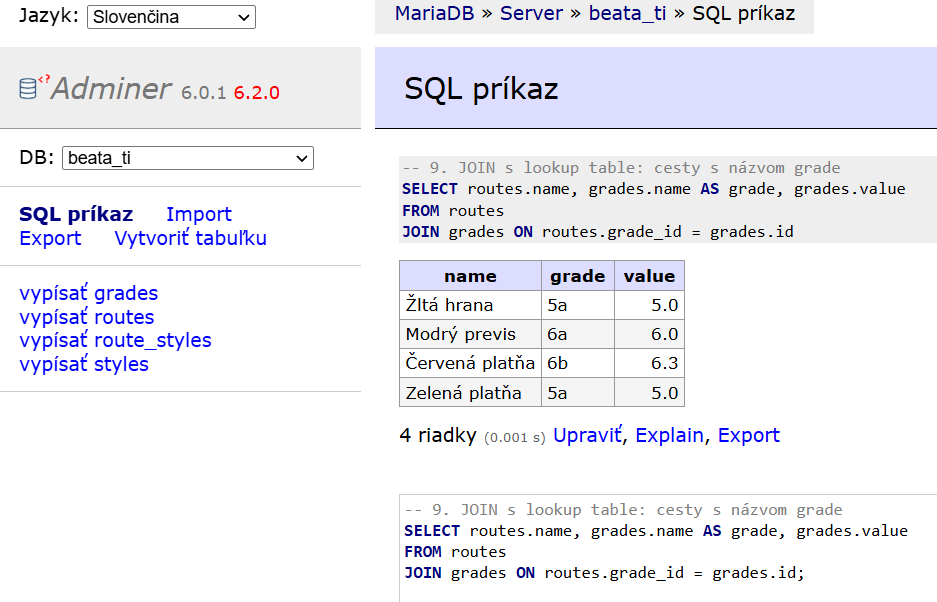
Pravidlá zápisu SQL:
- Každý príkaz končí bodkočiarkou. Do SQL command môžeš dať viac príkazov naraz, vykonajú sa po poradí.
- Text sa píše v apostrofoch:
'Žltá hrana','2026-09-14'. Čísla bez apostrofov:3,5.0. - Slová SQL (
SELECT,FROM,WHERE) sa píšu veľkými písmenami. Nie je to povinné, ale príkaz sa lepšie číta: veľké je SQL, malé sú tvoje názvy. - Názvy tables a columns píš malými písmenami, anglicky, bez diakritiky, slová spoj podčiarkovníkom:
route_styles,grade_id. Na sigma súroutesaRoutesdve rôzne tables. - Komentár je
--(dve pomlčky a medzera) až do konca riadka; databáza ho preskočí.
Viac: W3Schools: SQL Intro
Redundancia: prečo jedna table nestačí
Vráť sa k table routes hore. Keď narastie, prejavia sa na nej tieto chyby:
- Redundancy (redundancia): tá istá informácia je uložená viackrát. „5a má hodnotu 5.0” je napísané pri každej ceste s 5a. Keď sa správca steny rozhodne hodnoty prepočítať, musí prepísať sto records a na jeden zabudne.
- Nekonzistencia: pri Zelenej platni je
5Anamiesto5a. Pre databázu sú to dva rôzne grades;WHERE grade = '5a'Zelenú platňu nenájde. Keď hodnotu píšeš stokrát, raz sa pomýliš. Keď je napísaná raz a všade inde je len jej číslo, pomýliť sa nedá. - Viac hodnôt v jednej bunke:
toprope, leadje jeden text, nie dva styles. Na otázku „koľko ciest sa lezie style lead” databáza vie odpovedať len nespoľahlivým hľadaním v texte, a „lead” by našla aj v „leadership”. Každá hodnota patrí do vlastného record.
Riešenie je rozdeliť jednu table na viac. Každá nová table dostane column id, číslo record, ktoré v nej platí len raz. Grades idú do vlastnej table grades, každý raz, so svojím id. V routes zostane namiesto 5a len číslo 1, column sa volá grade_id (koncovka _id hovorí: toto je odkaz na id inej table). Styles idú do styles a dvojice „táto cesta, tento style” do štvrtej table route_styles, každá dvojica vo vlastnom record. Keď treba povedať, z ktorej table column je, píše sa table.column: routes.id je column id v table routes.
5a je v grades raz; v routes je namiesto nej číslo 1.
Toto sú tables, s ktorými pracuje celá Teória aj ukážky:
Tables pre dátový model lezeckej steny.
| id | name | value |
|---|---|---|
| 1 | 5a | 5.0 |
| 2 | 6a | 6.0 |
| 3 | 6b | 6.3 |
| id | name |
|---|---|
| 1 | toprope |
| 2 | lead |
| 3 | boulder |
| id | name | holds | grade_id | since | note | photo |
|---|---|---|---|---|---|---|
| 1 | Žltá hrana | žlté | 1 | 2026-09-14 | Vhodná pre začiatočníkov. | zlta-hrana.jpg |
| 2 | Modrý previs | modré | 2 | 2026-09-21 | Previs s dobrými chytmi. | modry-previs.jpg |
| 3 | Červená platňa | červené | 3 | 2026-10-05 | Malé stupy, treba dobre stáť. | cervena-platna.jpg |
| 4 | Zelená platňa | zelené | 1 | 2026-10-19 | Dlhá, vytrvalostná. | zelena-platna.jpg |
| route_id | style_id |
|---|---|
| 1 | 1 |
| 2 | 1 |
| 2 | 2 |
Všimni si: Žltá hrana aj Zelená platňa majú grade_id 1, obe sú 5a, a 5a je v databáze napísané raz. V route_styles je prvé číslo vždy z routes.id a druhé zo styles.id: record 1 | 1 čítaj „cesta 1 (Žltá hrana), style 1 (toprope)“, record 2 | 2 je „cesta 2 (Modrý previs), style 2 (lead)”. Modrý previs je tam dvakrát, lezie sa toprope aj lead. Červená platňa a Zelená platňa v route_styles nie sú vôbec, style im ešte nikto nezapísal. Cena za rozdelenie: keď chceš cesty vypísať s názvom grade, musíš tables spojiť. Na to je JOIN, príde v časti o výpise z viacerých tables.
Dátový model: typy tables a typy relácií
Zoznam tables, ich columns a toho, ako spolu súvisia, sa volá data model (dátový model). Kreslí sa ako obrázok. Toto je model lezeckej steny:
Ako čítať obrázok: každý obdĺžnik je table s názvom a columns. Pri každom column je prvé slovo jeho data type (dátový typ): int celé číslo, varchar text, decimal desatinné číslo, date dátum, text dlhý text; vysvetlíme ich pri CREATE TABLE. Čiara medzi dvoma tables je prepojenie a text na nej je column, v ktorom prepojenie je. Konce čiar hovoria, koľko records na ktorej strane patrí k sebe: || znamená „práve jeden”, o{ (vranie nohy s krúžkom) „nula alebo viac”. Čiaru grades – routes čítaj: jedna grade, nula alebo viac ciest; každá cesta má práve jednu grade.
V tomto predmete pracujeme s tromi typmi tables:
Main entity (hlavná entita) je table, okolo ktorej sa aplikácia točí. Má veľa columns, používatelia do nej pridávajú records, menia ich a mažú. Na lezeckej stene sú to cesty, routes. V knižnici by to boli knihy, v e-shope produkty.
Lookup table (číselník) je malá table s pevným zoznamom hodnôt, z ktorých sa vyberá. Má id, name a prípadne číselnú hodnotu value, nič viac. Mení sa zriedka a spravuje ju správca steny, bežný používateľ z nej len vyberá v <select> alebo radio. Na stene sú to grades a styles; v cv05 si ich mal ako array $grades a $styles, teraz sú to tables.
Pivot table (prepojka) spája dve tables, keď jeden record prvej patrí k viacerým records druhej a naopak. Má dva columns s id z oboch strán, každý record je jedna dvojica. Na stene je to route_styles.
Podľa toho, ako sú tables spojené, rozlišujeme dva typy relation (relácia):
One-to-many (relácia 1:N): jeden record prvej table patrí k mnohým records druhej, ale každý record druhej má práve jeden z prvej. Jeden grade má mnoho ciest, každá cesta má práve jeden grade. Rieši sa jedným column v table na strane N: routes.grade_id obsahuje id z grades. Na obrázku je to jedna čiara.
Many-to-many (relácia M:N): mnoho k mnohým na obe strany. Cesta má viac styles, style má viac ciest. Do žiadnej z dvoch tables sa to nezmestí (do routes.style_id by sa dal len jeden style), preto vzniká pivot table route_styles s dvoma columns route_id a style_id. Na obrázku to nie je jedna čiara, ale dve: routes – route_styles a styles – route_styles. Každá z nich je relácia 1:N (jedna cesta, veľa dvojíc; jeden style, veľa dvojíc) a spolu dávajú M:N.
Náš model má teda jednu main entity, dva lookup tables a jednu pivot table: grades je k routes pripojená reláciou 1:N (priamo cez grade_id), styles reláciou M:N (cez route_styles). Tvoj model bude mať rovnaký tvar.
Obrázok je nakreslený z textu v jazyku Mermaid. Takýto text ti vráti AI, keď ho o model požiadaš; GitHub ho v súbore .md vykreslí sám, takže v models.md svojho repository uvidíš obrázok.
erDiagram
    direction LR
    grades ||--o{ routes : "grade_id"
    routes ||--o{ route_styles : "route_id"
    styles ||--o{ route_styles : "style_id"

    grades {
        int id PK
        varchar name
        decimal value
    }
    styles {
        int id PK
        varchar name
    }
    routes {
        int id PK
        varchar name
        varchar holds
        int grade_id FK
        date since
        text note
        varchar photo
    }
    route_styles {
        int route_id PK, FK
        int style_id PK, FK
    }
Čítaj: riadok grades ||--o{ routes : "grade_id" je čiara relácie 1:N z grades do routes cez column grade_id; blok v zložených zátvorkách je zoznam columns table. V .md súbore sa blok uzavrie do troch spätných apostrofov so slovom mermaid za prvými tromi.
Ďalší lookup table, keď treba. V tabuľke Prehľad na stránke Cesty je aj línia steny (3, 7, 9, 5). Aj to je opakujúci sa údaj: na jednej línii je viac ciest. Môže byť ďalší lookup table lines (id, name) a v routes column line_id; model má potom päť tables a reláciu 1:N dvakrát. Rovnako by sa dal urobiť lookup table z farby chytov holds. Z opakujúcich sa údajov si vytvoríš lookup tables, koľko treba. Tvoj model má mať aspoň jednu main entity, dva lookup tables a jednu pivot table; viac lookup tables môže mať.
lines. V teórii ďalej pracujeme so štyrmi tables.
Viac: Mermaid: Entity Relationship Diagrams, Mermaid Live Editor (vlož text, vidíš obrázok)
SELECT z jednej table
SELECT je query, ktorá dáta vypíše. Nič nemení, môžeš ju púšťať koľkokrát chceš. Takto vyzerá celá; časti v hranatých zátvorkách sú voliteľné, poradie je pevné:
SELECT columns              -- ktoré columns; * znamená všetky
FROM table                  -- z ktorej table
[WHERE podmienka]           -- len records, ktoré splnia podmienku
[ORDER BY column [DESC]]    -- zoradené podľa column, DESC zostupne
[LIMIT počet];              -- najviac toľko records
Čo nepotrebuješ, vynecháš, ale poradie nemeníš. Teraz každá časť s príkladom a výsledkom. Najjednoduchší tvar: všetky columns (* je hviezdička, „všetko”), všetky records.
SELECT * FROM routes; -- všetky columns, všetky records
Výsledok v Adminer.
| id | name | holds | grade_id | since | note | photo |
|---|---|---|---|---|---|---|
| 1 | Žltá hrana | žlté | 1 | 2026-09-14 | Vhodná pre začiatočníkov. | zlta-hrana.jpg |
| 2 | Modrý previs | modré | 2 | 2026-09-21 | Previs s dobrými chytmi. | modry-previs.jpg |
| 3 | Červená platňa | červené | 3 | 2026-10-05 | Malé stupy, treba dobre stáť. | cervena-platna.jpg |
| 4 | Zelená platňa | zelené | 1 | 2026-10-19 | Dlhá, vytrvalostná. | zelena-platna.jpg |
Namiesto * zoznam columns, ktoré chceš, v poradí, v akom ich chceš:
SELECT name, holds FROM routes; -- len dva columns
Výsledok.
| name | holds |
|---|---|
| Žltá hrana | žlté |
| Modrý previs | modré |
| Červená platňa | červené |
| Zelená platňa | zelené |
WHERE vyberie records podľa podmienky (condition). Podmienky sú ako v PHP: =, <, >, <=, >=, nerovná sa <>, spájajú sa cez AND a OR. Rozdiely oproti PHP: rovnosť je jedno =, nie dve; nerovnosť je <>; spojky sú slová AND a OR.
SELECT name, holds FROM routes WHERE grade_id = 1; -- len cesty s grade id 1
Výsledok.
| name | holds |
|---|---|
| Žltá hrana | žlté |
| Zelená platňa | zelené |
SELECT name, since FROM routes WHERE since >= '2026-10-01'; -- postavené v októbri a neskôr; dátum v apostrofoch
Výsledok.
| name | since |
|---|---|
| Červená platňa | 2026-10-05 |
| Zelená platňa | 2026-10-19 |
Na hľadanie v texte je LIKE s %, ktoré znamená „ľubovoľný text”: '%platňa' je čokoľvek končiace na platňa, 'Modr%' čokoľvek začínajúce na Modr, '%hrana%' čokoľvek, čo obsahuje hrana.
SELECT name FROM routes WHERE name LIKE '%platňa'; -- názov končí na platňa
Výsledok.
| name |
|---|
| Červená platňa |
| Zelená platňa |
ORDER BY zoradí records podľa column; ASC vzostupne (predvolené, môžeš vynechať), DESC zostupne. Bez ORDER BY databáza vracia records v poradí, aké sa jej hodí, nespoliehaj sa naň.
SELECT name, since FROM routes ORDER BY since DESC; -- od najnovšej
Výsledok.
| name | since |
|---|---|
| Zelená platňa | 2026-10-19 |
| Červená platňa | 2026-10-05 |
| Modrý previs | 2026-09-21 |
| Žltá hrana | 2026-09-14 |
LIMIT obmedzí počet records. Spolu s ORDER BY dá „prvých N”: dve najnovšie cesty.
SELECT name, since FROM routes ORDER BY since DESC LIMIT 2;
Výsledok.
| name | since |
|---|---|
| Zelená platňa | 2026-10-19 |
| Červená platňa | 2026-10-05 |
S dátumom sa dá aj počítať, podobne ako minulý týždeň v PHP. CURDATE() je dnešný dátum a DATEDIFF(a, b) vráti a mínus b v dňoch; DATEDIFF(CURDATE(), since) je dnes mínus since. Vypočítaný column dostane názov cez AS (alias), inak by sa vo výsledku volal DATEDIFF(CURDATE(), since); AS sa dá použiť pri ktoromkoľvek column a alias môžeš použiť aj v ORDER BY (ORDER BY days DESC).
SELECT name, DATEDIFF(CURDATE(), since) AS days FROM routes; -- koľko dní je cesta postavená
Výsledok k 2. 11. 2026.
| name | days |
|---|---|
| Žltá hrana | 49 |
| Modrý previs | 42 |
| Červená platňa | 28 |
| Zelená platňa | 14 |
Viac: W3Schools: SQL SELECT, SQL WHERE, SQL LIKE, SQL ORDER BY, MariaDB: DATEDIFF
Agregačné funkcie: jedno číslo z mnohých records
Aggregate function (agregačná funkcia) vezme viac records a vráti jednu hodnotu: počet, súčet, priemer, najmenšiu, najväčšiu. Výsledkom je jeden record.
| Funkcia | Čo vráti |
|---|---|
COUNT(*) |
počet records |
SUM(column) |
súčet hodnôt |
AVG(column) |
priemer |
MIN(column) |
najmenšia hodnota (pri dátume najstarší, pri texte prvý v abecede) |
MAX(column) |
najväčšia |
SELECT COUNT(*) AS routes_count FROM routes; -- koľko je ciest
Výsledok.
| routes_count |
|---|
| 4 |
SELECT MIN(since) AS oldest, MAX(since) AS newest FROM routes; -- najstaršia a najnovšia cesta: dátumy
Výsledok.
| oldest | newest |
|---|---|
| 2026-09-14 | 2026-10-19 |
GROUP BY rozdelí records do skupín podľa column a agregačnú funkciu spočíta pre každú skupinu zvlášť. Výsledkom je jeden record na skupinu. Koľko ciest má ktorý grade, zatiaľ len podľa čísla:
SELECT grade_id, COUNT(*) AS routes_count
FROM routes
GROUP BY grade_id          -- jedna skupina = jedna hodnota grade_id
ORDER BY grade_id;
Výsledok.
| grade_id | routes_count |
|---|---|
| 1 | 2 |
| 2 | 1 |
| 3 | 1 |
Pravidlo: vo výsledku s GROUP BY môžu byť len columns, podľa ktorých sa zoskupuje, a agregačné funkcie. Databáza nevie, ktorý name by mala ukázať pri skupine 1, keď sú tam dve cesty.
Číslo, alebo celý record? MAX(since) vráti len dátum. Keď chceš vedieť, ktorá cesta je najnovšia, nepýtaš sa na dátum, ale na record: zoraď zostupne a vezmi prvý.
SELECT MAX(since) AS newest FROM routes; -- len dátum
Výsledok.
| newest |
|---|
| 2026-10-19 |
SELECT * FROM routes ORDER BY since DESC LIMIT 1; -- celý record najnovšej cesty
Výsledok.
| id | name | holds | grade_id | since | note | photo |
|---|---|---|---|---|---|---|
| 4 | Zelená platňa | zelené | 1 | 2026-10-19 | Dlhá, vytrvalostná. | zelena-platna.jpg |
Viac: W3Schools: SQL COUNT, AVG, SUM, SQL MIN and MAX, SQL GROUP BY
JOIN: výpis z viacerých tables
SELECT name, grade_id FROM routes dá pri Žltej hrane číslo 1. Návštevník steny chce vidieť 5a. To je v grades, a JOIN obe tables spojí: ku každému record z routes priloží record z grades, ktorý má také id, aké je v routes.grade_id. Podmienka spojenia sa píše za ON.
SELECT routes.name, grades.name AS grade, grades.value   -- columns z oboch tables, preto s názvom table
FROM routes
JOIN grades ON routes.grade_id = grades.id;              -- spoj record, kde sa grade_id rovná id grade
ON routes.grade_id = grades.id: každý record z routes nájde svoj record v grades.
Výsledok.
| name | grade | value |
|---|---|---|
| Žltá hrana | 5a | 5.0 |
| Modrý previs | 6a | 6.0 |
| Červená platňa | 6b | 6.3 |
| Zelená platňa | 5a | 5.0 |
Nové je tu routes.name: obe tables majú column name, preto sa píše s názvom table, inak by databáza nevedela, ktorý myslíš (hlási Column 'name' in field list is ambiguous). A AS grade dá column vo výsledku iný názov, inak by vo výsledku boli dva columns name.
Čítaj výsledok: hodnota 5a je v databáze raz, vo výsledku je dvakrát. Redundancia nie je v uložených dátach, vzniká až vo výpise, a to je v poriadku.
Cez pivot table sa spája dvakrát: routes s route_styles a route_styles so styles.
SELECT routes.name, styles.name AS style
FROM routes
JOIN route_styles ON route_styles.route_id = routes.id   -- 1. krok: cesta → jej dvojice
JOIN styles ON styles.id = route_styles.style_id;         -- 2. krok: dvojica → názov style
Výsledok.
| name | style |
|---|---|
| Žltá hrana | toprope |
| Modrý previs | toprope |
| Modrý previs | lead |
Modrý previs je dvakrát, lebo má dva styles: každá dvojica z route_styles je jeden record výsledku. A Červená platňa so Zelenou platňou chýbajú: JOIN vypíše len records, ktoré majú pár na druhej strane. Keď chceš všetky cesty aj bez style, použi LEFT JOIN: vypíše všetky records ľavej table (tej za FROM) a kde pár nie je, dá NULL.
SELECT routes.name, styles.name AS style
FROM routes
LEFT JOIN route_styles ON route_styles.route_id = routes.id   -- všetky cesty, aj bez dvojice
LEFT JOIN styles ON styles.id = route_styles.style_id;
LEFT JOIN zostanú vo výsledku s NULL; pri JOIN by vypadli.
Výsledok.
| name | style |
|---|---|
| Žltá hrana | toprope |
| Modrý previs | toprope |
| Modrý previs | lead |
| Červená platňa | NULL |
| Zelená platňa | NULL |
NULL je „bez hodnoty”, niečo iné ako prázdny text alebo nula. V PHP z neho bude null, pri výpise prázdny text. Kedy ktorý JOIN: „cesty, ktoré majú style” je JOIN; „všetky cesty a ich style, ak ho majú” je LEFT JOIN.
Viac: W3Schools: SQL JOIN, SQL LEFT JOIN, SQL Aliases
Agregačné funkcie cez viac tables
Preto má grades column value: s textom 5a sa počítať nedá, s číslom 5.0 áno. Priemerný grade ciest na stene potrebuje JOIN (hodnoty sú v grades, cesty v routes) a ROUND(x, 1), ktoré zaokrúhli na jedno desatinné miesto, inak dostaneš 5.57500.
SELECT ROUND(AVG(grades.value), 1) AS avg_value   -- priemer value cez všetky cesty, na 1 desatinné miesto
FROM routes
JOIN grades ON routes.grade_id = grades.id;
Výsledok.
| avg_value |
|---|
| 5.6 |
GROUP BY s názvom grade namiesto čísla:
SELECT grades.name AS grade, COUNT(*) AS routes_count
FROM routes
JOIN grades ON routes.grade_id = grades.id
GROUP BY grades.name          -- jedna skupina = jedna grade
ORDER BY grades.name;
To isté cez pivot table: koľko ciest sa lezie ktorým style. Cesty bez style v tomto výpise nie sú (JOIN).
SELECT styles.name AS style, COUNT(*) AS routes_count
FROM routes
JOIN route_styles ON route_styles.route_id = routes.id
JOIN styles ON styles.id = route_styles.style_id
GROUP BY styles.name          -- jedna skupina = jeden style
ORDER BY routes_count DESC;   -- zoradenie podľa aliasu
Výsledok.
| style | routes_count |
|---|---|
| toprope | 2 |
| lead | 1 |
COUNT(*) počíta records, COUNT(column) počíta records, kde column nie je NULL. S LEFT JOIN tak spočítaš styles pri každej ceste, aj nulu:
SELECT routes.name, COUNT(route_styles.style_id) AS styles_count   -- NULL z LEFT JOIN sa nepočíta
FROM routes
LEFT JOIN route_styles ON route_styles.route_id = routes.id
GROUP BY routes.id, routes.name   -- name je vo výsledku, preto musí byť aj v GROUP BY (pravidlo hore)
ORDER BY routes.id;
Výsledok.
| name | styles_count |
|---|---|
| Žltá hrana | 1 |
| Modrý previs | 2 |
| Červená platňa | 0 |
| Zelená platňa | 0 |
A znova číslo, alebo celý record: MAX(grades.value) dá 6.3; ktorá cesta to je, povie zoradenie a LIMIT 1.
SELECT routes.name, grades.name AS grade, grades.value   -- celý record najťažšej cesty
FROM routes
JOIN grades ON routes.grade_id = grades.id
ORDER BY grades.value DESC                               -- od najťažšej
LIMIT 1;                                                 -- len prvý
Výsledok.
| name | grade | value |
|---|---|---|
| Červená platňa | 6b | 6.3 |
Viac: W3Schools: SQL COUNT, AVG, SUM, SQL GROUP BY
Pravidlá mazania a vkladania
Dáta v štyroch tables na seba odkazujú číslami. Z toho vyplývajú pravidlá, ktoré musí niekto strážiť:
- Grade, ktorý používa cesta, sa zmazať nesmie. Keby zmizol record
1 | 5azgrades, Žltá hrana a Zelená platňa by maligrade_id = 1, ktoré nikam neukazuje;JOINby ich prestal vypisovať a nikto by nevedel prečo. To isté platí pre style, ktorý je vroute_styles. - Dvojice v pivot table, ktoré patria zmazanému record main entity, sa zmazať musia. Keď zmizne Modrý previs z
routes, records2 | 1a2 | 2vroute_stylesnemajú zmysel: dvojica „cesta 2, toprope” bez cesty 2 je smetie. Majú zmiznúť spolu s ňou, bez toho, aby na to niekto myslel. - Cesta s grade, ktorý neexistuje, sa vložiť nesmie.
grade_id = 9nikam neukazuje; taký record je od začiatku chybný.
Pravidlá by si mohol strážiť sám v PHP: pred každým mazaním skontrolovať, či sa nič nepokazí. Zabudneš raz a dáta sú rozbité navždy. Preto sa pravidlá zaznamenajú v databáze pri vytváraní tables a databáza ich stráži sama, pri každom príkaze, bez výnimky. Ako sa to zapíše, je v ďalšej časti, kde sa všetko spojí.
CREATE TABLE: štruktúra, kľúče a pravidlá
Tables, ktoré celý čas vypisujeme, vznikli príkazom CREATE TABLE. Pre každý column napíšeš názov a data type: aký druh hodnoty tam bude. Databáza data type stráži, do číselného column text nepustí. Data types je veľa, dnes stačia tieto:
| Data type | Čo uloží | Príklad |
|---|---|---|
INT |
celé číslo | 3, 2026 |
DECIMAL(3,1) |
desatinné číslo s pevným počtom miest: spolu 3 číslice, z toho 1 za čiarkou | 5.0, 6.3 |
VARCHAR(60) |
text do 60 znakov (číslo si volíš) | 'Žltá hrana' |
TEXT |
dlhý text bez limitu | poznámka, správa |
DATE |
dátum v tvare RRRR-MM-DD | '2026-09-14' |
Je to to isté, čo si riešil v týždni 5 (cv04) pri variables: rok je číslo, telefónne číslo je text, dátum je dátum. Databáza to navyše vynúti. Takto vyzerá grades aj s data types nad columns:
grades s data types columns.
| INT | VARCHAR(5) | DECIMAL(3,1) |
| id | name | value |
|---|---|---|
| 1 | 5a | 5.0 |
| 2 | 6a | 6.0 |
| 3 | 6b | 6.3 |
A toto je ten istý obrázok napísaný ako SQL:
CREATE TABLE grades (                      -- názov table
  id    INT AUTO_INCREMENT PRIMARY KEY,    -- číslo record; databáza ho pridelí sama, od 1 ďalej
  name  VARCHAR(5)   NOT NULL UNIQUE,      -- text do 5 znakov; NOT NULL: hodnota je povinná; UNIQUE: každá len raz
  value DECIMAL(3,1) NOT NULL              -- desatinné číslo na porovnávanie a priemery
) CHARACTER SET utf8mb4;                   -- kódovanie, aby sa uložila diakritika
Nové je tu NOT NULL: column nesmie zostať prázdny (NULL je „bez hodnoty”). UNIQUE: tá istá hodnota sa v column nesmie opakovať, grade 5a sa nedá vložiť dvakrát; to je zápis toho, čo sme chceli v časti o redundancii. AUTO_INCREMENT: číslo do id nepíšeš, databáza dá prvému record 1, ďalšiemu 2 a tak ďalej. A PRIMARY KEY je prvý z dvoch kľúčov:
Primary key (primárny kľúč) je column, ktorý jednoznačne určuje record. V main entity a v lookup tables je to vždy id INT AUTO_INCREMENT PRIMARY KEY; databáza nedovolí dve rovnaké hodnoty ani NULL a podľa id record rýchlo nájde. Pivot table nemá id, jej primary key je dvojica (route_id, style_id): tá istá dvojica sa nedá vložiť dvakrát. Na obrázku modelu je označený PK.
Foreign key (cudzí kľúč) je column, ktorý obsahuje id record z inej table, a je to povedané databáze: FOREIGN KEY (grade_id) REFERENCES grades(id) čítaj „grade_id odkazuje na grades.id“. Od tej chvíle databáza stráži tretie pravidlo z predchádzajúcej časti: v routes.grade_id môže byť len číslo, ktoré v grades.id existuje. Na obrázku modelu je označený FK a je to presne tá čiara medzi tables.
ON DELETE za REFERENCES je zápis prvých dvoch pravidiel: čo urobiť, keď sa zmaže record, na ktorý foreign key odkazuje.
ON DELETE RESTRICT: mazanie sa odmietne. Grade 5a sa nedá zmazať, kým ho používa nejaká cesta. Je to predvolené pravidlo (platí, aj keď ho nenapíšeš) a je správne pre lookup tables.ON DELETE CASCADE: závislé records sa zmažú spolu s ním. Keď sa zmaže cesta, zmažú sa aj jej records vroute_styles. Správne pre pivot tables.ON DELETE SET NULL: foreign key sa nastaví naNULL, record zostane, len stratí väzbu. Hodí sa pri nepovinných väzbách (column nesmie maťNOT NULL). V našom modeli nie je.
Zvyšné tri tables s data types nad columns a pod každou jej CREATE TABLE:
styles s data types columns.
| INT | VARCHAR(20) |
| id | name |
|---|---|
| 1 | toprope |
| 2 | lead |
| 3 | boulder |
CREATE TABLE styles (                      -- lookup table: styles lezenia
  id   INT AUTO_INCREMENT PRIMARY KEY,
  name VARCHAR(20) NOT NULL UNIQUE         -- názov style, každý len raz
) CHARACTER SET utf8mb4;
routes s data types columns.
| INT | VARCHAR(60) | VARCHAR(20) | INT | DATE | TEXT | VARCHAR(60) |
| id | name | holds | grade_id | since | note | photo |
|---|---|---|---|---|---|---|
| 1 | Žltá hrana | žlté | 1 | 2026-09-14 | Vhodná pre začiatočníkov. | zlta-hrana.jpg |
| 2 | Modrý previs | modré | 2 | 2026-09-21 | Previs s dobrými chytmi. | modry-previs.jpg |
| 3 | Červená platňa | červené | 3 | 2026-10-05 | Malé stupy, treba dobre stáť. | cervena-platna.jpg |
| 4 | Zelená platňa | zelené | 1 | 2026-10-19 | Dlhá, vytrvalostná. | zelena-platna.jpg |
CREATE TABLE routes (                            -- main entity: cesty
  id       INT AUTO_INCREMENT PRIMARY KEY,
  name     VARCHAR(60) NOT NULL,
  holds    VARCHAR(20) NOT NULL,                 -- farba chytov
  grade_id INT         NOT NULL,                 -- foreign key: grade, relácia 1:N
  since    DATE        NOT NULL,                 -- postavená od
  note     TEXT,                                 -- bez NOT NULL: poznámka je nepovinná
  photo    VARCHAR(60),                          -- názov súboru v img/, nepovinný
  FOREIGN KEY (grade_id) REFERENCES grades(id) ON DELETE RESTRICT   -- RESTRICT: record lookup table, ktorý niekto používa, sa nedá zmazať
) CHARACTER SET utf8mb4;
route_styles s data types columns.
| INT | INT |
| route_id | style_id |
|---|---|
| 1 | 1 |
| 2 | 1 |
| 2 | 2 |
CREATE TABLE route_styles (                      -- pivot table: cesta × style, relácia M:N
  route_id INT NOT NULL,
  style_id INT NOT NULL,
  PRIMARY KEY (route_id, style_id),              -- dvojica je primary key
  FOREIGN KEY (route_id) REFERENCES routes(id) ON DELETE CASCADE,    -- CASCADE: zmaž cestu a jej dvojice sa zmažú s ňou
  FOREIGN KEY (style_id) REFERENCES styles(id) ON DELETE RESTRICT    -- RESTRICT: používaný style sa nedá zmazať
) CHARACTER SET utf8mb4;
Po spustení na prednáške sú vľavo v Adminer štyri tables; po kliknutí na routes Adminer ukáže columns, data types a pod nimi foreign keys s pravidlami ON DELETE. To isté uvidíš pri svojej main entity v úlohe 7.4.
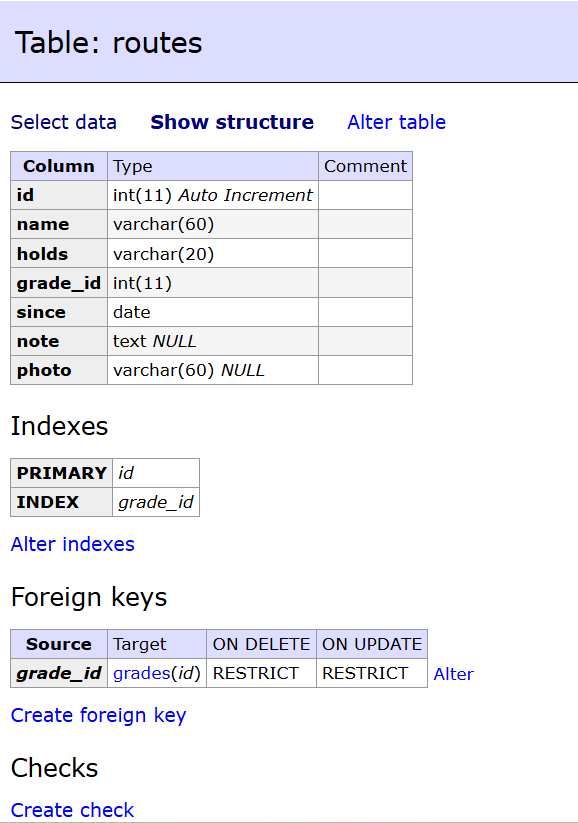
routes: columns s data types a pod nimi foreign keys s pravidlami.
Poradie. Foreign key môže odkazovať len na table, ktorá už existuje. Preto sa tables vytvárajú v poradí lookup tables → main entity → pivot table (grades, styles, routes, route_styles) a mažú sa v opačnom poradí. Rovnaké poradie platí pre vkladanie dát: cesta sa nedá vložiť, kým neexistuje jej grade.
Viac: W3Schools: SQL CREATE TABLE, SQL Data Types, SQL PRIMARY KEY, SQL FOREIGN KEY, MariaDB: Foreign Keys
INSERT, UPDATE, DELETE, DROP a ALTER: zmeny dát a štruktúry
Príkazy, ktoré menia dáta alebo štruktúru. Každý s výsledkom v Adminer. Príklady INSERT predpokladajú prázdne tables hneď po CREATE TABLE; od UPDATE ďalej tables naplnené dátami z Ukážky 2.
INSERT pridá record: zoznam columns a k nim zoznam hodnôt v rovnakom poradí. id vynecháš, dostane ho AUTO_INCREMENT.
INSERT INTO grades (name, value) VALUES ('5a', 5.0); -- jeden record
Výsledok: Query executed OK, 1 row affected. Po kliknutí na grades a Select data je v table record s id 1. Viac records jedným príkazom: za VALUES ide viac zátvoriek oddelených čiarkou, každá zátvorka je jeden record.
INSERT INTO grades (name, value) VALUES   -- viac records naraz
  ('6a', 6.0),                            -- čiarka za zátvorkou: nasleduje ďalší record
  ('6b', 6.3);                            -- posledný bez čiarky, bodkočiarka ukončí príkaz
Výsledok: 2 rows affected, v table sú tri records s id 1, 2, 3. Teraz už môžeš vložiť cestu, lebo grade s id 1 existuje; s grade_id = 9 by INSERT skončil chybou Cannot add or update a child row: a foreign key constraint fails.
INSERT INTO routes (name, holds, grade_id, since, note, photo)
VALUES ('Žltá hrana', 'žlté', 1, '2026-09-14', 'Vhodná pre začiatočníkov.', 'zlta-hrana.jpg');
UPDATE zmení hodnotu v records, ktoré vyberie WHERE.
UPDATE routes SET note = 'Vhodná pre začiatočníkov, dobré chyty.' WHERE id = 1; -- zmení note len v record s id 1
Výsledok: 1 row affected. Pozor: UPDATE routes SET note = '…'; bez WHERE zmení všetky records. Databáza sa nepýta.
DELETE zmaže records podľa WHERE; table a jej štruktúra zostanú.
DELETE FROM routes WHERE id = 2; -- zmaže Modrý previs
Výsledok: 1 row affected. V route_styles ale zmizli aj dva records 2 | 1 a 2 | 2: to urobil ON DELETE CASCADE. Bez WHERE zmaže všetky records a table je prázdna, ale je. Uvoľnené id sa už nepoužije: ďalšia vložená cesta dostane id 5, nie 2.
DELETE FROM grades WHERE id = 1; -- zmaž 5a, ktorú používajú dve cesty
Cannot delete or update a parent row: a foreign key constraint fails
(`meno_priezvisko`.`routes`, CONSTRAINT `routes_ibfk_1` FOREIGN KEY (`grade_id`) REFERENCES `grades` (`id`))
Nič sa nezmazalo: to urobil ON DELETE RESTRICT. Keď grade naozaj chceš zmazať, najprv presuň cesty na iný (UPDATE routes SET grade_id = 2 WHERE grade_id = 1;) a potom ho zmaž.
DROP TABLE zmaže table celú: dáta aj štruktúru. Žiadne WHERE.
DROP TABLE route_styles; -- table route_styles už neexistuje
Výsledok: route_styles zmizne zo zoznamu vľavo; SELECT * FROM route_styles; skončí chybou Table 'meno_priezvisko.route_styles' doesn't exist. Rozdiel si pamätaj takto: DELETE vyprázdni skriňu, DROP skriňu vyhodí. A poradie: DROP TABLE grades; skončí chybou Cannot drop table 'grades' referenced by a foreign key constraint, kým existuje routes; maže sa zhora nadol.
ALTER TABLE zmení štruktúru existujúcej table bez straty dát, napríklad pridá column. Nové hodnoty doň potom zapíšeš cez UPDATE.
ALTER TABLE routes ADD COLUMN bolts INT; -- nový column: počet istení; v existujúcich records je NULL
Viac: W3Schools: SQL INSERT INTO, SQL UPDATE, SQL DELETE, SQL DROP TABLE, SQL ALTER TABLE
V praxi: najprv dátový model
V skutočnom projekte sa nezačína od CREATE TABLE, ale od otázky, čo aplikácia potrebuje uchovať a ako to spolu súvisí. Z toho vznikne data model: zoznam tables, ich columns, kto je main entity, čo sú lookup tables, kde je relácia 1:N a kde M:N, a pri každom foreign key, čo sa stane pri mazaní. Až potom sa píše SQL a po ňom kód. Zle navrhnutá table sa v ôsmom týždni opravuje ťažko, dnes je to pár riadkov v models.md.
Tvoj model bude mať rovnaký tvar ako lezecká stena: jedna main entity, dva lookup tables (jeden pripojený reláciou 1:N, druhý M:N cez pivot table). Dobré modely v tomto tvare pre iné témy:
Knižnica: books (id, title, author, age_group_id, added, pages, note), age_groups (id, name, value: vek od, na priemery), genres (id, name), book_genres (book_id, genre_id). Kniha má jednu vekovú kategóriu (1:N), dátum zaradenia added a môže mať viac žánrov (M:N).
Požičovňa náradia: tools (id, name, category_id, since, note), categories (id, name, value: cena za deň), accessories (id, name), tool_accessories (tool_id, accessory_id). Náradie je v jednej kategórii (1:N), ktorá určuje cenu, má dátum nákupu since a príslušenstvo (kábel, kufrík) patrí k viacerým nástrojom (M:N).
Tréningy: workouts (id, name, level_id, date, minutes, note), levels (id, name, value), muscles (id, name), workout_muscles (workout_id, muscle_id). Tréning má jednu úroveň (1:N, value na priemery ako grades), dátum date a precvičuje viac svalových skupín (M:N).
Všetky tri majú v main entity aj column s dátumom, aby sa dalo zoraďovať a počítať dni ako pri cestách. Pri každom modeli vieš povedať: ktorá table je main entity, ktoré sú lookup tables, kde je relácia 1:N (column _id v main entity) a kde M:N (pivot table), a pri každom foreign key, čo sa stane pri mazaní.
Najčastejšie chyby a čo znamenajú
| Čo vidíš | Príčina | Riešenie |
|---|---|---|
Table 'meno_priezvisko.Routes' doesn't exist |
veľké písmeno alebo preklep v názve table | názvy tables malými písmenami, presne ako v CREATE TABLE |
Unknown column 'grade' in 'field list' |
column sa volá inak | pozri CREATE TABLE alebo klikni na table v Adminer |
Column 'name' in field list is ambiguous |
dve spojené tables majú rovnaký column | routes.name, grades.name AS grade |
You have an error in your SQL syntax … near … |
preklep v SQL; za near je miesto chyby |
chýbajúca čiarka, apostrof, zlé poradie častí |
Cannot add or update a child row |
_id odkazuje na neexistujúci record |
najprv vlož record do lookup table |
Cannot delete or update a parent row |
mažeš record, ktorý iná table používa (RESTRICT) |
presuň alebo zmaž závislé records, alebo to tak má byť |
Cannot add foreign key constraint |
data types columns sa nezhodujú, alebo cieľová table neexistuje | oba columns INT; tables v správnom poradí |
Duplicate entry '1-1' for key 'PRIMARY' |
tá istá dvojica v pivot table dvakrát | každá dvojica raz |
Incorrect date value |
dátum nie je RRRR-MM-DD v apostrofoch |
'2026-09-14' |
| výpis je prázdny, chyba žiadna | WHERE nič nenašlo, alebo JOIN bez páru |
over hodnotu, skús LEFT JOIN |
UPDATE alebo DELETE zmenil všetko |
chýba WHERE |
spusti svoj schema.sql + seed.sql (ako v Ukážke 2); WHERE píš vždy |
| diakritika je rozbitá | table bez utf8mb4 |
CHARACTER SET utf8mb4 v CREATE TABLE |
You have the routes on the Routes page in cards and in the Overview table. If you rewrote the three routes from it and one new one, Zelená platňa, into one table routes, it would look like this. Each row of the table is one route and is called a record; each column is one piece of data. We added the grade and the climbing styles from the arrays $grades and $styles (the grade 5c is left out for brevity) and a numeric value value for the grade: we chose it so that grades can be compared and averaged (5a = 5.0, 6a = 6.0, 6b = 6.3); you cannot calculate with the text 5a.
One table with everything. Red cells repeat, the orange one holds two values.
| name | holds | grade | value | styles | since | note |
|---|---|---|---|---|---|---|
| Žltá hrana | žlté | 5a | 5.0 | toprope | 2026-09-14 | Vhodná pre začiatočníkov. |
| Modrý previs | modré | 6a | 6.0 | toprope, lead | 2026-09-21 | Previs s dobrými chytmi. |
| Červená platňa | červené | 6b | 6.3 | 2026-10-05 | Malé stupy, treba dobre stáť. | |
| Zelená platňa | zelené | 5A | 5.0 | 2026-10-19 | Dlhá, vytrvalostná. |
It looks tidy. With four routes it even works, with a hundred it does not. Why is in the section on redundancy; first, where such a table lives and how you talk to it.
What a database and SQL are
A database is a place on the server where data is stored in tables and managed by a program, the database server. On sigma it is MariaDB. Its commands are the same as in MySQL, so when you search for something, guides and courses for MySQL apply too. Each of you has your own database, named the same as your database login. A program that needs the data (today Adminer, from next week your PHP) sends a command to the database server and gets a result back. The commands are written in the SQL language (Structured Query Language); one command is called a query.
Where the database is. Request and response as with a form, only between Adminer and the database server.
Query executed OK
Adminer is a single PHP file in your web space that shows you the database in the browser. How to download it, upload it and log in is in guide 03 Sigma, part 4. After logging in, click the name of your database on the left (name_surname); without that Adminer does not know which database to work in and reports No database selected. Then you see the list of tables on the left (empty for now) and above it the link SQL command: it opens a large text field where you type a query, and the button Execute under it sends the query to the database. The result appears under the button: for a listing a table with records, for other commands the sentence Query executed OK with the number of changed records, for example 1 row affected (Adminer and the database say “row”, it is the same record; for CREATE TABLE it is 0 rows affected and that is fine), or an error message. By clicking a table name on the left and then Select data you see its contents without typing.
Rules for writing SQL:
- Every command ends with a semicolon. You can put several commands into SQL command at once, they run in order.
- Text is written in single quotes:
'Žltá hrana','2026-09-14'. Numbers without quotes:3,5.0. - SQL words (
SELECT,FROM,WHERE) are written in capitals. It is not required, but the command reads better: capitals are SQL, lowercase is your names. - Write names of tables and columns in lowercase, in English, without accents, joining words with an underscore:
route_styles,grade_id. On sigma,routesandRoutesare two different tables. - A comment is
--(two dashes and a space) to the end of the line; the database skips it.
More: W3Schools: SQL Intro
Redundancy: why one table is not enough
Go back to the table routes above. When it grows, these faults show up:
- Redundancy: the same information is stored several times. “5a has the value 5.0” is written at every route with 5a. When the wall manager decides to recalculate the values, they must rewrite a hundred records and forget one.
- Inconsistency: Zelená platňa has
5Ainstead of5a. For the database these are two different grades;WHERE grade = '5a'will not find Zelená platňa. When you write a value a hundred times, you mistype once. When it is written once and everywhere else there is only its number, you cannot mistype. - Several values in one cell:
toprope, leadis one text, not two styles. The database can answer the question “how many routes are climbed in the lead style” only by unreliable searching inside the text, and it would find “lead” in “leadership” too. Each value belongs in its own record.
The solution is to split one table into several. Each new table gets a column id, the number of the record, which occurs in it only once. The grades go into their own table grades, each once, with its id. In the routes only the number 1 stays instead of 5a, and the column is called grade_id (the ending _id says: this is a reference to the id of another table). The styles go into styles and the pairs “this route, this style” into a fourth table route_styles, each pair in its own record. When you need to say which table a column belongs to, you write table.column: routes.id is the column id in the table routes.
5a is in grades once; in routes there is the number 1 instead.
These are the tables the whole Theory and the examples work with:
Tables for the data model of the climbing wall.
| id | name | value |
|---|---|---|
| 1 | 5a | 5.0 |
| 2 | 6a | 6.0 |
| 3 | 6b | 6.3 |
| id | name |
|---|---|
| 1 | toprope |
| 2 | lead |
| 3 | boulder |
| id | name | holds | grade_id | since | note | photo |
|---|---|---|---|---|---|---|
| 1 | Žltá hrana | žlté | 1 | 2026-09-14 | Vhodná pre začiatočníkov. | zlta-hrana.jpg |
| 2 | Modrý previs | modré | 2 | 2026-09-21 | Previs s dobrými chytmi. | modry-previs.jpg |
| 3 | Červená platňa | červené | 3 | 2026-10-05 | Malé stupy, treba dobre stáť. | cervena-platna.jpg |
| 4 | Zelená platňa | zelené | 1 | 2026-10-19 | Dlhá, vytrvalostná. | zelena-platna.jpg |
| route_id | style_id |
|---|---|
| 1 | 1 |
| 2 | 1 |
| 2 | 2 |
Notice: both Žltá hrana and Zelená platňa have grade_id 1, both are 5a, and 5a is written in the database once. In route_styles the first number is always from routes.id and the second from styles.id: read the record 1 | 1 as “route 1 (Žltá hrana), style 1 (toprope)”, the record 2 | 2 is “route 2 (Modrý previs), style 2 (lead)”. Modrý previs is there twice, it is climbed both toprope and lead. Červená platňa and Zelená platňa are not in route_styles at all, nobody has recorded a style for them yet. The price of splitting: when you want to list the routes with the name of the grade, you have to join the tables. That is what JOIN is for, it comes in the section on listing from several tables.
Data model: types of tables and types of relations
The list of tables, their columns and how they relate to each other is called the data model. It is drawn as a picture. This is the model of the climbing wall:
How to read the picture: each rectangle is a table with its name and columns. The first word at each column is its data type: int a whole number, varchar text, decimal a decimal number, date a date, text long text; we explain them at CREATE TABLE. A line between two tables is a link, and the text on it is the column where the link is. The ends of the lines say how many records on each side belong together: || means “exactly one”, o{ (a crow’s foot with a circle) “zero or more”. Read the line grades – routes as: one grade, zero or more routes; every route has exactly one grade.
In this course we work with three types of tables:
Main entity is the table the application revolves around. It has many columns, users add records to it, change them and delete them. On the climbing wall it is the routes, routes. In a library it would be the books, in an e-shop the products.
Lookup table is a small table with a fixed list of values to choose from. It has id, name and possibly a numeric value value, nothing more. It changes rarely and is managed by the administrator; an ordinary user only picks from it in a <select> or radio. On the wall these are grades and styles; in cv05 you had them as the arrays $grades and $styles, now they are tables.
Pivot table joins two tables when one record of the first belongs to several records of the second and vice versa. It has two columns with the id from both sides, each record is one pair. On the wall it is route_styles.
Depending on how the tables are joined, we distinguish two types of relations:
Relation 1:N (one-to-many): one record of the first table belongs to many records of the second, but each record of the second has exactly one of the first. One grade has many routes, each route has exactly one grade. It is solved by one column in the table on the N side: routes.grade_id contains the id from grades. In the picture it is one line.
Relation M:N (many-to-many): many to many on both sides. A route has several styles, a style has many routes. It does not fit into either of the two tables (routes.style_id could hold only one style), so the pivot table route_styles with the two columns route_id and style_id comes in. In the picture it is not one line but two: routes – route_styles and styles – route_styles. Each of them is a relation 1:N (one route, many pairs; one style, many pairs) and together they make M:N.
So our model has one main entity, two lookup tables and one pivot table: grades is joined to routes by a relation 1:N (directly through grade_id), styles by a relation M:N (through route_styles). Your model will have the same shape.
The picture is drawn from text in the Mermaid language. This is the text an AI returns when you ask it for a model; GitHub draws it in a .md file by itself, so in models.md in your repository you will see the picture.
erDiagram
    direction LR
    grades ||--o{ routes : "grade_id"
    routes ||--o{ route_styles : "route_id"
    styles ||--o{ route_styles : "style_id"

    grades {
        int id PK
        varchar name
        decimal value
    }
    styles {
        int id PK
        varchar name
    }
    routes {
        int id PK
        varchar name
        varchar holds
        int grade_id FK
        date since
        text note
        varchar photo
    }
    route_styles {
        int route_id PK, FK
        int style_id PK, FK
    }
Read: the line grades ||--o{ routes : "grade_id" is the line of the relation 1:N from grades to routes through the column grade_id; the block in curly braces is the list of columns of a table. In a .md file the block is enclosed in three backticks with the word mermaid after the first three.
Another lookup table when needed. The Overview table on the Routes page also has the line of the wall (3, 7, 9, 5). That is a repeating value too: several routes are on one line. It can be another lookup table lines (id, name) with the column line_id in routes; the model then has five tables and the relation 1:N twice. A lookup table could be made from the colour of the holds holds in the same way. From repeating values you make as many lookup tables as needed. Your model must have at least one main entity, two lookup tables and one pivot table; it may have more lookup tables.
lines. In the theory we keep working with four tables.
More: Mermaid: Entity Relationship Diagrams, Mermaid Live Editor (paste the text, see the picture)
SELECT from one table
SELECT is the query that lists data. It changes nothing, you can run it as many times as you like. This is the whole of it; the parts in square brackets are optional, the order is fixed:
SELECT columns              -- which columns; * means all
FROM table                  -- from which table
[WHERE condition]           -- only records that satisfy the condition
[ORDER BY column [DESC]]    -- sorted by the column, DESC descending
[LIMIT count];              -- at most that many records
What you do not need you leave out, but you never change the order. Now each part with an example and its result. The simplest form: all columns (* is the asterisk, “everything”), all records.
SELECT * FROM routes; -- all columns, all records
The result in Adminer.
| id | name | holds | grade_id | since | note | photo |
|---|---|---|---|---|---|---|
| 1 | Žltá hrana | žlté | 1 | 2026-09-14 | Vhodná pre začiatočníkov. | zlta-hrana.jpg |
| 2 | Modrý previs | modré | 2 | 2026-09-21 | Previs s dobrými chytmi. | modry-previs.jpg |
| 3 | Červená platňa | červené | 3 | 2026-10-05 | Malé stupy, treba dobre stáť. | cervena-platna.jpg |
| 4 | Zelená platňa | zelené | 1 | 2026-10-19 | Dlhá, vytrvalostná. | zelena-platna.jpg |
Instead of *, a list of the columns you want, in the order you want them:
SELECT name, holds FROM routes; -- only two columns
Result.
| name | holds |
|---|---|
| Žltá hrana | žlté |
| Modrý previs | modré |
| Červená platňa | červené |
| Zelená platňa | zelené |
WHERE picks records by a condition. Conditions are like in PHP: =, <, >, <=, >=, not equal <>, joined with AND and OR. Differences from PHP: equality is a single =, not two; not equal is <>; the connectives are the words AND and OR.
SELECT name, holds FROM routes WHERE grade_id = 1; -- only routes with grade id 1
Result.
| name | holds |
|---|---|
| Žltá hrana | žlté |
| Zelená platňa | zelené |
SELECT name, since FROM routes WHERE since >= '2026-10-01'; -- set in October or later; the date in quotes
Result.
| name | since |
|---|---|
| Červená platňa | 2026-10-05 |
| Zelená platňa | 2026-10-19 |
For searching in text there is LIKE with %, which means “any text”: '%platňa' is anything ending in platňa, 'Modr%' anything starting with Modr, '%hrana%' anything containing hrana.
SELECT name FROM routes WHERE name LIKE '%platňa'; -- the name ends in platňa
Result.
| name |
|---|
| Červená platňa |
| Zelená platňa |
ORDER BY sorts the records by a column; ASC ascending (the default, you can leave it out), DESC descending. Without ORDER BY the database returns records in whatever order suits it, do not rely on it.
SELECT name, since FROM routes ORDER BY since DESC; -- newest first
Result.
| name | since |
|---|---|
| Zelená platňa | 2026-10-19 |
| Červená platňa | 2026-10-05 |
| Modrý previs | 2026-09-21 |
| Žltá hrana | 2026-09-14 |
LIMIT limits the number of records. Together with ORDER BY it gives “the first N”: the two newest routes.
SELECT name, since FROM routes ORDER BY since DESC LIMIT 2;
Result.
| name | since |
|---|---|
| Zelená platňa | 2026-10-19 |
| Červená platňa | 2026-10-05 |
You can also calculate with dates, much like last week in PHP. CURDATE() is today’s date and DATEDIFF(a, b) returns a minus b in days; DATEDIFF(CURDATE(), since) is today minus since. A calculated column gets its name through AS (an alias), otherwise it would be called DATEDIFF(CURDATE(), since) in the result; AS can be used with any column, and you can use the alias in ORDER BY too (ORDER BY days DESC).
SELECT name, DATEDIFF(CURDATE(), since) AS days FROM routes; -- how many days the route has been up
Result as of 2 Nov 2026.
| name | days |
|---|---|
| Žltá hrana | 49 |
| Modrý previs | 42 |
| Červená platňa | 28 |
| Zelená platňa | 14 |
More: W3Schools: SQL SELECT, SQL WHERE, SQL LIKE, SQL ORDER BY, MariaDB: DATEDIFF
Aggregate functions: one number from many records
An aggregate function takes several records and returns one value: a count, a sum, an average, the smallest, the largest. The result is one record.
| Function | What it returns |
|---|---|
COUNT(*) |
the number of records |
SUM(column) |
the sum of the values |
AVG(column) |
the average |
MIN(column) |
the smallest value (for a date the oldest, for text the first alphabetically) |
MAX(column) |
the largest |
SELECT COUNT(*) AS routes_count FROM routes; -- how many routes there are
Result.
| routes_count |
|---|
| 4 |
SELECT MIN(since) AS oldest, MAX(since) AS newest FROM routes; -- the oldest and the newest route: dates
Result.
| oldest | newest |
|---|---|
| 2026-09-14 | 2026-10-19 |
GROUP BY splits the records into groups by a column and calculates the aggregate function for each group separately. The result is one record per group. How many routes each grade has, for now only by number:
SELECT grade_id, COUNT(*) AS routes_count
FROM routes
GROUP BY grade_id          -- one group = one value of grade_id
ORDER BY grade_id;
Result.
| grade_id | routes_count |
|---|---|
| 1 | 2 |
| 2 | 1 |
| 3 | 1 |
Rule: in a result with GROUP BY there can only be the columns you group by and aggregate functions. The database does not know which name it should show for group 1 when there are two routes in it.
A number, or the whole record? MAX(since) returns only a date. When you want to know which route is the newest, you are not asking for a date but for a record: sort descending and take the first one.
SELECT MAX(since) AS newest FROM routes; -- only a date
Result.
| newest |
|---|
| 2026-10-19 |
SELECT * FROM routes ORDER BY since DESC LIMIT 1; -- the whole record of the newest route
Result.
| id | name | holds | grade_id | since | note | photo |
|---|---|---|---|---|---|---|
| 4 | Zelená platňa | zelené | 1 | 2026-10-19 | Dlhá, vytrvalostná. | zelena-platna.jpg |
More: W3Schools: SQL COUNT, AVG, SUM, SQL MIN and MAX, SQL GROUP BY
JOIN: listing from several tables
SELECT name, grade_id FROM routes gives the number 1 at Žltá hrana. A visitor of the wall wants to see 5a. That is in grades, and JOIN joins the two tables: to each record of routes it attaches the record of grades whose id equals the value in routes.grade_id. The joining condition is written after ON.
SELECT routes.name, grades.name AS grade, grades.value   -- columns from both tables, hence with the table name
FROM routes
JOIN grades ON routes.grade_id = grades.id;              -- join the record where grade_id equals the grade's id
ON routes.grade_id = grades.id: each record of routes finds its record in grades.
Result.
| name | grade | value |
|---|---|---|
| Žltá hrana | 5a | 5.0 |
| Modrý previs | 6a | 6.0 |
| Červená platňa | 6b | 6.3 |
| Zelená platňa | 5a | 5.0 |
New here is routes.name: both tables have a column name, so it is written with the table name, otherwise the database would not know which one you mean (it reports Column 'name' in field list is ambiguous). And AS grade gives the column a different name in the result, otherwise the result would have two columns name.
Read the result: the value 5a is in the database once, in the result twice. The redundancy is not in the stored data, it only arises in the listing, and that is fine.
Through a pivot table you join twice: routes with route_styles and route_styles with styles.
SELECT routes.name, styles.name AS style
FROM routes
JOIN route_styles ON route_styles.route_id = routes.id   -- step 1: route → its pairs
JOIN styles ON styles.id = route_styles.style_id;         -- step 2: pair → name of the style
Result.
| name | style |
|---|---|
| Žltá hrana | toprope |
| Modrý previs | toprope |
| Modrý previs | lead |
Modrý previs appears twice because it has two styles: each pair from route_styles is one record of the result. And Červená platňa and Zelená platňa are missing: JOIN lists only records that have a partner on the other side. When you want all routes, even without a style, use LEFT JOIN: it lists all records of the left table (the one after FROM) and where there is no partner it puts NULL.
SELECT routes.name, styles.name AS style
FROM routes
LEFT JOIN route_styles ON route_styles.route_id = routes.id   -- all routes, even without a pair
LEFT JOIN styles ON styles.id = route_styles.style_id;
LEFT JOIN routes without a pair stay in the result with NULL; with JOIN they would drop out.
Result.
| name | style |
|---|---|
| Žltá hrana | toprope |
| Modrý previs | toprope |
| Modrý previs | lead |
| Červená platňa | NULL |
| Zelená platňa | NULL |
NULL is “no value”, something different from an empty text or zero. In PHP it becomes null, when printed an empty text. Which JOIN when: “routes that have a style” is JOIN; “all routes and their style, if they have one” is LEFT JOIN.
More: W3Schools: SQL JOIN, SQL LEFT JOIN, SQL Aliases
Aggregate functions across several tables
This is why grades has the column value: you cannot calculate with the text 5a, with the number 5.0 you can. The average grade of the routes on the wall needs a JOIN (the values are in grades, the routes in routes) and ROUND(x, 1), which rounds to one decimal place, otherwise you get 5.57500.
SELECT ROUND(AVG(grades.value), 1) AS avg_value   -- the average value over all routes, to 1 decimal place
FROM routes
JOIN grades ON routes.grade_id = grades.id;
Result.
| avg_value |
|---|
| 5.6 |
GROUP BY with the name of the grade instead of the number:
SELECT grades.name AS grade, COUNT(*) AS routes_count
FROM routes
JOIN grades ON routes.grade_id = grades.id
GROUP BY grades.name          -- one group = one grade
ORDER BY grades.name;
The same through the pivot table: how many routes are climbed in which style. Routes without a style are not in this listing (JOIN).
SELECT styles.name AS style, COUNT(*) AS routes_count
FROM routes
JOIN route_styles ON route_styles.route_id = routes.id
JOIN styles ON styles.id = route_styles.style_id
GROUP BY styles.name          -- one group = one style
ORDER BY routes_count DESC;   -- sorting by the alias
Result.
| style | routes_count |
|---|---|
| toprope | 2 |
| lead | 1 |
COUNT(*) counts records, COUNT(column) counts records where the column is not NULL. With LEFT JOIN you can count the styles of each route this way, including zero:
SELECT routes.name, COUNT(route_styles.style_id) AS styles_count   -- NULL from LEFT JOIN is not counted
FROM routes
LEFT JOIN route_styles ON route_styles.route_id = routes.id
GROUP BY routes.id, routes.name   -- name is in the result, so it must be in GROUP BY too (the rule above)
ORDER BY routes.id;
Result.
| name | styles_count |
|---|---|
| Žltá hrana | 1 |
| Modrý previs | 2 |
| Červená platňa | 0 |
| Zelená platňa | 0 |
And again a number, or the whole record: MAX(grades.value) gives 6.3; which route it is, sorting and LIMIT 1 tell you.
SELECT routes.name, grades.name AS grade, grades.value   -- the whole record of the hardest route
FROM routes
JOIN grades ON routes.grade_id = grades.id
ORDER BY grades.value DESC                               -- hardest first
LIMIT 1;                                                 -- only the first one
Result.
| name | grade | value |
|---|---|---|
| Červená platňa | 6b | 6.3 |
More: W3Schools: SQL COUNT, AVG, SUM, SQL GROUP BY
Rules for deleting and inserting
The data in the four tables refer to each other by numbers. Rules follow from that, and somebody has to enforce them:
- A grade used by a route must not be deleted. If the record
1 | 5adisappeared fromgrades, Žltá hrana and Zelená platňa would havegrade_id = 1pointing nowhere;JOINwould stop listing them and nobody would know why. The same holds for a style that is inroute_styles. - The pairs in the pivot table that belong to a deleted record of the main entity must be deleted. When Modrý previs disappears from
routes, the records2 | 1and2 | 2inroute_stylesmake no sense: the pair “route 2, toprope” without route 2 is rubbish. They should disappear together with it, without anyone having to think of it. - A route with a grade that does not exist must not be inserted.
grade_id = 9points nowhere; such a record is wrong from the start.
You could enforce the rules yourself in PHP: before every delete check that nothing breaks. You forget once and the data is broken forever. That is why the rules are recorded in the database when the tables are created, and the database enforces them by itself, at every command, without exception. How that is written is in the next section, where everything comes together.
CREATE TABLE: structure, keys and rules
The tables we have been listing all along were created with the command CREATE TABLE. For each column you write its name and its data type: what kind of value will be in it. The database enforces the data type, it will not let text into a numeric column. There are many data types, these are enough today:
| Data type | What it stores | Example |
|---|---|---|
INT |
a whole number | 3, 2026 |
DECIMAL(3,1) |
a decimal number with a fixed number of digits: 3 in total, 1 of them after the point | 5.0, 6.3 |
VARCHAR(60) |
text up to 60 characters (you choose the number) | 'Žltá hrana' |
TEXT |
long text without a limit | a note, a message |
DATE |
a date in the form YYYY-MM-DD | '2026-09-14' |
It is the same thing you dealt with in week 5 (cv04) with variables: a year is a number, a phone number is text, a date is a date. The database enforces it on top. This is grades with the data types above the columns:
grades with column data types.
| INT | VARCHAR(5) | DECIMAL(3,1) |
| id | name | value |
|---|---|---|
| 1 | 5a | 5.0 |
| 2 | 6a | 6.0 |
| 3 | 6b | 6.3 |
And this is the same picture written as SQL:
CREATE TABLE grades (                      -- the name of the table
  id    INT AUTO_INCREMENT PRIMARY KEY,    -- the record number; the database assigns it, from 1 upwards
  name  VARCHAR(5)   NOT NULL UNIQUE,      -- text up to 5 characters; NOT NULL: the value is required; UNIQUE: each only once
  value DECIMAL(3,1) NOT NULL              -- a decimal number for comparing and averages
) CHARACTER SET utf8mb4;                   -- encoding, so that accented characters are stored
New here is NOT NULL: the column must not stay empty (NULL is “no value”). UNIQUE: the same value must not repeat in the column, the grade 5a cannot be inserted twice; that is how what we wanted in the section on redundancy is written. AUTO_INCREMENT: you do not write the number into id, the database gives the first record 1, the next 2 and so on. And PRIMARY KEY is the first of two keys:
Primary key is the column that uniquely identifies a record. In the main entity and in lookup tables it is always id INT AUTO_INCREMENT PRIMARY KEY; the database allows neither two equal values nor NULL, and finds a record by id quickly. A pivot table has no id, its primary key is the pair (route_id, style_id): the same pair cannot be inserted twice. In the model picture it is marked PK.
Foreign key is a column that contains the id of a record from another table, and the database has been told so: read FOREIGN KEY (grade_id) REFERENCES grades(id) as “grade_id refers to grades.id”. From that moment on the database enforces the third rule of the previous section: routes.grade_id may only hold a number that exists in grades.id. In the model picture it is marked FK and it is exactly the line between the tables.
ON DELETE after REFERENCES is how the first two rules are written: what to do when the record a foreign key refers to is deleted.
ON DELETE RESTRICT: the delete is refused. The grade 5a cannot be deleted while some route uses it. It is the default rule (it applies even if you do not write it) and it is right for lookup tables.ON DELETE CASCADE: the dependent records are deleted together with it. When a route is deleted, its records inroute_stylesare deleted too. Right for pivot tables.ON DELETE SET NULL: the foreign key is set toNULL, the record stays, it only loses the link. Useful for optional links (the column must not haveNOT NULL). Not in our model.
The remaining three tables with the data types above the columns and under each its CREATE TABLE:
styles with column data types.
| INT | VARCHAR(20) |
| id | name |
|---|---|
| 1 | toprope |
| 2 | lead |
| 3 | boulder |
CREATE TABLE styles (                      -- lookup table: climbing styles
  id   INT AUTO_INCREMENT PRIMARY KEY,
  name VARCHAR(20) NOT NULL UNIQUE         -- the name of the style, each only once
) CHARACTER SET utf8mb4;
routes with column data types.
| INT | VARCHAR(60) | VARCHAR(20) | INT | DATE | TEXT | VARCHAR(60) |
| id | name | holds | grade_id | since | note | photo |
|---|---|---|---|---|---|---|
| 1 | Žltá hrana | žlté | 1 | 2026-09-14 | Vhodná pre začiatočníkov. | zlta-hrana.jpg |
| 2 | Modrý previs | modré | 2 | 2026-09-21 | Previs s dobrými chytmi. | modry-previs.jpg |
| 3 | Červená platňa | červené | 3 | 2026-10-05 | Malé stupy, treba dobre stáť. | cervena-platna.jpg |
| 4 | Zelená platňa | zelené | 1 | 2026-10-19 | Dlhá, vytrvalostná. | zelena-platna.jpg |
CREATE TABLE routes (                            -- main entity: routes
  id       INT AUTO_INCREMENT PRIMARY KEY,
  name     VARCHAR(60) NOT NULL,
  holds    VARCHAR(20) NOT NULL,                 -- the colour of the holds
  grade_id INT         NOT NULL,                 -- foreign key: the grade, relation 1:N
  since    DATE        NOT NULL,                 -- set since
  note     TEXT,                                 -- without NOT NULL: the note is optional
  photo    VARCHAR(60),                          -- the file name in img/, optional
  FOREIGN KEY (grade_id) REFERENCES grades(id) ON DELETE RESTRICT   -- RESTRICT: a lookup-table record that is in use cannot be deleted
) CHARACTER SET utf8mb4;
route_styles with column data types.
| INT | INT |
| route_id | style_id |
|---|---|
| 1 | 1 |
| 2 | 1 |
| 2 | 2 |
CREATE TABLE route_styles (                      -- pivot table: route × style, relation M:N
  route_id INT NOT NULL,
  style_id INT NOT NULL,
  PRIMARY KEY (route_id, style_id),              -- the pair is the primary key
  FOREIGN KEY (route_id) REFERENCES routes(id) ON DELETE CASCADE,    -- CASCADE: delete the route and its pairs are deleted with it
  FOREIGN KEY (style_id) REFERENCES styles(id) ON DELETE RESTRICT    -- RESTRICT: a style in use cannot be deleted
) CHARACTER SET utf8mb4;
After running it at the lecture there are four tables on the left in Adminer; clicking routes shows the columns, their data types and under them the foreign keys with their ON DELETE rules. You will see the same at your own main entity in task 7.4.
routes: columns with data types and under them the foreign keys with their rules.
Order. A foreign key can only refer to a table that already exists. That is why the tables are created in the order lookup tables → main entity → pivot table (grades, styles, routes, route_styles) and deleted in the opposite order. The same order applies to inserting data: a route cannot be inserted while its grade does not exist.
More: W3Schools: SQL CREATE TABLE, SQL Data Types, SQL PRIMARY KEY, SQL FOREIGN KEY, MariaDB: Foreign Keys
INSERT, UPDATE, DELETE, DROP and ALTER: changing data and structure
The commands that change data or structure. Each with its result in Adminer. The INSERT examples assume empty tables right after CREATE TABLE; from UPDATE on, tables filled with the data from Example 2.
INSERT adds a record: a list of columns and a list of values in the same order. You leave out id, it gets it from AUTO_INCREMENT.
INSERT INTO grades (name, value) VALUES ('5a', 5.0); -- one record
Result: Query executed OK, 1 row affected. After clicking grades and Select data the table holds a record with id 1. Several records with one command: after VALUES come several brackets separated by commas, each bracket is one record.
INSERT INTO grades (name, value) VALUES   -- several records at once
  ('6a', 6.0),                            -- a comma after the bracket: another record follows
  ('6b', 6.3);                            -- the last one without a comma, the semicolon ends the command
Result: 2 rows affected, the table has three records with id 1, 2, 3. Now you can insert a route, because the grade with id 1 exists; with grade_id = 9 the INSERT would end with the error Cannot add or update a child row: a foreign key constraint fails.
INSERT INTO routes (name, holds, grade_id, since, note, photo)
VALUES ('Žltá hrana', 'žlté', 1, '2026-09-14', 'Vhodná pre začiatočníkov.', 'zlta-hrana.jpg');
UPDATE changes a value in the records picked by WHERE.
UPDATE routes SET note = 'Vhodná pre začiatočníkov, dobré chyty.' WHERE id = 1; -- changes note only in the record with id 1
Result: 1 row affected. Careful: UPDATE routes SET note = '…'; without WHERE changes all records. The database does not ask.
DELETE deletes records by WHERE; the table and its structure stay.
DELETE FROM routes WHERE id = 2; -- deletes Modrý previs
Result: 1 row affected. But in route_styles the two records 2 | 1 and 2 | 2 disappeared too: that was ON DELETE CASCADE. Without WHERE it deletes all records and the table is empty, but it exists. A freed id is never reused: the next inserted route gets id 5, not 2.
DELETE FROM grades WHERE id = 1; -- delete 5a, which two routes use
Cannot delete or update a parent row: a foreign key constraint fails
(`name_surname`.`routes`, CONSTRAINT `routes_ibfk_1` FOREIGN KEY (`grade_id`) REFERENCES `grades` (`id`))
Nothing was deleted: that was ON DELETE RESTRICT. When you really want to delete the grade, first move the routes to another one (UPDATE routes SET grade_id = 2 WHERE grade_id = 1;) and then delete it.
DROP TABLE deletes the whole table: data and structure. No WHERE.
DROP TABLE route_styles; -- the table route_styles no longer exists
Result: route_styles disappears from the list on the left; SELECT * FROM route_styles; ends with the error Table 'name_surname.route_styles' doesn't exist. Remember the difference like this: DELETE empties the wardrobe, DROP throws the wardrobe away. And the order: DROP TABLE grades; ends with the error Cannot drop table 'grades' referenced by a foreign key constraint while routes exists; you delete top down.
ALTER TABLE changes the structure of an existing table without losing data, for example adds a column. You then write the new values into it with UPDATE.
ALTER TABLE routes ADD COLUMN bolts INT; -- a new column: the number of bolts; NULL in the existing records
More: W3Schools: SQL INSERT INTO, SQL UPDATE, SQL DELETE, SQL DROP TABLE, SQL ALTER TABLE
In practice: the data model first
In a real project you do not start from CREATE TABLE but from the question of what the application needs to keep and how it relates. From that the data model arises: the list of tables, their columns, which one is the main entity, which are lookup tables, where the relation is 1:N and where M:N, and for each foreign key what happens on delete. Only then is the SQL written, and after it the code. A badly designed table is hard to fix in week eight, today it is a few lines in models.md.
Your model will have the same shape as the climbing wall: one main entity, two lookup tables (one joined by a relation 1:N, the other M:N through a pivot table). Good models in this shape for other topics:
Library: books (id, title, author, age_group_id, added, pages, note), age_groups (id, name, value: age from, for averages), genres (id, name), book_genres (book_id, genre_id). A book has one age group (1:N), a date of adding added, and can have several genres (M:N).
Tool rental: tools (id, name, category_id, since, note), categories (id, name, value: price per day), accessories (id, name), tool_accessories (tool_id, accessory_id). A tool is in one category (1:N), which sets the price, has a purchase date since, and an accessory (a cable, a case) belongs to several tools (M:N).
Workouts: workouts (id, name, level_id, date, minutes, note), levels (id, name, value), muscles (id, name), workout_muscles (workout_id, muscle_id). A workout has one level (1:N, value for averages like grades), a date date, and trains several muscle groups (M:N).
All three have a date column in the main entity too, so that you can sort and count days as with the routes. For each model you can say: which table is the main entity, which are lookup tables, where the relation 1:N is (the _id column in the main entity) and where M:N is (the pivot table), and for each foreign key what happens on delete.
The most common errors and what they mean
| What you see | Cause | Fix |
|---|---|---|
Table 'name_surname.Routes' doesn't exist |
a capital letter or a typo in the table name | table names in lowercase, exactly as in CREATE TABLE |
Unknown column 'grade' in 'field list' |
the column is called differently | look at CREATE TABLE or click the table in Adminer |
Column 'name' in field list is ambiguous |
two joined tables have the same column | routes.name, grades.name AS grade |
You have an error in your SQL syntax … near … |
a typo in SQL; after near is the place of the error |
a missing comma, quote, wrong order of parts |
Cannot add or update a child row |
_id refers to a record that does not exist |
insert the record into the lookup table first |
Cannot delete or update a parent row |
you are deleting a record another table uses (RESTRICT) |
move or delete the dependent records, or that is how it should be |
Cannot add foreign key constraint |
the column data types do not match, or the target table does not exist | both columns INT; tables in the right order |
Duplicate entry '1-1' for key 'PRIMARY' |
the same pair in the pivot table twice | every pair once |
Incorrect date value |
the date is not YYYY-MM-DD in quotes |
'2026-09-14' |
| the listing is empty, no error | WHERE found nothing, or JOIN without a pair |
check the value, try LEFT JOIN |
UPDATE or DELETE changed everything |
WHERE is missing |
run your own schema.sql + seed.sql (as in Example 2); always write WHERE |
| accented characters are broken | the table is without utf8mb4 |
CHARACTER SET utf8mb4 in CREATE TABLE |
UkážkyExamples
Ukážky sú celé tri súbory lezeckej steny, presne tie, ktoré uvidíš na prednáške v mojej databáze. Do svojej databázy ich nenahrávaj: tables vzoru by sa ti pomiešali s tables tvojho modelu. Vo svojej databáze spúšťaš len svoje súbory z úloh; ukážky ti slúžia na to, aby si videl, ako majú vyzerať a čo majú vrátiť.
Ukážka 1: schema.sql, štruktúra
Tables v poradí lookup tables → main entity → pivot table, kľúče a pravidlá ON DELETE rovno v CREATE TABLE. Na začiatku DROP TABLE IF EXISTS v opačnom poradí, aby sa súbor dal spustiť znova od čistého stavu (IF EXISTS: nehlás chybu, keď table ešte nie je).
-- Lezecká stena: štruktúra databázy. Spustiť raz; opakované spustenie zmaže a vytvorí všetko nanovo.

DROP TABLE IF EXISTS route_styles;   -- mazanie v opačnom poradí: najprv pivot table
DROP TABLE IF EXISTS routes;         -- potom main entity
DROP TABLE IF EXISTS styles;         -- nakoniec lookup tables
DROP TABLE IF EXISTS grades;

CREATE TABLE grades (                            -- lookup table: grade
  id    INT AUTO_INCREMENT PRIMARY KEY,          -- primary key, prideľuje databáza
  name  VARCHAR(5)   NOT NULL UNIQUE,            -- francúzska stupnica: 5a, 6a, 6b; každá len raz
  value DECIMAL(3,1) NOT NULL                    -- číslo na porovnávanie a priemery
) CHARACTER SET utf8mb4;

CREATE TABLE styles (                            -- lookup table: styles lezenia
  id   INT AUTO_INCREMENT PRIMARY KEY,
  name VARCHAR(20) NOT NULL UNIQUE               -- toprope, lead, boulder; UNIQUE: dvakrát ten istý sa nedá
) CHARACTER SET utf8mb4;

CREATE TABLE routes (                            -- main entity: cesty
  id       INT AUTO_INCREMENT PRIMARY KEY,
  name     VARCHAR(60) NOT NULL,
  holds    VARCHAR(20) NOT NULL,                 -- farba chytov
  grade_id INT         NOT NULL,                 -- foreign key: grade, relácia 1:N
  since    DATE        NOT NULL,                 -- postavená od
  note     TEXT,                                 -- bez NOT NULL: poznámka je nepovinná
  photo    VARCHAR(60),                          -- názov súboru v img/, nepovinný
  FOREIGN KEY (grade_id) REFERENCES grades(id) ON DELETE RESTRICT   -- RESTRICT: record lookup table, ktorý niekto používa, sa nedá zmazať
) CHARACTER SET utf8mb4;

CREATE TABLE route_styles (                      -- pivot table: cesta × style, relácia M:N
  route_id INT NOT NULL,
  style_id INT NOT NULL,
  PRIMARY KEY (route_id, style_id),              -- dvojica je primary key
  FOREIGN KEY (route_id) REFERENCES routes(id) ON DELETE CASCADE,    -- CASCADE: zmaž cestu a jej dvojice sa zmažú s ňou
  FOREIGN KEY (style_id) REFERENCES styles(id) ON DELETE RESTRICT    -- RESTRICT: používaný style sa nedá zmazať
) CHARACTER SET utf8mb4;
Po spustení (na prednáške) sú vľavo v Adminer štyri tables, zatiaľ prázdne.
Ukážka 2: seed.sql, dáta
Dáta na začiatok (seed, osivo). Poradie rovnaké ako pri CREATE TABLE, lebo cesta potrebuje existujúci grade a dvojica existujúcu cestu aj style. id sa nepíše, prideľuje ho AUTO_INCREMENT: prvý record dostane 1, a na to sa grade_id v routes spolieha, preto sa seed.sql spúšťa hneď po schema.sql do prázdnych tables.
-- Lezecká stena: dáta na začiatok. Spustiť raz po schema.sql.

INSERT INTO grades (name, value) VALUES          -- id 1, 2, 3
  ('5a', 5.0),
  ('6a', 6.0),
  ('6b', 6.3);

INSERT INTO styles (name) VALUES                 -- id 1, 2, 3
  ('toprope'),
  ('lead'),
  ('boulder');

INSERT INTO routes (name, holds, grade_id, since, note, photo) VALUES   -- id 1 až 4
  ('Žltá hrana',     'žlté',    1, '2026-09-14', 'Vhodná pre začiatočníkov.',    'zlta-hrana.jpg'),
  ('Modrý previs',   'modré',   2, '2026-09-21', 'Previs s dobrými chytmi.',     'modry-previs.jpg'),
  ('Červená platňa', 'červené', 3, '2026-10-05', 'Malé stupy, treba dobre stáť.', 'cervena-platna.jpg'),
  ('Zelená platňa',  'zelené',  1, '2026-10-19', 'Dlhá, vytrvalostná.',          'zelena-platna.jpg');

INSERT INTO route_styles (route_id, style_id) VALUES   -- dvojice id
  (1, 1),    -- Žltá hrana: toprope
  (2, 1),    -- Modrý previs: toprope
  (2, 2);    -- Modrý previs: lead
Po spustení sú v routes štyri records presne ako v Teórii. Keď sa niečo pokazí, stačí spustiť schema.sql a seed.sql znova a databáza je ako nová; presne tak budeš vracať svoju databázu svojimi dvoma súbormi.
Ukážka 3: queries.sql, výpisy
Pätnásť query z Teórie v jednom súbore, v rovnakom poradí, očíslované; výsledky sú v Teórii pri každej query (pri query 13 v obrázku). Rovnako budeš spúšťať svoje query: po jednej, označ query myšou a stlač Execute, Adminer spustí len označený text.
-- Lezecká stena: výpisy. Spúšťať po jednej.

-- 1. všetky cesty, všetky columns
SELECT * FROM routes;

-- 2. vybrané columns
SELECT name, holds FROM routes;

-- 3. podmienka WHERE
SELECT name, holds FROM routes WHERE grade_id = 1;

-- 4. hľadanie v texte
SELECT name FROM routes WHERE name LIKE '%platňa';

-- 5. zoradenie, od najnovšej
SELECT name, since FROM routes ORDER BY since DESC;

-- 6. počítanie s dátumom: koľko dní je cesta postavená
SELECT name, DATEDIFF(CURDATE(), since) AS days FROM routes;

-- 7. počet ciest
SELECT COUNT(*) AS routes_count FROM routes;

-- 8. najnovšia cesta: celý record, nie dátum
SELECT * FROM routes ORDER BY since DESC LIMIT 1;

-- 9. JOIN s lookup table: cesty s názvom grade
SELECT routes.name, grades.name AS grade, grades.value
FROM routes
JOIN grades ON routes.grade_id = grades.id;

-- 10. JOIN cez pivot table: cesty a ich styles (len cesty, ktoré style majú)
SELECT routes.name, styles.name AS style
FROM routes
JOIN route_styles ON route_styles.route_id = routes.id
JOIN styles ON styles.id = route_styles.style_id;

-- 11. LEFT JOIN: všetky cesty, style alebo NULL
SELECT routes.name, styles.name AS style
FROM routes
LEFT JOIN route_styles ON route_styles.route_id = routes.id
LEFT JOIN styles ON styles.id = route_styles.style_id;

-- 12. priemerná grade
SELECT ROUND(AVG(grades.value), 1) AS avg_value
FROM routes
JOIN grades ON routes.grade_id = grades.id;

-- 13. počet ciest podľa grade
SELECT grades.name AS grade, COUNT(*) AS routes_count
FROM routes
JOIN grades ON routes.grade_id = grades.id
GROUP BY grades.name
ORDER BY grades.name;

-- 14. počet ciest podľa style, cez pivot table
SELECT styles.name AS style, COUNT(*) AS routes_count
FROM routes
JOIN route_styles ON route_styles.route_id = routes.id
JOIN styles ON styles.id = route_styles.style_id
GROUP BY styles.name
ORDER BY routes_count DESC;

-- 15. najťažšia cesta: celý record, nie číslo
SELECT routes.name, grades.name AS grade, grades.value
FROM routes
JOIN grades ON routes.grade_id = grades.id
ORDER BY grades.value DESC
LIMIT 1;
Ukážka 4: UPDATE, DELETE a DROP na živých dátach
Postupne, s pohľadom do Adminer po každom príkaze; na svojej databáze to urobíš v úlohe 7.7. Na konci databázu vrátiš schema.sql + seed.sql.
-- 1. oprava poznámky: 1 row affected
UPDATE routes SET note = 'Vhodná pre začiatočníkov, dobré chyty.' WHERE id = 1;

-- 2. zmazanie cesty: 1 row affected; v route_styles zmizli jej dve dvojice (CASCADE)
DELETE FROM routes WHERE id = 2;

-- 3. pokus zmazať grade v použití: chyba Cannot delete or update a parent row (RESTRICT)
DELETE FROM grades WHERE id = 1;

-- 4. pokus zmazať table, na ktorú odkazuje routes: chyba Cannot drop table 'grades' referenced by a foreign key
DROP TABLE grades;

-- 5. DELETE bez WHERE: table je prázdna, ale existuje; COUNT dá 0
DELETE FROM route_styles;
SELECT COUNT(*) FROM route_styles;

-- 6. DROP: table už neexistuje; SELECT skončí chybou Table doesn't exist
DROP TABLE route_styles;
SELECT COUNT(*) FROM route_styles;
Po kroku 6 sa spustí schema.sql a seed.sql a všetko je späť; vo svojej databáze to urobíš svojimi dvoma súbormi (úloha 7.7).
Ukážka 5: prompt na dátový model
Navrhujem databázu pre web na tému [DOPLŇ tému] (MariaDB). Potrebujem dátový model
v tomto tvare: jedna main entity, dva lookup tables a jedna pivot table (ďalšie lookup
tables len ak ich téma naozaj potrebuje). Prvý lookup table je k main entity pripojený
reláciou 1:N cez column [nazov]_id, druhý reláciou M:N cez pivot table.
Main entity má aspoň jeden column s data type DATE (napr. since alebo added).

Main entity je [DOPLŇ: čo eviduješ, napr. knihy]. Z môjho formulára mám tieto
zoznamy možností, z nich sprav lookup tables: [DOPLŇ: skopíruj array $grades a $styles
z content/register.php alebo opíš, čo je v select a radio]. Lookup table má len id a name,
prvý navyše číselný column value na priemery.

Výsledok napíš dvakrát:
1. ako text: pre každú table názov (anglicky, malé písmená, množné číslo), zoznam
   columns s data type (INT, DECIMAL, VARCHAR(n), TEXT, DATE), ktorý column je primary key,
   ktoré sú foreign keys a na čo odkazujú, a pri každom foreign key pravidlo ON DELETE
   (RESTRICT alebo CASCADE) s jednou vetou prečo;
2. ako Mermaid erDiagram s direction LR, v tables uveď columns s data type a PK/FK,
   čiary ||--o{ s názvom column.
Žiadne SQL, žiadna table používateľov, zatiaľ len model.
Prečo je prompt napísaný takto:
- tvar 1 + 2 + 1 je pevný: rovnaký ako vzor, takže každý ďalší týždeň prenesieš postup zo vzoru do svojho projektu,
- lookup tables z tvojho form: to, čo máš od cv05 v array pre select a radio (vo vzore
$gradesa$styles), sa stane tables a budúci týždeň ich form načíta z databázy, - ON DELETE s dôvodom: pri obhajobe sa pýtame práve na to,
- Mermaid: text, z ktorého GitHub nakreslí obrázok priamo v
models.md, - žiadne SQL: najprv model, potom kód; SQL príde ďalším promptom, keď model schválíš.
Ukážka 6: prompt na schema.sql a seed.sql
Tu je môj dátový model (posielam). Vytvor pre MariaDB dva súbory.

schema.sql: na začiatku DROP TABLE IF EXISTS v opačnom poradí, potom CREATE TABLE
v poradí lookup tables, main entity, pivot table. Každá table CHARACTER SET utf8mb4,
id INT AUTO_INCREMENT PRIMARY KEY (pivot table má PRIMARY KEY z dvojice), NOT NULL
pri povinných columns, FOREIGN KEY s ON DELETE podľa modelu. Pri každom column
komentár -- čo obsahuje.

seed.sql: INSERT v rovnakom poradí ako CREATE TABLE, každá table jedným INSERT
s viacerými records oddelenými čiarkou: 3 records do každého lookup table, 4 records
do main entity (dva nech majú rovnakú hodnotu z prvého lookup table) a 3 records do
pivot table (jeden record main entity nech je v pivot table dvakrát, dva nech v nej
nie sú vôbec). Dáta na tému [DOPLŇ tému], slovensky s diakritikou. id sa v INSERT
nepíše. Do main entity napíš len tri records a INSERT ukonči bodkočiarkou; pod neho
daj komentár -- DOPLŇ: štvrtý record samostatným INSERT. Pivot table nech odkazuje
len na records 1 až 3.

[VLOŽ model]
Prečo takto: DROP TABLE IF EXISTS na začiatku znamená, že po každom pokazení spustíš súbor znova; rozloženie dát (dve rovnaké hodnoty, jeden record dvakrát v pivot table, dva vôbec) je také, aby GROUP BY, JOIN a LEFT JOIN ukázali rozdiel, inak všetky query vrátia to isté; jeden record dopíšeš sám, aby si vedel, ako INSERT vyzerá.
Ukážka 7: prompt na queries.sql
Tu je schema.sql a seed.sql mojej databázy (posielam). Napíš súbor queries.sql
s očíslovanými query pre MariaDB, pred každou komentár -- čo vypíše:
1. všetky columns main entity; 2. dva vybrané columns; 3. WHERE s podmienkou
na foreign key; 4. LIKE; 5. ORDER BY DESC; 6. DATEDIFF(CURDATE(), dátum z main entity)
AS days; 7. COUNT(*); 8. celý record s najnovším dátumom cez ORDER BY a LIMIT 1;
9. JOIN s prvým lookup table (columns z oboch tables s názvom table, AS pre rovnaké
názvy); 10. JOIN cez pivot table na druhý lookup table; 11. to isté s LEFT JOIN;
12. ROUND(AVG(value), 1) cez JOIN; 13. GROUP BY s COUNT podľa prvého lookup table;
14. GROUP BY s COUNT podľa druhého lookup table cez pivot table; 15. celý record
s najvyšším value cez ORDER BY a LIMIT 1. Query 16 nechaj prázdnu s komentárom
-- DOPLŇ: vlastná query z mojej témy.
Žiadne aliasy tables (žiadne r, g), píš celé názvy tables.
Prečo takto: pätnásť query zodpovedá Teórii v rovnakom poradí, pri každej vieš, čo má vyjsť; celé názvy tables, lebo r.name sa o týždeň nečíta; jednu query vymyslíš sám a tá sa pýta pri obhajobe.
The examples are the complete three files of the climbing wall, exactly the ones you will see at the lecture in my database. Do not load them into your own database: the tables of the sample would get mixed up with the tables of your model. In your database you run only your own files from the tasks; the examples are there so that you see what the files should look like and what they should return.
Example 1: schema.sql, the structure
The tables in the order lookup tables → main entity → pivot table, the keys and the ON DELETE rules right in CREATE TABLE. At the start DROP TABLE IF EXISTS in the opposite order, so that the file can be run again from a clean state (IF EXISTS: do not report an error when the table is not there yet).
-- Climbing wall: the database structure. Run once; running it again deletes and creates everything anew.

DROP TABLE IF EXISTS route_styles;   -- deleting in the opposite order: the pivot table first
DROP TABLE IF EXISTS routes;         -- then the main entity
DROP TABLE IF EXISTS styles;         -- the lookup tables last
DROP TABLE IF EXISTS grades;

CREATE TABLE grades (                            -- lookup table: grades
  id    INT AUTO_INCREMENT PRIMARY KEY,          -- primary key, assigned by the database
  name  VARCHAR(5)   NOT NULL UNIQUE,            -- French scale: 5a, 6a, 6b; each only once
  value DECIMAL(3,1) NOT NULL                    -- a number for comparing and averages
) CHARACTER SET utf8mb4;

CREATE TABLE styles (                            -- lookup table: climbing styles
  id   INT AUTO_INCREMENT PRIMARY KEY,
  name VARCHAR(20) NOT NULL UNIQUE               -- toprope, lead, boulder; UNIQUE: no duplicates
) CHARACTER SET utf8mb4;

CREATE TABLE routes (                            -- main entity: routes
  id       INT AUTO_INCREMENT PRIMARY KEY,
  name     VARCHAR(60) NOT NULL,
  holds    VARCHAR(20) NOT NULL,                 -- the colour of the holds
  grade_id INT         NOT NULL,                 -- foreign key: the grade, relation 1:N
  since    DATE        NOT NULL,                 -- set since
  note     TEXT,                                 -- without NOT NULL: the note is optional
  photo    VARCHAR(60),                          -- the file name in img/, optional
  FOREIGN KEY (grade_id) REFERENCES grades(id) ON DELETE RESTRICT   -- RESTRICT: a lookup-table record that is in use cannot be deleted
) CHARACTER SET utf8mb4;

CREATE TABLE route_styles (                      -- pivot table: route × style, relation M:N
  route_id INT NOT NULL,
  style_id INT NOT NULL,
  PRIMARY KEY (route_id, style_id),              -- the pair is the primary key
  FOREIGN KEY (route_id) REFERENCES routes(id) ON DELETE CASCADE,    -- CASCADE: delete the route and its pairs are deleted with it
  FOREIGN KEY (style_id) REFERENCES styles(id) ON DELETE RESTRICT    -- RESTRICT: a style in use cannot be deleted
) CHARACTER SET utf8mb4;
After running it (at the lecture) there are four tables on the left in Adminer, empty for now.
Example 2: seed.sql, the data
The data to start with (seed). The order is the same as for CREATE TABLE, because a route needs an existing grade and a pair needs an existing route and style. id is not written, AUTO_INCREMENT assigns it: the first record gets 1, and grade_id in the routes relies on that, which is why seed.sql is run right after schema.sql into empty tables.
-- Climbing wall: the data to start with. Run once after schema.sql.

INSERT INTO grades (name, value) VALUES          -- id 1, 2, 3
  ('5a', 5.0),
  ('6a', 6.0),
  ('6b', 6.3);

INSERT INTO styles (name) VALUES                 -- id 1, 2, 3
  ('toprope'),
  ('lead'),
  ('boulder');

INSERT INTO routes (name, holds, grade_id, since, note, photo) VALUES   -- id 1 to 4
  ('Žltá hrana',     'žlté',    1, '2026-09-14', 'Vhodná pre začiatočníkov.',    'zlta-hrana.jpg'),
  ('Modrý previs',   'modré',   2, '2026-09-21', 'Previs s dobrými chytmi.',     'modry-previs.jpg'),
  ('Červená platňa', 'červené', 3, '2026-10-05', 'Malé stupy, treba dobre stáť.', 'cervena-platna.jpg'),
  ('Zelená platňa',  'zelené',  1, '2026-10-19', 'Dlhá, vytrvalostná.',          'zelena-platna.jpg');

INSERT INTO route_styles (route_id, style_id) VALUES   -- pairs of id
  (1, 1),    -- Žltá hrana: toprope
  (2, 1),    -- Modrý previs: toprope
  (2, 2);    -- Modrý previs: lead
After running it there are four records in routes exactly as in the Theory. When something breaks, running schema.sql and seed.sql again makes the database as new; that is exactly how you will restore your own database with your own two files.
Example 3: queries.sql, the listings
Fifteen queries from the Theory in one file, in the same order, numbered; the results are in the Theory next to each query (for query 13 in the picture). You will run your own queries the same way: one at a time, select the query with the mouse and press Execute, Adminer runs only the selected text.
-- Climbing wall: listings. Run one at a time.

-- 1. all routes, all columns
SELECT * FROM routes;

-- 2. chosen columns
SELECT name, holds FROM routes;

-- 3. the WHERE condition
SELECT name, holds FROM routes WHERE grade_id = 1;

-- 4. searching in text
SELECT name FROM routes WHERE name LIKE '%platňa';

-- 5. sorting, newest first
SELECT name, since FROM routes ORDER BY since DESC;

-- 6. calculating with a date: how many days the route has been up
SELECT name, DATEDIFF(CURDATE(), since) AS days FROM routes;

-- 7. the number of routes
SELECT COUNT(*) AS routes_count FROM routes;

-- 8. the newest route: the whole record, not a date
SELECT * FROM routes ORDER BY since DESC LIMIT 1;

-- 9. JOIN with a lookup table: routes with the name of the grade
SELECT routes.name, grades.name AS grade, grades.value
FROM routes
JOIN grades ON routes.grade_id = grades.id;

-- 10. JOIN through the pivot table: routes and their styles (only routes that have a style)
SELECT routes.name, styles.name AS style
FROM routes
JOIN route_styles ON route_styles.route_id = routes.id
JOIN styles ON styles.id = route_styles.style_id;

-- 11. LEFT JOIN: all routes, the style or NULL
SELECT routes.name, styles.name AS style
FROM routes
LEFT JOIN route_styles ON route_styles.route_id = routes.id
LEFT JOIN styles ON styles.id = route_styles.style_id;

-- 12. the average grade
SELECT ROUND(AVG(grades.value), 1) AS avg_value
FROM routes
JOIN grades ON routes.grade_id = grades.id;

-- 13. the number of routes per grade
SELECT grades.name AS grade, COUNT(*) AS routes_count
FROM routes
JOIN grades ON routes.grade_id = grades.id
GROUP BY grades.name
ORDER BY grades.name;

-- 14. the number of routes per style, through the pivot table
SELECT styles.name AS style, COUNT(*) AS routes_count
FROM routes
JOIN route_styles ON route_styles.route_id = routes.id
JOIN styles ON styles.id = route_styles.style_id
GROUP BY styles.name
ORDER BY routes_count DESC;

-- 15. the hardest route: the whole record, not a number
SELECT routes.name, grades.name AS grade, grades.value
FROM routes
JOIN grades ON routes.grade_id = grades.id
ORDER BY grades.value DESC
LIMIT 1;
Example 4: UPDATE, DELETE and DROP on live data
Step by step, with a look into Adminer after each command; you do it on your own database in task 7.7. At the end you restore the database with schema.sql + seed.sql.
-- 1. fixing a note: 1 row affected
UPDATE routes SET note = 'Vhodná pre začiatočníkov, dobré chyty.' WHERE id = 1;

-- 2. deleting a route: 1 row affected; its two pairs disappeared from route_styles (CASCADE)
DELETE FROM routes WHERE id = 2;

-- 3. trying to delete a grade in use: error Cannot delete or update a parent row (RESTRICT)
DELETE FROM grades WHERE id = 1;

-- 4. trying to delete a table that routes refers to: error Cannot drop table 'grades' referenced by a foreign key
DROP TABLE grades;

-- 5. DELETE without WHERE: the table is empty but exists; COUNT gives 0
DELETE FROM route_styles;
SELECT COUNT(*) FROM route_styles;

-- 6. DROP: the table no longer exists; SELECT ends with the error Table doesn't exist
DROP TABLE route_styles;
SELECT COUNT(*) FROM route_styles;
After step 6 schema.sql and seed.sql are run and everything is back; in your own database you do the same with your own two files (task 7.7).
Example 5: a prompt for the data model
I am designing a database for a website about [FILL IN the topic] (MariaDB). I need a data
model in this shape: one main entity, two lookup tables and one pivot table (further
lookup tables only if the topic really needs them). The first lookup table is joined to
the main entity by a relation 1:N through the column [name]_id, the second by a relation
M:N through the pivot table. The main entity has at least one column with the data type
DATE (e.g. since or added).

The main entity is [FILL IN: what you keep records of, e.g. books]. From my form I have
these lists of options, make them the lookup tables: [FILL IN: copy the arrays $grades and
$styles from content/register.php or describe what is in the select and radio]. A lookup
table has only id and name, the first one also a numeric column value for averages.

Write the result twice:
1. as text: for each table its name (English, lowercase, plural), the list of columns with
   their data type (INT, DECIMAL, VARCHAR(n), TEXT, DATE), which column is the primary key,
   which are foreign keys and what they refer to, and for each foreign key the ON DELETE
   rule (RESTRICT or CASCADE) with one sentence why;
2. as a Mermaid erDiagram with direction LR; in the tables give the columns with data type
   and PK/FK, lines ||--o{ with the column name.
No SQL, no users table, just the model for now.
Why the prompt is written like this:
- the shape 1 + 2 + 1 is fixed: the same as the sample, so every following week you transfer the procedure from the sample to your project,
- lookup tables from your form: what you have had since cv05 in your select/radio arrays (in the sample
$gradesand$styles) becomes tables, and next week your form loads them from the database, - ON DELETE with a reason: that is exactly what we ask about at the defence,
- Mermaid: text from which GitHub draws the picture directly in
models.md, - no SQL: the model first, the code after; the SQL comes with the next prompt once you approve the model.
Example 6: a prompt for schema.sql and seed.sql
Here is my data model (attached). Create two files for MariaDB.

schema.sql: at the start DROP TABLE IF EXISTS in the opposite order, then CREATE TABLE in
the order lookup tables, main entity, pivot table. Every table CHARACTER SET utf8mb4,
id INT AUTO_INCREMENT PRIMARY KEY (the pivot table has a PRIMARY KEY of the pair), NOT NULL
for required columns, FOREIGN KEY with ON DELETE according to the model. At each column
a comment -- what it contains.

seed.sql: INSERT in the same order as CREATE TABLE, each table with one INSERT with several
records separated by commas: 3 records into each lookup table, 4 records into the main
entity (two of them with the same value from the first lookup table) and 3 records into
the pivot table (one record of the main entity twice in the pivot table, two not in it at
all). Data about [FILL IN the topic], in Slovak or English (with accents where needed). id is not written in INSERT.
Write only three records into the main entity and end the INSERT with a semicolon; under
it put the comment -- DOPLŇ: štvrtý record samostatným INSERT. The pivot table refers
only to records 1 to 3.

[PASTE the model]
Why like this: DROP TABLE IF EXISTS at the start means you can run the file again after every mishap; the layout of the data (two equal values, one record twice in the pivot table, two not at all) is such that GROUP BY, JOIN and LEFT JOIN show a difference, otherwise all queries return the same thing; you write one record yourself so that you know what an INSERT looks like.
Example 7: a prompt for queries.sql
Here are schema.sql and seed.sql of my database (attached). Write the file queries.sql with
numbered queries for MariaDB, before each a comment -- what it lists:
1. all columns of the main entity; 2. two chosen columns; 3. WHERE with a condition on
a foreign key; 4. LIKE; 5. ORDER BY DESC; 6. DATEDIFF(CURDATE(), a date from the main
entity) AS days; 7. COUNT(*); 8. the whole record with the newest date through ORDER BY
and LIMIT 1; 9. JOIN with the first lookup table (columns from both tables with the table
name, AS for equal names); 10. JOIN through the pivot table to the second lookup table;
11. the same with LEFT JOIN; 12. ROUND(AVG(value), 1) through JOIN; 13. GROUP BY with
COUNT by the first lookup table; 14. GROUP BY with COUNT by the second lookup table
through the pivot table; 15. the whole record with the highest value through ORDER BY
and LIMIT 1. Leave query 16 empty with the comment -- DOPLŇ: vlastná query z mojej témy.
No table aliases (no r, g), write the full table names.
Why like this: the fifteen queries correspond to the Theory in the same order, for each you know what should come out; full table names, because r.name is unreadable a week later; you make up one query yourself and that one is asked at the defence.
Úlohy na cvičenieLab tasks
Úlohy dostaneš aj ako zadanie cv06 v Classroom 50, sú v súbore README.md v tvojom repository. Z repository sa dnes nič nenahráva na sigma: obsahuje len súbory SQL a models.md, všetko spúšťaš v Adminer. Na sigma ide len adminer.php z úlohy 7.1.
Link na zadanie cv06: prijať zadanie
(platí pre skupiny B. Stehlíkovej; ostatné skupiny dostanú link od svojho cvičiaceho)
Úloha 7.1: Adminer. Podľa návodu 03 Sigma, časť 4: stiahni Adminer for MySQL, premenuj na adminer.php, nahraj do webového priestoru a prihlás sa. Heslo k databáze dostaneš na cvičení. Po prihlásení klikni vľavo na názov svojej databázy a nájdi link SQL command.
Úloha 7.2: Zadanie. Prijmi zadanie cv06 v Classroom 50 (link je vyššie) a repository naklonuj do ~/web/ti/cv06 podľa návodu 04 Odovzdávanie, časti 2 a 3. Sú v ňom prázdne súbory schema.sql, seed.sql, queries.sql a models.md s tromi nadpismi.
Úloha 7.3: Dátový model. Prompt z Ukážky 5 so svojou témou a so zoznamami možností zo svojho content/register.php v cv05. Výsledok vlož do models.md pod nadpis Môj model: textový opis a pod ním blok Mermaid (medzi tri spätné apostrofy so slovom mermaid). Skontroluj tvar 1 + 2 + 1 a názvy (anglicky, malé písmená, _id). Po push otvor models.md na GitHub: obrázok modelu sa vykreslí sám.
Úloha 7.4: schema.sql a seed.sql. Prompt z Ukážky 6 so svojím modelom. Ulož ako schema.sql a seed.sql; namiesto komentára -- DOPLŇ: štvrtý record napíš vlastný štvrtý record ako samostatný INSERT. Potom vo svojej databáze spusti v SQL command najprv schema.sql, potom seed.sql. Preklikaj tables cez Select data; pri main entity si pozri foreign keys, ktoré Adminer ukazuje pod columns.
Úloha 7.5: queries.sql. Prompt z Ukážky 7. Ulož ako queries.sql, spusti každú query vo svojej databáze a nad ňu dopíš komentárom, koľko records vrátila (-- 4 records). Porovnaj s výsledkami v Teórii: tvoje dáta sú iné, ale tvar výsledku (počet columns, čo je NULL, jeden record pri LIMIT 1) má byť rovnaký. Query 16 napíš sám.
Úloha 7.6: Úpravy výpisov rukou. V queries.sql priamo uprav a spusti: v query 2 vymeň jeden column za iný; v query 5 zmeň smer zoradenia; v query 12 vymeň AVG za MAX a potom za MIN; do query 9 pridaj ďalší column z main entity (napríklad dátum); v query 13 zoraď namiesto podľa názvu lookup table podľa počtu zostupne (ORDER BY tvoj alias počtu DESC; ak query ORDER BY nemá, pridaj ho). Každú upravenú query nechaj v súbore pod pôvodnou s komentárom -- upravené: čo.
Úloha 7.7: Mazanie a pravidlá. Vyskúšaj na svojej databáze postup z Ukážky 4: UPDATE jednej hodnoty s WHERE; DELETE record main entity, ktorý je v pivot table, a pozri, čo sa stalo v pivot table; DELETE record lookup table, ktorý je v použití, a prečítaj chybu; DROP TABLE lookup table a prečítaj chybu; DELETE bez WHERE na pivot table a COUNT(*); DROP TABLE pivot table a SELECT z nej. Do models.md pod nadpis Čo sa stalo pri mazaní napíš ku každému kroku jednu vetu. Nakoniec schema.sql + seed.sql.
Úloha 7.8: Posúď dva modely. Požičovňa bicyklov, dva návrhy; types sú typy bicyklov (horský, cestný), terrains terény, na ktoré sa bicykel hodí. Do models.md pod nadpis Posúdenie napíš, ktorý je nesprávny a aspoň tri konkrétne dôvody (ktorý column, ktorý record, čo sa stane pri sto bicykloch).
Model A:
bikes.type_id → types.id ON DELETE RESTRICT; bike_terrains.bike_id → bikes.id ON DELETE CASCADE; bike_terrains.terrain_id → terrains.id ON DELETE RESTRICT.
Model B:
Dáta v bikes napríklad: ('Trek 500', 'horský', 'les, cesta', '12 €', 'jar 2025'), ('Kona Dew', 'Horsky', 'cesta', '10', '2024-03-01').
Úloha 7.9: Commit a push. Podľa návodu 04, časť 5; commit po každej hotovej úlohe. Výsledok testov podľa časti 6. Na sigma sa dnes nič nenahráva.
Hodnotenie: 1 bod. V repository cv06 na GitHub je models.md s modelom v tvare 1 + 2 + 1 (text aj Mermaid), vetami k mazaniu (úloha 7.7) a posúdením modelov A a B (úloha 7.8), schema.sql s aspoň štyrmi tables, kľúčmi a pravidlami ON DELETE, seed.sql s dátami a queries.sql so šestnástimi query a úpravami z úlohy 7.6, ktoré v Adminer bežia. Commit a push najneskôr do nasledujúceho cvičenia.
You get the tasks also as the assignment cv06 in Classroom 50, they are in the file README.md in your repository. Nothing from the repository is uploaded to sigma today: it contains only the SQL files and models.md, you run everything in Adminer. Only adminer.php from task 7.1 goes to sigma.
Link to the assignment cv06: accept the assignment
(valid for B. Stehlíková’s groups; the other groups get the link from their lab teacher)
Task 7.1: Adminer. Following guide 03 Sigma, part 4: download Adminer for MySQL, rename it to adminer.php, upload it to your web space and log in. You get the database password in the lab. After logging in, click the name of your database on the left and find the link SQL command.
Task 7.2: The assignment. Accept the assignment cv06 in Classroom 50 (the link is above) and clone the repository into ~/web/ti/cv06 following guide 04 Submitting, parts 2 and 3. It contains the empty files schema.sql, seed.sql, queries.sql and models.md with three headings.
Task 7.3: The data model. The prompt from Example 5 with your topic and the lists of options from your content/register.php in cv05. Put the result into models.md under the heading Môj model (the headings in the template are Slovak): the text description and under it the Mermaid block (between three backticks with the word mermaid). Check the shape 1 + 2 + 1 and the names (English, lowercase, _id). After the push open models.md on GitHub: the picture of the model is drawn by itself.
Task 7.4: schema.sql and seed.sql. The prompt from Example 6 with your model. Save as schema.sql and seed.sql; instead of the comment -- DOPLŇ: štvrtý record write your own fourth record as a separate INSERT. Then in your own database run schema.sql first in SQL command, then seed.sql. Click through the tables with Select data; at the main entity look at the foreign keys Adminer shows under the columns.
Task 7.5: queries.sql. The prompt from Example 7. Save as queries.sql, run each query in your own database and write above it in a comment how many records it returned (-- 4 records). Compare with the results in the Theory: your data is different, but the shape of the result (the number of columns, what is NULL, one record with LIMIT 1) should be the same. Write query 16 yourself.
Task 7.6: Changing the listings by hand. Edit and run directly in queries.sql: in query 2 swap one column for another; in query 5 change the sort direction; in query 12 swap AVG for MAX and then for MIN; add another column from the main entity (for example the date) to query 9; in query 13 sort by the count descending instead of by the lookup-table name (ORDER BY your count alias DESC; add ORDER BY if the query has none). Leave each edited query in the file under the original with the comment -- upravené: and what you changed.
Task 7.7: Deleting and the rules. Try the procedure from Example 4 on your database: UPDATE of one value with WHERE; DELETE of a record of the main entity that is in the pivot table, and see what happened in the pivot table; DELETE of a lookup-table record in use, and read the error; DROP TABLE of a lookup table, and read the error; DELETE without WHERE on the pivot table and COUNT(*); DROP TABLE of the pivot table and a SELECT from it. In models.md under the heading Čo sa stalo pri mazaní write one sentence for each step. Finally schema.sql + seed.sql.
Task 7.8: Judge two models. A bike rental, two designs; types are bike types (mountain, road), terrains the terrains a bike is suited for. In models.md under the heading Posúdenie write which one is wrong and at least three concrete reasons (which column, which record, what happens with a hundred bikes).
Model A:
bikes.type_id → types.id ON DELETE RESTRICT; bike_terrains.bike_id → bikes.id ON DELETE CASCADE; bike_terrains.terrain_id → terrains.id ON DELETE RESTRICT.
Model B:
Data in bikes for example: ('Trek 500', 'horský', 'les, cesta', '12 €', 'jar 2025'), ('Kona Dew', 'Horsky', 'cesta', '10', '2024-03-01').
Task 7.9: Commit and push. Following guide 04, part 5; commit after every finished task. The test results following part 6. Nothing is uploaded to sigma today.
Grading: 1 point. In the repository cv06 on GitHub there is models.md with a model in the shape 1 + 2 + 1 (text and Mermaid), the sentences about deleting (task 7.7) and the judgement of models A and B (task 7.8), schema.sql with at least four tables, keys and ON DELETE rules, seed.sql with data and queries.sql with sixteen queries and the edits from task 7.6, all running in Adminer. Commit and push by the next lab at the latest.
Obhajoba a live codingDefence and live coding
Databáza je časť kola 2 (SQL a návrh databázy). Pri obhajobe budú použité iba otázky a úlohy z týchto zoznamov. Live coding robíš v Adminer vo svojej databáze; schema.sql a seed.sql maj po ruke, aby si databázu vedel vrátiť do východiskového stavu.
Vysvetli (code walkthrough)
- Čo je database, table, record a column; kde je tvoja databáza.
- Čo je SQL a čo je query.
- Čo je redundancia a prečo je v
routesgrade_ida nie5a. - Prečo sa viac hodnôt nepíše do jednej bunky.
- Čo je main entity, lookup table a pivot table; ukáž ich vo svojom modeli.
- Rozdiel medzi reláciou 1:N a M:N a ako sa každá ukladá.
- Ako sa číta čiara v obrázku modelu (
||ao{). - Čo robí
WHERE,ORDER BY,LIMIT,LIKE '%…'. - Čo robí
ASa prečo je priDATEDIFFaleboCOUNT. - Prečo sa pri
JOINpíšeroutes.namea čo robíON. - Prečo sa cez pivot table spája dvakrát.
- Rozdiel medzi
JOINaLEFT JOIN; odkiaľ jeNULL. - Čo robí
COUNT,AVG,MAX; prečo má lookup table columnvalue. - Čo robí
GROUP BYa čo smie byť vo výsledku. - Rozdiel medzi
COUNT(*)aCOUNT(column). - Ako získaš celý record s najvyššou hodnotou a prečo nestačí
MAX. - Čo sa zmazať nesmie a čo sa zmazať musí; ukáž na svojom modeli.
- Čo je primary key a čo je primary key pivot table.
- Čo je foreign key a čo databáza odmietne, keď ho má.
- Čo robí
ON DELETE RESTRICTa čoON DELETE CASCADE; ukáž, kde ich máš. - Prečo sa tables vytvárajú a mažú v určitom poradí.
- Čo je
AUTO_INCREMENTa prečo saidvINSERTnepíše; ako sa vloží viac records naraz. - Čo je
NOT NULLa čo jeNULL; čo sú data types a prečo nie je rokVARCHAR. - Rozdiel medzi
DELETEaDROP TABLE; čo urobíUPDATEaleboDELETEbezWHERE. - Čo robí
DROP TABLE IF EXISTSna začiatkuschema.sqla čo robíALTER TABLE.
Uprav (live coding)
- Pridaj do lookup table nový record a vlož record main entity, ktorý ho používa.
- Napíš query: records main entity s podmienkou na dátum alebo číslo.
- Zmeň query so
JOINtak, aby vypísala aj records bez páru. - Napíš query s
GROUP BY: počet records main entity podľa druhého lookup table (cez pivot table). - Vypíš celý record s najstarším dátumom.
- Vypíš priemer
valuezaokrúhlený na jedno desatinné miesto. - Zmaž record main entity a ukáž, čo sa stalo v pivot table.
- Pokús sa zmazať record lookup table v použití; vysvetli chybu a urob to tak, aby sa dal zmazať.
- Pridaj do main entity nový column cez
ALTER TABLE … ADD COLUMNa napíš doň hodnotu cezUPDATE. - Vlož do pivot table dvojicu, ktorá tam už je; vysvetli chybu.
Zdôvodni (design decisions)
- Prečo je grade v lookup table a v
routeslengrade_id; ukáž to isté na svojom modeli. - Prečo styles nie sú column v
routes, ale pivot table; ukáž to isté na svojom modeli. - Prečo má
routes.grade_idRESTRICTaroute_styles.route_idCASCADE; ukáž pravidlá vo svojom modeli. - Prečo má lookup table číselný
value, keď má ajname; ktorý je to vo tvojom modeli. - Prečo sa model navrhuje pred prvým
CREATE TABLE. - Ktorý z modelov A a B v úlohe 7.8 je nesprávny a prečo.
Definition of Done
- Repository cv06 je na GitHub a posledný commit má zelenú ✓.
models.mdmá model v tvare 1 + 2 + 1 ako text aj Mermaid (na GitHub sa kreslí), pri každom foreign keyON DELETEs dôvodom, vety k mazaniu a posúdenie modelov A a B.schema.sqlaseed.sqlbežia v Adminer od čistého stavu;queries.sqlmá 16 query a úpravy z úlohy 7.6, každá beží.- V Adminer vieš ukázať tables, foreign keys a výsledok každej query a vysvetliť každý riadok svojich súborov.
The database is part of round 2 (SQL and database design). At the defence only questions and tasks from these lists are used. You do the live coding in Adminer in your own database; keep schema.sql and seed.sql at hand so that you can restore the database to its starting state.
Explain (code walkthrough)
- What a database, a table, a record and a column are; where your database is.
- What SQL is and what a query is.
- What redundancy is and why
routeshasgrade_idand not5a. - Why several values are not written into one cell.
- What a main entity, a lookup table and a pivot table are; show them in your model.
- The difference between the relations 1:N and M:N and how each is stored.
- How to read a line in the model picture (
||ando{). - What
WHERE,ORDER BY,LIMIT,LIKE '%…'do. - What
ASdoes and why it is atDATEDIFForCOUNT. - Why
routes.nameis written in aJOINand whatONdoes. - Why you join twice through a pivot table.
- The difference between
JOINandLEFT JOIN; whereNULLcomes from. - What
COUNT,AVG,MAXdo; why the lookup table has the columnvalue. - What
GROUP BYdoes and what may be in the result. - The difference between
COUNT(*)andCOUNT(column). - How you get the whole record with the highest value and why
MAXis not enough. - What must not be deleted and what must be deleted; show it in your model.
- What a primary key is and what the primary key of a pivot table is.
- What a foreign key is and what the database refuses when it has one.
- What
ON DELETE RESTRICTdoes and whatON DELETE CASCADEdoes; show where you have them. - Why tables are created and deleted in a certain order.
- What
AUTO_INCREMENTis and whyidis not written inINSERT; how several records are inserted at once. - What
NOT NULLis and whatNULLis; what data types are and why a year is notVARCHAR. - The difference between
DELETEandDROP TABLE; whatUPDATEorDELETEwithoutWHEREdoes. - What
DROP TABLE IF EXISTSdoes at the start ofschema.sqland whatALTER TABLEdoes.
Modify (live coding)
- Add a new record to a lookup table and insert a record of the main entity that uses it.
- Write a query: records of the main entity with a condition on a date or a number.
- Change a query with
JOINso that it also lists records without a pair. - Write a query with
GROUP BY: the number of records of the main entity by the second lookup table (through the pivot table). - List the whole record with the oldest date.
- List the average of
valuerounded to one decimal place. - Delete a record of the main entity and show what happened in the pivot table.
- Try to delete a lookup-table record in use; explain the error and make it deletable.
- Add a new column to the main entity with
ALTER TABLE … ADD COLUMNand write a value into it withUPDATE. - Insert into the pivot table a pair that is already there; explain the error.
Justify (design decisions)
- Why the grade is in a lookup table and
routesonly hasgrade_id; show the same in your own model. - Why the styles are not a column in
routesbut a pivot table; show the same in your own model. - Why
routes.grade_idhasRESTRICTandroute_styles.route_idhasCASCADE; show the rules in your own model. - Why the lookup table has a numeric
valuewhen it also hasname; which one it is in your model. - Why the model is designed before the first
CREATE TABLE. - Which of the models A and B in task 7.8 is wrong and why.
Definition of Done
- The repository cv06 is on GitHub and the last commit has a green ✓.
models.mdhas the model in the shape 1 + 2 + 1 as text and Mermaid (drawn on GitHub),ON DELETEwith a reason at each foreign key, the sentences about deleting and the judgement of models A and B.schema.sqlandseed.sqlrun in Adminer from a clean state;queries.sqlhas 16 queries and the edits from task 7.6, each of them runs.- In Adminer you can show the tables, the foreign keys and the result of every query, and explain every line of your files.